After adding to Protected Users Group, can't RDP inside of RDM (I can using the Microsoft RDP client).
After adding to Protected Users Group, can't RDP inside of RDM (I can using the Microsoft RDP client).

I moved a Server Admin account into the Protected Users group. I instantly get hit with an error when trying to RDP using the FQDN (I tried just the server name and the FQDN).
I then open mstc and try to RDP and it works.
I saw a forum post a few months ago where someone had a similar issue and just changed it to connect via the FQDN. It's not working on my end.
All Comments (11)
Hello,
Thank you for contacting us regarding this. I would appreciate your assistance with the following inquiries:
- Could you please specify the version of RDM you are currently using?
- What type of data source are you using?
I'm also wondering if you could provide me with a screenshot of the error you're receiving when attempting the connection?
Let me know
Best regards,
Samuel Dery
RDM version: 2023.2.32.0 64-bit
Data Source: Local
This only started happening after adding the users to the Protected Users Group. If I use the Microsoft RDP client (not the one from the App Store) I can remote in with the account fine (even get the MFA trigger from Crowdstrike).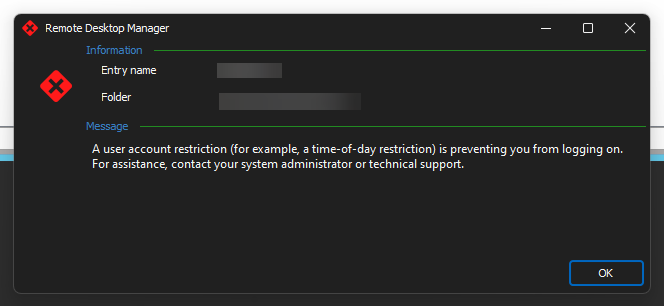
2023-10-06_11-02-18.png
Hello,
Thank you for your reply,
I see, If you go into your entry "Properties" and change the "Display" to "External" and attempt to launch the entry, is this working as expected? This test will allow us to confirm if this is working using the same configuration in MSTSC.
Let me know,
Best regards,
Samuel Dery
There is no option for External. Under Display it just has Screen sizing mode/Remote desktop size, and Zoom.
Hello,
Thank you for your reply,
My apologies for the confusion, here is a screenshot of the field I'm referring to: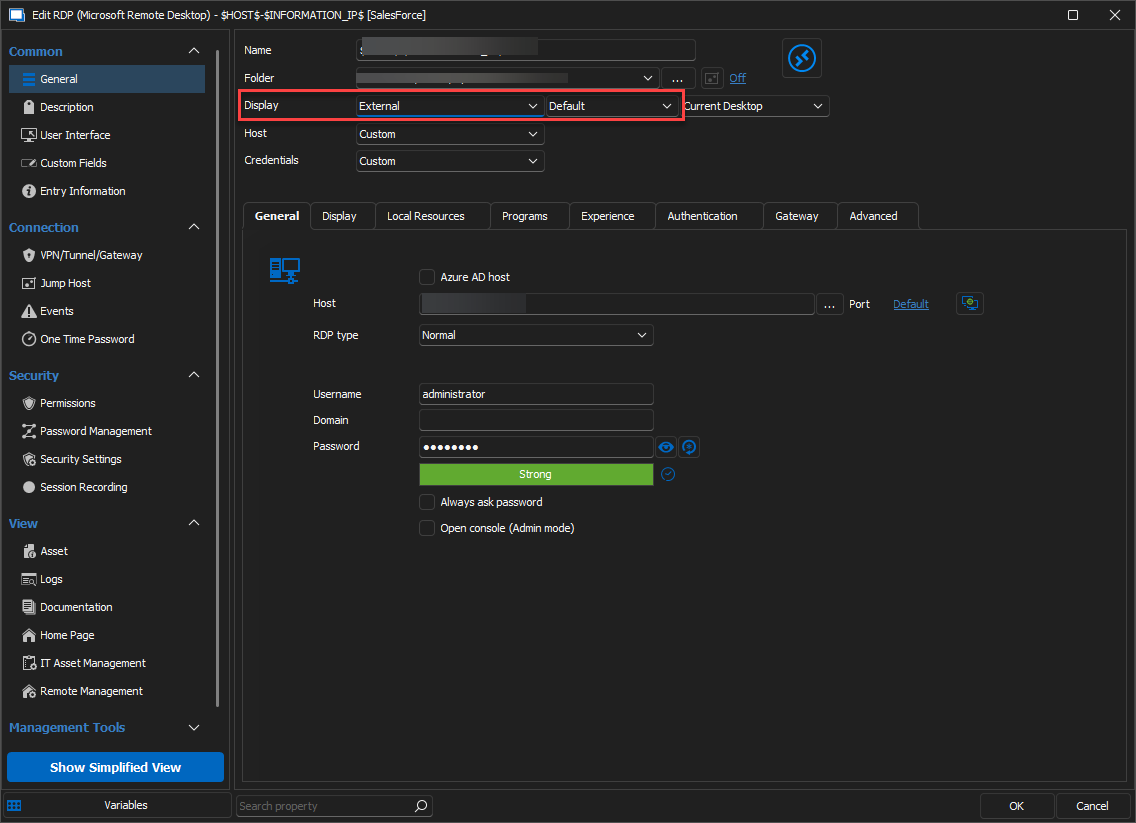
Let me know the results of this test.
Best regards,
Samuel Dery
e9c49965-216d-40f2-8c75-5d8a41ab84ba.png
Received the same error. Error code 0xc07.
Hello
If I can interject, you wrote in the OP that you moved a "server admin" account into the protected users group. Is this a domain administrator account?
Adding a user to the "protected users" group forces RDP to use kerberos for authentication, instead of NTLM. That's why it's required to connect to the server by hostname, not IP (you already noted this, and you should keep connecting to the hostname).
Since this is working in mstsc, it rules out a lot of common kerberos issues (things in principal should work the same between RDM and mstsc).
Is your client computer in the same domain as the server? How are you specifying the credentials in RDM (for example, separate username and domain fields, or combined - e.g. DOMAIN\user with the domain field left blank) and do you have anything configured in the "username format" of the Advanced page of the RDP settings?
When you connect with mstsc, how are you specifying the username?
If you haven't already, a low-hanging fruit to try would be to leave the domain field empty in RDM and give the username field in UPN format (e.g. username@domain.tld).
Please let me know if something isn't clear or you have further questions
Kind regards,
Richard Markievicz
The Server Admin account is not a Domain Administrator. It is an account that is in a Security Group which adds it to the local administrator group on servers.
Using MSTC was working ,but when I tested it today it was giving the same error that RDM was giving.
The one thing I haven't tested is from a different computer. My laptop is Azure AD Joined and not Domain Joined. I've tried using both <DOMAIN>user and user@<domain>.com. These servers are domain joined to our local AD.
Hello again
Strange that it stopped working with mstsc. Did something else change, like you moved to a different network?
Kerberos requires your client machine to have line-of-sight to a domain controller for the target domain. Is that the case?
Thanks and kind regards,
Richard Markievicz
Nope I was on the same network. Tomorrow I'll just RDPing via RDM on another machine that is domain joined to see if I can replicate the issue.
Nope I was on the same network. Tomorrow I'll just RDPing via RDM on another machine that is domain joined to see if I can replicate the issue.
Thank you. Please let us know the outcome.
Kind regards,
Richard Markievicz