
alexander
Kopieren und Einfügen Fenster skaliert falsch
Danke für die Info Min. ;)
Kopieren und Einfügen Fenster skaliert falsch
Hallo Support-Team,
ich habe bei mir das Kopieren und Einfügen Fenster (mit Details aktiviert) aktiv um zu prüfen ob das was ich einfügen möchte auch das Richtige ist.
Seit mind. der Version 2026.2.8 ist das Vorschaufenster bei vielen Zeilen zu Groß um auf meinem Desktop korrekt angezeigt zu werden und ich sehe die Knöpfe JA/NEIN nicht mehr, somit kann ich auch den Einfüge-Vorgang nicht abschließen.

Das Fenster lässt sich leider auch nicht verkleinern.
MfG
Alexander
An Error Occurred: [Response 8]
Hello Jacob,
With 2025.3.16.0 the error message is gone.
Thank you for your support!
Kind regards,
Alexander
An Error Occurred: [Response 8]
Hello Jacob,
I get the following message, after I close the error message:
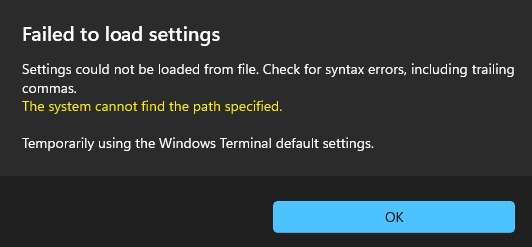
After I press OK, I can use Windows Terminal without problems.
Kind regards,
Alexander
An Error Occurred: [Response 8]
Hello,
I experience the same error message, when I try to start Tools -> Windows Terminal.
I use 2025.2.30.0 as portable version with Personal Hub Account 1 on Windows 11 -> same error message
I use 2025.2.30.0 as installed version with Personal Hub Account 2 on Windows 10 -> same error message
I have Personal Hub as date source and can access the link above without problems.
Let me know if you have additional tests I can do.
Kind regards,
Alexander
Update available window looks different from Release notes window
Hi Carl,
Thank you for your reply. The problem is not solved. Every time I open my old RDM portable and check for updates, I see the left version. But when I open the Release notes, everything looks as expected.
Sorry, I forgot to mention, I'm using a portable version of RDM.
I made some tests (create a new portable version of RDM without any imported configs) and with this new RDM portable it looks as expected.
Therefore it looks like some cache problem or a different setting in the options.
First I checked for cache problems. I followed the steps here Clear Cache and it works now.

Kind regards,
Alexander
Update available window looks different from Release notes window
Hello,
When a new update is available, the information looks totally different from the Release notes (see screenshot below).
Is there a setting which I configured wrong or is it "normal behaviour"?

Kind regards,
Alexander