An Error Occurred: [Response 8]

Hi All!
I hope someone could help, I've been getting this error for a few months now, it seems to be when I select some entries in my personal vault but not sure what it means. Could anyone suggest how I fix this if there's a way?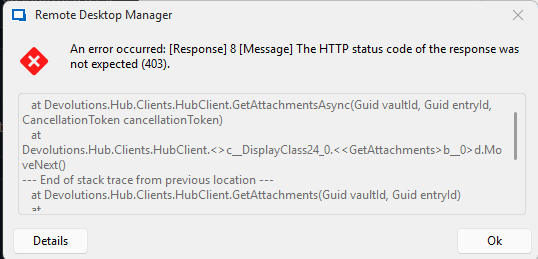
Thanks
Dave
75d79954-fd89-42cf-9134-758a538ce25f.png
Recommended Answer
Hello Jacob,
With 2025.3.16.0 the error message is gone.
Thank you for your support!
Kind regards,
Alexander
All Comments (10)
Hello,
Thank you for your feedback.
According to our online documentation, it's an Access Denied error message.
https://docs.devolutions.net/hub/kb/hub-business/troubleshooting-articles/errors-list/#forbidden-403
What RDM version are you using?
Do you get the same problem when selecting these entries in the Hub Business web UI?
Best regards,
Érica Poirier
Hello,
Thank you for your feedback.
According to our online documentation, it's an Access Denied error message.
https://docs.devolutions.net/hub/kb/hub-business/troubleshooting-articles/errors-list/#forbidden-403
What RDM version are you using?
Do you get the same problem when selecting these entries in the Hub Business web UI?
Best regards,
@Erica Poirier
Hi Erica
Thanks for your quick reply! the version I'm using is 2025.2.20.0
If you have the link to the hub business web UI I'll check there too and let you know :)
Thanks
Dave
Hello,
Thank you for your feedback.
You should find the Hub Business URL in File - Data sources in your RDM.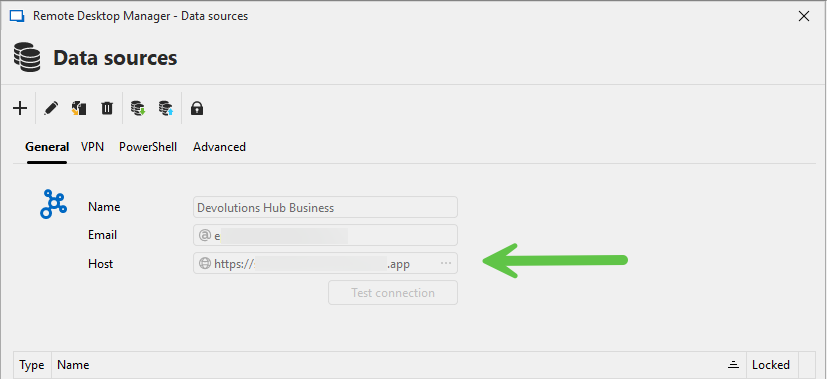
Best regards,
Érica Poirier
750dcddf-4208-4b23-83ac-aa5cf562d8df.png
Hello,
Thank you for your feedback.
You should find the Hub Business URL in File - Data sources in your RDM.
Best regards,
@Erica Poirier
Hi Erica
Thanks for this, I've taken a look and there's no URL, the only difference is it says Devolutions Hub Personal rather than Business?
Hello,
Thank you for your follow-up.
Please note that Hub Personal is the free, single-user version of Hub Business. If you're using Hub Personal, there should be only one vault available, a single, unified vault for storing all your entries.
To help troubleshoot further, could you please try accessing the following website and let me know if you are able to connect:
https://hub.devolutions.com/
Additionally, I recommend testing the portable version of Remote Desktop Manager. This version is useful for ruling out certain causes of the issue. You can refer to the following documentation for setup instructions:
https://docs.devolutions.net/rdm/kb/how-to-articles/portable-rdm-installation/
Please let me know how it goes, and if you encounter any issues during setup or testing.
I look forward to your reply.
Best regards,
Jacob Lafrenière
Hello,
I experience the same error message, when I try to start Tools -> Windows Terminal.
I use 2025.2.30.0 as portable version with Personal Hub Account 1 on Windows 11 -> same error message
I use 2025.2.30.0 as installed version with Personal Hub Account 2 on Windows 10 -> same error message
I have Personal Hub as date source and can access the link above without problems.
Let me know if you have additional tests I can do.
Kind regards,
Alexander
Hello,
Thank you for reaching out on this matter.
I was able to reproduce the issue. Could you confirm whether you are able to access the Windows Terminal in the background after closing the error message? On my end, I was able to access it once the error pop-up was dismissed.
I will report this bug to the development team so they can begin working on a fix. I will follow up with you as soon as the fix is deployed in a future update.
Best regards,
Jacob Lafrenière
Hello Jacob,
I get the following message, after I close the error message: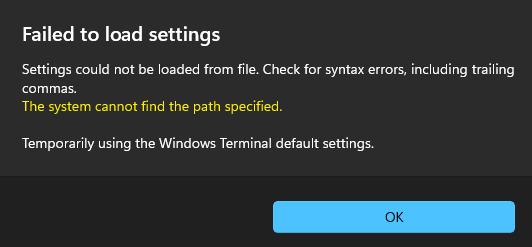
After I press OK, I can use Windows Terminal without problems.
Kind regards,
Alexander
grafik.png
Hello Jacob,
With 2025.3.16.0 the error message is gone.
Thank you for your support!
Kind regards,
Alexander
Hello,
Thank you for the follow-up.
I’ll go ahead and mark this topic as resolved. If the issue occurs again, feel free to reply to this message to reopen the discussion.
Best regards,
Jacob Lafrenière