
mrgutieres
2026.1.0.8-1 RDP issues
Sorry, had to reboot to Windows (yuck) to work on RDM there. Back on Linux, I am running 2026.1 again. As a reminder, 2025.3.x works with no issues. SSPI is currently set to Portable in 2026.1; changing it to now to System instead. I saved the config. Shutdown RDM...running RDM from terminal....zomg it worked...why did that work? Thank you so much.
2026.1.0.8-1 RDP issues
Pulled out the IPs to protect the innocent ;)
2026.1.0.8-1 RDP issues
Well this is interesting... I didn't touch it but directly after (though several minutes later) the above, I got the below.
[09:55:50:768] [84828:00014b67] [DEBUG][com.freerdp.core.auth] - [credssp_auth_init]: Using package: Negotiate (cbMaxToken: 48000 bytes)
[09:55:50:768] [84828:00014b67] [DEBUG][com.freerdp.core.auth] - [credssp_auth_setup_client]: Acquired client credentials
[10:01:50:886] [84828:00014b67] [DEBUG][com.freerdp.core.auth] - [credssp_auth_authenticate]: Authentication in progress... (output token size: 57)
[10:01:50:886] [84828:00014b67] [DEBUG][com.freerdp.core.nla] - [nla_send]: ----->> sending...
[10:01:50:886] [84828:00014b67] [DEBUG][com.freerdp.core.nla] - [nla_send]: ----->> protocol version 6
[10:01:50:886] [84828:00014b67] [DEBUG][com.freerdp.core.nla] - [nla_write_octet_string]: ----->> negoToken
[10:01:50:886] [84828:00014b67] [DEBUG][com.freerdp.core.nla] - [nla_write_octet_string]: ----->> client nonce
[10:01:50:886] [84828:00014b67] [DEBUG][com.freerdp.core.nla] - [nla_send]: [110 bytes]
[10:01:50:886] [84828:00014b67] [ERROR][com.freerdp.core.transport] - [transport_default_write]: BIO_should_retry returned a system error 104: Connection reset by peer
[10:01:50:886] [84828:00014b67] [ERROR][com.freerdp.core] - [transport_default_write]: ERRCONNECT_CONNECT_TRANSPORT_FAILED [0x0002000D]
[10:01:50:886] [84828:00014b67] [ERROR][com.freerdp.core.transport] - [transport_connect_nla]: NLA begin failed
[10:01:50:886] [84828:00014b67] [DEBUG][com.freerdp.core.nego] - [nego_connect]: Failed to connect with [HYBRID][0x00000002] security
[10:01:50:888] [84828:00014b67] [DEBUG][com.freerdp.core.rdp] - [rdp_finalize_reset_flags][0x7fc1d8057d30]: [CONNECTION_STATE_NEGO] reset finalize_sc_pdus
[10:01:50:888] [84828:00014b67] [DEBUG][com.freerdp.core.rdp] - [rdp_client_transition_to_state][0x7fc1d8057d30]: CONNECTION_STATE_NEGO --> CONNECTION_STATE_INITIAL
[10:01:50:893] [84828:00014b67] [INFO][com.freerdp.codec] - [openh264_load_functionpointers]: loaded libopenh264.so.7 2.6.0
[10:01:50:906] [84828:00014b67] [INFO][com.freerdp.codec] - [openh264_load_functionpointers]: loaded libopenh264.so.7 2.6.0
[10:01:50:907] [84828:00014b67] [DEBUG][com.freerdp.core.nego] - [nego_set_negotiation_enabled]: Enabling security layer negotiation: TRUE
[10:01:50:907] [84828:00014b67] [DEBUG][com.freerdp.core.nego] - [nego_set_restricted_admin_mode_required]: Enabling restricted admin mode: FALSE
[10:01:50:907] [84828:00014b67] [DEBUG][com.freerdp.core.nego] - [nego_set_RCG_required]: Enabling remoteCredentialGuards: FALSE
[10:01:50:907] [84828:00014b67] [DEBUG][com.freerdp.core.nego] - [nego_enable_rdp]: Enabling RDP security: TRUE
[10:01:50:907] [84828:00014b67] [DEBUG][com.freerdp.core.nego] - [nego_enable_tls]: Enabling TLS security: TRUE
[10:01:50:907] [84828:00014b67] [DEBUG][com.freerdp.core.nego] - [nego_enable_nla]: Enabling NLA security: TRUE
[10:01:50:907] [84828:00014b67] [DEBUG][com.freerdp.core.nego] - [nego_enable_ext]: Enabling NLA extended security: FALSE
[10:01:50:907] [84828:00014b67] [DEBUG][com.freerdp.core.nego] - [nego_enable_rdstls]: Enabling RDSTLS security: FALSE
[10:01:50:907] [84828:00014b67] [WARN][com.freerdp.core.nego] - [nego_enable_aad]: This build does not support AAD security, disabling.
[10:01:50:907] [84828:00014b67] [DEBUG][com.freerdp.core.rdp] - [rdp_client_transition_to_state][0x7fc1d8057d30]: CONNECTION_STATE_INITIAL --> CONNECTION_STATE_NEGO
[10:01:50:907] [84828:00014b67] [DEBUG][com.freerdp.core] - [freerdp_tcp_is_hostname_resolvable]: resetting error state
[10:01:50:907] [84828:00014b67] [DEBUG][com.freerdp.core] - [freerdp_tcp_default_connect]: resetting error state
[10:01:50:907] [84828:00014b67] [DEBUG][com.freerdp.core] - [freerdp_tcp_default_connect]: connecting to peer x.x.x.x
[10:01:50:910] [84828:00014b67] [DEBUG][com.freerdp.core.nego] - [nego_connect]: state: NEGO_STATE_NLA
[10:01:50:910] [84828:00014b67] [DEBUG][com.freerdp.core.nego] - [nego_attempt_nla]: Attempting NLA security
[10:01:50:910] [84828:00014b67] [DEBUG][com.freerdp.core.nego] - [nego_send_negotiation_request]: RequestedProtocols: [SSL|HYBRID][0x00000003]
[10:01:50:933] [84828:00014b67] [DEBUG][com.freerdp.core.nego] - [nego_process_negotiation_response]: RDP_NEG_RSP::flags = { [0x1f] |EXTENDED_CLIENT_DATA_SUPPORTED|DYNVC_GFX_PROTOCOL_SUPPORTED|RDP_NEGRSP_RESERVED|RESTRICTED_ADMIN_MODE_SUPPORTED|REDIRECTED_AUTHENTICATION_MODE_SUPPORTED }
[10:01:50:933] [84828:00014b67] [DEBUG][com.freerdp.core.nego] - [nego_recv]: selected_protocol: [HYBRID][0x00000002]
[10:01:50:933] [84828:00014b67] [DEBUG][com.freerdp.core.nego] - [nego_attempt_nla]: state: NEGO_STATE_FINAL
[10:01:50:933] [84828:00014b67] [DEBUG][com.freerdp.core.nego] - [nego_connect]: Negotiated [HYBRID][0x00000002] security
[10:01:50:933] [84828:00014b67] [DEBUG][com.freerdp.core.nego] - [nego_try_connect]: nego_security_connect with PROTOCOL_HYBRID
[10:01:50:956] [84828:00014b67] [DEBUG][com.freerdp.core.nla] - [nla_set_early_user_auth]: Early User Auth active: false
[10:01:50:956] [84828:00014b67] [DEBUG][com.freerdp.core.nla] - [nla_set_state]: -- NLA_STATE_INITIAL --> NLA_STATE_INITIAL
[10:01:50:956] [84828:00014b67] [INFO][com.freerdp.core.auth] - [auth_resolve_sspi_table]: Using SSPI Module: /usr/lib/devolutions/RemoteDesktopManager/libDevolutionsSspi.so
[10:01:50:956] [84828:00014b67] [DEBUG][com.freerdp.core.auth] - [credssp_auth_init]: Using package: Negotiate (cbMaxToken: 48000 bytes)
[10:01:50:956] [84828:00014b67] [DEBUG][com.freerdp.core.auth] - [credssp_auth_setup_client]: Acquired client credentials
2026.1.0.8-1 RDP issues
Just now seeing your reply, I installed 2025.3.2.3-1 and it works with the old version; see output attached as old version log.
Reinstalling 2026.1.0.8-1 now.

Here's what I get export WLOG_LEVEL="DEBUG"
remotedesktopmanager
MESA: warning: Support for this platform is experimental with Xe KMD, bug reports may be ignored.
[09:55:50:681] [84828:00014b67] [DEBUG][com.winpr.timezone] - [winpr_get_timezone_from_link]: tzid: America/New_York
[09:55:50:681] [84828:00014b67] [DEBUG][com.winpr.timezone] - [winpr_get_timezone_from_link]: tzid: America/New_York
[09:55:50:681] [84828:00014b67] [DEBUG][com.winpr.timezone] - [winpr_get_timezone_from_link]: tzid: America/New_York
[09:55:50:681] [84828:00014b67] [DEBUG][com.winpr.timezone] - [winpr_get_timezone_from_link]: tzid: America/New_York
[09:55:50:690] [84828:00014b67] [INFO][Devolutions.Rdp.Credentials] - [Parse]: parsing "b******", "c***********" (Mstsc) => "Username: "b******" Domain: "c***********""
[09:55:50:691] [84828:00014b67] [DEBUG][com.freerdp.core] - [freerdp_connect_begin]: resetting error state
[09:55:50:691] [84828:00014b67] [DEBUG][com.freerdp.client.common.cmdline] - [freerdp_client_load_static_channel_addin]: loading channelEx rdpdr
[09:55:50:691] [84828:00014b67] [DEBUG][com.freerdp.client.common.cmdline] - [freerdp_client_load_static_channel_addin]: loading channelEx rdpsnd
[09:55:50:691] [84828:00014b67] [DEBUG][com.freerdp.client.common.cmdline] - [freerdp_client_load_static_channel_addin]: loading channelEx RDMJump
[09:55:50:691] [84828:00014b67] [DEBUG][com.freerdp.client.common.cmdline] - [freerdp_client_load_static_channel_addin]: loading channelEx RDMCmd
[09:55:50:691] [84828:00014b67] [DEBUG][com.freerdp.client.common.cmdline] - [freerdp_client_load_static_channel_addin]: loading channelEx RDMLog
[09:55:50:691] [84828:00014b67] [DEBUG][com.freerdp.channels.cliprdr.client] - [cliprdr_VirtualChannelEntryEx]: VirtualChannelEntryEx
[09:55:50:691] [84828:00014b67] [DEBUG][com.freerdp.client.common.cmdline] - [freerdp_client_load_static_channel_addin]: loading channelEx cliprdr
[09:55:50:691] [84828:00014b67] [DEBUG][com.freerdp.channels.drdynvc.client] - [drdynvc_VirtualChannelEntryEx]: VirtualChannelEntryEx
[09:55:50:691] [84828:00014b67] [DEBUG][com.freerdp.client.common.cmdline] - [freerdp_client_load_static_channel_addin]: loading channelEx drdynvc
[09:55:50:692] [84828:00014b67] [DEBUG][com.freerdp.settings] - [log_monitor_configuration]: [BEGIN] MonitorDefArray[1]
[09:55:50:692] [84828:00014b67] [DEBUG][com.freerdp.settings] - [log_monitor]: [0] [primary] {0x0-1974x953} [0] {1000x1000, orientation: 0, desktopScale: 100, deviceScale: 100}
[09:55:50:692] [84828:00014b67] [DEBUG][com.freerdp.settings] - [log_monitor_configuration]: [END] MonitorDefArray[1]
[09:55:50:692] [84828:00014b67] [DEBUG][com.freerdp.client.common.cmdline] - [freerdp_client_load_static_channel_addin]: loading channelEx rdpdr
[09:55:50:692] [84828:00014b67] [DEBUG][com.freerdp.client.common.cmdline] - [freerdp_client_load_static_channel_addin]: loading channelEx rdpsnd
[09:55:50:692] [84828:00014b67] [DEBUG][com.freerdp.client.common.cmdline] - [freerdp_client_load_static_channel_addin]: loading channelEx RDMJump
[09:55:50:692] [84828:00014b67] [DEBUG][com.freerdp.client.common.cmdline] - [freerdp_client_load_static_channel_addin]: loading channelEx RDMCmd
[09:55:50:692] [84828:00014b67] [DEBUG][com.freerdp.client.common.cmdline] - [freerdp_client_load_static_channel_addin]: loading channelEx RDMLog
[09:55:50:692] [84828:00014b67] [DEBUG][com.freerdp.channels.cliprdr.client] - [cliprdr_VirtualChannelEntryEx]: VirtualChannelEntryEx
[09:55:50:692] [84828:00014b67] [DEBUG][com.freerdp.client.common.cmdline] - [freerdp_client_load_static_channel_addin]: loading channelEx cliprdr
[09:55:50:692] [84828:00014b67] [DEBUG][com.freerdp.channels.drdynvc.client] - [drdynvc_VirtualChannelEntryEx]: VirtualChannelEntryEx
[09:55:50:692] [84828:00014b67] [DEBUG][com.freerdp.client.common.cmdline] - [freerdp_client_load_static_channel_addin]: loading channelEx drdynvc
[09:55:50:693] [84828:00014b67] [ERROR][com.freerdp.channels.virtual.channel] - [virtchan_virtual_channel_init_event_ex]: Unhandled event type 0
[09:55:50:693] [84828:00014b67] [ERROR][com.freerdp.channels.virtual.channel] - [virtchan_virtual_channel_init_event_ex]: Unhandled event type 0
[09:55:50:693] [84828:00014b67] [ERROR][com.freerdp.channels.virtual.channel] - [virtchan_virtual_channel_init_event_ex]: Unhandled event type 0
[09:55:50:693] [84828:00014b67] [DEBUG][com.freerdp.primitives] - [primitives_autodetect_best]: primitives benchmark: only one backend, skipping...
[09:55:50:693] [84828:00014b67] [DEBUG][com.freerdp.primitives] - [primitives_autodetect_best]: primitives autodetect, using optimized
[09:55:50:695] [84828:00014b67] [DEBUG][com.freerdp.codec] - [openh264_library_path_from_environment]: no environment variable 'FREERDP_OPENH264_LIBRARY_PATH'
[09:55:50:695] [84828:00014b67] [DEBUG][com.freerdp.codec] - [openh264_init]: No FREERDP_OPENH264_LIBRARY_PATH set, using default search
[09:55:50:696] [84828:00014b67] [INFO][com.freerdp.codec] - [openh264_load_functionpointers]: loaded libopenh264.so.7 2.6.0
[09:55:50:710] [84828:00014b67] [INFO][com.freerdp.codec] - [openh264_load_functionpointers]: loaded libopenh264.so.7 2.6.0
[09:55:50:712] [84828:00014b67] [WARN][com.freerdp.core.rdp] - [log_build_warn][0x7fc1d8057d30]: *************************************************
[09:55:50:712] [84828:00014b67] [WARN][com.freerdp.core.rdp] - [log_build_warn][0x7fc1d8057d30]: This build is using [runtime-check] build options:
[09:55:50:712] [84828:00014b67] [WARN][com.freerdp.core.rdp] - [log_build_warn][0x7fc1d8057d30]: * 'WITH_VERBOSE_WINPR_ASSERT=ON'
[09:55:50:712] [84828:00014b67] [WARN][com.freerdp.core.rdp] - [log_build_warn][0x7fc1d8057d30]: *
[09:55:50:712] [84828:00014b67] [WARN][com.freerdp.core.rdp] - [log_build_warn][0x7fc1d8057d30]: [runtime-check] build options might slow down the application
[09:55:50:712] [84828:00014b67] [WARN][com.freerdp.core.rdp] - [log_build_warn][0x7fc1d8057d30]: *************************************************
[09:55:50:712] [84828:00014b67] [WARN][com.freerdp.core.rdp] - [log_build_warn_cipher][0x7fc1d8057d30]: *************************************************
[09:55:50:712] [84828:00014b67] [WARN][com.freerdp.core.rdp] - [log_build_warn_cipher][0x7fc1d8057d30]: [SSL] {Cipher} build or configuration missing:
[09:55:50:712] [84828:00014b67] [WARN][com.freerdp.core.rdp] - [log_build_warn_cipher][0x7fc1d8057d30]: * des-ede3-cbc: RDP security FIPS mode will not work
[09:55:50:712] [84828:00014b67] [WARN][com.freerdp.core.rdp] - [log_build_warn_cipher][0x7fc1d8057d30]: *************************************************
[09:55:50:712] [84828:00014b67] [DEBUG][com.freerdp.core.nego] - [nego_set_negotiation_enabled]: Enabling security layer negotiation: TRUE
[09:55:50:712] [84828:00014b67] [DEBUG][com.freerdp.core.nego] - [nego_set_restricted_admin_mode_required]: Enabling restricted admin mode: FALSE
[09:55:50:712] [84828:00014b67] [DEBUG][com.freerdp.core.nego] - [nego_set_RCG_required]: Enabling remoteCredentialGuards: FALSE
[09:55:50:712] [84828:00014b67] [DEBUG][com.freerdp.core.nego] - [nego_enable_rdp]: Enabling RDP security: TRUE
[09:55:50:712] [84828:00014b67] [DEBUG][com.freerdp.core.nego] - [nego_enable_tls]: Enabling TLS security: TRUE
[09:55:50:712] [84828:00014b67] [DEBUG][com.freerdp.core.nego] - [nego_enable_nla]: Enabling NLA security: TRUE
[09:55:50:712] [84828:00014b67] [DEBUG][com.freerdp.core.nego] - [nego_enable_ext]: Enabling NLA extended security: FALSE
[09:55:50:712] [84828:00014b67] [DEBUG][com.freerdp.core.nego] - [nego_enable_rdstls]: Enabling RDSTLS security: FALSE
[09:55:50:712] [84828:00014b67] [WARN][com.freerdp.core.nego] - [nego_enable_aad]: This build does not support AAD security, disabling.
[09:55:50:712] [84828:00014b67] [DEBUG][com.freerdp.core.rdp] - [rdp_client_transition_to_state][0x7fc1d8057d30]: CONNECTION_STATE_INITIAL --> CONNECTION_STATE_NEGO
[09:55:50:712] [84828:00014b67] [DEBUG][com.freerdp.core] - [freerdp_tcp_is_hostname_resolvable]: resetting error state
[09:55:50:712] [84828:00014b67] [DEBUG][com.freerdp.core] - [freerdp_tcp_default_connect]: resetting error state
[09:55:50:712] [84828:00014b67] [DEBUG][com.freerdp.core] - [freerdp_tcp_default_connect]: connecting to peer x.x.x.x
[09:55:50:716] [84828:00014b67] [DEBUG][com.freerdp.core.nego] - [nego_connect]: state: NEGO_STATE_NLA
[09:55:50:716] [84828:00014b67] [DEBUG][com.freerdp.core.nego] - [nego_attempt_nla]: Attempting NLA security
[09:55:50:716] [84828:00014b67] [DEBUG][com.freerdp.core.nego] - [nego_send_negotiation_request]: RequestedProtocols: [SSL|HYBRID][0x00000003]
[09:55:50:743] [84828:00014b67] [DEBUG][com.freerdp.core.nego] - [nego_process_negotiation_response]: RDP_NEG_RSP::flags = { [0x1f] |EXTENDED_CLIENT_DATA_SUPPORTED|DYNVC_GFX_PROTOCOL_SUPPORTED|RDP_NEGRSP_RESERVED|RESTRICTED_ADMIN_MODE_SUPPORTED|REDIRECTED_AUTHENTICATION_MODE_SUPPORTED }
[09:55:50:743] [84828:00014b67] [DEBUG][com.freerdp.core.nego] - [nego_recv]: selected_protocol: [HYBRID][0x00000002]
[09:55:50:743] [84828:00014b67] [DEBUG][com.freerdp.core.nego] - [nego_attempt_nla]: state: NEGO_STATE_FINAL
[09:55:50:743] [84828:00014b67] [DEBUG][com.freerdp.core.nego] - [nego_connect]: Negotiated [HYBRID][0x00000002] security
[09:55:50:743] [84828:00014b67] [DEBUG][com.freerdp.core.nego] - [nego_try_connect]: nego_security_connect with PROTOCOL_HYBRID
[09:55:50:767] [84828:00014b67] [DEBUG][com.freerdp.core.nla] - [nla_set_early_user_auth]: Early User Auth active: false
[09:55:50:767] [84828:00014b67] [DEBUG][com.freerdp.core.nla] - [nla_set_state]: -- NLA_STATE_INITIAL --> NLA_STATE_INITIAL
[09:55:50:767] [84828:00014b67] [INFO][com.freerdp.core.auth] - [auth_resolve_sspi_table]: Using SSPI Module: /usr/lib/devolutions/RemoteDesktopManager/libDevolutionsSspi.so
[09:55:50:768] [84828:00014b67] [DEBUG][com.freerdp.core.auth] - [credssp_auth_init]: Using package: Negotiate (cbMaxToken: 48000 bytes)
[09:55:50:768] [84828:00014b67] [DEBUG][com.freerdp.core.auth] - [credssp_auth_setup_client]: Acquired client credentials
2026.1.0.8-1 RDP issues
I apologize if this is only happening to me but ever since I upgraded to the latest version from the previous 2025 version, I have been unable to use RDP. I believe it connects but all I get is a black background/window. Doing journalctl when trying to connect showed RDM unable to find a specific cisco h264 file. I have .8 and it was looking for .7 so I symlinked it in the directory and that error went away. That said, the issue persists. I am attaching the the journalctl entries on an RDP connection in case it points to something obvious that I haven't found.

Thanks in advance for the help.
MS RDP - Best Practices on MAC
I fear that I am getting the same issue. I am on Mac OS 26.3 (ARM) with the latest version of RDM. The windows box I am connecting to is a Windows Server 2019 Data Center VM. I have attached the session logging you mentioned in your post. I also removed the IP address on line 60. Once I RDPed in (fresh session), I just logged clicked the start button a few times. Even that was slow. Any help you can offer would be greatly appreciated.
I tried the below app as well and got relatively the same performance so I guess it is not just RDM. That said, when I switch to my windows laptop and use RDM again (same hub based vault), the performance is significantly better.

RDM Linux running on WSL2's new GUI App feature, UI Colours??
Thank you for the reply Gabriel. Much appreciated. Looking forward to the native support.
RDM Linux running on WSL2's new GUI App feature, UI Colours??
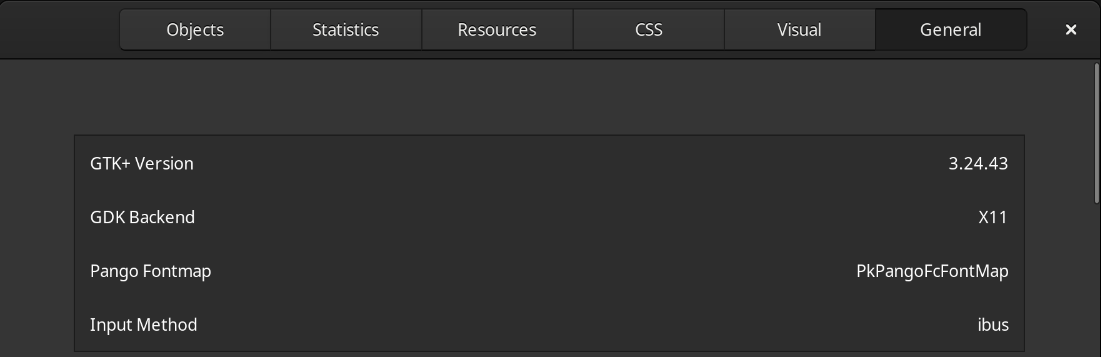
I answered one of my two questions using the command GTK_DEBUG=interactive remotedesktopmanager... still learning Linux... now I just need the Wayland question answered
RDM Linux running on WSL2's new GUI App feature, UI Colours??
Def seems like WSL2 / Windows issue rather than Devolutions issue. WSL2 still seems like a constant work in progress lol, test with another WSL2 GUI app e.g. GEDIT, if its the same you know its Microsoft WSL2 Issue, then use the Github.com repo for WSL as I have since.
try GNOME Tweak Tools as Jonathan suggested maybe...
I apologize I should have been clear: I am not running WIndows nor WSL2, no VMs whatsover. The Fedora that I am running is local to my laptop's hard drive.
Above should still apply for Dark mode tweaking, assume you have checked within RDM itself too right?? Enable dark theme in Remote Desktop Manager: easy guide - Devolutions Blog
Thank you. I had to do some Google Fu but based on what you said above, I realized I was missing some packages

Now it works.

Does this mean that RDM is a GTK2 or GTK 4 application? Also, is there a way to force it to use Wayland rather than X11 under XWayland?
RDM Linux running on WSL2's new GUI App feature, UI Colours??
Def seems like WSL2 / Windows issue rather than Devolutions issue. WSL2 still seems like a constant work in progress lol, test with another WSL2 GUI app e.g. GEDIT, if its the same you know its Microsoft WSL2 Issue, then use the Github.com repo for WSL as I have since.
try GNOME Tweak Tools as Jonathan suggested maybe...
I apologize I should have been clear: I am not running WIndows nor WSL2, no VMs whatsover. The Fedora that I am running is local to my laptop's hard drive.
RDM Linux running on WSL2's new GUI App feature, UI Colours??
I couldn't see the original poster's screenshot but I have to assume it is the same thing I am experiencing 4 years later. Is something wrong with my system or is there a way to get a true dark mode in RDM on Linux? I am running Fedora 41 with Gnome with all updates installed and the latest version of RDM if that helps.My kernel version is 6.13.9-200.fc41.x86_64 and I have a system (laptop) running Intel drivers and Nvidia (570.133.07). If the below is expected behavior, is there a plan to change it in the near future? Thanks in advance.
Tab skip to the last tab on the right
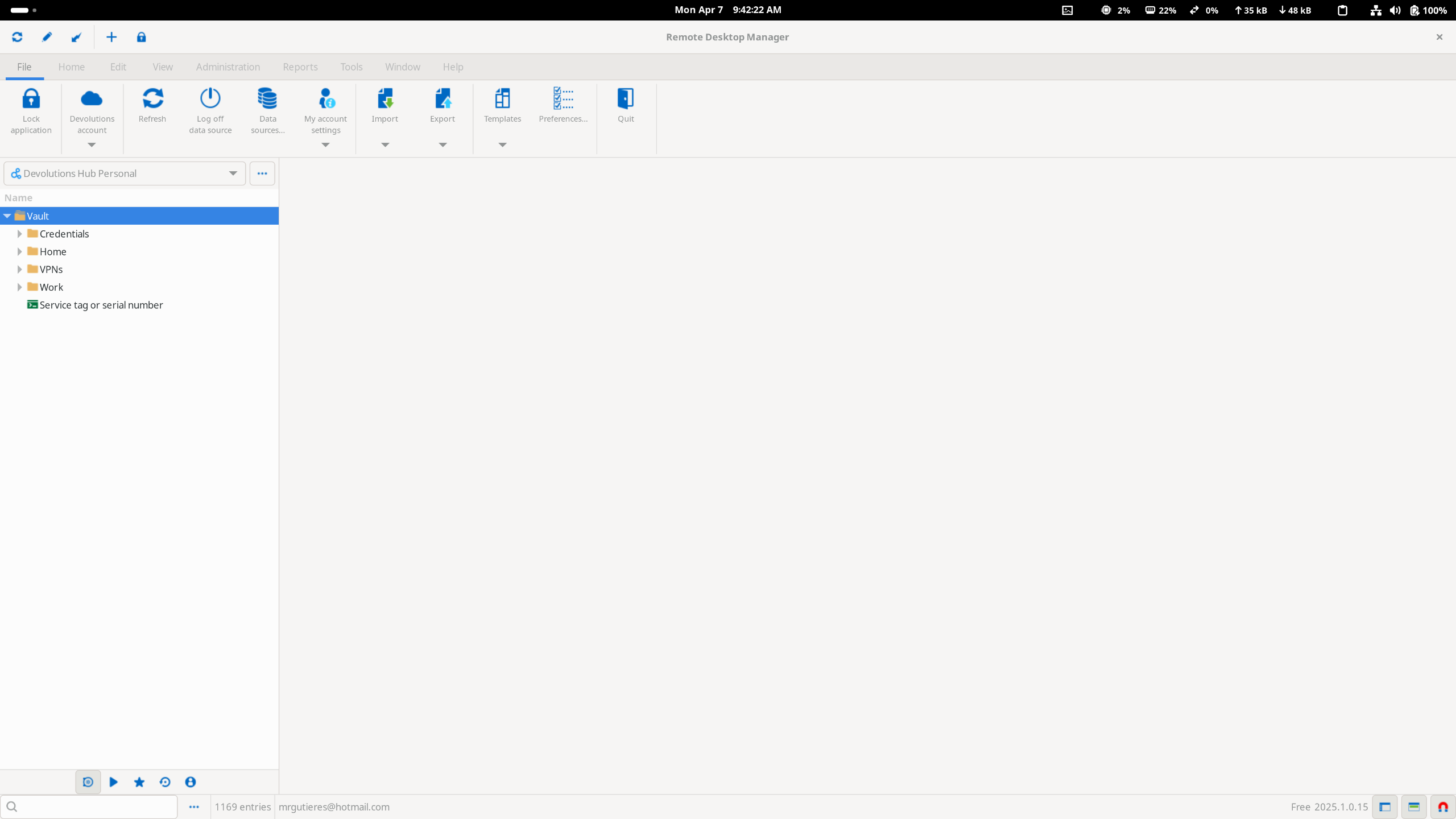
Hey guys, I have a weird bug that has happened across multiple versions including the latest Linux 2024.3.2.13 version. The bug is that when you have more than one tab on the application, RDM will randomly jump to the last tab on the bar. It happens when the application is idle AND when in use. No idea why. Any help would be greatly appreciated.
I am running on Fedora 41, Wayland, integrated Intel and Nvidia card with rpmfusion drivers installed for the latter.
RDM Closes when rightclick on RDP Session
I believe it's fixed. I have not seen the issue reoccur since I updated. Thank you guys
RDM Closes when rightclick on RDP Session
Hi again.
Just a little update: the cause of this issue has been found and will be resolved in the next release. We do not yet have a date in mind, but I will update this thread when we do. Sorry for the inconvenience.
Best regards.
I just want to add here that it is not KDE specific since I get the same issue while running in Gnome. I'd be interested to hear what the core issue is while we wait for the update. This bug has been the one things preventing me from going all in on Linux on my work laptop instead of Windows
DEB and RPM repository
Just saw this but yep; I'd be greatly appreciative of this.
DEB and RPM repository
Hi guys, First great work on improving the Linux version of the RDM software. That said, a question: Are there plans to create a repository so we can just apt update or dnf update rather than downloading new versions manually from the website?
RDM crashes on Fedora
Hi,
Just saw this thread while searching for something else and wanted to advise that installing 'xorg-xwayland' stops the crashes for me in a pure Wayland environment. Appreciate that you're not using vanilla wayland when you do this, but at least you don't need to log out and back in using X11 just to use one app. Thought I'd share.
Thanks
Hey Dan... thanks for the heads up. Looks like I have xwayland installed already on my Fedora box. I am not sure how to default RDM to trying X11 instead of Wayland so xwayland can be used.
RDM crashes on Fedora
Hey guys. I am running RDM Linux on Fedora 37 with a Devolutions online free vault in Wayland Gnome installed via Flatpak. Since the most recent release, I have been having crashes in the app whenever I happen to choose an RDP session that has any issue with it that would cause RDM to bring up an error. For example, if my saved credentials to the RDP target has expired, I get the connection error prompt followed by RDM crashing. If I fat finger an IP address and the IP can't be resolved, I get an error and RDM crashes. What's weird is that if I launch the application from its flatpak folder in the terminal to see what errors I am getting and repeat the same steps, I see some GTK related messages when I launch the application and again when the error pops up but it does not crash. Also, I installed Vmware Workstation Pro for Linux, installed Ubuntu 22.10, loaded up the same online vault and no crash behavior; edit I should mention that the RDM install on Ubuntu was using the .deb version rather than the flatpak
I am stumped. I don't want to have to switch to Ubuntu. Please help. I will get you the output from the command line here in a second. Hopefully I can edit my post.
Here we go... here I have intentionally not connected to VPN while running the application from the terminal and trying to access an RDP target so I can simulate what would cause the application to crash

Slow refreshes on RDP connection
I often get slow refreshes on RDP connections that seems to occur most often when the remote machine has a Chrome browser window up on a new tab with a background. I am unable to interact with the session while the remote machine's chrome browser background updates line by line till finished.
Has anyone else seen this. I hope I am explaining it well.