2026.1.0.8-1 RDP issues

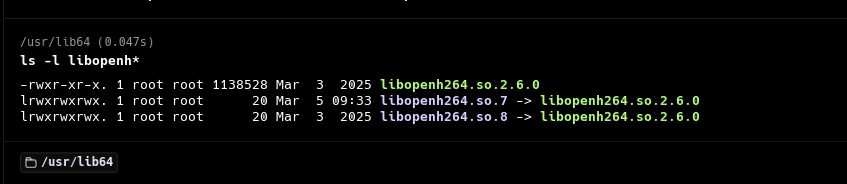
I apologize if this is only happening to me but ever since I upgraded to the latest version from the previous 2025 version, I have been unable to use RDP. I believe it connects but all I get is a black background/window. Doing journalctl when trying to connect showed RDM unable to find a specific cisco h264 file. I have .8 and it was looking for .7 so I symlinked it in the directory and that error went away. That said, the issue persists. I am attaching the the journalctl entries on an RDP connection in case it points to something obvious that I haven't found.
Thanks in advance for the help.
Recommended Answer
Hello
Ok, I'm glad that worked for you and you're back up-and-running.
In RDP, Network Level Authentication supports different security packages (like plugins) called SSPs. The security package to use is negotiated between the client and the server. Historically we only ship a build of FreeRDP that supports NTLM via its internal SSPs. This is the "System" SSPI module in RDM. We also provide our own SSP module ("Portable" in RDM) that supports NTLM and Kerberos.
This is starting to become very relevant as we see Microsoft is becoming serious about deprecating NTLM in the future. In RDM 2026.1 we made the "Portable" SSP the default and that seems to have caused an issue in your environment.
With the "System" SSP, RDM tells the server it supports NTLM, the server agrees that it is supported, so that is used.
With the "Portable" SSP, RDM tells the server it supports NTLM and Kerberos, and if the server supports Kerberos that is what will be used (it's preferred by the server because it's more secure). Kerberos implies some additional client side setup (especially for non-Windows, non-domain machine) and if that early setup fails for some reason, the client should fall back to NTLM and continue as normal (assuming the server allows it).
What makes this really strange in your case is that the negotiation handshake is failing, but not in a normal way - we don't get an error response or continuation from the server after starting NLA, instead the server just closes the connection. That's something I haven't seen before and implies one of (or both) a bug on our side or a strange interaction with your Windows environment.
Since Kerberos is clearly not a requirement in your domain, there's nothing wrong with continuing as you have it - leave the SSPI Module set to "System" and keep using NTLM. If it's something that you're interested in troubleshooting further (either now, or at some point in the future), I'd be happy to investigate that with you.
In the meantime please don't hesitate if you have other questions or comments, and I do apologize for the inconvenience
Kind regards,
Richard Markievicz
All Comments (8)
Hello
The errors related to OpenH264 are benign, it's an optional component that'll be loaded at runtime if it's found (and enabled in RDM). Unfortunately, FreeRDP logs the failure to locate the binary at ERROR level when really it should be INFO or at least WARN. This has been a bit of a headache for us as it's commonly misinterpreted, so I'll try and raise that with the upstream project when I have chance.
That doesn't solve your problem, which sounds strange. I think the first thing to rule out is a connection problem (although realistically any further errors should've been caught when you checked journalctl).
Can you try launching RDM with the environment variable WLOG_LEVEL set to DEBUG or TRACE, recreate the problem, and share the resulting log data with me?
Thanks and kind regards,
Richard Markievicz