
amurray
Hide "Expired" status from webinterface like in RDM
Oh, that feature does not exist yet. Did not know that.
Thanks for the update.
Hide "Expired" status from webinterface like in RDM
Hi
Is it possible to hide entries with the status "expired" from the DVLS Webinterface, like its possible in the RDM desktop software?
Regards,
Alex
devolutions web login not showing host entry for web login
Thanks, that is a usable solution for me.
Just one last question: I think our "it integrator partner" has deactivated the options for sub-entries during initial setup. how do I re-enable them?
devolutions web login not showing host entry for web login
Hi
Lately, I've changed a few entries from the type "Website" to "Host" with two separate Templates called "SSH Login (SSH Shell Entry)" and "Webinterface Login (Website Session Entry)".
Since the change, our browser extension does not recognize the logins anymore.
My guess is that, because there's no "real" entry with the correct URL, the extension (for good a good reason) cant find an entry to display for auto-fill.
Is there any way to be able to still pass the "Website Session Template Entry" to the browser extension so we can auto-fill the login?
Current workaround is a duplicate entry. One as a "Host" type and another one as a "Website" type. Second one will just be used for the browser extension.
Maybe there already is a solution to this and I am just missing out on it :)
Regards,
Alex
hide "expired" web login
Hi Gabriel
Sure, see below...
DWL is connected to a Devolutions Server directly.
The web interface also shows the expired entries.
Hope this helped :)
Regards,
Alex
RDM choosing wrong date-picker regional format
Hi Etienne
Thanks for the update. Nice to hear that is has been fixed. Currently I can not update yet to the latest version yet, but I will try it out as soon as I have updated.
Regards,
Alex
Hotkey for search window
Hi Hubert
Thanks for the reply. Indeed this seems to be working, but only if you have no session tab open (respectively, if you have the focus on the Dashboard tab).
Is there any chance, that this may work when a session is open, but for example has no focus, by clicking into (the empty part of ) the navigation list?
Regards,
Alex
hide "expired" web login
Hi Gabriel
Do you have any news for me regarding this topic?
Regards,
Alex
RDM choosing wrong date-picker regional format
Hi Etienne
Any news on this topic?
Regards,
Alex
Hotkey for search window
Good day
Before we migrated to RDM/DVLS we had a software in which we could jump to the search field by using a hotkey (for example ctrl+q).
I really really miss this feature in RDM.
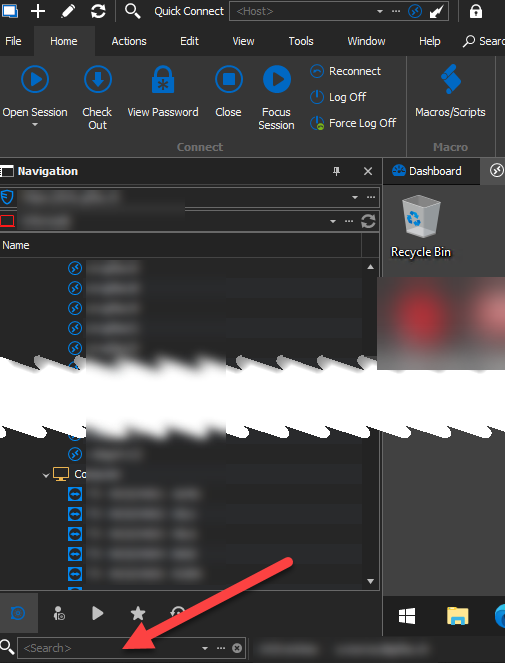
This should be a fairly basic feature request :)
Regards,
Alex
RDM choosing wrong date-picker regional format
Good day
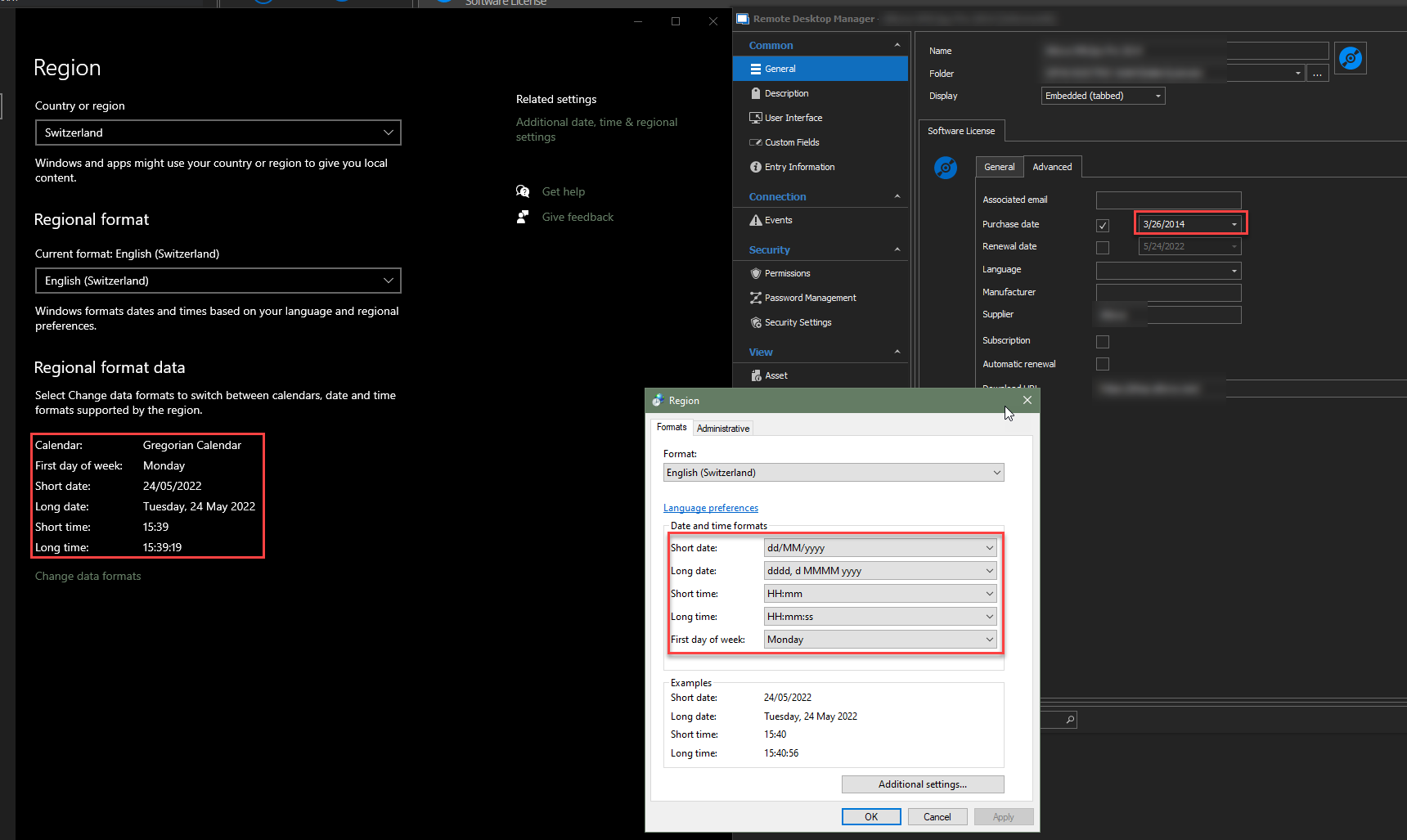
When having non-typical regional settings, RDM gets confused and lists faulty date fields.
As seen in the attached screenshot, although having my system set to dd/MM/yyyy, RDM will set it to MM/dd/yyyy
Is it possible to have this picked from the regional settings or at least provide a English (UK) version? It is really frustrating with this (at least for Europeans) non-logical order which is used in the US :)
Best regards,
Alex
Powershell command: Batch edit "Website" data entries
Found my solution myself.
The property which I need was .HostUrl and/or .HostUrlMain.
For other uses in the future:
I typed the following in to the Custom Powershell Command Window.
$connection | Format-List | Out-File -FilePath "C:\temp\out.txt"This generated the out.txt file in my local C:\ and I got a list of all properties.
Regards,
Alex
Powershell command: Batch edit "Website" data entries
Good day
I would like to batch edit some entries with a custom PowerShell command.
So for changing the name of all selected data entries there is a sample within the powershell command window:
$connection.Name = "ModifiedName";
$RDM.Save();
What is the correct property (instead of .Name) to use, so I can change the field "Website" within a Website Data Entry.
I have already tried .Host and .URL with no success. I have also tried.Website but it throws an error.
I could not find any documentation about all existing properties of a data entry.
Thanks and regards,
Alex
hide "expired" web login
Hi
Thanks for your reply and update.
For now, I will just delete the old entry as I can safely verify that it is a duplicate of the other entry.
Just for the records: I tend to keep all entries and just set them as expired if they are no longer valid or used.
It may be useful, in a very specific, very unlikely situation at some point in the future - yes, I see myself as a classical data hoarder :)
Thanks again and regards,
Alex
hide "expired" web login
Good day
In our Devolutions Server installation, I have two website entries which are similar but one of them is set to expired.
In RDM, the entry which is expired, will not show up in the navigation. In the Web Login Plugin of the browser, both entries show up.
Is there an option to also "hide" the expired entries in the web login plugin in the browser?
Regards,
Alex