
(user deleted)
Pointers
arg ... don't i feel daft now. my first script, i'd created as a remote script and post that pretty much duplicated it while testing. yes, of course a local one works fine.
thanks :)
Pointers
so, I'm now on 2022.1.25.0 64-bit
I have mine setup very similar to above with a credential entry and a powershell macro/script/tool entry with embedded code. I right click on my credentials and select my stored macro (from the Macro/Script/Tools context menu) and nothing happens :( I don't even get a new tab created with failed powershell code in or any messages.
Powershell and RDM seems to be configured fine. I can add a Powershell Sesssion in RDM with the same script code embeded, then double click on the session and it launches a new PS window and adds it as a tab into RDM so I can see the results. And it will return that session's made up user credentials (as in your above example) - It's just when I use a credential entry, select a script, nothing happens.
Do you have any suggestions why it might be showing this nil behavior or how to debug it? Is there an interactive option I've not ticked?
BTW, thanks very much for your patience and help with this, I do believe I can achieve what I want once I overcome this :)
Pointers
I'm on 2022.1.13.0 64-bit connected to an Azure SQL data source.
I'll look into upgrading to the latest version and test again. Just don't want to force a Db Upgrade for everyone else so might be a while. (BTW as a side note, it would be really useful to know if an update was going to force a DB schema update and then force everyone else to update before we actually did the update, i'd be more inclined to update regularly :) ).
Thanks
Pointers
Yes, another good solution to running powershell scripts, but I'm still stuck in that I can't run or embed a script against a stored credential entry in RDM unless I know the name (We've got 1000's of entries, I don't know the names of them and I want a generic script). I did try to link powershell session entry to Run As, Linked Vault credential entry. However, when you set that up, the RDM errors when you try run the embedded script.
I'm not sure why you can't have powershell scripts work against all entries in RDM?
Pointers
At that point, it prevents me having any generic scripts that use the credentials if I need to know the RDMSession name for each of them - unless you can suggest another way of doing it so it would still be automated?
Any reason why it's been set like this or I guess what I'm asking, is can it not be amended on a future release to run powershell scripts/macros against any entry in RDM?
Pointers
I don't appear to be able to execute a macro against a "Username / Password Credential Entry".
When I try to execute a script, it only gives me the "RDP (Microsoft Remote Desktop) Session" or "Web Browser Session" that are stored in my vault, but none of the 100's of Username/Password Credential Entries I have.
Is this by desgin? At its simplest, what I want to do is take the username/password that's in a "Username / Password Credential Entry". and use that within my Powershell script (e.g. log onto M365) but don't understand how I can even start looking at that if I can't execute a script against those type of entries.
Pointers
!thanks Érica, I'll look in this at my next opportunity (I'm doing it as a bit of a side project :) )
Pointers
Hi,
As we've moved more to the cloud, our RDM has more and more become a glorified password vault for all the clients/users we support and I wanted to do a bit more with it.
I've installed the powershell module, and just ran a simple script by launching from the Tools, Powershell via the RDM GUI to iterate through all the "sessions" (which for us are mainly username/password credentials
$sessions = Get-RDMSession
foreach ($session in $sessions)
{
	if ($session.name -eq 'A_Username_and_password_session')
	{
		write-host $session.name
		write-host $session.Username
	}
}
so i'm happy that I can connect and run simple commands.
So ultimately, before I dig too deep, what I really want to do is have some powershell code stored against a "session" entry so for example if i run it from a particular session entry, it knows which one it is, so can grab the username and password details and use them to log on to Azure/Office 365 in powershell and perform a series of other commands.
Is this something I can achieve? Ideally, I'd love to have a repository of powershell scripts stored in RDM that I could select from from any of the "sessions". Are there any guides for using powershell with RDM - most the stuff I've looked at doesn't seem to talk about using powershell to access credentials from RDM for use elsewhere.but more about manipulating the RDM database itself.
Thanks
Split Tunnelling
i'll give that a go.
thanks :)
Split Tunnelling
My problem is that when I am working from home on RDM over a Windows built in L2TP/IPSec VPN with split tunnelling (i.e. I have rules to go through the office for certain IP's because our RDM database is an Azure database which is IP restricted to our Office) that although RDM works most of the time without any problem for viewing items, if I try modify/add an item it crashes with the following error :
InvalidOperationException - Invalid operation. The connection is closed.

   at System.Data.SqlClient.TdsParserStateObject.ReadSniSyncOverAsync()
   at System.Data.SqlClient.TdsParserStateObject.TryReadNetworkPacket()
   at System.Data.SqlClient.TdsParserStateObject.TryPrepareBuffer()
   at System.Data.SqlClient.TdsParserStateObject.TryReadUInt32(UInt32& value)
   at System.Data.SqlClient.TdsParserStateObject.TryReadPlpLength(Boolean returnPlpNullIfNull, UInt64& lengthLeft)
   at System.Data.SqlClient.TdsParser.TrySkipPlpValue(UInt64 cb, TdsParserStateObject stateObj, UInt64& totalBytesSkipped)
   at System.Data.SqlClient.SqlDataReader.TryResetBlobState()
   at System.Data.SqlClient.SqlDataReader.TryCleanPartialRead()
   at System.Data.SqlClient.SqlDataReader.TryReadInternal(Boolean setTimeout, Boolean& more)
   at System.Data.SqlClient.SqlDataReader.Read()
   at Devolutions.RemoteDesktopManager.Business.DataSources.DatabaseConnectionDataSource.cca8119a110bebd9f7c66a9b8aa671a9c(IDataReader cb8306497615195e4d2b0b196997bb844, List`1 c956c86e3e516742fdb9aca7e24607786)
   at Devolutions.RemoteDesktopManager.Business.DataSources.DatabaseConnectionDataSource.cca8119a110bebd9f7c66a9b8aa671a9c(IDbCommand c469787a81372d641f189d46c8cbb1738, List`1& c8b9dc1f68940a43e7cd099cb1e4646fe, Byte[]& c9bd301a2fd1db0ad012d647646537ec1, Int32& c0d10ab04b5b18d594b7605de6eda18b5, RepositoryEntity& c1f8ddfa1eaeaf7bf35c25d5d9b952cc6)
   at Devolutions.RemoteDesktopManager.Business.DataSources.DatabaseConnectionDataSource.GetConnections()
   at Devolutions.RemoteDesktopManager.Managers.ConnectionManager.ca4799bebd8b706f34eea94a778843b55(ConnectionEngine cb85976372b62c8c45ee9bbcc16483427, Boolean cfe205b02d73750f8fd14d199343fe545)
   at Devolutions.RemoteDesktopManager.Managers.ConnectionManager.LoadConnections(BaseConnectionDataSource dataSource)
   at Devolutions.RemoteDesktopManager.Managers.ConnectionManager.RefreshConnections(ConnectionEngine engine)
   at Devolutions.RemoteDesktopManager.Forms.FrmMainDocumentManager.RefreshAllConnectionView(Boolean saveState, Boolean checkOnline, Boolean force)
   at Devolutions.RemoteDesktopManager.Forms.FrmMainDocumentManager.RefreshViewBase(Boolean saveState, Boolean checkOnline, Boolean force)
   at Devolutions.RemoteDesktopManager.Managers.UIManager.RefreshView(Boolean checkOnline, Boolean forceRefresh)
   at Devolutions.RemoteDesktopManager.Managers.UIManager.EndUpdate(Boolean checkOnline)
   at Devolutions.RemoteDesktopManager.Managers.SessionMenuManager.cb5f4370dc0bade8ad60e1eb90902f742()
   at Devolutions.RemoteDesktopManager.Managers.SessionMenuManager.cccf438048160b2c926db445b80d41678(Object c19f185fd70cefc696ba148af1c4faf54, EventArgs cf1018bb83ec7debd818319fd3cb4844e)
   at DevExpress.XtraBars.BarItemLink.OnLinkClick()
   at DevExpress.XtraBars.BarButtonItemLink.OnLinkAction(BarLinkAction action, Object actionArgs)
   at DevExpress.XtraBars.ViewInfo.BarSelectionInfo.ClickLink(BarItemLink link)
   at DevExpress.XtraBars.ViewInfo.BarSelectionInfo.UnPressLink(BarItemLink link)
   at DevExpress.XtraBars.Controls.CustomLinksControl.OnMouseUp(MouseEventArgs e)
   at System.Windows.Forms.Control.WmMouseUp(Message& m, MouseButtons button, Int32 clicks)
   at System.Windows.Forms.Control.WndProc(Message& m)
   at DevExpress.XtraBars.Controls.CustomControl.WndProc(Message& msg)
   at System.Windows.Forms.NativeWindow.Callback(IntPtr hWnd, Int32 msg, IntPtr wparam, IntPtr lparam)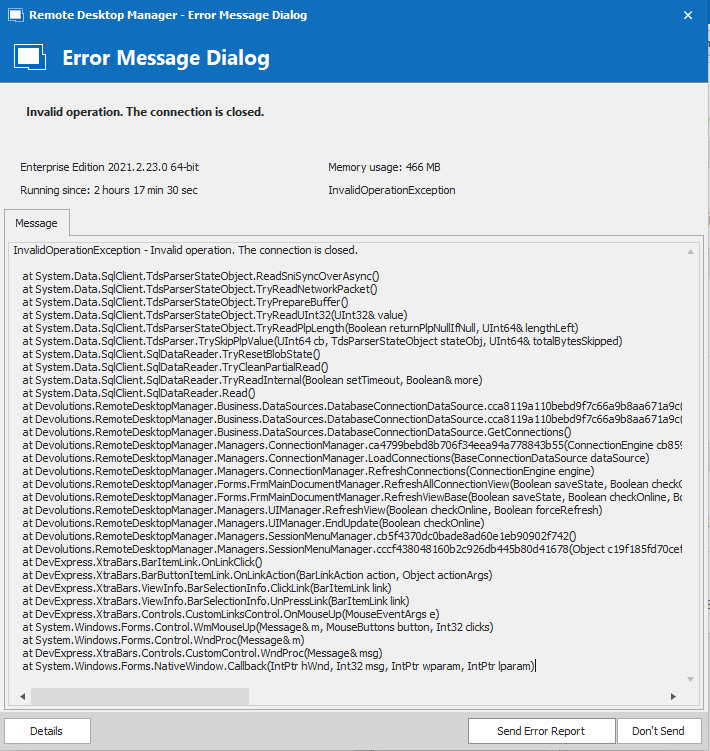
While in the office on the same machine I don't have any problems. If I modify/add/delete an entry, although it crashes, it still does the action I requested however I have to restart RDM to get connected again. Also, some times it does work just fine. I can add an item and it doesn't complain and then I can delete same said item literally seconds later and it crashes.
I'm running the current latest version (although I note there's a new one today), but I've had this problem since I setup RDM about 2 years ago and lived with it. I just had some spare time during the xmas lull so I thought I'd try resolve it :)
My thoughts were that if there are any other IP addresses I need to route through my VPN rather than go directly to the internet for RDM to work other than the Azure server hosting our SQL Database.
Split Tunnelling
Are there any must have IP ranges I should have entered into my routing table for RDM?
While on VPN, I seem to have occasional issues connecting. Once connected it's reasonably reliable, until I try add an entry - at which point, it errors and I have to restart but weirdly it does add the entry.