Pointers

Hi,
As we've moved more to the cloud, our RDM has more and more become a glorified password vault for all the clients/users we support and I wanted to do a bit more with it.
I've installed the powershell module, and just ran a simple script by launching from the Tools, Powershell via the RDM GUI to iterate through all the "sessions" (which for us are mainly username/password credentials
$sessions = Get-RDMSession
foreach ($session in $sessions)
{
	if ($session.name -eq 'A_Username_and_password_session')
	{
		write-host $session.name
		write-host $session.Username
	}
}
so i'm happy that I can connect and run simple commands.
So ultimately, before I dig too deep, what I really want to do is have some powershell code stored against a "session" entry so for example if i run it from a particular session entry, it knows which one it is, so can grab the username and password details and use them to log on to Azure/Office 365 in powershell and perform a series of other commands.
Is this something I can achieve? Ideally, I'd love to have a repository of powershell scripts stored in RDM that I could select from from any of the "sessions". Are there any guides for using powershell with RDM - most the stuff I've looked at doesn't seem to talk about using powershell to access credentials from RDM for use elsewhere.but more about manipulating the RDM database itself.
Thanks
All Comments (12)
Hello,
You can create a PowerShell Macro/Script/Tool entry type which contains the script you want to run against a session in RDM. Then it should use the credential entry tied to this session.
So when you select an entry in the navigation pane, the PowerShell macro should be available in the Macros/Scripts/Tools tab.
Let me know if you have any further questions about this.
Best regards,
Érica Poirier
!thanks Érica, I'll look in this at my next opportunity (I'm doing it as a bit of a side project :) )
I don't appear to be able to execute a macro against a "Username / Password Credential Entry".
When I try to execute a script, it only gives me the "RDP (Microsoft Remote Desktop) Session" or "Web Browser Session" that are stored in my vault, but none of the 100's of Username/Password Credential Entries I have.
Is this by desgin? At its simplest, what I want to do is take the username/password that's in a "Username / Password Credential Entry". and use that within my Powershell script (e.g. log onto M365) but don't understand how I can even start looking at that if I can't execute a script against those type of entries.
Hello,
Thank you for your feedback.
In fact, the Macros/Scripts/Tools can be run on session entry type only, not credential entries. And yes it's by design.
If you want to get the password from a credential entry, you must select it first and then use the Get-RDMSessionPassword cmdlet like this :
$session = Get-RDMSession -Name "YourCredentialEntry"
$password = Get-RDMSessionPassword -Session $session -AsPlainText
Let me know if that helps.
Best regards,
Érica Poirier
At that point, it prevents me having any generic scripts that use the credentials if I need to know the RDMSession name for each of them - unless you can suggest another way of doing it so it would still be automated?
Any reason why it's been set like this or I guess what I'm asking, is can it not be amended on a future release to run powershell scripts/macros against any entry in RDM?
Hello
Sorry to jump in, From a Macro/Script/Tool as Erica Mentioned, You can access the ID and the Name of the entry with $ID$, and $NAME$
So, By using an embedded script :
write-host "-Start-"
write-host "Name: $NAME$"
write host "Password:" (Get-RDMSessionPassword -ID $ID$ -AsPlainText)
write-host "-End-"
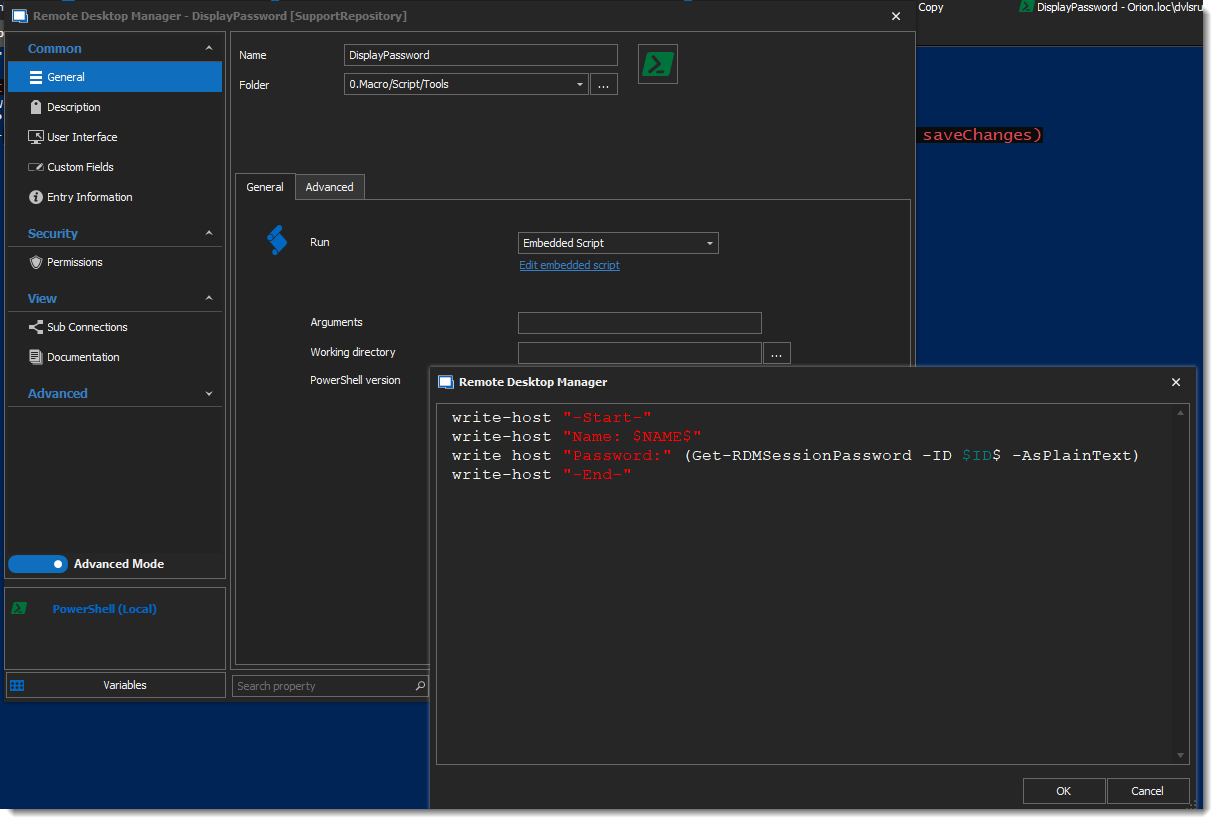
You get a very generic way of displaying the password and the username.
It's quite easy to extrapolate from there...
I hope this helps!
Best regards,
Alex Belisle
2022-04-22_11-31-29.png
Yes, another good solution to running powershell scripts, but I'm still stuck in that I can't run or embed a script against a stored credential entry in RDM unless I know the name (We've got 1000's of entries, I don't know the names of them and I want a generic script). I did try to link powershell session entry to Run As, Linked Vault credential entry. However, when you set that up, the RDM errors when you try run the embedded script.
I'm not sure why you can't have powershell scripts work against all entries in RDM?
Hello,
Thank you for your feedback.
What RDM version are you using and what data source type are you connected to?
What path are you trying to use in RDM to run the script?
I think my previous test wasn't working at all. I'm using 2022.1.23 on a SQL data source. I've been able to run a Macro/Script/Tool PowerShell (Local) entry type against a Credential entry (Username/Password).
This is my PowerShell (Local) entry with an embedded script.
Then, from the context menu or even from the Macros/Scripts/Tools tab of the Credential entry, I can run the script.
Here is the result.
Best regards,
Érica Poirier
I'm on 2022.1.13.0 64-bit connected to an Azure SQL data source.
I'll look into upgrading to the latest version and test again. Just don't want to force a Db Upgrade for everyone else so might be a while. (BTW as a side note, it would be really useful to know if an update was going to force a DB schema update and then force everyone else to update before we actually did the update, i'd be more inclined to update regularly :) ).
Thanks
so, I'm now on 2022.1.25.0 64-bit
I have mine setup very similar to above with a credential entry and a powershell macro/script/tool entry with embedded code. I right click on my credentials and select my stored macro (from the Macro/Script/Tools context menu) and nothing happens :( I don't even get a new tab created with failed powershell code in or any messages.
Powershell and RDM seems to be configured fine. I can add a Powershell Sesssion in RDM with the same script code embeded, then double click on the session and it launches a new PS window and adds it as a tab into RDM so I can see the results. And it will return that session's made up user credentials (as in your above example) - It's just when I use a credential entry, select a script, nothing happens.
Do you have any suggestions why it might be showing this nil behavior or how to debug it? Is there an interactive option I've not ticked?
BTW, thanks very much for your patience and help with this, I do believe I can achieve what I want once I overcome this :)
Hello,
Thank you for your feedback.
Is it a Local or Remote PowerShell macro/script/tool? For the Credential entry, it works with a Local one.
What permissions are set on the Credential and the PowerShell entries? At least you need View and Connect (execute) permissions.
If that's the entry you're using and have those permissions, I think it would worth to have a remote session to troubleshoot your problem. Please send an email to service@devolutions.net with a reference to this thread in your request.
Best regards,
Érica Poirier
arg ... don't i feel daft now. my first script, i'd created as a remote script and post that pretty much duplicated it while testing. yes, of course a local one works fine.
thanks :)