
Tristis Oris
Global hotkeys issue
When not in session - literally what i'm talking. thanks.
too many `keyboard` at search was hard to find it)
Global hotkeys issue
after 3.15 you add (or not?) ctrl+K to open seach inside RDM. So when ssh connection is focused and i want to remove a line, i can't do it.
Doesn't matter what combination UI using, it would confilct with something else. If connection window is focused, i probably want to works inside that window.
Post-login - sudo elevation
It works, thank you.
Post-login - sudo elevation
Right now this field is case sensitive) so it doesn't work with 26.
Post-login - sudo elevation
If there's no proper way, how about adding an enumeration?
word1|word2|..
Post-login - sudo elevation
For all SSH sessions, I used one universal setting and it worked. Waiting for `password` works even for distros that have no text at all. But with Ubuntu 26, this stopped working because the text changed.
This also works for RHEL. But however you look at it, waiting for a specific word is a very hacky method. Can't you make a smart password input based on console readiness / line change?

ubuntu24, keyword `password`
sudo -i
[sudo] password for name:
ubuntu26, keyword `password`
sudo -i
name@name:~$ sudo -i
[sudo: authenticate] Password:
ubuntu26, keyword `sudo`
sudo -i
[sudo: authenticate] Password:
debian 11+, no keyword:
sudo -i
[sudo] password for awx:
Sorry, try again.
xen:
sudo -i
# ^C
Ignore bracketed-paste markers (ESC[200~ and ESC[201~)
Found batch `session type` only after ..2.9 update . The feature looks working, thank you.
Need to change each folder one by one. No way to find all ssh connections at once?
Ignore bracketed-paste markers (ESC[200~ and ESC[201~)
Great. But i see no way to batch edit all hosts. This option is not available.
SFTP mode need a lot improvements
ssh host > open embedded SFTP\SCP
- Select folder with files, at down menu Ctrl+A - only available options is download, no remove uvailable.
- Impossible to disselect files.
- F2 rename menu - can't close with Esc.
- Can't leave home (connection) directory.
- Edit\upload at not home (permissions) directory don't work. Nothing happens.
This mode looks like WinSCP, but can't replace any of it functions.
Literally only files download from home directory is working, but only if you are owner of them - never.
Can't open multiple connections
yes, problem happens because of post-login commands. If clear tab, this hosts will open above the limit.
Can't open multiple connections
nope.
all custom fields:
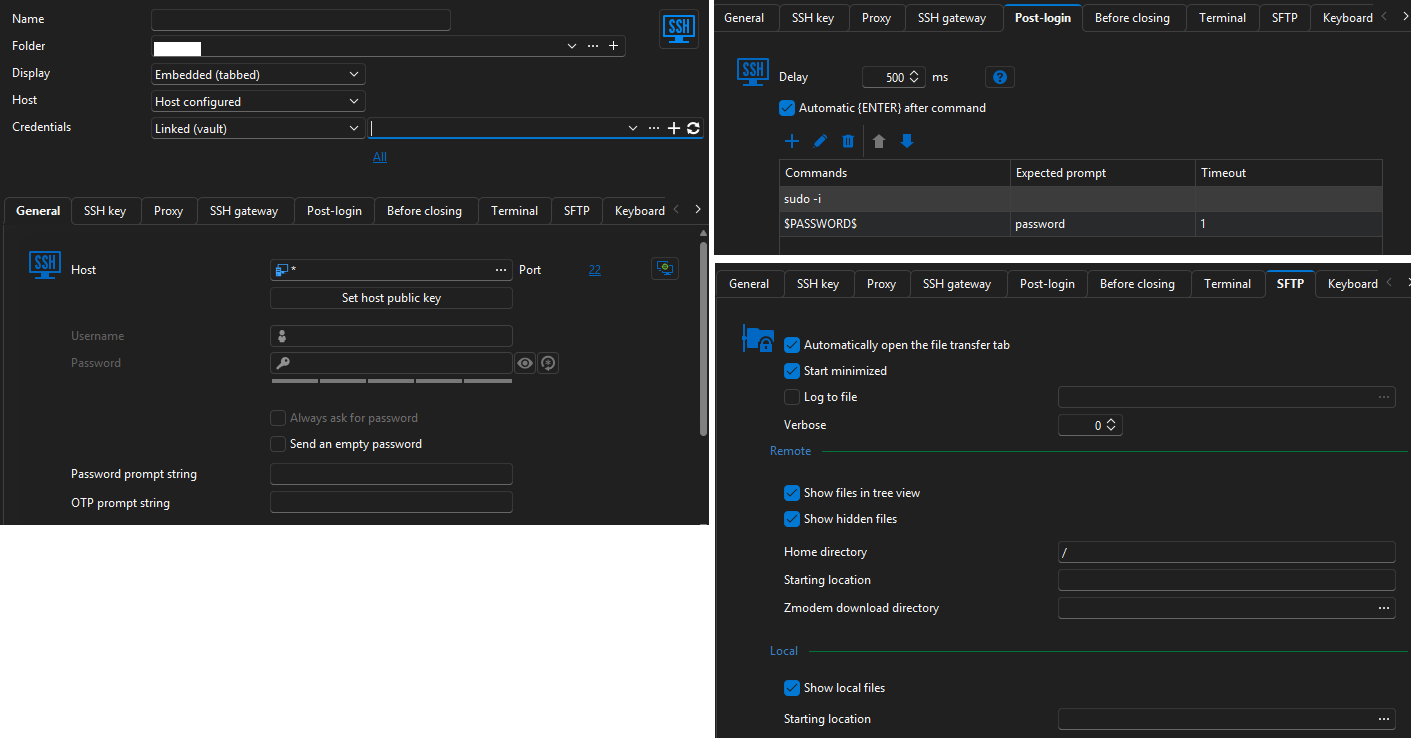
Can't open multiple connections
reproduced with portable V2025.3.27.0.
no issue with V2025.2.30.0.
Can't open multiple connections
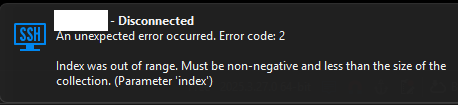
After latest update when i try to open 2nd ssh, i got error.
v2025.3.27.0
Extra symbols when paste clipboard
done. https://forum.devolutions.net/topics/50890/ignore-bracketedpaste-markers-esc200-and-esc201
Ignore bracketed-paste markers (ESC[200~ and ESC[201~)
When pasting from clipboard, RMB or win+V, doesn't matter, sometimes text surrounded with extra symbol.
I know that an old problem, not related only with RDM and could be fixed directly on host. But maybe you can fix it globally.
^[[200~ * ~
Extra symbols when paste clipboard
When pasting from clipboard, RMB or win+V, doesn't matter, sometimes text surrounded with extra symbol.
I know that an old problem, not related only with RDM and could be fixed directly on host. But maybe you can fix it globally.
^[[200~ * ~

Explanation about password management
> This option needs to be enabled both on the host entry and the linked credential entry.
This! Not obvious for sure. Now it works, thank you.
Explanation about password management
Got it. But none of them works with storage password. I also tried to change default>storage at Tools tab.
Explanation about password management
Same as
But what a diffrence tool_password & password?
Explanation about password management
it works if store password with classic way, not linked account.
macro:
sudo -i
$TOOL_PASSWORD$Explanation about password management
Related question.
i'm usiing $TOOL_PASSWORD$ at postlogin script. But it stop working now with linked account. How to fix that?
Explanation about password management
That's exactly what I meant! Thanks.
I didn't notice this menu(
Explanation about password management
i have some amount of ssh credentials at different folders.
Some of them use the same login - which i need to change the stored password.
If use batch edit > edit credentials - login would be overwritten at every host, even it use a another account.
I can create a global credentials, but can't link them with host element. So it works only for manual login via rmb menu?
Did i miss something here?
Separate export location
Storage export stored at special path.
sftp download change the last path globally.
So to export backup, need to change path again. repeat.
Broadcast tabs issue
open multiple connections
start broadcast
open new connection
All tabs would be rearranged vertically.
2025.2.21. broken for a long.