
angelfreire
Powershell - Load from Inventory
Original Poster chiming in... For what it's worth, this function still works correctly for us on module version 2023.3.2 with SQL data source.
using Set-RDMSessionDocumentation to add documentation to a session
That was the trick. Many thanks Jonathan.
using Set-RDMSessionDocumentation to add documentation to a session
Erica, can I follow on this thread and ask about how to retrieve this data? Here is an example:
***
Get-RDMSessionDocumentation -Session $RDMSession
Pages
-----
{Notes}
***
The Notes tab in Documentation has data in it but I can't figure out how to structure the command so as to retrieve it. I tried a few variations including:
Get-RDMSessionDocumentation -Session $RDMSession -Page Notes
Get-RDMSessionDocumentation -Session $RDMSession -Page "Notes"
Get-RDMSessionDocumentation -Session $RDMSession -Page "{Notes}"
With no success. Could you point me in the right direction?
Thanks.
RDMDatasource cmdlets not working
Just tested with our existing scripts and everything is working again. Thanks!
RDMDatasource cmdlets not working
I can confirm the behavior on Windows with Powershell 7.3.3, RDM version 2023.1.18.0 and Devolutions.Powershell module version 2023.1.0.4.
Simply running get-rdmversion produces:
The type initializer for 'NetSecurityNative' threw an exception.
at Interop.NetSecurityNative.ImportPrincipalName(Status& minorStatus, String inputName, Int32 inputNameByteCount, SafeGssNameHandle& outputName)
at Microsoft.Win32.SafeHandles.SafeGssNameHandle.CreatePrincipal(String name)
at System.Net.Security.SafeDeleteNegoContext..ctor(SafeFreeNegoCredentials credential, String targetName)
at System.Net.Security.NegotiateStreamPal.EstablishSecurityContext(SafeFreeNegoCredentials credential, SafeDeleteContext& context, String targetName, ContextFlagsPal inFlags, SecurityBuffer inputBuffer, SecurityBuffer outputBuffer, ContextFlagsPal& outFlags)
at System.Net.Security.NegotiateStreamPal.InitializeSecurityContext(SafeFreeCredentials credentialsHandle, SafeDeleteContext& securityContext, String[] spns, ContextFlagsPal requestedContextFlags, SecurityBuffer[] inSecurityBufferArray, SecurityBuffer outSecurityBuffer, ContextFlagsPal& contextFlags)
at Microsoft.Data.SqlClient.SNI.SNIProxy.GenSspiClientContext(SspiClientContextStatus sspiClientContextStatus, Byte[] receivedBuff, Byte[]& sendBuff, Byte[][] serverName)
at Microsoft.Data.SqlClient.SNI.TdsParserStateObjectManaged.GenerateSspiClientContext(Byte[] receivedBuff, UInt32 receivedLength, Byte[]& sendBuff, UInt32& sendLength, Byte[][] _sniSpnBuffer)
at Microsoft.Data.SqlClient.TdsParser.SNISSPIData(Byte[] receivedBuff, UInt32 receivedLength, Byte[]& sendBuff, UInt32& sendLength)
The type initializer for 'NetSecurityNative' threw an exception.
at Interop.NetSecurityNative.ImportPrincipalName(Status& minorStatus, String inputName, Int32 inputNameByteCount, SafeGssNameHandle& outputName)
at Microsoft.Win32.SafeHandles.SafeGssNameHandle.CreatePrincipal(String name)
at System.Net.Security.SafeDeleteNegoContext..ctor(SafeFreeNegoCredentials credential, String targetName)
at System.Net.Security.NegotiateStreamPal.EstablishSecurityContext(SafeFreeNegoCredentials credential, SafeDeleteContext& context, String targetName, ContextFlagsPal inFlags, SecurityBuffer inputBuffer, SecurityBuffer outputBuffer, ContextFlagsPal& outFlags)
at System.Net.Security.NegotiateStreamPal.InitializeSecurityContext(SafeFreeCredentials credentialsHandle, SafeDeleteContext& securityContext, String[] spns, ContextFlagsPal requestedContextFlags, SecurityBuffer[] inSecurityBufferArray, SecurityBuffer outSecurityBuffer, ContextFlagsPal& contextFlags)
at Microsoft.Data.SqlClient.SNI.SNIProxy.GenSspiClientContext(SspiClientContextStatus sspiClientContextStatus, Byte[] receivedBuff, Byte[]& sendBuff, Byte[][] serverName)
at Microsoft.Data.SqlClient.SNI.TdsParserStateObjectManaged.GenerateSspiClientContext(Byte[] receivedBuff, UInt32 receivedLength, Byte[]& sendBuff, UInt32& sendLength, Byte[][] _sniSpnBuffer)
at Microsoft.Data.SqlClient.TdsParser.SNISSPIData(Byte[] receivedBuff, UInt32 receivedLength, Byte[]& sendBuff, UInt32& sendLength)
2023.1.18.0
Powershell - Load from Inventory
Confirmed. Thanks again.
Powershell - Load from Inventory
Jonathan,
I've become so accustomed to a Powershell 7.x workflow that I never thought to do any testing in 5.1. I tested the workflow a moment ago and it works as expected with 2022.1.1.0.
Many, many thanks.
Angel F.
Powershell - Load from Inventory
Checking to see if there is any update. Thanks.
Powershell - Load from Inventory
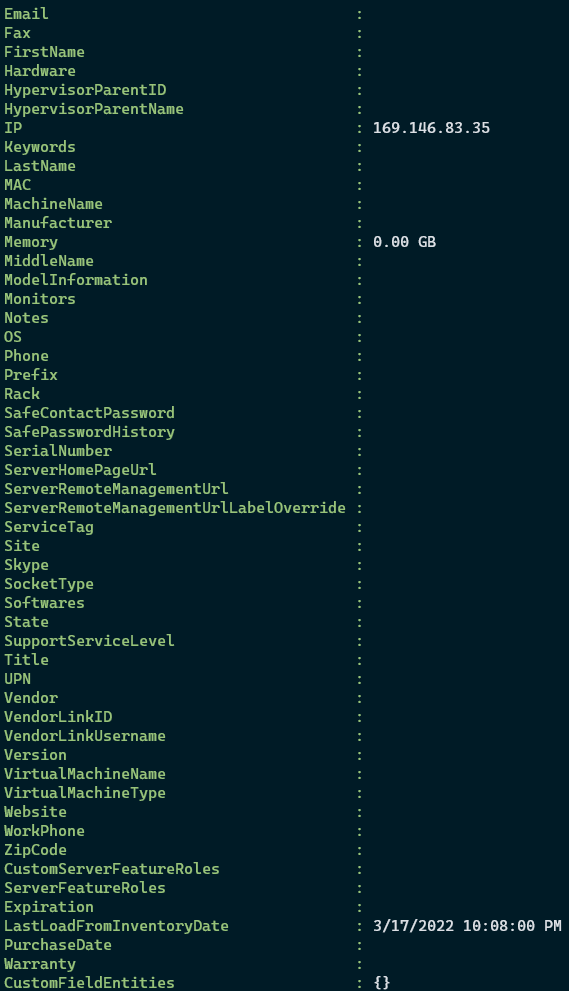
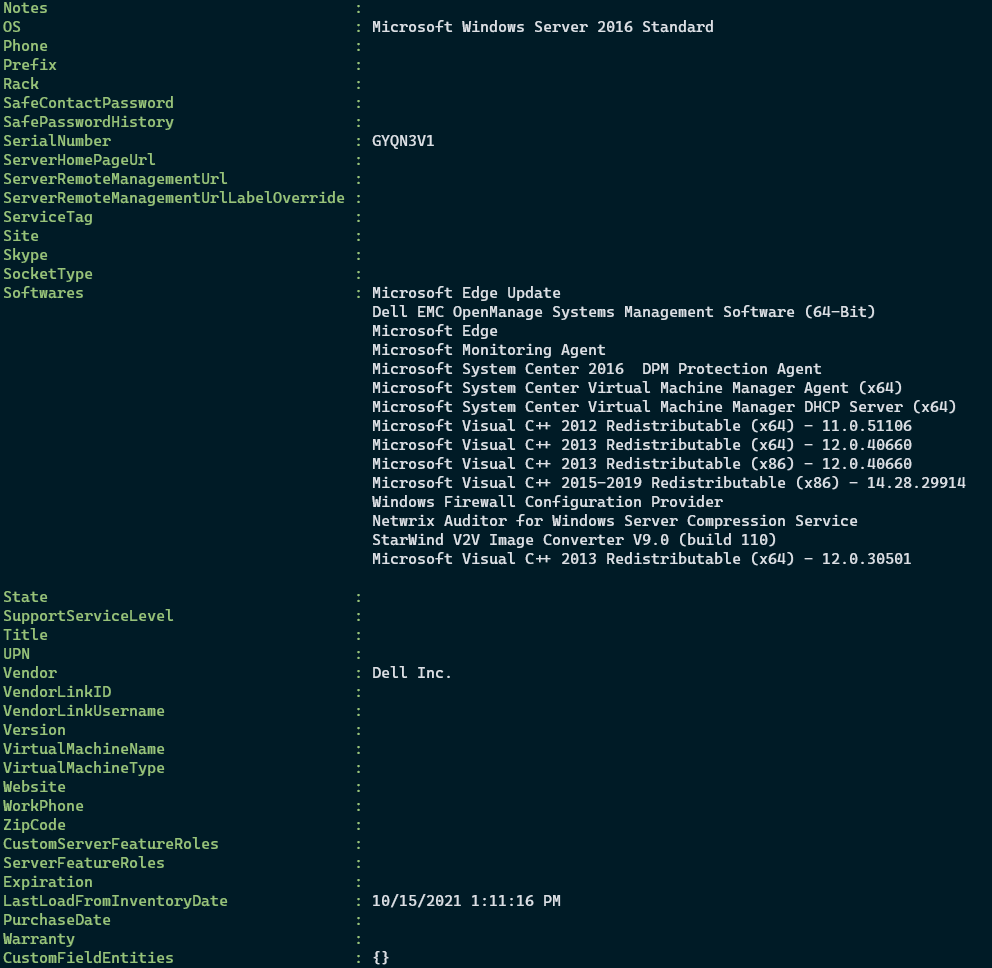
Thanks for the suggestion Jonathan. I tried it from the top and though $inventory.Connection.MetaInformation does return properties, they are largely empty. The IP address for the server is filled out as is the LastLoadFromInventoryDate but that is all. When I choose the "Load From Inventory" button under assets in the interface, it takes about 30 seconds and then numerous fields are populated including Software details, Hardware details, etc. I have not had success reproducing this result from the Powershell commands. The first attachment is the result from the commands. The second is the result of viewing the MetaInformation from another server in the rdmsession collection. ($sessions[10].MetaInformation) This is a sample of the data that is populated when using the GUI instead of Powershell.
Powershell - Load from Inventory
We're trying to automate a monthly update of the assets in RDM through Powershell and the commands seem to execute without errors but, aside from the "Last Load" time in the Asset tab, it doesn't appear to be collecting the new data. Here are some of the details.
RemoteDesktopModule version 2022.1.0.6
Using the code below:
$ds = get-rdmdatasource -name RDM
set-rdmcurrentdatasource $ds
$sessions = get-rdmsession | ? ConnectionType -eq 'rdpconfigured'
# verified that the correct data is being returned from these commands
$mycred = (get-credential) #Our regular accounts do not have local admin rights so I answer this with my elevated credentials
invoke-rdmloadfrominventorysession -session $sessions[0] -credential $mycred -verbose -debug #Only feeding the first session in the array for testing and verified that it is a valid server
set-rdmsession -session $session[0] -refresh
update-rdmui
====
The invoke command produced this output:
VERBOSE: Load from inventory - SERVER01
VERBOSE: Retrieving System Information with for SERVER01 with the user mydomain\myprivaccount
VERBOSE: Success: True - SERVER01
Connection ErrorMessages Success
---------- ------------- -------
RemoteDesktopManager.PowerShellModule.PSOutputObject.PSConnection {} True
There is no error reported or logged in the error messages property yet there is no data update in RDM except for the Last Load time as stated above. Am I missing some part of the process? When using the button in the GUI to refresh the Asset's inventory, it takes a while to query and populate. The Powershell line for RDMLoad returns a success immediately. This may mean that the command has been passed successfully as a collection job and it will take time to update the database but even if I wait 15 minutes before the session refresh and update-rdmui, I still don't have data. Closing and reopening the app also does not update. Since the RDMLoad with the debug switch doesn't report any errors, I am uncertain where things are failing.
Thanks.
Initiate Load From Inventory via Powershell
We're trying to automate a monthly update of the assets in RDM through Powershell and the commands seem to execute without errors but, aside from the "Last Load" time in the Asset tab, it doesn't appear to be collecting the new data. Here are some of the details.
RemoteDesktopModule version 2022.1.0.6
Using the code below:
$ds = get-rdmdatasource -name RDM
set-rdmcurrentdatasource $ds
$sessions = get-rdmsession | ? ConnectionType -eq 'rdpconfigured'
# verified that the correct data is being returned from these commands
$mycred = (get-credential) #Our regular accounts do not have local admin rights so I answer this with my elevated credentials
invoke-rdmloadfrominventorysession -session $sessions[0] -credential $mycred -verbose -debug #Only feeding the first session in the array for testing
set-rdmsession -session $session[0] -refresh
update-rdmui
====
The invoke command produced this output:
VERBOSE: Load from inventory - SERVER01
VERBOSE: Retrieving System Information with for SERVER01 with the user mydomain\myprivaccount
VERBOSE: Success: True - SERVER01
Connection ErrorMessages Success
---------- ------------- -------
RemoteDesktopManager.PowerShellModule.PSOutputObject.PSConnection {} True
There is no error reported or logged in the error messages property yet there is no data update in RDM except for the Last Load time as stated above. Am I missing some part of the process?
Thanks.
Notes in Documentation tab
Thank you for the update. This will be a great boost to the fungibility of RDM for us.
Notes in Documentation tab
Is there a mechanism for retrieving notes written to 'Pages' in the Documentation tab from Powershell?
WARNING: Unable to save the entry; access denied
Just updated and verified. Many thanks!
WARNING: Unable to save the entry; access denied
Question: Has this command been removed from more recent Powershell Modules? Invoke-RDMLoadFromInventorySession is not present in the last few releases of the 2021.2.0.x branch I have been using. (Currently on 2021.2.0.25)
Thanks.