Powershell - Load from Inventory
We're trying to automate a monthly update of the assets in RDM through Powershell and the commands seem to execute without errors but, aside from the "Last Load" time in the Asset tab, it doesn't appear to be collecting the new data. Here are some of the details.
RemoteDesktopModule version 2022.1.0.6
Using the code below:
$ds = get-rdmdatasource -name RDM
set-rdmcurrentdatasource $ds
$sessions = get-rdmsession | ? ConnectionType -eq 'rdpconfigured'
# verified that the correct data is being returned from these commands
$mycred = (get-credential) #Our regular accounts do not have local admin rights so I answer this with my elevated credentials
invoke-rdmloadfrominventorysession -session $sessions[0] -credential $mycred -verbose -debug #Only feeding the first session in the array for testing and verified that it is a valid server
set-rdmsession -session $session[0] -refresh
update-rdmui
====
The invoke command produced this output:
VERBOSE: Load from inventory - SERVER01
VERBOSE: Retrieving System Information with for SERVER01 with the user mydomain\myprivaccount
VERBOSE: Success: True - SERVER01
Connection ErrorMessages Success
---------- ------------- -------
RemoteDesktopManager.PowerShellModule.PSOutputObject.PSConnection {} True
There is no error reported or logged in the error messages property yet there is no data update in RDM except for the Last Load time as stated above. Am I missing some part of the process? When using the button in the GUI to refresh the Asset's inventory, it takes a while to query and populate. The Powershell line for RDMLoad returns a success immediately. This may mean that the command has been passed successfully as a collection job and it will take time to update the database but even if I wait 15 minutes before the session refresh and update-rdmui, I still don't have data. Closing and reopening the app also does not update. Since the RDMLoad with the debug switch doesn't report any errors, I am uncertain where things are failing.
Thanks.
All Comments (37)

Hello,
I ran some tests on my side and I seem to be getting the same issue you are having.
I have gone ahead and opened a ticket with our engineering team working on the module to investigate.
Once I hear back from them I will update you in this forum.
Best regards,
Eric St-Martin
Hi,
Based on my testing, you can retrieved the inventory information like this.
$inventory = Invoke-RDMLoadFromInventorySession -session $sessions[0]
$inventory.Connection.MetaInformation
Let me know if this helps.
Regards
Jonathan Lafontaine
Thanks for the suggestion Jonathan. I tried it from the top and though $inventory.Connection.MetaInformation does return properties, they are largely empty. The IP address for the server is filled out as is the LastLoadFromInventoryDate but that is all. When I choose the "Load From Inventory" button under assets in the interface, it takes about 30 seconds and then numerous fields are populated including Software details, Hardware details, etc. I have not had success reproducing this result from the Powershell commands. The first attachment is the result from the commands. The second is the result of viewing the MetaInformation from another server in the rdmsession collection. ($sessions[10].MetaInformation) This is a sample of the data that is populated when using the GUI instead of Powershell.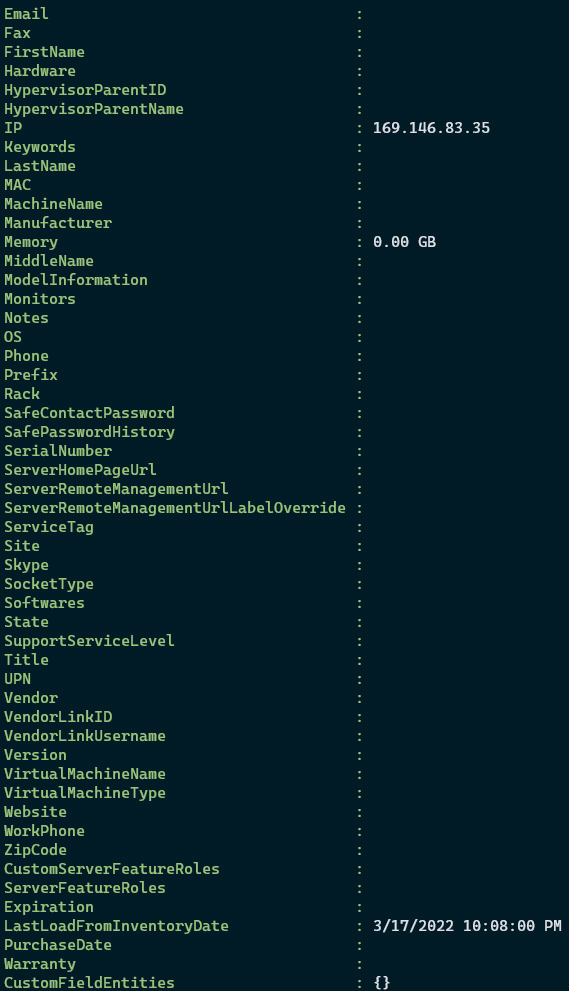
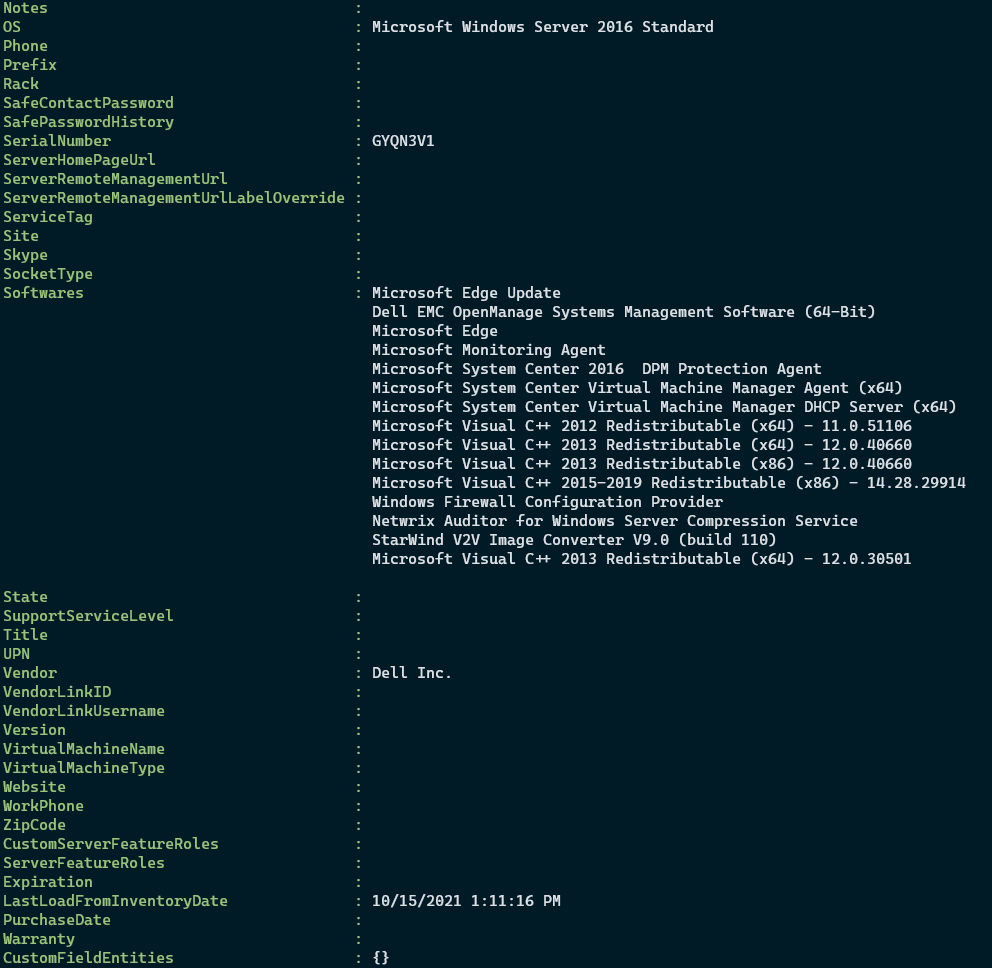
PoshRDMLoad1.PNG
GUIRDMLoad1.PNG
Checking to see if there is any update. Thanks.
Hi,
Unfortunately no, but your issue is high on my priority list.
Jonathan Lafontaine
Hi,
I have good news for you.
I've reworked Invoke-RDMLoadFromInventorySession to be compatible with the new .net core PowerShell module.
It will only work on Windows but with version 2022.1.1.0, you should be able to retrieve inventory information like you used to.
Let me know how it goes
Regards
Jonathan Lafontaine
Jonathan,
I've become so accustomed to a Powershell 7.x workflow that I never thought to do any testing in 5.1. I tested the workflow a moment ago and it works as expected with 2022.1.1.0.
Many, many thanks.
Angel F.
2022.1.1.0 should be able to retrieve the inventory in PS7.2 too.
Jonathan Lafontaine
Confirmed. Thanks again.
My pleasure.
Glad it works.
Jonathan Lafontaine
Hello,
Experiencing similar symptoms to what was described in the original post when running Invoke-RDMLoadFromInventorySession with RDM 2023.3.25
Using the GUI to load from system inventory works fine, but via powershell most of the asset fields are not populated.
Powershell output is attached.
Thanks
Joe
ea386012-ea70-45bb-9917-29693fbd0fb2.png
Hello Joe,
Could you confirm what version of the module you are currently using? You can use Get-RDMInstance to retrieve it. Can you also confirm what type of data source ( Devolutions Server, SQL Server, etc.) so we can try to replicate the issue?
Best regards,
Richard Boisvert
Hi Richard,
The module version is 2023.2.0.8. Datasource is DVLS. Have tried running Invoke-RDMLoadFromInventorySession with and without the -Credential parameter, but neither works.
Joe
Original Poster chiming in... For what it's worth, this function still works correctly for us on module version 2023.3.2 with SQL data source.
Hello,
Thank you for confirming it is still working correctly on a SQL data source; it seems to be caused by the Devolutions Server data source. I will validate with the PowerShell module developer.
Best regards,
Richard Boisvert
Hello,
Just to confirm, for the same entry, it does work from the GUI? when I receive that error in the Devolutions.PowerShell, I also receive it in RDM: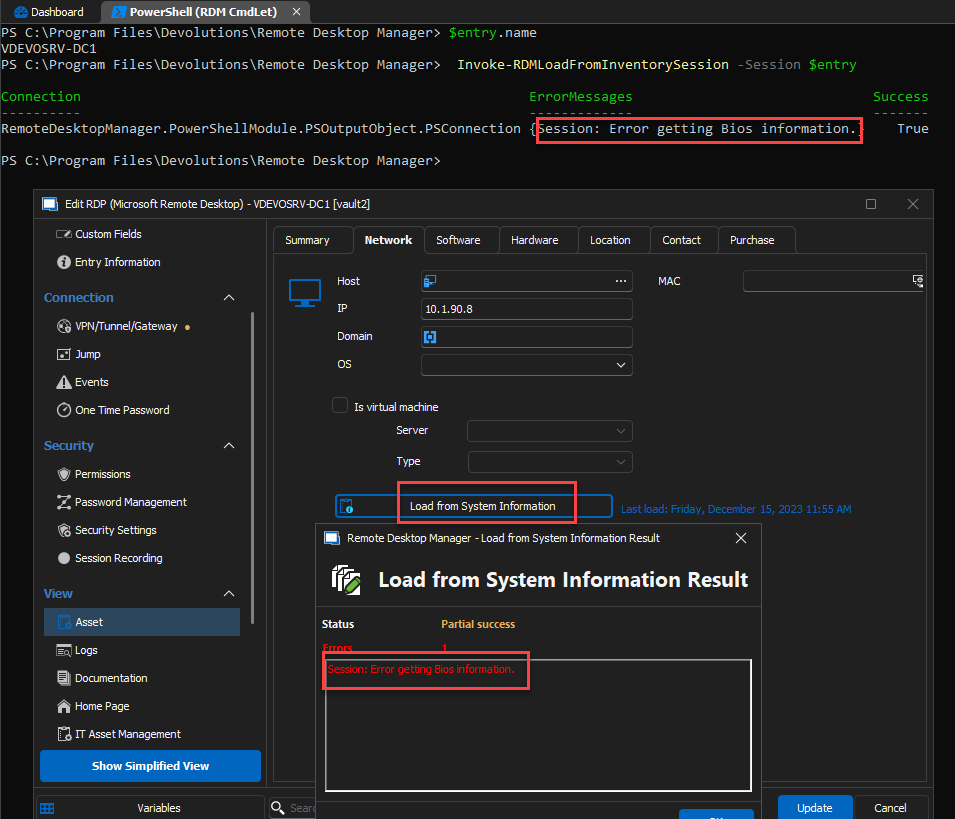
Best regards,
Richard Boisvert
70cec8c9-1ae6-4400-915f-dff56b351c8b.png
confirmed, it works from the GUI, but not powershell.
Also, I'm not sure that PowerShell is retrieving the credential correctly from the entry in RDM, but irrespective it still doesnt work if I specify a credential manually via the cmdlet parameter.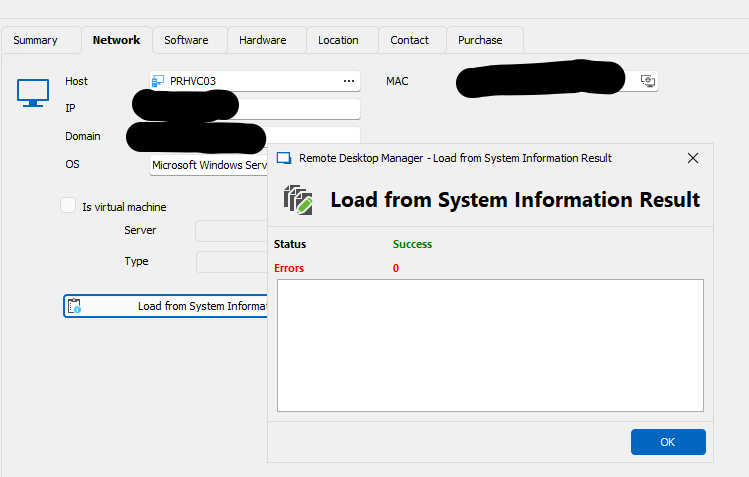

19ac56d4-6246-4b84-8014-647e5e185087.png
297a288b-6a14-4e46-8657-f8dd65325f33.png
Hello,
Thank you for confirming. I have opened an internal ticket to validate what the issue is.
Best regards,
Richard Boisvert
Hello,
With the release of Devolutions.PowerShell module version 2023.3.5, you should find that the Invoke-RDMLoadFromInventorySession command is correctly executing on a DVLS data source. Should you experience any issues, please don't hesitate to reach out to us.
Best regards,
Maxime
Hi Maxime,
Thanks for the update. its still not working.
When not specifying the -credential parameter:
WARNING: Access denied
RemoteDesktopManager.PowerShellModule.PSOutputObject.PSConnection {Session: Error getting Bios information.} True
When specifying the -credential parameter:
VERBOSE: [Invoke-RDMLoadFromInventorySession] Start
WARNING: Access denied
VERBOSE: Load from inventory - PR-SERVER1
VERBOSE: Retrieving System Information with for PR-SERVER1.domain.local with the user admin@domain.local
VERBOSE: Success: True - PR-SERVER1
RemoteDesktopManager.PowerShellModule.PSOutputObject.PSConnection {Session: Error getting Bios information.} True
Have tried username in forms of both @domain and DOMAIN\
Joe
Hello Joe,
I will conduct a further investigation to determine the cause of your issue.
Regards,
Maxime
Hello Joe,
It appears that the 'Credential' parameter is functioning as expected so far. However, to further diagnose the issue, could you try using an alternate set of credentials for testing? The observation that the commands cease after the first execution suggests two possibilities: either access is being denied or the RPC server is unavailable.
Additionally, I'm curious if you've tried logging in with just the username, leaving out both the 'DOMAIN' prefix and the '@domain' suffix.
Regards,
Maxime
Hi Maxime,
The credential I'm using is a domain admin, and secondly I can map a drive to the c$ share using that credential, all from the same machine where the powershell command is not working, but RDM thick client does.
Using just username without domain, doesnt seem to make a difference.
Is there a way to get more verbose or debug output from Invoke-RDMLoadFromInventorySession? I have added the -verbose and -debug flags, but the output is pretty brief.
VERBOSE: [Invoke-RDMLoadFromInventorySession] Start
WARNING: Access denied
VERBOSE: Load from inventory - PR-SERVER1
VERBOSE: Retrieving System Information with for PR-SERVER1.domain.local with the user admin@domain.local
VERBOSE: Success: True - PR-SERVER1
RemoteDesktopManager.PowerShellModule.PSOutputObject.PSConnection {Session: Error getting Bios information.} True
Thanks
Joe
Hello,
In the module version (2023.2.0.8), it is not possible to obtain additional information. However, I will release an updated version (2023.2.0.10), which will log a silent error. This error will be visible when the debug level is set to 'Debug and Show log silent', and no additional parameters will be required.
Could you also let me know if your host contains a variable, and what type of connection it uses?
Regards,
Maxime
Hi Maxime,
Sounds good, pls let me know when I can try the new module version. I've tried the entries with both variables and explicit addressing, neither works. I'm using the RDM entry type called 'host'. The script I'm using is shown below.
Thanks
Joe
Import-Module Devolutions.PowerShell
$ds = Get-RDMDataSource -Name "RDM"
Set-RDMCurrentDataSource $ds
If (-not ($credential))
{
$Credential = Get-Credential
}
$Sessions = Get-RDMSession
$Hosts = $Sessions | where { $_.ConnectionType -eq 'Host' }
$HostsToFix = $Hosts | where { $_.Name -ne $_.MetaInformation.MachineName }
ForEach ($HostSession in $HostsToFix)
{
$Hostname = $HostSession.HostResolved
$port = 3389
If ([System.Net.Sockets.TcpClient]::new().ConnectAsync($Hostname, $port).Wait(100) -eq $true)
{
Write-Host "Updating inventory for $Hostname"
Invoke-RDMLoadFromInventorySession -session $HostSession -Credential $Credential -Verbose
Set-RDMSession $HostSession -Refresh
}
}
Update-RDMUI
Hello Joe,
The version 2023.2.0.10 is now available. The debug level option can be accessed in File -> Options -> Advanced -> Debug level. Make sure the 'Debug' and 'Show log silent' are enabled, or set the value to 3.
Thank you for providing the script; it will be useful in identifying the issue.
Regards,
Maxime
Hi Maxime,
I'm a bit confused about the module versioning, you mention v2023.2.0.10, but the last one I tried was 2023.3.5. Is there a newer version of 2023.3.x I should be testing with. Running install-module devolutions.powershell still sees 2023.3.5 as the latest.
Anyhow, I did a forced install of v2023.2.0.10 alongside RDM 2023.3.33, but still getting 'access denied' errors from Powershell, but in the Thick client GUI it eventually succeeds within a few minutes after displaying the 'invalid namespace' error message twice.
Debug level has been set to 3 in the RDM thick client, but I dont see anything in the application logs relating to the Powershell inventory attempt. There is however an entry for the error message the thick client displays.
Thanks
Joe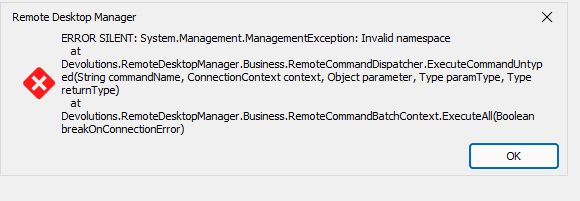


ccce9499-6208-45e5-a20a-b4845c6b61f3.png
4f3cafff-3945-49f0-a75e-689b59eb4a79.png
7b291dcb-260e-47a1-971b-05143eef3266.png
Hello,
I understood that you were using the 2023.2.0.8 version of the module, leading me to presume your DVLS instance matched version 2023.2.X. It's generally advisable to align the module version with the corresponding major and minor versions of your rdm and dvls instances (formatted as Major.Minor.Patch). However, upon learning your RDM version, I realized my assumption was incorrect. Rest assured, the upcoming release will incorporate adjustments similar to those in module version 2023.2.0.10.
The 'WARNING: Access denied' message suggests the current user lacks administrator privileges, but this doesn't hinder the cmdlet's execution. Based on your PowerShell output, it appears there were no subsequent errors. Has the information been updated correctly?
You have the option to use a different configuration file other than the default RDM file. If executing Get-RDMPowerShellOverride returns a non-null value in OptionFilePath, it implies the use of an alternate configuration file. This might be why errors aren't displayed, as the debug level set in RDM wouldn't influence this separate configuration.
Regarding the two errors observed in the RDM UI, I've successfully replicated them and will be investigating further. Currently, my priority is to ensure consistent behavior between the Devolutions.PowerShell module and RDM.
Best regards,
Maxime
Hello,
I understood that you were using the 2023.2.0.8 version of the module, leading me to presume your DVLS instance matched version 2023.2.X. It's generally advisable to align the module version with the corresponding major and minor versions of your rdm and dvls instances (formatted as Major.Minor.Patch). However, upon learning your RDM version, I realized my assumption was incorrect. Rest assured, the upcoming release will incorporate adjustments similar to those in module version 2023.2.0.10.
The 'WARNING: Access denied' message suggests the current user lacks administrator privileges, but this doesn't hinder the cmdlet's execution. Based on your PowerShell output, it appears there were no subsequent errors. Has the information been updated correctly?
You have the option to use a different configuration file other than the default RDM file. If executing Get-RDMPowerShellOverride returns a non-null value in OptionFilePath, it implies the use of an alternate configuration file. This might be why errors aren't displayed, as the debug level set in RDM wouldn't influence this separate configuration.
Regarding the two errors observed in the RDM UI, I've successfully replicated them and will be investigating further. Currently, my priority is to ensure consistent behavior between the Devolutions.PowerShell module and RDM.
Best regards,
Maxime
@Maxime Bernier
this is a 2 year old issue. I am not using powershell but may i the future. But I cant even get it to pull the system info in the app. The only thing after 30 minutes of scanning it can seem to grab is the IP: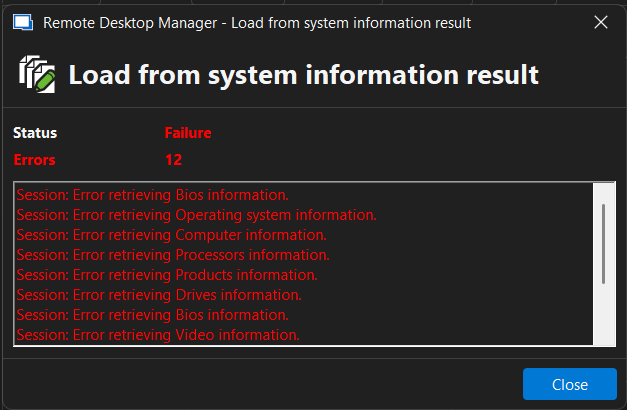
90f88a25-5641-4a19-bc57-9f7bdddc1a57.png
Hello,
Could you please let me know which version of RDM you’re running, as well as the type of data source you’re using? That information will help me reproduce the issue on my side.
Best regards,
Maxime
Hello,
Could you please let me know which version of RDM you’re running, as well as the type of data source you’re using? That information will help me reproduce the issue on my side.
Best regards,
Maxime
@Maxime Bernier
2025.2.28.0 64-bit (JIT)
Hello,
Thank you for the follow-up.
The issue may be related to insufficient access rights or RDM using incorrect credentials.
Please refer to the following documentation article, which outlines troubleshooting steps for the System Information Report feature in RDM:
https://docs.devolutions.net/rdm/kb/troubleshooting-articles/wmi-troubleshooting/
I recommend reviewing point 3 to test your access and point 4 to ensure that RDM is using the correct credentials.
Let me know if you discover anything on your end or if you have any further questions.
Best regards,
Jacob Lafrenière
Hello,
Thank you for the follow-up.
The issue may be related to insufficient access rights or RDM using incorrect credentials.
Please refer to the following documentation article, which outlines troubleshooting steps for the System Information Report feature in RDM:
https://docs.devolutions.net/rdm/kb/troubleshooting-articles/wmi-troubleshooting/
I recommend reviewing point 3 to test your access and point 4 to ensure that RDM is using the correct credentials.
Let me know if you discover anything on your end or if you have any further questions.
Best regards,
@Jacob Lafrenière
OK I did some further testing and came down to this using powershell.
#test rule which failed:
Get-WmiObject -Query "SELECT * FROM Win32_OperatingSystem" -ComputerName "nameofcomputertestingwith"
#set firewall rule for WMI for Domain only(this requires powershell as admin):
Get-NetFirewallRule -DisplayName "Windows Management Instrumentation (WMI-In)" | Where-Object { $_.Profile -eq 'Domain' } | Set-NetFirewallRule -Enabled True
#made sure agent installed:
Winget install Devolutions.RemoteDesktopManagerAgent
Ran above test successfully this time.
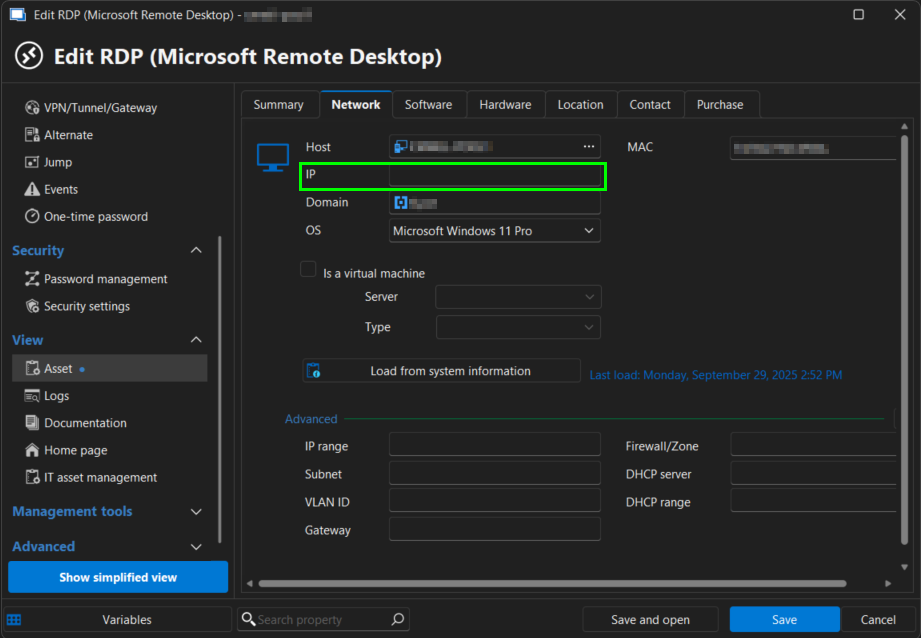
Now when I run "Load from system information" it takes about 10 minutes but it returns most data and says no errors. But for some reason it wipes out the IP field"
Hello,
Thank you for the follow-up.
I’m glad to hear you were able to resolve the issue. Could you please share the screenshot again, I can't see it? I’d like to confirm the IP field you mentioned.
I look forward to your reply.
Best regards,
Jacob Lafrenière
Hello,
Thank you for the follow-up.
I’m glad to hear you were able to resolve the issue. Could you please share the screenshot again, I can't see it? I’d like to confirm the IP field you mentioned.
I look forward to your reply.
Best regards,
5974fa4c-25e5-4dc4-ace4-945c01e28272.png
Hello,
Thank you for the follow-up.
I was able to reproduce the issue you are experiencing with the IP address disappearing. I will report this bug to our development team, who will begin working on a fix.
I will follow up with you as soon as the fix is included in a future update.
Best regards,
Jacob Lafrenière
Hello,
The issue regarding the IP address getting overwritten has been implemented and will be available in version 2025.3.16.0.
Regards
Jonathan Del Signore