
ascheipner
DarkMode and External RDP session shows bright white Tab content
Hi,
I'm using RDM in Dark mode and RDP sessions in External Fullscreen mode.
When I minimize the external RDP window to return back to RDM, I have this huge white page in the Tab of the RDP session like this:
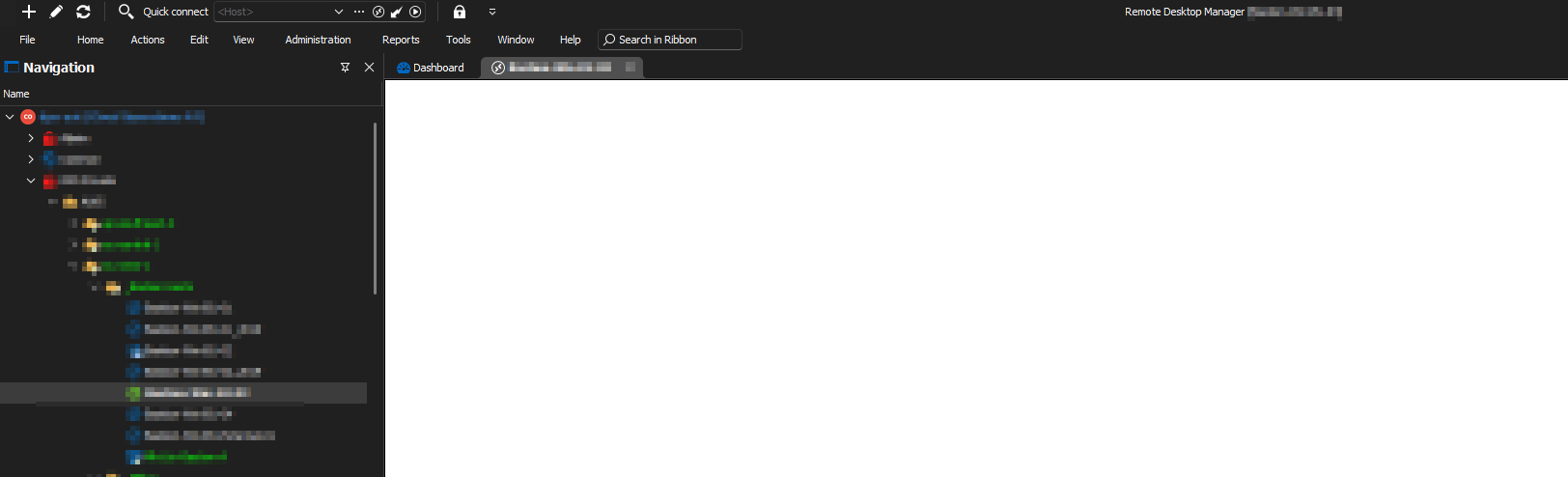
This high contrast is hurting my eyes and the only workaround I came up so far is by switching the tab manually to "Dashboard".
Can you please make that page also dark?
Maybe it doesn't look so bad in this small screenshot, but imagine RDM in full-screen mode on a 32 inch display where 70% of the screen is a blank WHITE page.
=> When you are working in dark mode the whole day, this is really hard to look at!
If you have any other workarounds such as some color/themes settings that I can apply, would be really appreciated.
Thanks for your help!
RDM can't connect Devolutions Server
Hi Erica,
I hope I can re-open this bug report with my reply, as this problem now re-occurs because of your fix in versions > 2024.1.8.0 that you did trying to mitigate this for everyone.
In DVLS versions > 2024.1.8.0, you added in line #74 of the web.config the line "<basicAuthentication enabled="false" /> => trying to solve this for everyone
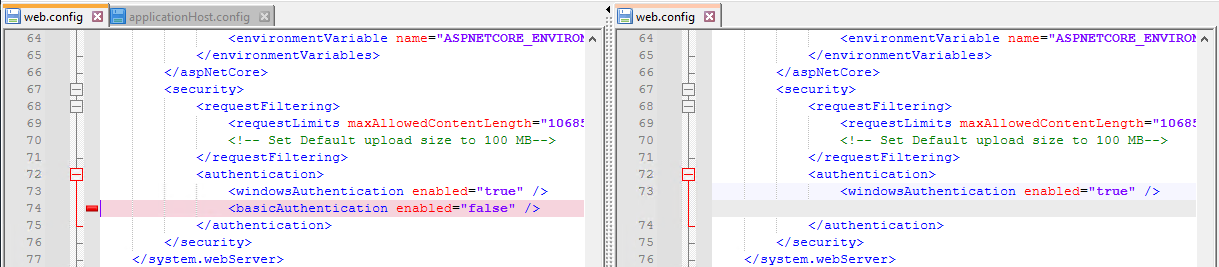
However this setting breaks the authentication section completely with a syntax error (at least on our IIS servers), if basicAuthentication is already disabled on a higher level (either Default Web Site or at Serverlevel)
The result is that our RDMs cannot connect anymore to DVLS which brings us back to the initial post of this bug ticket (same error).
The IIS error is: "web.config. Line number: 74. Error: This configuration section cannot be used at this path. This happens when the section is locked at a parent level. Locking is either by default (overrideModeDefault="Deny"), or set explicitly by a location tag...."
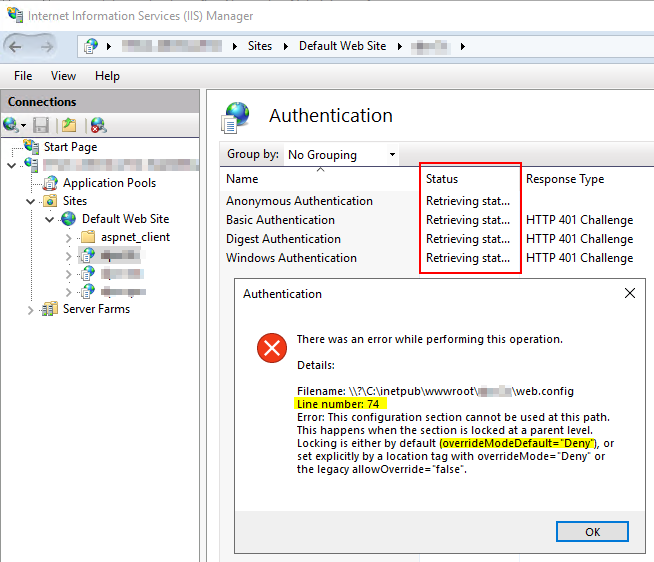
The error message describes exactly the issue:
In our applicationHost.config the basicAuthentication section is locked with overrideModeDefault="Deny" />
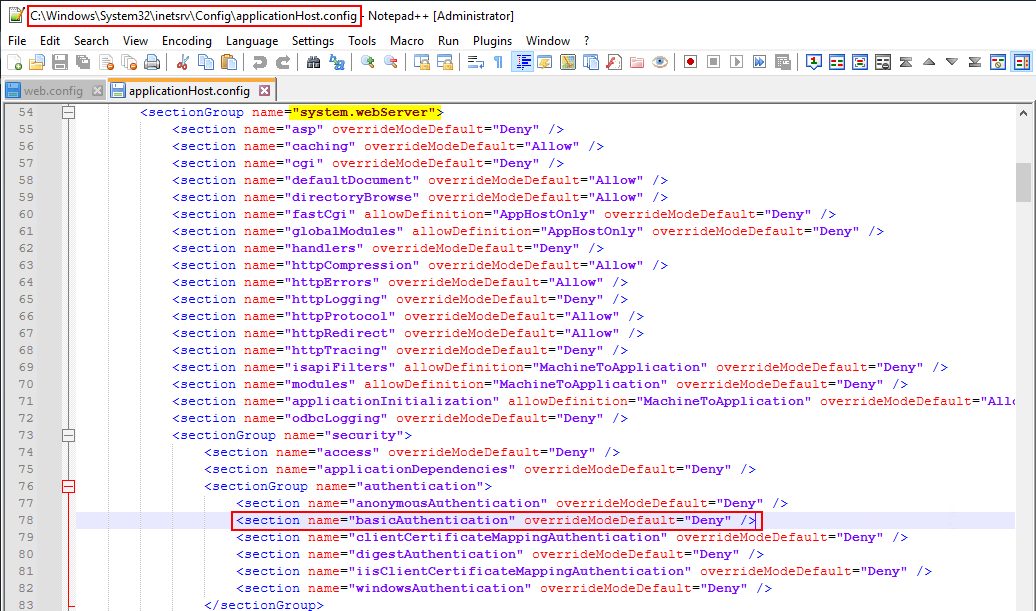
I don't know, if that is only on our servers, or if this is the default setting in IIS
Anyway: Adding line #74 in the web.config "<basicAuthentication enabled="false" /> breaks authentication
Workaround:
Manually remove line #74 in the web.config "<basicAuthentication enabled="false" /> => RDM works again
Todo:
Check if line #74 in the web.config "<basicAuthentication enabled="false" /> can be added withour IIS Syntax error by first parsing the applicationHost.config
I attach a few screenshots to make it more clear.
I hope I could explain the issue properly! :)
Entries cannot be saved on DVLS with PowerShell 7.2
Hi Erica,
sure, done!
Thanks and best regards,
Alex
Entries cannot be saved on DVLS with PowerShell 7.2
Hi Erica, hi Jonathan,
I was using 2021.2.8.0 with a SQL-Fix from your Support for the Empty-Root-Problem.
Now I just updated to the latest 2021.2.10.0, but the problem still persists.
What I forgot to mention and might be important/related, we are using MFA, so I'm connected with using:
Set-RDMDatasourceProperty $TargetDataSource -Property "ScriptingTenantID" -Value $AppId
Set-RDMDatasourceProperty $TargetDataSource -Property "ScriptingApplicationPassword" -Value $RDMPassword
Set-RDMDatasource $TargetDatasource
That can be the issue, as we've had also issues in the past with it, can you please check if it's reproducable for you?
Thanks and best regards,
Alex
Entries cannot be saved on DVLS with PowerShell 7.2
Hi,
since we've updated to PowerShell 7.2.0 Final, we cannot save existing or new entries anymore on our Devolutions Server.
Reading objects with Get-RDMSession work fine in PowerShell 7.2.0, but Set-RDMSession fails all the time (see error below in output).
The same commands work most of the time in PowerShell 5.1. However also in PS 5.1 we have this error sporadically, but not always.
We use of course the latest available Module version as of today. Here's some sample output of the problem.
PS C:\RDM> gmo RemoteDesktopManager |select Version

Version
-------
2021.2.0.30

PS C:\RDM> Get-RDMCurrentDataSource |ft

ID                                   IsConnected IsOffline Name    Type
--                                   ----------- --------- ----    ----
141d21d7-070a-47b3-8883-17b3a8874f8b        True     False dps-aut RDMS

PS C:\RDM> Get-RDMCurrentVault

Description ID                                   IsAllowedOffline Name
----------- --                                   ---------------- ----
            f4f5ccef-27bc-43cd-be09-eb0c84697fff             True Cloud Operations AT

PS C:\RDM> $SessionFolder = New-RDMSession -Name 'PS72Test' -Type 'Group' -Group 'OPS Public\Web'
PS C:\RDM> $SessionFolder.Name
PS72Test
PS C:\RDM> Set-RDMSession -Session $SessionFolder -Debug
WARNING: Unable to save the entry; invalid data sent

Property Name value cannot be empty
PS C:\RDM> $PSVersionTable

Name                           Value
----                           -----
PSVersion                      7.2.0
PSEdition                      Core
GitCommitId                    7.2.0
OS                             Microsoft Windows 10.0.19043
Platform                       Win32NT
PSCompatibleVersions           {1.0, 2.0, 3.0, 4.0…}
PSRemotingProtocolVersion      2.3
SerializationVersion           1.1.0.1
WSManStackVersion              3.0
Please help!
Thanks and best regards,
Alex
Could not login to Devolutions Server - MFA not supported
Hi Jonathan,
I can confirm that this finally now works for me too!
We tried this already previously but had issues, as you can see from my 5th post. I don't know why it didn't work back then, probably because I was missing the roles or I used one of your older PSModules.
However with version 2021.2.0.24,Powershell 7.1.5 and the correct application user it now also works with my existing DPS datasource! :D
Thank you so much Richard and Jonathon for your help!
You are doing a really great job in giving so much support here in this forum!
I really appreciate it!
Thanks and best regards,
Alex
Could not login to Devolutions Server - MFA not supported
Hi Richard,
my fault! The roles were correct, but just on the other application user! I created multiple credentials for testing and forgot to set the role/vault also on the last application credential I was testing with, sorry! :(
I also updated to the latest script version 2021.2.0.24.
Here's the status:
Bug #1) still present, so I need the override, if I want to run the script also on my local PC where I have RDM installed. Will there be a fix?
Bug #2) still present, as you said, my existing datasource has other credentials, so it cannot work with the existing datasource, I have to create a new one, but I'm fine with that, if this won't get fixed. I'm not sure anymore if we can call it a bug, it's just that the normal credentials take precedence over the application properties :/
Problem #3) still present, but I found the issue. I can reproduce it very easily with the following script:
PS C:\> # Open a new Powershell 7.1.5 session in Terminal
PS C:\> Import-Module RemoteDesktopManager
PS C:\> # Comment Get-RDMPowerShellOverride out and it works, leave it uncommented and it breaks!
PS C:\> $override = Get-RDMPowerShellOverride
PS C:\> $TargetDataSource = New-RDMDataSource -DVLS -Name "new-con" -Server "https://dps.server/" -SetDatasource
DllNotFoundException - Unable to load DLL 'SQLite.Interop.dll' or one of its dependencies: The specified module could not be found. (0x8007007E)

   at System.Data.SQLite.UnsafeNativeMethods.sqlite3_open_interop(Byte[] utf8Filename, Byte[] vfsName, SQLiteOpenFlagsEnum flags, Int32 extFuncs, IntPtr& db)
   at System.Data.SQLite.SQLite3.Open(String strFilename, String vfsName, SQLiteConnectionFlags connectionFlags, SQLiteOpenFlagsEnum openFlags, Int32 maxPoolSize, Boolean usePool)
   at System.Data.SQLite.SQLiteConnection.Open()
   at Devolutions.RemoteDesktopManager.Business.DataSources.DatabaseConnectionDataSource.OpenConnection(IDbConnection dbConnection)
   at Devolutions.RemoteDesktopManager.Business.DataSources.DatabaseConnectionDataSource.GetDataSet(String sql, IDbDataParameter[] parameters, Int32 commandTimeout)
   at Devolutions.RemoteDesktopManager.Business.DataSources.DatabaseConnectionDataSource.GetData(String sql, IDbDataParameter[] parameters, Int32 commandTimeout)
   at Devolutions.RemoteDesktopManager.Business.DataSources.DatabaseConnectionDataSource.GetData(String sql, IDbDataParameter[] parameters)
   at Devolutions.RemoteDesktopManager.Business.DataSources.DatabaseConnectionDataSource.GetData(String sql, IDbDataParameter[] parameters, IDbTransaction dbTransaction)
   at Devolutions.RemoteDesktopManager.Business.DataSources.DatabaseConnectionDataSource.GetDataSourceSettings(IDbTransaction dbTransaction)
   at Devolutions.RemoteDesktopManager.Business.DataSources.SQLiteConnectionDataSource.GetDataSourceSettings(IDbTransaction dbTransaction)
   at Devolutions.RemoteDesktopManager.Business.DataSources.DatabaseConnectionDataSource.GetDataSourceSettings()
   at Devolutions.RemoteDesktopManager.Managers.ConnectionManager.LoadDataSourceSettingsFromDataSource(ConnectionEngine engine)
   at Devolutions.RemoteDesktopManager.Managers.ConnectionManager.ValidatePolicies(ConnectionEngine engine, Boolean hasChanged)
   at Devolutions.RemoteDesktopManager.Managers.ConnectionManager.LoadConnectionsFromDataSource(ConnectionEngine engine, Boolean hasChanged)
   at Devolutions.RemoteDesktopManager.Managers.ConnectionManager.LoadConnections(BaseConnectionDataSource dataSource)
DllNotFoundException - Unable to load DLL 'SQLite.Interop.dll' or one of its dependencies: The specified module could not be found. (0x8007007E)

   at System.Data.SQLite.UnsafeNativeMethods.sqlite3_open_interop(Byte[] utf8Filename, Byte[] vfsName, SQLiteOpenFlagsEnum flags, Int32 extFuncs, IntPtr& db)
   at System.Data.SQLite.SQLite3.Open(String strFilename, String vfsName, SQLiteConnectionFlags connectionFlags, SQLiteOpenFlagsEnum openFlags, Int32 maxPoolSize, Boolean usePool)
   at System.Data.SQLite.SQLiteConnection.Open()
   at Devolutions.RemoteDesktopManager.Business.DataSources.DatabaseConnectionDataSource.OpenConnection(IDbConnection dbConnection)
   at Devolutions.RemoteDesktopManager.Business.DataSources.DatabaseConnectionDataSource.GetDataSet(String sql, IDbDataParameter[] parameters, Int32 commandTimeout)
   at Devolutions.RemoteDesktopManager.Business.DataSources.DatabaseConnectionDataSource.GetData(String sql, IDbDataParameter[] parameters, Int32 commandTimeout)
   at Devolutions.RemoteDesktopManager.Business.DataSources.DatabaseConnectionDataSource.GetData(String sql, IDbDataParameter[] parameters)
   at Devolutions.RemoteDesktopManager.Business.DataSources.DatabaseConnectionDataSource.GetData(String sql, IDbDataParameter[] parameters, IDbTransaction dbTransaction)
   at Devolutions.RemoteDesktopManager.Business.DataSources.DatabaseConnectionDataSource.GetDataSourceSettings(IDbTransaction dbTransaction)
   at Devolutions.RemoteDesktopManager.Business.DataSources.SQLiteConnectionDataSource.GetDataSourceSettings(IDbTransaction dbTransaction)
   at Devolutions.RemoteDesktopManager.Business.DataSources.DatabaseConnectionDataSource.GetDataSourceSettings()
   at Devolutions.RemoteDesktopManager.Managers.ConnectionManager.LoadDataSourceSettingsFromDataSource(ConnectionEngine engine)
   at Devolutions.RemoteDesktopManager.Managers.ConnectionManager.ValidatePolicies(ConnectionEngine engine, Boolean hasChanged)
   at Devolutions.RemoteDesktopManager.Managers.ConnectionManager.LoadConnectionsFromDataSource(ConnectionEngine engine, Boolean hasChanged)
   at Devolutions.RemoteDesktopManager.Managers.ConnectionManager.LoadConnections(BaseConnectionDataSource dataSource)
In my script I call Get-RDMPowerShellOverride to check if the OptionPath is set, because I need the override on my local PC, because of Bug #1
As I'm not using SQLite datasources the New-RDMDataSource session still works, although the SQLite.dll can't be loaded after calling Get-RDMPowerShellOverride.
So I guess there is a bug in Get-RDMPowerShellOverride, right?
Current situation:
With the override and the correct roles/vault set again (*sigh*) my script works now!
But I guess at least:
Bug #1 should be fixed for New-RDMDatasource
Bug #3 should be fixed so that Get-RDMPowerShellOverride doesn't break loading the SQLite.dll
Do you agree?
Thanks and best regards,
Alex
Could not login to Devolutions Server - MFA not supported
Hi Richard,
no this still does not work, as already the first command fails, because (for whatever reason) Get-RDMDataSource already tries to establish a connection to my default datasource (which is the Devolutions Server) and I get again the prompt:
Unable to connect to the data source.
Do you want to go in offline mode?
[] Yes  [] No  [?] Help No
But even if I skip that and execute your commands on my existing datasource it doesn't work and I think the problem is that on the existing datasource the original Username/Password is still configured and even if you override the properties "ScriptingTenantID" and "ScriptingApplicationPassword" the original connection details still take precedence over those or are somehow used in combination with the original Username/Password which ends up in an invalid connection.
Then I tried creating a complete new datasource like this:
$TargetDataSource = New-RDMDataSource -DVLS -Name "rdmsync" -Server "https://myserverurl/"
Set-RDMDatasourceProperty $TargetDataSource -Property "ScriptingTenantID" -Value $AppId
Set-RDMDatasourceProperty $TargetDataSource -Property "ScriptingApplicationPassword" -Value ([System.Iconvertible]($AppKey | ConvertFrom-SecureString -AsPlainText))
# to store permanently
Set-RDMDataSource $TargetDataSource
# to connect
Set-RDMCurrentDataSource $TargetDataSource
But again (for whatever reason) New-RDMDatasource already tries to establish a connection to my default datasource and I get the prompt.
When I skip that prompt again I am finally connected:
PS C:\git\operations\PSScripts\RDM> Get-RDMCurrentDataSource

ID          : e4e20b98-ffa6-4296-9874-986106961732
IsConnected : True
IsOffline   : False
Name        : rdmsync
Type        : RDMS


PS C:\RDM> Get-RDMSession
Get-RDMSession: Connection not found.
PS C:\RDM> Get-RDMVault

Description ID                                   IsAllowedOffline Name
----------- --                                   ---------------- ----
            ffffffff-ffff-ffff-ffff-ffffffffffff             True None

PS C:\RDM> Get-RDMCurrentVault

Description ID                                   IsAllowedOffline Name
----------- --                                   ---------------- ----
            ffffffff-ffff-ffff-ffff-ffffffffffff             True None
But as you can see, my application user cannot see anything!?!? What am I missing here?
To summarize:
Bug #1) Get-RDMDataSource and even New-RDMDataSource always tries to auto-establish a connection with your default datasource. Especially the latter one makes not much sense, but I can imagine that all CMDlets use the same Init() function which auto-connects.
Bug #2) Your workaround doesn't work with my existing datasource as not only the "ScriptingTenantID" and "ScriptingApplicationPassword" are considered for connecting.
I also tried to workaround Bug #1 by using a copy of RemoteDesktopManager.cfg, placed it in my script dir and use this:
$override = Get-RDMPowerShellOverride
$override.OptionFilePath = $RDMSyncTempCfgPath
Set-RDMPowerShellOverride
Then I run into problem #3:
Exception occured: Unable to load DLL 'SQLite.Interop.dll' or one of its dependencies: The specified module could not be found. (0x8007007E)
DllNotFoundException - Unable to load DLL 'SQLite.Interop.dll' or one of its dependencies: The specified module could not be found. (0x8007007E)

   at System.Data.SQLite.UnsafeNativeMethods.sqlite3_open_interop(Byte[] utf8Filename, Byte[] vfsName, SQLiteOpenFlagsEnum flags, Int32 extFuncs, IntPtr& db)
   at System.Data.SQLite.SQLite3.Open(String strFilename, String vfsName, SQLiteConnectionFlags connectionFlags, SQLiteOpenFlagsEnum openFlags, Int32 maxPoolSiz
e, Boolean usePool)
   at System.Data.SQLite.SQLiteConnection.Open()
   at Devolutions.RemoteDesktopManager.Business.DataSources.DatabaseConnectionDataSource.OpenConnection(IDbConnection dbConnection)
   at Devolutions.RemoteDesktopManager.Business.DataSources.DatabaseConnectionDataSource.GetDataSet(String sql, IDbDataParameter[] parameters, Int32 commandTime
out)
   at Devolutions.RemoteDesktopManager.Business.DataSources.DatabaseConnectionDataSource.GetData(String sql, IDbDataParameter[] parameters, Int32 commandTimeout
)
   at Devolutions.RemoteDesktopManager.Business.DataSources.DatabaseConnectionDataSource.GetData(String sql, IDbDataParameter[] parameters)
   at Devolutions.RemoteDesktopManager.Business.DataSources.DatabaseConnectionDataSource.GetData(String sql, IDbDataParameter[] parameters, IDbTransaction dbTra
nsaction)
   at Devolutions.RemoteDesktopManager.Business.DataSources.DatabaseConnectionDataSource.GetDataSourceSettings(IDbTransaction dbTransaction)
   at Devolutions.RemoteDesktopManager.Business.DataSources.SQLiteConnectionDataSource.GetDataSourceSettings(IDbTransaction dbTransaction)
   at Devolutions.RemoteDesktopManager.Business.DataSources.DatabaseConnectionDataSource.GetDataSourceSettings()
   at Devolutions.RemoteDesktopManager.Managers.ConnectionManager.LoadDataSourceSettingsFromDataSource(ConnectionEngine engine)
   at Devolutions.RemoteDesktopManager.Managers.ConnectionManager.ValidatePolicies(ConnectionEngine engine, Boolean hasChanged)
   at Devolutions.RemoteDesktopManager.Managers.ConnectionManager.LoadConnectionsFromDataSource(ConnectionEngine engine, Boolean hasChanged)
   at Devolutions.RemoteDesktopManager.Managers.ConnectionManager.LoadConnections(BaseConnectionDataSource dataSource)
So, it would be great if you could fix Bug #1 and Bug #2, but in the meantime:
can you please help with problem #3?
And the most important part: What am I doing wrong, that my application user doesn't have access to the Vaults?
Thanks and best regards,
Alex
Could not login to Devolutions Server - MFA not supported
Hi Richard,
no it doesn't work.
I've everything on the latest versions:
Devolutions Server: v 2021.2.8.0
RDM: 2021.2.16
PowerShell: 7.1.5
RemoteDesktopManager PS module: 2021.2.0.22
This is how I tried:
PS C:\RDM> $AppKey = Get-Content .\RDMSync.secrets | ConvertTo-SecureString
PS C:\RDM> Set-RDMCurrentDataSource -ID '141d21d7-070a-47b3-8883-17b3a8874f8b' -Username $AppId -Password $AppKey
Host Version: 7.1.5
Invalid username or password, please verify your credentials
Invalid username or password, please verify your credentials
Invalid username or password, please verify your credentials
PS C:\RDM> Get-Module RemoteDesktopManager | select Version

Version
-------
2021.2.0.22

PS C:\RDM> $AppKey | ConvertFrom-SecureString -AsPlainText # returns the correct password
The contents of $AppId and $AppKey are correct, I double-checked.
Thanks for your help!
BR,
Alex
Could not login to Devolutions Server - MFA not supported
Hi again,
sorry, actually I was wrong. I was playing around with Set-RDMCurrentDataSource, and if you execute it multiple times you don't get any error anymore, and I thought it was working.
But Get-RDMCurrentDataSource shows me that I'm still not connected.
I guess then this only works with the Devolutions Server PS Module, am I right?
If so, I have to rewrite my sync script first! :(
Thanks and best regards,
Alex
Could not login to Devolutions Server - MFA not supported
Hi Richard,
thx for your help! I didn't even know that a Devolutions-Server PS Module existed, as I used the RDM module for years now!
However using the Application Key with the RDM-Module (Set-CurrentDataSource -ID -Username -Password) worked!
I will now use the Set-RDMPowerShellOverride for using a different profile for my sync script, and I should be good to go!
Thank you so much!
Could not login to Devolutions Server - MFA not supported
Hi,
after upgrading to the new RDM PowerShell-Module it is not possible to connect to our Devolutions Server anymore, which requires entering a Google Authenticator MFA token.
There is no Pop-Up dialog (or read prompt) for entering the MFA token. Instead the module immediately breaks and shows a lot of errors like this:
Could not login to Devolutions Server. Please contact your administrator.
Could not login to Devolutions Server. Please contact your administrator.
Unable to connect to the data source.
Do you want to go in offline mode?
[] Yes  [] No  [?] Help No
NotImplementedException - The method or operation is not implemented.

   at RemoteDesktopManager.UIService.ShowRDMSLogin(String userName, String password, Boolean canChangeUserName, Boolean offlinePromptMode, Boolean showGoOffli
ne, Boolean unlockMode)
   at Devolutions.RemoteDesktopManager.Business.DataSources.RDMSConnectionDataSource.ShowLogin(String& userName, String& password, Boolean canChandeUserName,
String ip, Boolean canGoOffline, Boolean unlockMode)
   at Devolutions.RemoteDesktopManager.Business.DataSources.RDMSConnectionDataSource.LoginUserNamePasswordStep(Boolean useCredentials, String& userName, Strin
g& password, Boolean canChangeUserName, Boolean unlockMode)
   at Devolutions.RemoteDesktopManager.Business.DataSources.RDMSConnectionDataSource.Login(Boolean useCredentials)
   at Devolutions.RemoteDesktopManager.Business.DataSources.RDMSWebApiClient.get_WebClient()
   at Devolutions.RemoteDesktopManager.Business.DataSources.RDMSWebApiClient.<>c__DisplayClass74_0.<GetCacheValues>b__0()
   at Devolutions.RemoteDesktopManager.Business.DataSources.RDMSWebApiClient.RetryAction[T](ExecuteActionDelegate`1 action, String label)
   at Devolutions.RemoteDesktopManager.Business.DataSources.RDMSWebApiClient.ExecuteAction[T](ExecuteActionDelegate`1 action, ExecuteActionLogMode logMode)
   at Devolutions.RemoteDesktopManager.Business.DataSources.RDMSWebApiClient.ExecuteActionData[T](ExecuteActionDelegate`1 action)
   at Devolutions.RemoteDesktopManager.Business.DataSources.RDMSWebApiClient.GetCacheValues(String repositoryID)
   at Devolutions.RemoteDesktopManager.Business.DataSources.RDMSConnectionDataSource.HasSecurityChanged()
   at Devolutions.RemoteDesktopManager.Managers.ConnectionManager.HasSecurityChanged(BaseConnectionDataSource dataSource)
   at Devolutions.RemoteDesktopManager.Managers.ConnectionManager.LoadConnections(BaseConnectionDataSource dataSource)
Previously in the old version shipped with RDM 2021.1.41.0 there was a Pop-up dialog for entering the MFA token.
Platform: Windows
RDM version: 2021.2.16
PS Module version: 2021.2.0.20
Powershell Version: 7.1.4 and 5.1 both do throw the same errors.
Please help!
Thanks and best regards,
Alex