DarkMode and External RDP session shows bright white Tab content
DarkMode and External RDP session shows bright white Tab content
0 vote

Hi,
I'm using RDM in Dark mode and RDP sessions in External Fullscreen mode.
When I minimize the external RDP window to return back to RDM, I have this huge white page in the Tab of the RDP session like this: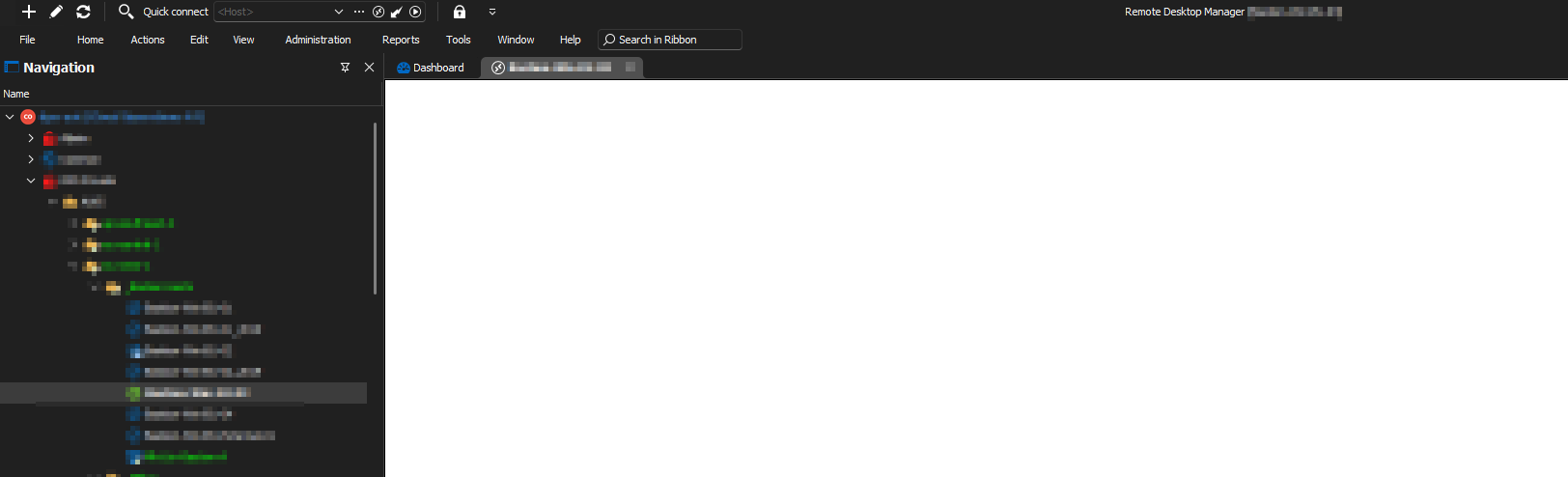
This high contrast is hurting my eyes and the only workaround I came up so far is by switching the tab manually to "Dashboard".
Can you please make that page also dark?
Maybe it doesn't look so bad in this small screenshot, but imagine RDM in full-screen mode on a 32 inch display where 70% of the screen is a blank WHITE page.
=> When you are working in dark mode the whole day, this is really hard to look at!
If you have any other workarounds such as some color/themes settings that I can apply, would be really appreciated.
Thanks for your help!
ee15fc2c-885e-4da9-9f18-7738da40780e.png
All Comments (1)
Hello,
There's no workaround at the moment but I was able to reproduce this. I've opened an internal ticket.
Regards,
Hubert Mireault