
Joffrey
Update token for hashicorp credential
Hi @Maxime Bernier ,
it works !
But, I recommend supporting the "approle" authentication method, since tokens inevitably expire after a maximum of 30 days. This means I had to automate the token renewal process.
While "ldap" is supported, it’s not really suitable for an application. Using "approle" is the better choice.
Thanks you
Update token for hashicorp credential
Ok, thanks you !
Update token for hashicorp credential
Hi,
How can I update the token for connectiontype "credential" and credentialtype "hashicorpVault" ?
I tried set-rdmentrypassword , no change.
thanks you
The xml is:
<?xml version="1.0" encoding="utf-8"?>
<RDMExport>
  <Connections>
    <Connection>
      <ConnectionType>Credential</ConnectionType>
      <ID>2fbbe2fb-1f05-4d8a-9f93-34a5a8374c8c</ID>
      <Name>MY-VAULT</Name>
      <Credentials>
        <CredentialType>HashiCorpVault</CredentialType>
        <HashiCorpVaultAlwaysPromptWithList>true</HashiCorpVaultAlwaysPromptWithList>
        <HashiCorpVaultServer>https://my.vault.server</HashiCorpVaultServer>
        <SafeHashiCorpVaultToken>b3f90GoGTtHARPA76il/NDUIc+B3v9N8Qa5hZP8ROw3LvrWfOzFmRjsuA39Hin6OwdzrJbM/8b1ZulIIROEgQ5qb2iZLCfCY7T+dTL4fvwmx8nKw9mvHvISolVYWUGTHHRI6S1emUS0=</SafeHashiCorpVaultToken>
</Credentials>Hashicorp Vault link makes permissions bugs
Do I need to open a case ?
I tried to set "allow" in all permissions, no change.
More Hashicorp Vault Integration
ho ! I didn't click on my Hashicorp Vault entry.
Thanks you
Hashicorp Vault link makes permissions bugs
Hi,
Version is 2024.3.29.0
Datasource is SQL Server
Yes, we can launch session without issues.
The "bug" doesn't exist with an RDM administrator account
Joffrey
More Hashicorp Vault Integration
Hi,
2/ Sometimes, we want to open a session with a different credential:
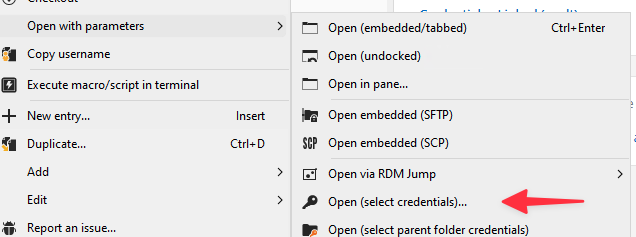
Thanks you for all your answers !
Joffrey
Hashicorp Vault link makes permissions bugs
Hi,
With a SSH entry + username/password, I can see the "view password function":
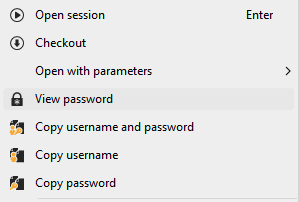
OK. But If I edit my entry en configure a link to Hashicorp Vault:
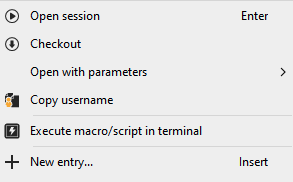
Why ??
More Hashicorp Vault Integration
Hi,
We use Hashicorp Vault as secret integration for our username/password.
But we can't use for:
1/ SSH key for SSH entry
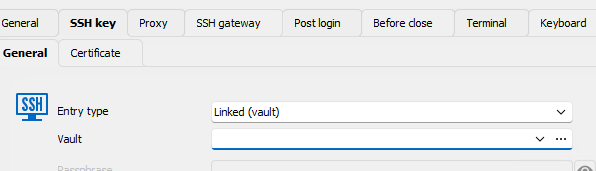
In the "Vault" selection (on my screenshot), My "Hashicorp Vault" entry is hidden. I think "Ssh Key" RDM feature is not compatible with Vault.
Can y ou add it ?
2/ simple username/password entry:
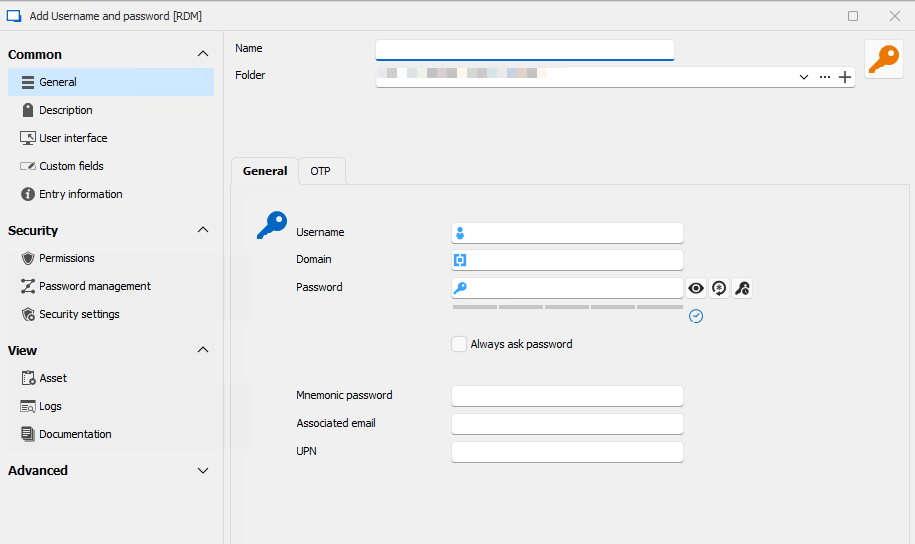
There is no "Linked (vault)" Entry type.
Can you add it ? With a selection button like RDP/Webbrow/SSH entry. Ex:
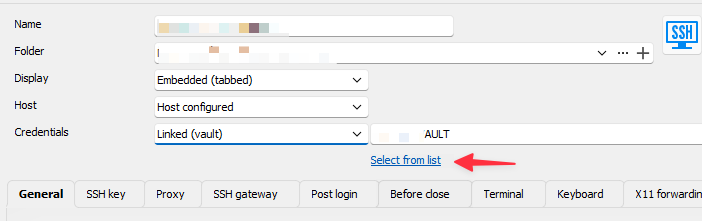
3/ in the Hashicorp Vault entry:
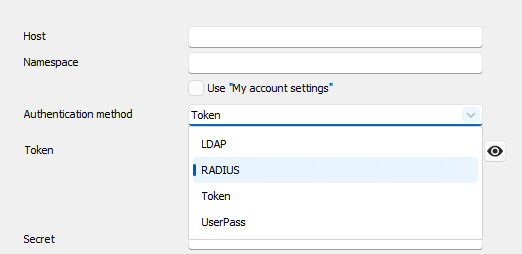
It will be cool to add "Approle" in the authentication method (it's like userPass with a different url)
Can you add it ?
Joffrey
Get-RDMSessionPassword not implemented ??
As I said, save the status in a $var, empty the status, do your stuffs and put the message back, works.
Get-RDMSessionPassword not implemented ??
Ok, thanks you. Perhaps I can remove the message, do my stuff and put it back.
And perhaps you can suggest to your engineering team to add a '-AcceptStatus' parameter ;-p
Get-RDMSessionPassword not implemented ??
HI,
In this code :
$RDPSessions  = Get-RDMSession | Where-Object {$_.ConnectionType -eq "RDPConfigured"}
foreach ($s in $RDPSessions)
{
    # Get Username and password to store in Vault
    if ($s.rdp.Domain) {
    	$username = -join($s.rdp.UserName, '@', $s.rdp.domain)
    }
    else {
	    $username = $s.rdp.UserName
    }
    $password = Get-RDMSessionPassword -Session $s -AsPlainText
}
I get the error :
      $password = Get-RDMSessionPassword -Session $s -AsPlainText
                  ~~~~~~~~~~~~~~~~~~~~~~~~~~~~~~~~~~~~~~~~~~~~~~~
 The method or operation is not implemented.
The entry (some datas are obfuscated):
<?xml version="1.0"?>
<RDMExport>
  <Connections>
    <Connection>
      <Url>12.12.12.12</Url>
      <AllowPasswordVariable>true</AllowPasswordVariable>
      <ConnectionType>RDPConfigured</ConnectionType>
      <CreatedBy>MAQ\user</CreatedBy>
      <CreationDateTime>2023-07-05T10:18:25</CreationDateTime>
      <Description>description 1
Description 2
</Description>
      <ID>cef686c9-b80e-4d65-9848-5d5c9237430f</ID>
      <Name>MY-HBGT7</Name>
      <OpenEmbedded>true</OpenEmbedded>
      <PinEmbeddedMode>False</PinEmbeddedMode>
      <StatusMessage>MAQ\USER : 01-04-2021

!! DO NOT UPDATE RULES !!</StatusMessage>
      <RDP>
        <SafePassword>xxxxxxxx==</SafePassword>
        <UserName>administrateur</UserName>
      </RDP>
    </Connection>
  </Connections>
  <DatabaseID>A9A91957-E24A-41AA-B249-9DD89AFA348D</DatabaseID>
  <Version>2</Version>
</RDMExport>
Thanks you
Edit: pwsh 7.2.5 + Devolutions Module 2023.2.0.1 ; RDM 2023.1.26.0
Use a wrapper script for ssh connection
Ok thanks you. Finally, I use a Powershell Session + SSH Windows binary. For this particular use cas, it's easier to do with a powershell session with a prompt in the powershell session to login to Vault if necessary.
Do you know if it's possible to open a sensitive message prompt in a Event + powershell script fort a SSH session ?
RDM + Hashicorp Vault SSH CA
Hi,
I you want to use the Hashicorp Vault SSH CA sign feature with your SSH session, this is my first attempt with a before Event on a SSH session:
$env:VAULT_ADDR="https://your.vault.addr"
$tmpkey = New-TemporaryFile
Remove-ITem $tmpkey.Fullname -Force -Confirm:$false
ssh-keygen.exe -q -t ed25519 -N '""' -f $tmpkey.Fullname
vault write -field=signed_key ssh-demo-rdm/sign/demorole  public_key="@$($tmpkey.Fullname).pub"  > "$($tmpkey.Fullname)-cert.pub"
$RDM.Connection.Terminal.PrivateKeyCertificateType = "File"
$RDM.Connection.Terminal.PrivateKeyCertificateFileName = "$($tmpkey.Fullname)-cert.pub"
$RDM.Connection.Terminal.PrivateKeyType = "File"
$RDM.Connection.Terminal.PrivateKeyFileName = "$($tmpkey.Fullname)"
$RDM.Connection.Terminal.PrivateKeyPromptForPassPhrase = false
$RDM.save()
If you know how:
Use the "File -> Settings -> Password Management -> HashiCorp Vault" configuration to login to Vault
Or retreive a login/password from "File -> My defaults -> ..." to make the login in my script
retrieve the public key from "File -> My Defaults -> My Personal Private Key" or "My Personal Credentials" or from a Personnal Vault
I appreciate help ;-)
I think I will add customs fields for role or Vault addr
Use a wrapper script for ssh connection
Thanks you ! It works if I don't use personnals settings. I generated a temporary file with a new ssh key for the current connection.
But, How can I retreive public key stored in "File -> My Defaults -> My Personal Private Key" or in "File -> Settings -> My Personnal Credentials".
And I need "Personnal -> Settings -> Password Management -> HashiCorp Vault" too (used when you set "use my account settings")
Use a wrapper script for ssh connection
Thanks you Richard, but I don't find any doc about the powershell module and $RDM.connection.
I want to read User public ssh key and set a temporary ssh certificate.
Where is the documentation about $RDM.connection object ?
Use a wrapper script for ssh connection
Hi,
I would like to run a powershell script to sign a SSH key and generate a SSH certificate before a SSH login. Is it possible via a wrapper (change de CLI called by RDM) ?
Thanks you
SCP session
perfect !! Thanks you !
SCP session
Hi,
I know I can create a SCP Entry. But, I don't want to create entry for all my host ssh Entry. Is it possible to add a macro/tool, to just right click on the host entry and choose 'run SCP session' ??
How export RDM config ? (.cfg)
I don't understand why. If a export button exists, the code already exists. You just need to write de powershell function.
I make a diff between the UI export function and the orignal cfg. There are 2 properties: OptionSensitivePacked and OptionEncryptionPacked on the exported cfg. No way to get these options with powershell to write my default.cfg ?
How export RDM config ? (.cfg)
Hi !
First, I want to give you a gift :
tasks:
  - name: Ensure the required NuGet package provider ve$srsion is installed
    ansible.windows.win_shell: Find-PackageProvider -Name Nuget -ForceBootstrap -IncludeDependencies -Force
  - win_chocolatey:
      name:
      - sql-server-express
      - rdm
    become: true
    become_method: runas
    become_user: "{{ ansible_user }}"
  - community.windows.win_psmodule:
      name: RemoteDesktopManager
      state: latest
  - name: Configure SQL
    ansible.windows.win_shell: |
      Invoke-Sqlcmd -ServerInstance "{{ db_instance }}" -Database Master -Query "sp_configure 'Remote access', 1 ; reconfigure"
      $s = new-object('Microsoft.SqlServer.Management.Smo.Server') '{{ db_instance }}'
      $s.Settings.LoginMode = [Microsoft.SqlServer.Management.SMO.ServerLoginMode]::Mixed
      $s.Alter()
      Restart-Service -Name 'MSSQL$SQLEXPRESS'
      Invoke-Sqlcmd -ServerInstance "{{ db_instance }}" -Database Master -Query "CREATE LOGIN [{{ rdm_dblogin }}] WITH PASSWORD = '{{ rdm_dbpass }}'"
      Invoke-Sqlcmd -ServerInstance "{{ db_instance }}" -Database Master -Query "CREATE USER [{{ rdm_dblogin }}] FOR LOGIN [{{ rdm_dblogin }}] WITH DEFAULT_SCHEMA=[dbo]"
      Invoke-Sqlcmd -ServerInstance "{{ db_instance }}" -Database Master -Query "GRANT ALTER ANY USER TO [{{ rdm_dblogin }}] WITH GRANT OPTION AS [dbo];"
      Invoke-Sqlcmd -ServerInstance "{{ db_instance }}" -Database Master -Query "GRANT CONNECT TO [{{ rdm_dblogin }}] AS [dbo];"
      Invoke-Sqlcmd -ServerInstance "{{ db_instance }}" -Database Master -Query "GRANT CREATE ANY DATABASE TO [{{ rdm_dblogin }}]"
  - name: Configure RDM
    ansible.windows.win_shell: |
      $cd = ConvertTo-SecureString "{{ rdm_dbpass }}" -AsPlainText -Force
      $reg = Get-RDMRegistrationInfo
      $reg.Name = '{{ rdm_regname }}'
      $reg.Email = '{{ rdm_regmail }}'
      $reg.Serial = '{{ rdm_regserial }}'
      Set-RDMRegistrationInfo $reg
      $d = New-RDMDataSource -Database "RemoteDesktopManager" -Name "{{ rdm_dsname }}"  -SQLServer -Password $cd -Server "{{ db_instance }}"  -Username {{ rdm_dblogin }}
      Invoke-RDMCreateDataSourceDatabase $d
      Set-RDMDataSource $d
      Set-RDMCurrentDataSource $d
      Get-RDMDataSource | Where-Object -FilterScript {$_.Name -ne "{{ rdm_dsname }}"} | Remove-RDMDataSource
      Invoke-Sqlcmd -ServerInstance "{{ db_instance }}" -Database Master -Query "REVOKE CREATE ANY DATABASE TO [{{ rdm_dblogin }}]"
      $d = Get-RDMDataSource
      $u = New-RDMUser -Administrator -Login "{{ rdm_adminuser }}" -AuthenticationType Builtin -Email "{{ rdm_adminmail }}" -Password $cd
      $u.FirstName = "{{ rdm_adminfname }}"
      $u.LastName = "{{ rdm_adminlname }}"
      $u.UserInfo.UserAccount.UserMustChangePasswordAtNextLogon = $True
      set-rdmUser $u
      Set-RDMDatasourceProperty -DataSource $d -Property UseDBLogin -Value $True
      Set-RDMDatasourceProperty -DataSource $d -Property LoginMode -Value "Custom"
      Set-RDMDatasourceProperty -DataSource $d -Property DBLoginUserName -Value "{{ rdm_dblogin }}"
      Set-RDMDatasourceProperty -DataSource $d -Property DBLoginPassword -Value "{{ rdm_dbpass }}"
      Set-RDMDatasourceProperty -DataSource $d -Property UserNameEditable -Value $True
      Set-RDMDatasourceProperty -DataSource $d -Property User -Value "%USERNAME%"
      Set-RDMDatasourceProperty -DataSource $d -Property Password -Value ""
      Set-RDMDataSource $d
      Set-RDMCurrentDataSource $d
A full Ansible playbook to :
Install sql + RDM
Configure SQL access
Configure RDM for SQL datasource with custom login (because Integrated Security is not really secure)
But. Something is missing. I need to export a .cfg as the default.cfg. (multi users support)
In the UI, it's in "Options -> Export Options -> Export". But I don't find how to do this in Powershell
And, how can I hide the registration serial to no-Administrator User ? (in UI + Powershell)
Thanks you !
Configure Datasource with powershell: hidden ??
Yes. All is done with the local Administrator account
Configure Datasource with powershell: hidden ??
Hi,
I trying to full configure RDM with powershell. This is the code to create datasource: (It's a test: I use SQL Express.I use a sql server for production)
$d = New-RDMDataSource -SqlServer -Database "RemoteDesktopManager" -Name "Test" -Server "localhost\SQLEXPRESS" -IntegratedSecurity
Invoke-RDMCreateDataSourceDatabase $d
Set-RDMDataSource $d
1/ there is an error with the database création:
[...]
[22/03/2022 17:16:07]INFO Upgrading database for data source 'Test' with version 749
[22/03/2022 17:16:07]INFO Upgrading database for data source 'Test' with version 750
[22/03/2022 17:16:07]ERROR SILENT System.Reflection.TargetInvocationException: Exception has been thrown by the target of an invocation. ---> System.Management.Automation.PSArgumentException: label cannot be null or empty.
   at System.Management.Automation.Host.ChoiceDescription..ctor(String label)
   at Devolutions.RemoteDesktopManager.Managers.UIManager.ShowYesNoCancelMessage(Image largeImage, String message, String yesText, String noText, String cancelText)
   at Devolutions.RemoteDesktopManager.Business.DataSources.DatabaseConnectionDataSource.ConfigureVersionManagementPrompt(Version minVersion, Version maxVersion)
   --- End of inner exception stack trace ---
   at System.RuntimeMethodHandle.InvokeMethod(Object target, Object[] arguments, Signature sig, Boolean constructor)
   at System.Reflection.RuntimeMethodInfo.UnsafeInvokeInternal(Object obj, Object[] parameters, Object[] arguments)
   at System.Reflection.RuntimeMethodInfo.Invoke(Object obj, BindingFlags invokeAttr, Binder binder, Object[] parameters, CultureInfo culture)
   at Devolutions.RemoteDesktopManager.Business.DataSources.DatabaseUpdater.Upgrade(Boolean silent, Action`1 logMessage)
2/ My datasource is hiddent ! When I start RDM, there is only the original local datasource, I can't select my sql datasource. But, with powershell (Get-RDMDatasource), the datasource is return. If I create a new datasource in RDM manually, The Get-RDMDatasource give me 3 datasources, the local, the powershell version and the manually created.
So why, my powershell created datasource is hidden ??
Thanks you
Install enterprise License
That what I want !
Thanks you !
Install enterprise License
Hi,
I'm searching how to install my enterprise license with powershell.
Thanks you !