More Hashicorp Vault Integration
1 vote

Hi,
We use Hashicorp Vault as secret integration for our username/password.
But we can't use for:
1/ SSH key for SSH entry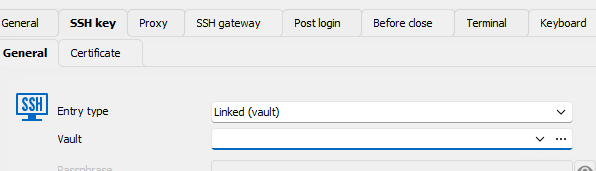
In the "Vault" selection (on my screenshot), My "Hashicorp Vault" entry is hidden. I think "Ssh Key" RDM feature is not compatible with Vault.
Can y ou add it ?
2/ simple username/password entry: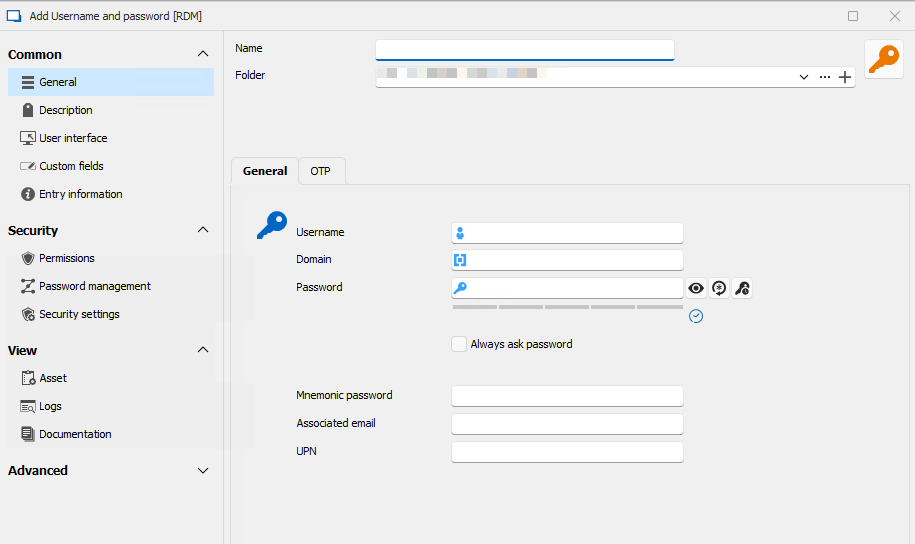 There is no "Linked (vault)" Entry type.
Can you add it ? With a selection button like RDP/Webbrow/SSH entry. Ex: 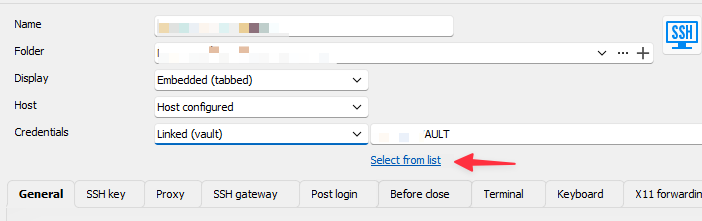
3/ in the Hashicorp Vault entry: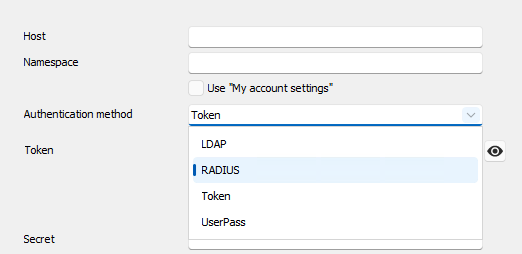 It will be cool to add "Approle" in the authentication method (it's like userPass with a different url)
Can you add it ?
Joffrey
348e4aa9-fd5e-4986-a334-42adf1e2b352.png
90a37afc-96a2-4334-8416-e1b82669719b.png
CleanShot 2025-04-08 at 15.36.24.png
CleanShot 2025-04-08 at 15.32.16.png
CleanShot 2025-04-08 at 15.30.35.png
CleanShot 2025-04-08 at 15.29.11.png
All Comments (5)
Thank you for the suggestion Joffrey. I'll go over your three points in order.
1. We had a request for this in the past so we'll note that you're also interested in this.
2. A credential entry can't link to another credential entry, this is by design and we don't plan to change this. Could you describe what you're trying to achieve with this? We could try and figure out a solution with what RDM already supports.
3. I've opened a ticket for this. In theory it should be simple to add.
As an additional note, at the moment we don't have a test environment for Hashicorp since they changed their pricing structure for their cloud version. We're looking to self-host our own Hashicorp instance locally to save on costs. This means that at the moment we can't develop these features but we're hoping to be able to in the near future.
Regards,
Hubert Mireault
Hi,
2/ Sometimes, we want to open a session with a different credential: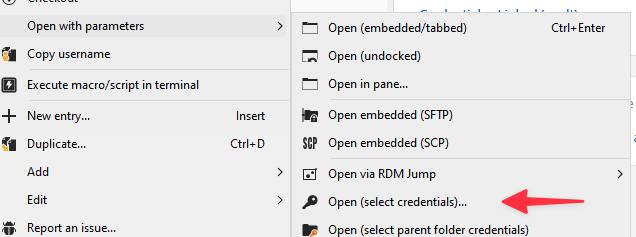
Thanks you for all your answers !
Joffrey
a904b101-e9ba-48ca-add0-d7b4fcbdf9f8.png
CleanShot 2025-04-09 at 08.56.32.png
Hello,
The feature to do "Open (select credentials)" is only for sessions, like RDP or SSH. When you press this, you will be prompted to select your credential. From there, you can select your Hashicorp entry and you can use the credentials stored in your Hashicorp that way.
If this is not what you're trying to achieve, could you give more information about your configuration in RDM? There must be something I don't understand in what you're trying to do. Maybe further screenshots could be helpful. If you already have username/password entries and you wanted to convert them to a Hashicorp entry, that could also be possible, if that was what you were struggling with.
Regards,
Hubert Mireault
ho ! I didn't click on my Hashicorp Vault entry.
Thanks you
No problem, I'm glad I could help.
For your other requests, we will post back in this thread once we have an update.
Regards,
Hubert Mireault