tschoening
Stable serialization of data source XML
Hi everyone,
I'm heavily using XML-based data sources so be able to maintain those files in Subversion. That makes them easily accessible to other employees and one can track all changes like IP-addresses for hosts, changed login scripts for web-UI because of printer firmware updates and stuff like that. I simply love it! :-)
What I don't like, though, is that for pretty minor changes like an IP only of some session, RDM seems to always rewrite entire connection nodes in the underlying XML. It removes old ones and appends new ones, which makes unnecessary difficult to follow DIFFs in SVN. As all of the individual connection nodes have some GUID-ID already, which doesn't change during updates, it would be far better if changes for existing connections could be applied in-place. So that a change to some IP of some connection really only results in one changed line containing the IP itself.


Depending on how you serialize XML, the easiest approach might be to apply some stable sorting to connections and their items whenever the XML is created. Connections always bei their IDs alphabetically, items of connections always by their alphabetical item name. Currently it seems updated nodes are really removed and appended and in-place updates might be difficult to achieve. Simply rewriting the entire XML with stable sort order might be the easier implementation.
Thanks!
Multiple different SSH Secure Gateways don't load automatically if one is open already
Hi everyone,
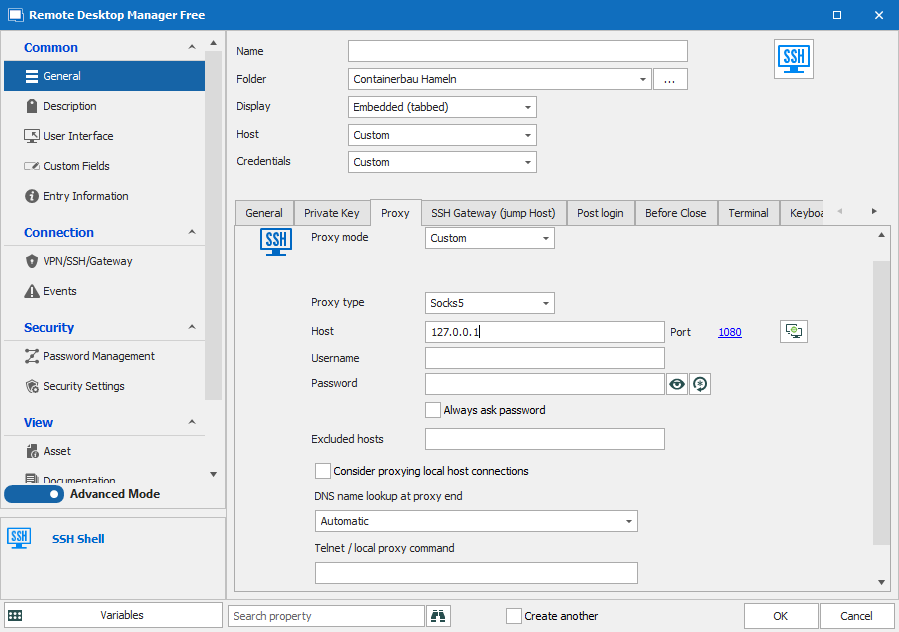
I have multiple different data sources based on XML files and each models a different topic or customer network or stuff. I really often need to access hosts in some private network using SSH jump hosts and have created SSH Secure Gateways. That are SSH-tunnels acting as dynamic socks proxy on localhost and some port, like in the following example:

I have lots of e.g. browser sessions afterwards using those SSH-tunnels like in the following example:


This whole setup allows me to pretty conveniently access web-UIs of printers and stuff in otherwise private networks and is one of the major benefits of RDM for my use-cases compared to other software. When opening e.g. web-UI sessions, the SSH tunnel is even established automatically as necessary. Though, there's one thing which seems unnecessary annoying:
I have multiple different data sources with the same approaches and in ALL of them the one important SSH tunnel is named the same "SSH Secure Gateway". Simply because I don't need to care about the name too much and when configuring web-UI sessions to use SSH, the one and only available in the current data source is suggested only.

Though, when actually executing a web-UI session there seems to be some name-only check if the configured SSH Secure Gateway is established already and if so, some possibly different one is not anymore. This actually prevents me from easily accessing multiple different web-UIs in different private networks at the same time. Simply because some "SSH Secure Gateway" is open already, all web-UI session require a different one think that this is the correct one already and simply don't open the correct one anymore.
Would be great if this check could be enhanced like in the config dialog, where all web-UI sessions correctly know about their own SSH tunnel to use. Thanks!
How to connect localhost-URLs through SSH Secure Gateways?
Tried, doesn't work.
How to connect localhost-URLs through SSH Secure Gateways?
I've just upgraded to 2022.2.17.0 and things still don't work. The data source is a XML file, so that I'm able to put it into GIT/SVN.
How to connect localhost-URLs through SSH Secure Gateways?
Tried that before already and right now again, doesn't work. The session still tries to connect to my 127.0.0.1 instead of running through the SSH Secure Gateway and using THAT 127.0.0.1 afterwards.
How to connect localhost-URLs through SSH Secure Gateways?
It is Chrome, that's why attached all the configs, so you might have a better look at the details yourself.

Allow folders to open as individual session instead of all containing sessions.
Great, that as fast! So back to my original question, I sadly mixed multiple different not working things up...
Is there some folder which can be opened like a session?
My folder containing a host of http://127.0.0.1:8080 only allows me to open all sessions within that folder. But I would like to open http://127.0.0.1:8080 itself using the folder. The current workaround is to have a session of http://127.0.0.1:8080 named _self within that folder.
Allow folders to open as individual session instead of all containing sessions.
That works, thanks. Would be great to reduce the following warning, though:

Something like detect if variables are used and not show that warning in those cases might make sense. Or resolve the variables like if the session was started and check against that value. Or only show that warning when the URL is changed, currently it comes whenever I change anything. That seems a bit annoying and overkill.
Allow folders to open as individual session instead of all containing sessions.
I tried to try, but wasn't able to setup anything useful. I know how to inherit hosts from parent workstation-type folders etc. But those inherited values can't be enhanced further. Things like $HOST$ without inheriting from the parent don't work and I couldn't find any useful docs about custom fields, where to place them, how to reference them etc. So if you can provide any more examples or insights, I might try again. Thanks!
https://forum.devolutions.net/topics/35286/variables-and-custom-fields
How to connect localhost-URLs through SSH Secure Gateways?
I've did some additional testing and had a look at Wireshark and whenever I open my web browser session in RDM, the connection attempt is from some port around 6108X to 8080 on localhost. The source port is simply increasing, started with ...80, was ...81, ....82 etc., shouldn't matter too much. But the destination was always the same, 8080, even though from my understanding it should be the local tunnel endpoint port 13346.
I have Tomcat set up on my own system with http://127.0.0.1:8080/PavonisAdmin as well for test purposes. Though, most of the time it's disabled. Guess what heppens when I enable my local Tomcat? :-) Correct, I see THAT web interface in the RDM session. That explains why the connection attempt fails without my running Tomcat as well, RDM simply doesn't forward through the tunnel for some reason. I've attached my failing config so you might have a look. But keep in mind that I successfully use those approaches for other web-UIs, the only difference really is that those use 127.0.0.1 as the destination, but some other private IP.

How to connect localhost-URLs through SSH Secure Gateways?
While "localhost" in deed resolves differently, e.g. [::1] locally and 127.0.0.1 remotely, I already tried with setting everything to 127.0.0.1. I as well made sure using some viewer for open TCP connections that the local tunnel endpoint is 127.0.0.1 on my machine, that Tomcat on the remote server is 127.0.0.1:8080 etc. Still no luck. Using Process Monitor from Sysinternals I can see that a tunnel is established, what I don't see is any connection attempt of the session using the secure gateway.
[30.06.2022 08:47:48] Connecting to port: 12321 (IP any)
[30.06.2022 08:47:48] SSH banner: SSH-2.0-OpenSSH_7.6p1 Ubuntu-4ubuntu0.7
[30.06.2022 08:47:48] Sending kex init
[30.06.2022 08:47:48] Received kex init
[30.06.2022 08:47:48] Selected algorithms: curve25519-sha256, ssh-ed25519, chacha20-poly1305@openssh.com, chacha20-poly1305@openssh.com, implicit by cipher, implicit by cipher, none, none
[30.06.2022 08:47:48] Sending Ed25519 kex init
[30.06.2022 08:47:48] Received Ed25519 kex reply
[30.06.2022 08:47:48] Successfully authentified server
[30.06.2022 08:47:48] Sending new keys message
[30.06.2022 08:47:48] Sending userauth service request
[30.06.2022 08:47:48] Received new keys message
[30.06.2022 08:47:48] Received extension info message
[30.06.2022 08:47:48] Server accepts public key types: ssh-ed25519,ssh-rsa,rsa-sha2-256,rsa-sha2-512,ssh-dss,ecdsa-sha2-nistp256,ecdsa-sha2-nistp384,ecdsa-sha2-nistp521
[30.06.2022 08:47:48] Received service accepted message
[30.06.2022 08:47:48] Using provided key data
[30.06.2022 08:47:48] Sending userauth init request
[30.06.2022 08:47:48] Received userauth failure: publickey,password
[30.06.2022 08:47:48] Starting authentication by key
[30.06.2022 08:47:48] Validating public key: rsa-sha2-512
[30.06.2022 08:47:48] Received userauth key ok
[30.06.2022 08:47:48] Sending userauth public key signature: rsa-sha2-512
[30.06.2022 08:47:48] Received userauth success
[30.06.2022 08:47:48] User authenticated successfuly by public key
[30.06.2022 08:47:48] Listening on 127.0.0.1:13346 D
[30.06.2022 08:47:48] Received global request: hostkeys-00@openssh.com , no need to reply
Afterwards I start the session within RDM and either there aren't any additional log statements in that windows anymore and the session only shows the following error message:
The Page Failed to Load

A connection attempt was refused.

To customize this message, please handle the WebView's LoadFailed event and then Set e.ErrorMessage in your event handler based on e.ErrorCode, or call e.UseDefaultMessage if you just wish to display the error message without this help message.
Or sometimes I see the above error message, but some additional logs for SSH as well:
[30.06.2022 08:50:02] Sending forward channel open request: 0/- update.googleapis.com:443
[30.06.2022 08:50:02] Received channel open confirmation: 0/0 WS 200000/2097152 MPS 32000/32768
[30.06.2022 08:50:02] Successfully established connection 127.0.0.1:13346 -> update.googleapis.com:443
[30.06.2022 08:50:15] Sending channel EOF: 0/0
[30.06.2022 08:50:15] Received channel EOF: 0/0
[30.06.2022 08:50:15] Sending channel close request: 0/0
[30.06.2022 08:50:15] Received channel close request: 0/0
[30.06.2022 08:50:15] Channel is closed: 0/0
[30.06.2022 08:50:15] Closed tunnel: 127.0.0.1:13346 -> update.googleapis.com:443
This looks like the configured Chrome browser for that session does something on its own and successfully transfers over the tunnel. Most likely because neither localhost nor 127.0.0.1 nor [::1] are used. I have the feeling that RDM detects cases like 127.0.0.1 and simply doesn't forward traffic over the tunnel in those cases.
Some additional evidence for that: The tunnel established by RDM is available not only for RDM itself, but for every SOCKS compatible application I use outside of RDM, e.g. on the shell. So I tried to access the website manually using CURL and this worked. I see downloaded HTML on the shell AND some corresponding logs in RDM's SSH window.
[30.06.2022 09:04:32] Sending forward channel open request: 0/- 127.0.0.1:8080
[30.06.2022 09:04:32] Received channel open confirmation: 0/0 WS 200000/2097152 MPS 32000/32768
[30.06.2022 09:04:32] Successfully established connection 127.0.0.1:13346 -> 127.0.0.1:8080
[30.06.2022 09:04:32] Sending channel EOF: 0/0
[30.06.2022 09:04:32] Received channel EOF: 0/0
[30.06.2022 09:04:32] Sending channel close request: 0/0
[30.06.2022 09:04:32] Received channel close request: 0/0
[30.06.2022 09:04:32] Channel is closed: 0/0
[30.06.2022 09:04:32] Closed tunnel: 127.0.0.1:13346 -> 127.0.0.1:8080
The corresponding shell:
C:\Users\tschoening>curl --location -x socks5h://127.0.0.1:13346 http://127.0.0.1:8080/PavonisAdmin
<!DOCTYPE HTML PUBLIC "-//W3C//DTD HTML 4.0 Transitional//EN">
<html>
<head>
    <meta http-equiv="X-UA-Compatible" content="IE=edge" />
    <META HTTP-EQUIV="Refresh" CONTENT="0;URL=pages/restricted/administration/admin.xhtml">

    <head>
        <title>Governikus DATA Pavonis</title>
    </head>
</head>

<body>
<p>Loading ...</p>
</body>
</html>

C:\Users\tschoening>
Habe a look at the used hosts and ports: It's 127.0.0.1 in both cases and the port of the requested website is :8080, not the tunnel endpoint or alike. That is exactly like expected when using a SOCKS proxy. OTOH, that same configuration simply doesn't work from within RDM for some reason, neither as SSH Secure Gateway nor as manually configured SOCKS proxy in the session. It really seems that RDM ignores the tunnel when 127.0.0.1/localhost/[::1] gets requested as target. Though, it doesn't do so when configuring a port forwarding instead of a SSH Secure Gateway/SOCKS proxy. Looks to me like there's some automatic preventing my use-case.
How to connect localhost-URLs through SSH Secure Gateways?
Hi everyone,
I'm accessing lots of web-UIs behind customer routers, firewalls etc. using setups with some SSH Secure Gateway. The config for the SSH Secure Gateway takes care of SSH username, private keys, passwords etc. and is configured in dynamic mode with some randomly chosen port. Multiple sessions reference that SSH Secure Gateway to automatically create a session as necessary.
The important thing to note is that individual sessions use URLs like https://192.168.0.1:6443 or http://192.168.0.10:80 etc. I don't need to care about which ports the SSH Secure Gateway uses, but simply need to configure that the SSH secure Gateway is used per session. That works easily in all cases where I don't need to access localhost, but when trying to use that, the SSH Secure Gateway doesn't seem to be used anymore.
The problem is that I have some setups where I connect using SSH to some server and and that server hosts web-apps on e.g. http://localhost:8080/webapp1, /webapp2 etc. Creating a session like all other non-localhost sessions before with using localhost doesn't work. It seems like the SSH Secure Gateway is not used in those cases. Changing the web server to listen on some non-localhost private IP additionally and configuring that private IP in the session makes things work instantly. Pretty much like with the former examples of :6443 and :80. Though, I would like to avoid listening on more than localhost, for security reasons, it's simply not needed.
I'm able to access http://localhost:8080 only when not using a SSH Secure Gateway with dynamic setup, but a static port forwarding using some random local port and 8080 remote. In those cases I need to configure http://localhost:RANDOM_PORT in the session and things in general work like with PuTTY in the past.
Am I missing something or is localhost handled specially?
I would have expected SSH Secure Gateway itself don't matter too much about private IPs vs. localhost. If the SSH endpoint sits on some server hosting some web-apps, localhost should simply work form the perspective of the SSH tunnel endpoint.
Thanks!
Allow folders to open as individual session instead of all containing sessions.
Hi everyone,
I'm maintaining some Linux servers e.g. hosting Apache Tomcat hosting some Java based web applications, web services etc. The important thing to note is that Tomcat itself is NOT publicly available, but only using some reverse proxy setup behind Apache HTTPd. So for customer web-apps etc., browsers connect to HTTPd which forwards requests to Tomcat.
Though, there are some web-apps within Tomcat which are not for customers, but only admins like me. Those are for maintenance reasons mostly to e.g. configure other web-apps hosted for direct access by customers. Additionally, Tomcat itself might provide a web-UI which isn't exposed using HTTPd. Instead, the current approach was to start a SSH session e.g. using PuTTY on Windows, forward localhost:8081 to localhost:8080 on the server and access all web-UIs of interest that way.
RDM can make these things a bit easier by creating an individual session for each web-app of interest and handling the SSH-stuff using SSH Secure Gateway. So my new approach is creating a combination of folders and session using the following example:
org.example.server1
Tomcat
webapp1 -> http://localhost:8080/webapp1
webapp2 -> http://localhost:8080/webapp2
webapp3 -> http://localhost:8080/webapp3
Accessing the individual web-apps work already, but currently I need to configure the whole URL per session. Instead it would be great to 1. have http://localhost:8080 on the level of the folder "Tomcat" only and inherit that at the level of the individual sessions. 2., it would as well be great if I could open the folder Tomcat like it was a session by itself to actually open the web-app behind http://localhost:8080.
According my tests, both is not possible currently or at least I don't know how. Opening a folder seems to open the contained sessions only always, not what is associated with the folder itself. Even though if it's a Workstation or Server type, I can put SSH Secure Gateway and URL into the config. So in theory everything is available.
Besides that, inheriting http://localhost:8080 and enhancing it per session by some suffix like /webapp1 doesn't seem to work as well. When inheriting some host, it can't easily be enhanced in the inheriting session, but seems to only be used as-is? Or do I need to work with variables which are used on the Tomcat-folder level, like http://localhost:8080/$WEB_APP$? Didn't get something like that to work and even if this would work, depending on how missing variables are treated it might fail my first wish.
Thanks for considering!
How to use host IPs for folder type "Workstation" for RDP sessions?
Just to make that clear: It's not about credentials, but an inherited host IP. I'm not using "Linked (Vault)", but "Inherited" instead. Making a feature request would be great, I can't see why the host IP/name should not be forwarded in my use case.
How to use host IPs for folder type "Workstation" for RDP sessions?
I'm not exporting to import again, but instead am exporting to forward the RDP file to external people, so that those can access a system I have configured for me. Including the available host IP in those case would prevent me from additional manual customizations to the file.
How to use host IPs for folder type "Workstation" for RDP sessions?
I've just recognized one additional thing: When exporting a RDP session into a RDP file from Remote Desktop Manager, the inherited host IP is not embedded into the file. Is that by design or a bug or ...? Would be great if the RDP file would be usable, especially as the host IP is available in general.
How to use host IPs for folder type "Workstation" for RDP sessions?
That works perfectly for me, thanks! Should have simply tried it... :-)
How to use host IPs for folder type "Workstation" for RDP sessions?
Thanks, I overlooked that dropdown! That's exactly what I searched for. Though, things don't seem to work for me:
The Workstation folder is able to maintain host name and IP. I have some configs for which only one of both is valid, namely the IP. Reason is VPN connections, SSH tunnels etc. which need to be established first, preventing name resolution in some setups. It seems that if I put host name and IP into Workstation folder, the host name is always used in case a RDP session inherits the host. OTOH, if I don't put a host name into the workstation folder, the RDP sessions errors out entirely. Would be great to have something like "Inherited (Host)" vs. "Inherited (IP)". RDP sessions can easily take either a host name or an IP on their own.
How to use host IPs for folder type "Workstation" for RDP sessions?
Hi everyone,
I have many hosts for which I need to maintain multiple RDP sessions with e.g. different user credentials. It's simply the easiest way for me to remember which user exists, not need to click too much etc. I'm doing so by creating a folder with some host name and underneath individual RDP sessions with the usernames and possibly some additional data as necessary. With that setup, each RDP session needs to have the same host name or IP.

Recently I discovered something which looks like a different folder type and is called "Workstation". That folder is able to maintain some host name or IP address. This looked like that host/IP gets inherited by underneath sessions, but sadly I wasn't able to get something like this running. The RDP sessions requires something for the host field and I wasn't able to figure out what this should be, if it's some variable or alike,

Of course, it might simply be that things don't work like they seem to me at all. :-) So, what is that "Workstation" type folder for and is it able to forward its own host/IP to child sessions underneath? Thanks!
RDM 2021.2.15.0 - 2021.2.21.0 hang when closing RDP session with SSH port forwarding.
The secure gateway looks good and I already migrated most of my connections to use that. Though, would be great of course to know where my problem is, at I might need to use forwarded ports at some point in the future again. I've debugged further and what makes the RDP session hangs seems to be the setting on the VPN connection for closing some intermediate connection. My understanding is forwarded SSH connection as some kind of jump host -> VPN connection tunneling through that and the concrete RDP session at last. It seems like when closing the intermediate connection RDM simply hangs. Depending on the VPN setting, if that session should be closed automatically as part of closing the RDP session, RDM hangs instantly. If the VPN setting is to close the intermediate session manually instead, the RDP session itself can be closed and RDM hangs when closing the intermediate session manually.


RDM 2021.2.15.0 - 2021.2.21.0 hang when closing RDP session with SSH port forwarding.
I've recognized this today a lot when using RDP sessions with 2021.2.15.0, updated to 2021.2.21.0 and the problems keeps happening. My RDP sessions are tunneled through SSH by creating some SSH port forwarding, which is configured at the VPN-parts of the RDP connection. I manually open the port forwarding and afterwards do the same with whatever RDP session I need. At some point I'm closing some RDP session because I'm done with those, but keep the port forwarding alive, because I need different RDP sessions using the same tunnel.
I'm somewhat sure that with older versions of RDM than ".15" closing those RDP sessions worked, but they currently don't. Instead, if I close the RDP session, the UI simply freezes and never comes back. I need to kill the process using the Task Manager.
During researching about the problem I've found some thread with a setup called SSH Secure Gateway. I switched some of my RDP sessions to use that and those sessions can easily be closed without freezing the UI. The following screenshot shows the enabled port forwarding and the RDP session "lohmar-srv" has just been closed. One can see in the tabs that the entry for RDP session is still there, while the main content has already been removed. The tabs are for the SSH port forwarding, the proxy connection to SSH and the RDP session itself.

Not sure how I can debug this further or provide any logs. But would be great if you could have a look. Thanks!
Use Proxy server for RDP connections
Thanks, that was I was looking for!
Use Proxy server for RDP connections
At least for me the HTTP proxy doesn't work. I have some PuTTY connections already and one of those is providing a SOCKS5 proxy on port 1080. How can I configure simply that all traffic for some RDP connection is routed through that proxy?
If I understand HTTP proxy correctly, that is something "created" on its own, that's why one needs to configure different ports. But that's not what I want, I simply want to tell the connection to route everything through 127.0.0.1:1080. I even tried not using HTTP proxy but some "custom" one and it didn't work as well. "custom" is some app which needs to be started with some config and while I'm able to start my PuTTY session that way, I'm still unable to tell the RDP connection to route all traffic through 127.0.0.1:1080.
I'm pretty sure what I need simply is a custom proxy setting like is available for SSH connections. Though, that can't be configured that way for RDP. So, is my use case simply not possible? Am I forced to configure my SSH settings redundantly in RDM and PuTTY? I need PuTTY anyway and would therefore prefer using that for SSH for now.