Use Proxy server for RDP connections
0 vote

I love the product that you guys offer, however one issue I have with it is there's no way for me to proxy an RDP connection over a standard HTTP proxy.
One of your competitor's products, the former 2x now Parallels RDP client allows me to specify proxy information per connection.
This allows me to have one single interface for various different clients I support.
Here's my use case...
I have a client that supplies contractors with access to their systems through a Netscaler "VPN" service. But this isn't a regular VPN like a Cisco.
It's a Java applet that runs a local proxy and modifies the Internet Explorer proxy settings to forward traffic to 127.0.0.1:3128.
With the competitor's product, on each of the RDP connections I have I can specify that proxy information, and RDP will connect through that proxy to the systems I need to support.
It appears the proxy settings inside the Devolutions products allow for the checking of updates and connection to the Devolutions Cloud, however these settings do not trickle down to the individual RDP connections. And I do not see the option to configure proxy settings for individual RDP connections.
I use the Free version of your Remote Desktop Manager, if this is a feature of Enterprise I'd gladly pay as I prefer your solution to your competitor's, however they do offer this functionality for free.
Thanks very much for your consideration and please let me know if you would like information on my requirements and configuration screenshots of your competitor's solution which allows RDP connections through a proxy server.
All Comments (18)
Hello Matt,
We use the default RDP ActiveX on Windows. As far as I know its not built-in in the RDP protocol but we do something similar with the SSH Port Forwarding. We support NetScaler as an add-on in the VPN section. Have you tried this?
Regards
David Hervieux
Hmm, David even downloading the latest 11.5 trial I don't see Netscaler as an option in the VPN settings for a new connection.
An integrated Netscaler solution may not work here as the customer I'm referencing also has Symantec 2 factor auth setup with their Netscaler installation.
Thanks,
It's an add-on that you need to install in Tools->Add-on Manager
David Hervieux
Unless I'm missing something, the Netscaler addon for this particular customer isn't very useful. The Netscaler session connects, however I'm still stuck with the same issue, I can't forward the RDP connection over the local proxy that has been created by the Netscaler session.
Once the Netscaler session is established, how do I go about forwarding the RDP sessions through the local proxy server?
Netscaler.PNG
Does it always use the same port and url like 127.0.0.1:3128?
You could use this address as the RDP host
Regards
David Hervieux
No, 127.0.0.1:3128 is a gateway proxy, I can communicate with their entire infrastructure by going through that proxy.
It's not assigned to a single host.
So for example, internet explorer's proxy settings are set to all 127.0.0.1 port 3128.
From there I can browse to website1.local, website2.local, website3.local, etc.
Connections have to travel through that proxy in order to reach the customer's network.
How do you use the proxy with mstsc.exe right now?
Regards
David Hervieux
David, I don't use the RDP client, I use the Parallels Client (Formerly 2x).
Attached is a screenshot of an individual connection that has proxy settings that work correctly.
parallels_network.jpg
I will check what we can do for that.
Regards
David Hervieux
Hi,
We will verify what we can do and come back to you
Regards
David Hervieux
Hi,
the company I work for has adopted the Enterprise Edition of RDM as a strategic tool from several years (50+ users).
We would like to also have the possibility to access some remote servers via RDP through our corporate proxy. In some cases, while not having the possibility to create a VPN or similar, we still do need access to this server via RDP. Since all our connections go through a proxy, we need to be able to connect via a proxied RDP connection (more or less, the same situation Matt Lestock is in.
Currently we are using Parallels 2X RDP to connect to those remote servers, but we would really like to move all these connections to RDM (all other connections are there, connection info can be saved in the RDM database, connections are shared among all the authorized users and so on).
Would it be possible to implement this type of connection in RDM?
Thanks, Marco
Hello guys,
I have a secret for you. This is already implemented in RDM 12. We will have beta soon. We now have our own implementation of Http Proxy, Socks4, Sock4a and Sock5.
Stay tuned
Regards
David Hervieux
Hi,
Have you tried RDM 12 with the http proxy? Does it work well for you?
Regards
David Hervieux
At least for me the HTTP proxy doesn't work. I have some PuTTY connections already and one of those is providing a SOCKS5 proxy on port 1080. How can I configure simply that all traffic for some RDP connection is routed through that proxy?
If I understand HTTP proxy correctly, that is something "created" on its own, that's why one needs to configure different ports. But that's not what I want, I simply want to tell the connection to route everything through 127.0.0.1:1080. I even tried not using HTTP proxy but some "custom" one and it didn't work as well. "custom" is some app which needs to be started with some config and while I'm able to start my PuTTY session that way, I'm still unable to tell the RDP connection to route all traffic through 127.0.0.1:1080.
I'm pretty sure what I need simply is a custom proxy setting like is available for SSH connections. Though, that can't be configured that way for RDP. So, is my use case simply not possible? Am I forced to configure my SSH settings redundantly in RDM and PuTTY? I need PuTTY anyway and would therefore prefer using that for SSH for now.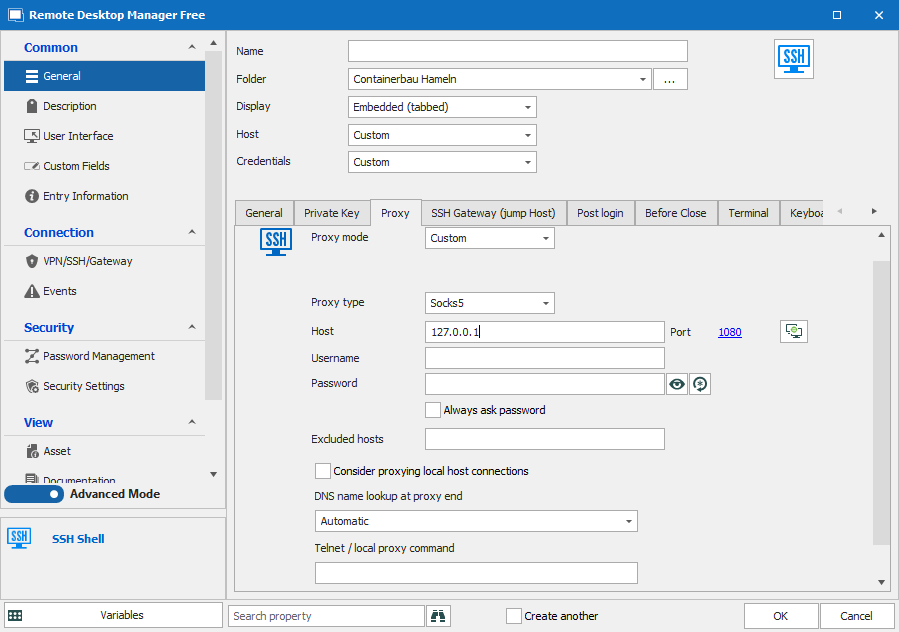
Bild_2021-09-02_162245.png
Hello,
Thank you for contacting us on that matter! Since you have posted on an old thread, I will contact our Engineering Department on that matter and see what can be done.
Best regards,
James Lafleur
Hello,
After having a discussion on that matter with our Engineering Department, they informed me that in order to achieve this, you would need to create a "Proxy Tunnel" entry and then have your RDP entry use it under the "VPN/SSH/Gateway" section. To do so, please refer to these steps:
1- Create a Proxy Tunnel (HTTP, SOCKS4, SOCKS4A, SOCKS5A) entry:
2- Go in the properties of your RDP entry, under the "VPN/SSH/Gateway" section and use the following configuration:
*Please note that you will need to choose the "Proxy Tunnel" option found under the "Existing" section of the dropdown for "Type":
3- Under the "Settings (Proxy Tunnel)" use the ellipsis button to select the "Proxy Tunnel" you just created: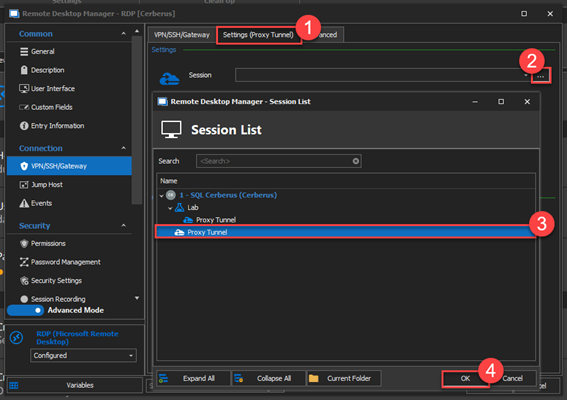
Once this is done, your RDP connection should now pass through the Proxy Tunnel that you have configured.
Best regards
James Lafleur
Proxy_Tunnel.png
Thanks, that was I was looking for!
You are more than welcome! We are glad to see that it works for you!
James Lafleur