
royvandenekker
Dark mode funky title bar
I am working in an RDP session, yes. I could have mentioned that after reading "terminal services" in that setting but I forgot.
So enabling/disabling that setting probably would be of no use since the software is already forcing some things.
It was already enabled, to answer that specific question
Dark mode funky title bar
Unfortunately it is still there.
Generic icon on taskbar
I don't know, just my few cents on what observed some time. When running the installer, do you let it remove the old .exe first and then place a new one? Maybe Windows doesn't like this. Could you try to replace it instead of remove?
For this same reason I don't have it pinned to the taskbar, annoys me a bit to see this generic icon. 😂
Pinned start menu items seem to work fine.
Dark mode funky title bar
Hi,
I just upgraded to 2022.2.16.0 and now I notice some white areas on the far ends of the title bar. Pretty funky as I am constantly thinking there is something behind it and the white caused by some transparency effect.
But the title bar isn't transparent. No such issue with the light mode.
Running Windows 11.
See attach.
Regards,
Roy

Maximal version warning despite not having set/limited it
Nice. Always fast in listening to the community and fixing the issues.
Maximal version warning despite not having set/limited it
If it is okay, let me get back to you when a new update is out. Updated my instance so I have to wait for this update screen to show.
Can ask others but think it is the best to test at the same machine.
Maximal version warning despite not having set/limited it
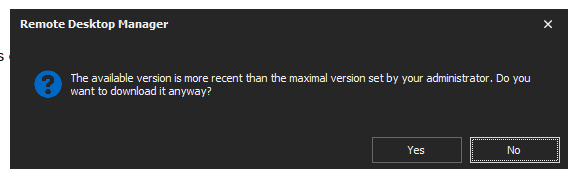
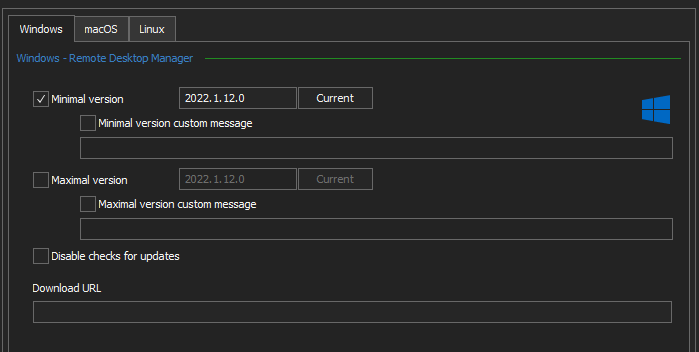
When downloading a new version, I always get a warning this version is newer than allowed by the administrator. But no maximal version has been set.
Last tab used (favourites in my scenario) not remembered
Thanks guys for the quick fix. Even though I left out the version number you got the right one. I see I forgot to mention it, making the first sentence a bit weird.
I'll wait for the next update.
Last tab used (favourites in my scenario) not remembered
Since the release of the 2022.1.12.0 client the last used tab (for my mostly favourites) isn't remembered. It's probably the only tab I use since all those other servers are not of my concern (and are for my collegues).
Would love to see this back.
Selected columns not saved in Favorites tab
It looks like both issues are addressed in the new version. Great job!
Selected columns not saved in Favorites tab
Thanks Eric, it is something simple probably.
If I might suggest something else for this tab. It also used to remember which sub folders were expanded. That doesn't work either anymore, but for a even longer time.
Problem there is it is not all of them. My first one out of tree is expanded, there other two are not. No real clue how to reproduce except just for having them. Not sure what does and does not trigger the right functionality.
Selected columns not saved in Favorites tab
Since our company has many and I only use a few of them on a daily basis, I marked them as favorite.
Since a few versions ago the column Vault was added to the server list. I can remove it by opening the Column Chooser and drag the Vault column into the box. But when I restart the program that column is back. It just doesn't save the state to a file or something.