cpxddv
Update embedded browser?
Thanks for your extensive reply. I was on version 2020.3.29.0 and updated to 2021.1.20.0 so that was a bit of an error on my end because I see Chrome is updated now too :) RDM update process was pretty smooth so thumbs up for that btw.
As for Edge, that's good news. I've already tested the Edge embedded integration a bit (after download the required Webview component) and it does work good so far except for most of the form filling using credentials from an external vault. That part works great when using embedded Chrome, doesn't work for most of the sites using embedded Edge.
I'll stick to embedded Chrome for now since it's up to date and might swap to embedded Edge in time or where ever it's mandatory.
Update embedded browser?
I'm currently evaluating RDM for our company and one of its aspect is security. I have added a couple of Web Browser (http/https) session entries in which I used Chrome as the embedded web browser and I've noticed it's a bit out dated.
The version RDM is using is: 86.0.4240.111
The current Chrome/Chromium stable/release is: 89.0.4389.114
From a security PoV this is not allowed in our company. My question: is there any way I, as end user, can update the embedded browser? Or will these updates only come with newer versions of the RDM client. I know I can use the External option so the entry will be opened in my system's up to date browser, but I prefer using the embedded browser.
edit: Another thing I've noticed is that our AV solution, doesn't seem to work in the embedded browser. For example the industry wide AV test file (Eicar), is correctly being blocked by my anti virus product when opened in my own browser but not when opened in the embedded browser ( https://www.eicar.org/?page_id=3950 ) . Is there any way to make AV work on the embedded browser? Scratch that last part, it's only the .txt file that doesn't seem to trigger.
Thanks in advance for the information.
Convert entry from RDP to SSH (or other way around)
Thank you, that did the trick!
Convert entry from RDP to SSH (or other way around)
Hi,
Is it possible to convert an RDP session entry to SSH or the other way around? What I mean with that, suppose I make an entry for a RDP session. I enter the ip adres, the credentials etc. but after making the entry I find out that the server for which I make the entry isn't a RDP host but a SSH host. So in this case I just need to flip the protocol for that entry from RDP to SSH and save it. Is such a thing possible?
What's the use of the entry: Session > Database Session and SQL MGT addon?
Ok that makes sense. Thanks for your reply.
What's the use of the entry: Session > Database Session and SQL MGT addon?
Hi,
I'm currently evaluating RDM for our company and I'm currently adding some (test) entries. I have this Azure Database which I want to manage from RDM. To be clear: I'm not talking about adding a SQL server as datasource, I just want to manage a Azure DB from RDM. So I made a new entry in the section Session and as type Database Session along with the connection string. Whenever I double click this new entry, nothing happens. I was hoping that it would maybe launch my system installed Sql Management Studio or something but that doesn't seem to be the case. My question: what does the Session > Database Session entry do and in which scenario's is it used?
Note: I have read the link below but that seems a lot of work and is possibly insecure since the credentials are available in a prompt through a variable. (https://blog.devolutions.net/2018/01/create-ssms-shortcuts-with-remote-desktop-manager)
Another question: I saw RDM having a Sql Management Studio addon. What's the use of this addon or in what scenario's is this used? Because the only use I could find so far is the ability to click and start it from the RDM toolbar which is nothing different that starting it myself from my Windows quick launch bar. Are there any dynamic uses/integrations possible in RDM?
How do I resize main window and ribbon?
Hello,
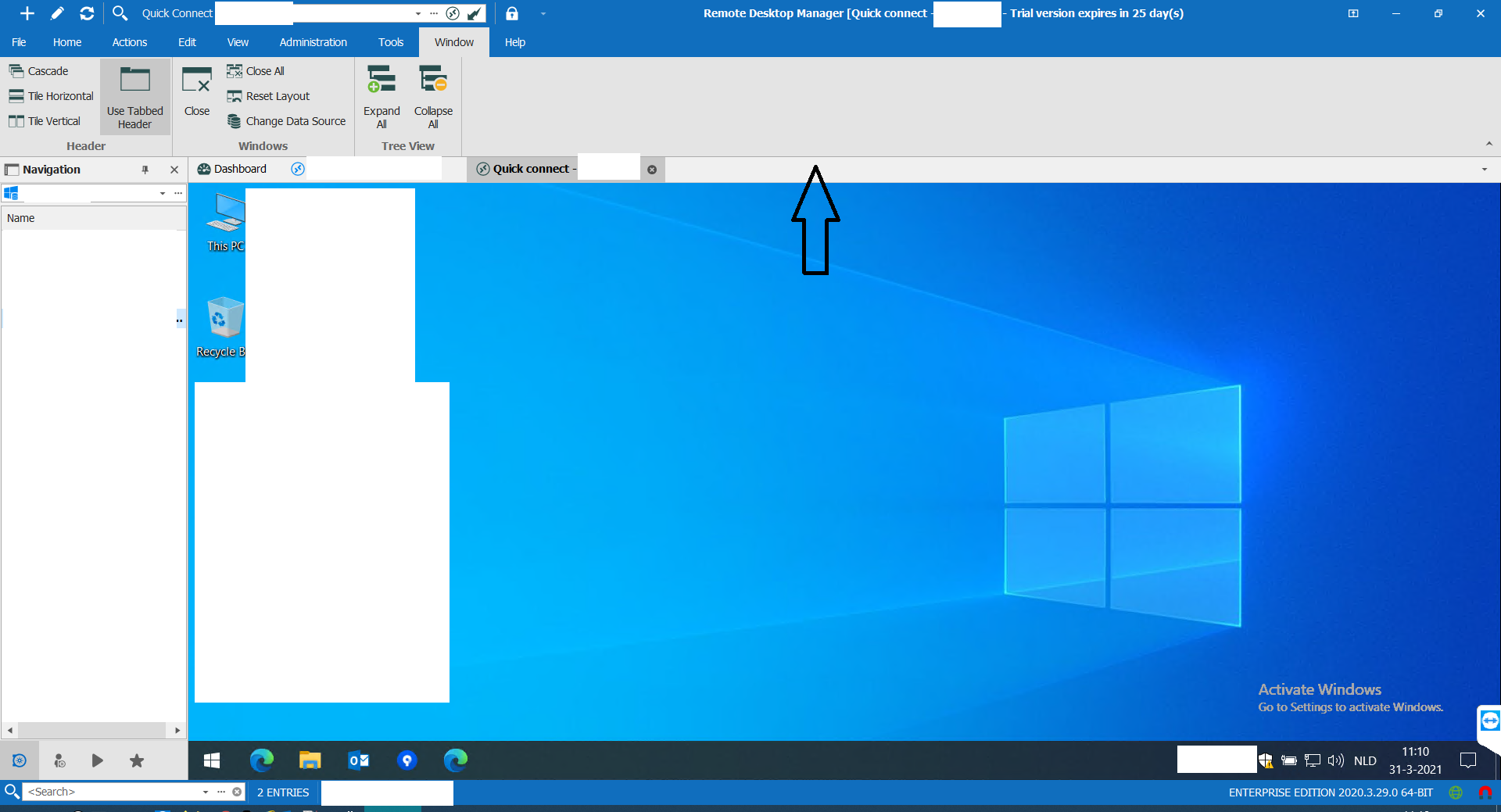
you can hide the ribbon on click on the marked arrow:
if you want to hide also the menu options and the top bar, you can use the setting with marked as 1
If you click on one of the menu options, the ribbon appears and will auto hide again.
Regards,
Min
Thanks for your reply. I already found that but that's not what I'm looking for since I don't want to completely hide an element. I want to drag the screen area up so it's bigger, whilst making the ribbon smaller (just like you can also drag the navigation area wider/thinner). Seems not possible...correct?
How do I resize main window and ribbon?
Hi,
I'm currently evaluating RDM for our company. My first question, how do resize the ribbon and the main window? I want the main window to be bigger and the ribbon to be thinner. I can't seem to just drag those windows up down.Thanks in advance.