
fgwg
RDP screen stops refreshing but input is captured.
Hi both. Thanks for the replies.
To answer the questions:
Yes, I've only observed the issue with RDP sessions
All of the options mentioned above were in effect, however, I tried reducing the network quality to Satellite and that seems to have fixed the issue. I was able to narrow it down further to the option of "Desktop background", which seems to be the one that causes the session to freeze. I realised that the reason for "detect network automatically" perhaps not addressing this is because I'm tunnelling via an SSH host, and therefore the RDP endpoint address is actually localhost.
If there's an improvement that can be made for this, that's great, but otherwise I can use this as a workaround.
Thanks again
RDP screen stops refreshing but input is captured.
Hi guys.
I'm seeing an issue in RDM for macOS where connections to some machines located far away with a higher RTT (~300ms) are unusable. The session connects, I get about 5 seconds of use and then the display stops working. My input continues to get captured though as whatever I click or type will show when I disconnect and reconnect the session. It will happen repeatedly. Sometimes I get lucky and it will remain usable for a while before it eventually & inevitably does the same.
The problem doesn't appear to happen on machines that are closer. But it also doesn't happen if I use the Microsoft RD app for macOS. It appears to be specific to RDM/freeRDP when a higher RTT is in play.
I'd appreciate any suggestions on what settings I could look at to help this?
Thanks
SSH Link settings not working since upgrading to 2023.1.5.0
Hi Xavier.
I've just installed the new release and so far, so good! I'll let you know if I run into trouble.
Thanks very much for your support!
SSH Link settings not working since upgrading to 2023.1.5.0
Thanks Xavier, that will do the trick for now :)
SSH Link settings not working since upgrading to 2023.1.5.0
Thanks Xavier!
Is there a workaround I can use in the meantime for the save issue, until the next release is available?
SSH Link settings not working since upgrading to 2023.1.5.0
I've also noticed that since the upgrade, any of my sessions now do not automatically start the SSH session, so it's like they are no longer honouring this setting.
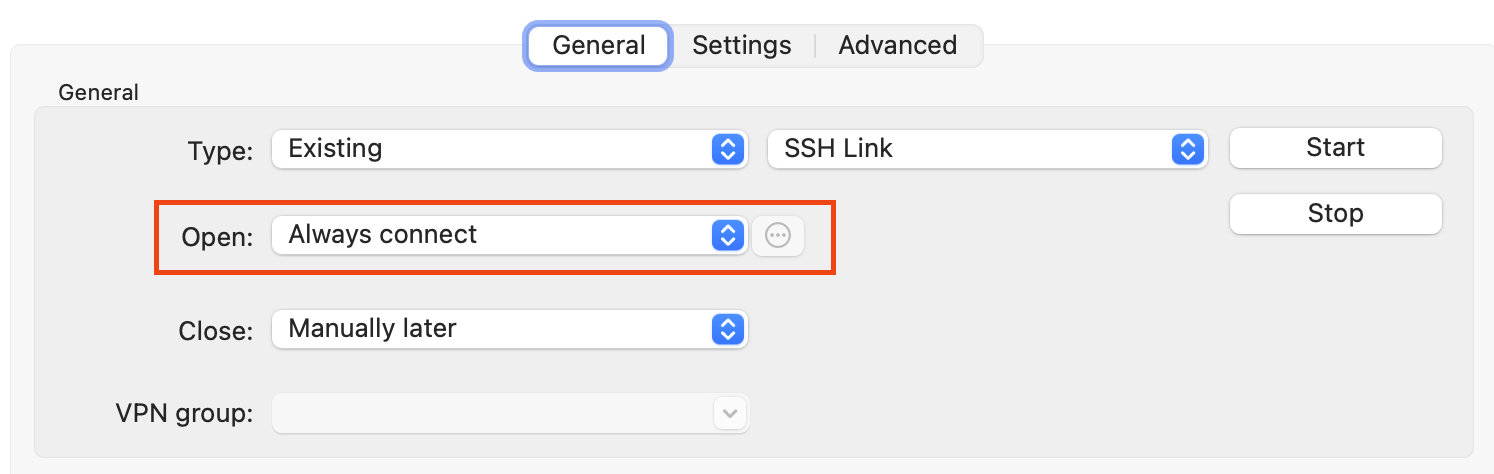
I have to find the SSH session and open that manually first, then my other sessions will use it.
SSH Link settings not working since upgrading to 2023.1.5.0
HI Xavier
Sure. At a higher level folder I have this configured..
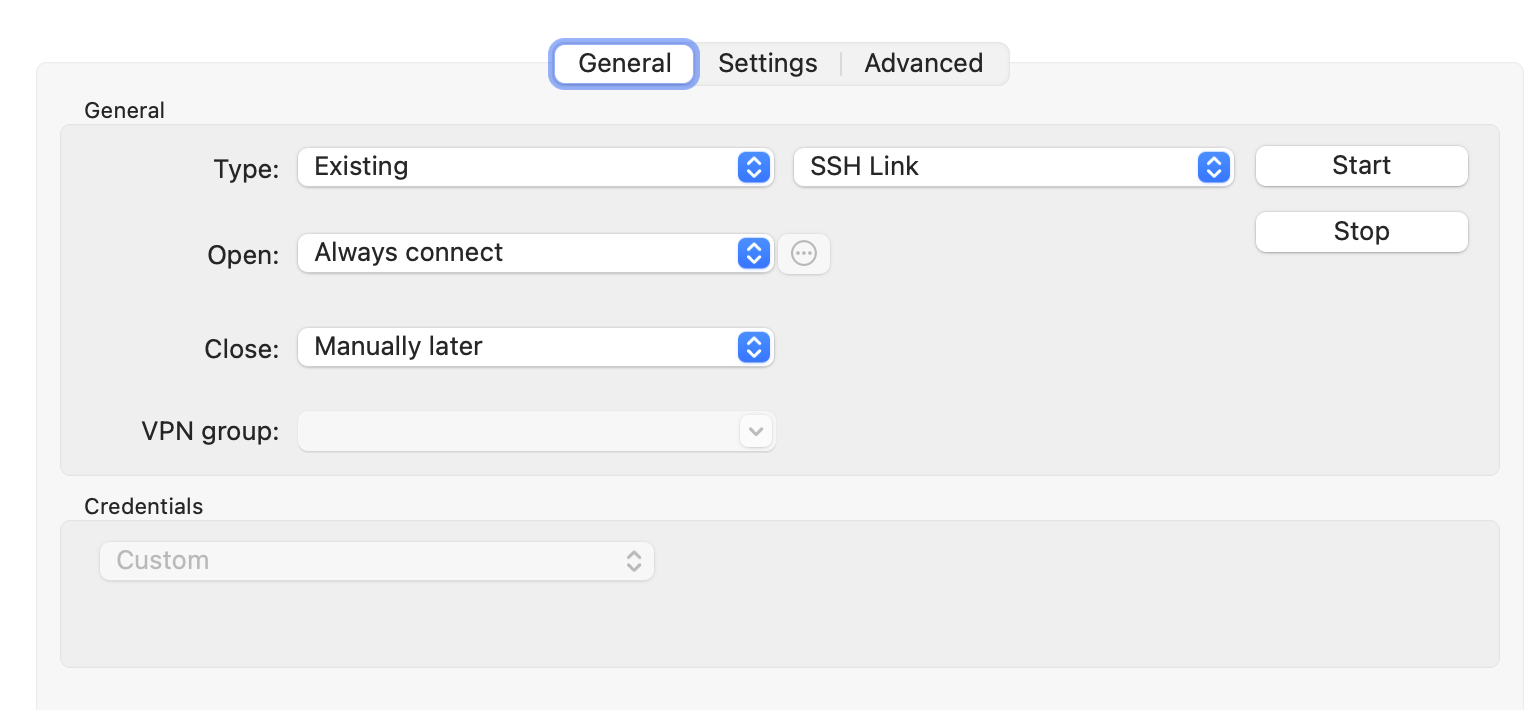
Then in subfolders, I have them set to Inherited.
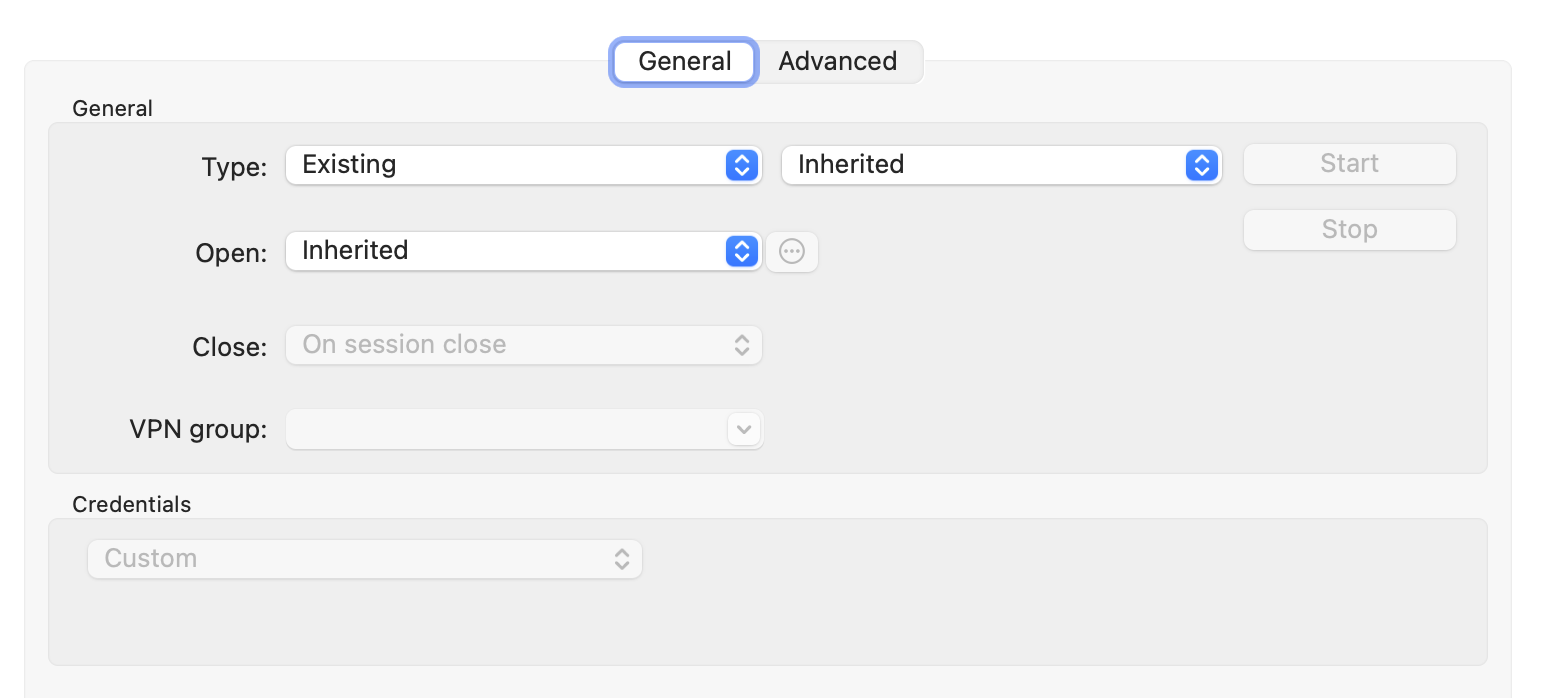
However, when I try to modify a session to make it Inherit, or create a new session, it will not honour that setting, instead, after I click ok and then re-open the properties, I find it has reverted to the default of..
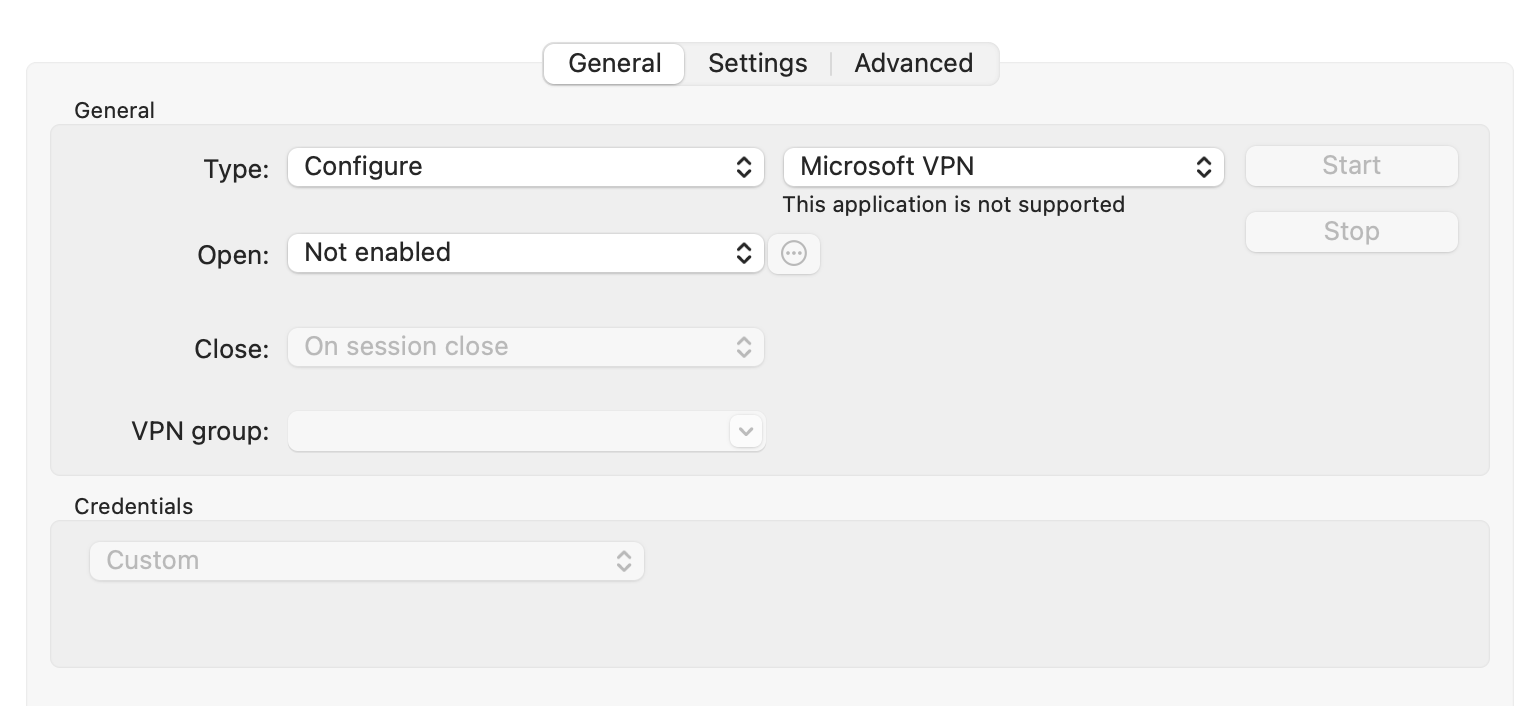
Hope this helps.
SSH Link settings not working since upgrading to 2023.1.5.0
Thanks for the quick reply Xavier!
I'm using a SQLite database.
SSH Link settings not working since upgrading to 2023.1.5.0
Hi guys.
Since the last update I'm having trouble with SSH Link (which I see was renamed).
I have sessions set to inherit the VPN/Gateway settings, some go maybe 3 folders deep before they get the settings. Some appear to be working but some are not.
In addition, I have some sessions where I edit them to set the SSH Link up on them, and they are not honouring the settings. I press ok, wait for 'Loading Connections' to finish, go to edit it again and the settings are reverted.
The same thing is happening if I create a new session. The SSH Link setting doesn't stick.
Are there some issues with this change?
Thanks
RDP display issues when using scaled resolutions
Hi all.
In RDM Mac, I'm having trouble getting a good display quality in an RDP session when using a scaled resolution. I have twin 4k monitors and am using the scaling options on macOS, 1 below full res to make things more readable. When I have this option set though, the quality inside RDP session gets worse when using RDM. It seems to not be passing the setting through to the server.
If I use the MS Remote Desktop client, then it handles it properly and the text inside of the RDP session is much better.
I'm using RDM 2022.3.8.0
In the global preferences under Types -> RDP, I have the following settings:
Optimise for Retina Displays: Yes
Rendering Engine: Metal
And under the session settings, RDP -> Display, I have:
Remote Desktop Size: Default
Screen Sizing Mode: Default
Optimise for Retina displays: Default
Desktop Scaling Level: 100%
Device Scaling Level: 100%
Am I missing a setting that will make it work like the MS client does?
When using the MS client, if I have one of my monitors at full res (More Space) and the other one at 1 below that, then when I move the session between monitors it adjusts the setting inside the session (with a window resize to trigger it) and so it looks good on both displays. However RDM doesn't seem to be doing this.
Any help appreciated. Thanks!
$HOST$ variable returning wrong value?
Hi Xavier.
Thank you so much for explaining. I have tried this and it works exactly as you described.
Hugely appreciate your assistance and rapid response :)
FG
$HOST$ variable returning wrong value?
Hey all.
I am trying to set my RDM up so that I can have a single SSH Tunnel session, and then all my other RDP/SSH sessions will tunnel through tha via local port forwarding.
I thought I'd figured it out, but I've noticed something strange and I'm not sure if it's intended behaviour or if I'm doing something wrong. I'll do my best to explain as clearly as I can.
I have set up an 'SSH Tunnel' session as follows (just relevant settings with redacted values):
-- Take note of the variable, as that's the important point in this issue..
Name: My SSH Box (this is a Windows box running OpenSSH)
SSH Server Settings:
Host: jumpbox.somedomain.com
Local Tunnel Settings:
Mode: Local
Local address: 127.0.0.1
Local port: Default
Remote host: $HOST$
Remote port: Default
I then have an RDP session as follows:
RDP:
Host: server1.somedomain.com
VPN/SSH/Gateway:
General:
Type: Existing - SSH
Open: Always connect
Close: On session close
Settings:
Session: My SSH Box
Use dynamic port
Force "localhost": Yes
So I would expect that upon launching the RDP session, the following would happen..
Start an SSH session to jumpbox.somedomain.com with Local Port forwarding of '56789:server1.somedomain.com:3389'. With that hostname being pulled via the variable from the RDP session
Start RDP to localhost:56789.
However, it looks like the $HOST$ variable is not picking up the value I'd expect it to..
RDP is indeed connecting to localhost:56789, so the port forward part is working, but I'm actually ending up in an RDP session on jumpbox instead of server1. So $HOST$ is returning the value of the host from the SSH Tunnel session (itself), NOT the RDP Session.
Am I doing something wrong? I'd greatly appreciate any advice!
Thanks
FG
Using HTTP Proxy without specifically tunnelling/port forwarding
Hi Richard.
I think I'm going to give that a go. That's a good suggestion and I've just spoken to a colleague who is funnily enough doing exactly that.
Thanks!
Using HTTP Proxy without specifically tunnelling/port forwarding
Unfortunately for me setting the proxy system wide isn't an option as the proxy is only there for managing these servers and is located in another country.
Ok I think I might have to settle for going external with these sessions then. The most important thing really is just having all my administration shortcuts in RDM and at least that would be achieved that way, although just not the most elegant!
Thanks Xavier. Really appreciate the assistance :-)
Using HTTP Proxy without specifically tunnelling/port forwarding
Hi Xavier.
Thanks for replying so quickly!
Yes, you're right, it's a web browser session. Ah ok that makes sense. So is there no way to just send the traffic through a proxy rather than setting up a port forward? The problem with the port forward is that it only works for one port that you specify. If the browser directs you to another port (as it does for remote console on port 3900) then of course that doesn't work because it's not forwarded. I realise I could add a separate proxy tunnel session for that port to ensure it's forwarded, but then that would only work for one session at a time. If I want to connect to multiple servers, then I can't. Do you know of an alternative way to achieve this?
Right now, I have to dedicate one browser (Firefox) for these purposes and configure the proxy in that browser for all HTTP traffic. I was thinking perhaps I could then use Firefox as the browser engine for website sessions in RDM and use those. I tried that but it doesn't work. I guess it doesn't pull the proxy settings from Firefox?
Thanks
Frank
Using HTTP Proxy without specifically tunnelling/port forwarding
Hi all.
Just wondering if it's possible to use a HTTP proxy for a session without specifically doing any port forwarding, just sending all traffic for that session down the proxy, just like you would a regular web browser.
I am trying to set up web browser sessions to Lenovo XClarity for our servers, and port forwarding will allow me to get there, but remote console won't work because it attempts to connect on a different port, which isn't tunnelled.
In a browser, I simply set a HTTP proxy for all traffic and away you go, I can browse anything and it will traverse the proxy. I would like to do the same thing for a session within RDM, so I click the session, it connects to the proxy and just sends all traffic for that session down it (including popup windows from that session), rather than having to map ports and then connect to 'localhost'.
Is that possible?
Thanks