
davidperry5
FIPS Compliance for RDP sessions
I take this to mean that there is currently no plan to make the product FIPS compliant.
Thank you all.
FIPS Compliance for RDP sessions
Hi,
By default, RDP connection encryption is handled by the operating system and not the software. Therefore, those connections should comply with your system configuration and organization requirements.
Regards,
Martin,
You are quite correct, the cryptographic modules are maintained within the OS. I should have been more clear. I am just looking for FIPS 140 compliance. Which may only be a public statement somewhere on the site. Whether achieving that compliance requires additional work, I do not know. I am not a FIPS expert. I only know that Remote Desktop Manager does not currently list compliance and am wondering if that is on the radar for the company.
FIPS Compliance for RDP sessions
My organization is requiring FIPS compliant algorithms on RDP connections and therefor attempting to disallow this product. Seeing the KB article on FIPS it appears that there is, or was, no FIPS compliance. Is there any plan to enable FIPS compliance for Remote Desktop Manager Enterprise or Free editions?
Play List logons having trouble
Hi,
I would be happy to test further, but unfortunately, I have already resolved the issue, so further testing would be a challenge and may not provide valid data at this point.
Just for future reference, I believe that the file "RemoteDesktopManagerFree.cfg" was the likely culprit, but I was unable to test by the time all was said and done.
What I ended up doing was;
Uninstalling RDM.
Deleting the 'Devolutions' folder
Installing RDM 2021.1.30.0 from EXE
Replacing "connections.db", "RemoteDesktopManagerFree.cfg", and "RemoteDesktopManagerFreeLayout########.lyt" with those from an April backup.
Thank you for your assistance, and my apologies again for putting a non-bug issue in this section.
Play List logons having trouble
Disregard. This is not a bug, but apparently some level of corruption in whatever configuration file RDM uses. Which is a local file. A fresh install on another system does not present this issue with version 27. Since this issue appeared on or about the time that I updated to version 27, I made the guess that this was a bug in 27. I will move this issue to the Support forum.
Thanks.
Play List logons having trouble
Additional note,
I deleted the install of RDMfe, and rebooted my Win10 box. I then downloaded version 30 and installed it. The issue remains.
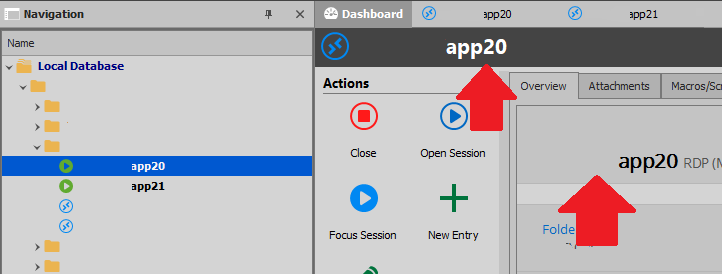
I did note that the Dashboard changes when I select different servers in the Navigator pane. The highlighted tab remains on Dashboard.
Play List logons having trouble
@Samuel Dery, Thank you for your reply.
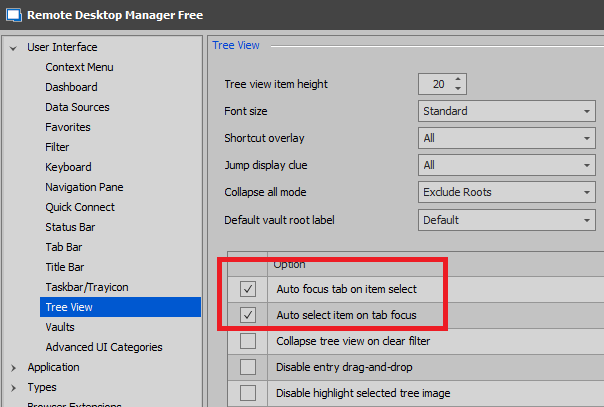
I verified "Auto focus tab on item select" and "Auto select item on tab focus.” at “File" ->"Options" -> "User Interface" -> "Tree View" in version 2021.1.27.0, and both were selected. They are still selected in version 30.
I
subsequently, updated to version 2021.1.30.0 using the update feature in RDMfe, and ran the same tests as previous. With this version (2021.1.30.0), the issue seems to be worse. I now don't need to use Play Lists. If I manually log into multiple servers, the Navigation Pane selections are ignored.
NOTE – We are using smartcards not passwords (in case it matters).
I am including screen shots to make sure we are looking at the same thing.
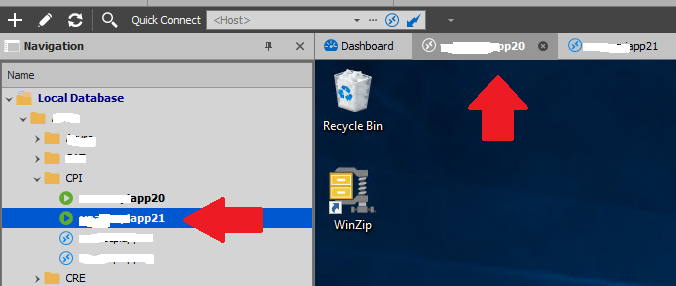
Notice in the second image that the tab is highlighted on server '20', but the Navigation pane is highlighting server '21' (these should always match).
If I select the tab for server 21, I will get server 21's desktop and the tab highlight will match. However the server highlighting in the Navigation pane never chages (as we see here).
If I select server 20 in the Navigation pane, the highlight in the Navigation pane will change, but the desktop I am presented does not change, and the tab highlight does not change.
So it appears that the presented desktop is tied to the tab but the Navigation pane is essentially now tied to nothing.
Again, for servers that I individually logged onto, this was not occurring in version 27, only with servers logged onto with a Play List. Now this is a problem with both individually logged on servers and servers logged onto with a Play List. In fact, while testing I found that whatever server I had highlighted in the Navigation pane remained highlighted when I used a Play List, even if that server had nothing to do with the servers in the Play List.
Let me know of I can assist further.
Best Regards.
Play List logons having trouble
The issue is that when a group of servers has been opened or logged onto, using a Play List I cannot bring up their screen (dashboard?) by clicking on the server
in the left side, vertical, Navigation pane. I must to use the tabs at the top of the dashboard screen/area. However, if I open a group of servers individually, I can access the dashboard/desktop for each server using either the tabs at the top, or the tree view in the Navigation pane on the left. Testing indicates that as long as I log into one or more servers individually, the Navigation pane selection works as expected.
Additionally, and perhaps more critically, when selecting a server using the tabs, the highlight in the Navigation pane does not change to the server in focus. That may not be new, but it is visually confusing and has already caused me to act upon the wrong server. I might be alone in that error, but I doubt it. This issue also does not occur if the servers were not logged onto using a Play List.
An additional test indicates that, if I log onto one server of a Play List individually, and then use the Play List to log onto the rest of the servers, the issue does not occur.
This appears to have started with this version (2021.1.27.0)
RDMfe Ver - 2021.1.27.0
NET Runtime - 4.0.30319
NET Ver - 4.7.2
Remote Desktop Manager Free Edition
Single Sign on (SSO) for servers in a Playlist
I have been told that this feature is unavailable, but it seems like a good idea to add it.
Using Remote Desktop Manager 2020.2.20.0, with a local database, I created a Play List with multiple servers that I want to RDP to. The difficulty is that I have to log into each server individually. If I create a Play List with 10 servers, I have to enter my credentials 10 times. Obviously, a Play List with 50 servers would be even more difficult. I believe that adding the capability to log into all servers of a Play List with a single presentation of credentials would improve usability.
Obviously, the account used on all servers in the Play List would need to be using the same account, but I believe that this would be the case most, if not all of the time. A simple check to verify when attempting to activate this option should suffice. So that should not present much difficulty. This would work with username/password as well as with Smartcard.
Thank you.
Single Sign on (SSO) for servers in a Playlist
Thank you Etienne. I can add this to the feature request section if needed.
Single Sign on (SSO) for servers in a Playlist
Hello,
I have not found this setting, so I am asking about it.
Using Remote Desktop Manager 2020.2.20.0, with a local database. I created a Playlist with multiple servers that I want to RDP to. The issue is that I have to log into each server individually. Since the account I am using is the same account on all servers, is it possible, to have the playlist ask one time for my credentials, and then it can use that to log into the rest of the servers in the Playlist? I am specifically using a Smartcard, but the function would be the same with a username/password.
Thank you