Play List logons having trouble

The issue is that when a group of servers has been opened or logged onto, using a Play List I cannot bring up their screen (dashboard?) by clicking on the server
in the left side, vertical, Navigation pane. I must to use the tabs at the top of the dashboard screen/area. However, if I open a group of servers individually, I can access the dashboard/desktop for each server using either the tabs at the top, or the tree view in the Navigation pane on the left. Testing indicates that as long as I log into one or more servers individually, the Navigation pane selection works as expected.
Additionally, and perhaps more critically, when selecting a server using the tabs, the highlight in the Navigation pane does not change to the server in focus. That may not be new, but it is visually confusing and has already caused me to act upon the wrong server. I might be alone in that error, but I doubt it. This issue also does not occur if the servers were not logged onto using a Play List.
An additional test indicates that, if I log onto one server of a Play List individually, and then use the Play List to log onto the rest of the servers, the issue does not occur.
This appears to have started with this version (2021.1.27.0)
RDMfe Ver - 2021.1.27.0
NET Runtime - 4.0.30319
NET Ver - 4.7.2
Remote Desktop Manager Free Edition
All Comments (7)
Hello,
I've tried to reproduce your issue on my side while using RDM 2021.1.30.0 without success, when launching multiple connections I'm able to change the tab that is in focus by simply clicking the entry in the "Navigation Pane". Would it be possible for you to update to see if the issue persists?
The latest version of RDM can be downloaded from this link:
https://remotedesktopmanager.com/home/download
Also, I'd like to confirm that the following options are indeed enabled on your side, could you go under "File" -> "Options" -> "User Interface" -> "Tree View" the options I'd like you to confirm are enabled are "Auto focus tab on item select" and "Auto select item on tab focus".
Let me know,
Best regards,
Samuel Dery
@Samuel Dery, Thank you for your reply.
I verified "Auto focus tab on item select" and "Auto select item on tab focus.” at “File" ->"Options" -> "User Interface" -> "Tree View" in version 2021.1.27.0, and both were selected. They are still selected in version 30.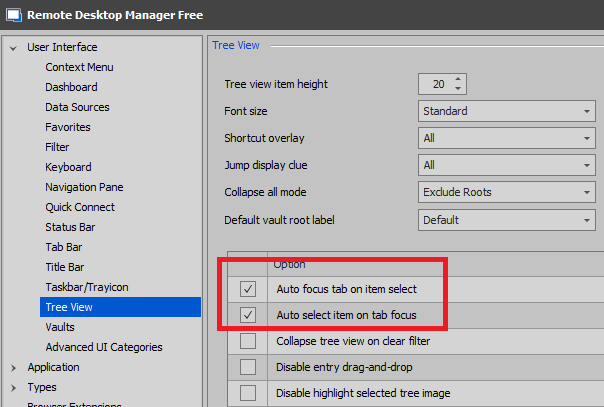
I
subsequently, updated to version 2021.1.30.0 using the update feature in RDMfe, and ran the same tests as previous. With this version (2021.1.30.0), the issue seems to be worse. I now don't need to use Play Lists. If I manually log into multiple servers, the Navigation Pane selections are ignored.
NOTE – We are using smartcards not passwords (in case it matters).
I am including screen shots to make sure we are looking at the same thing. 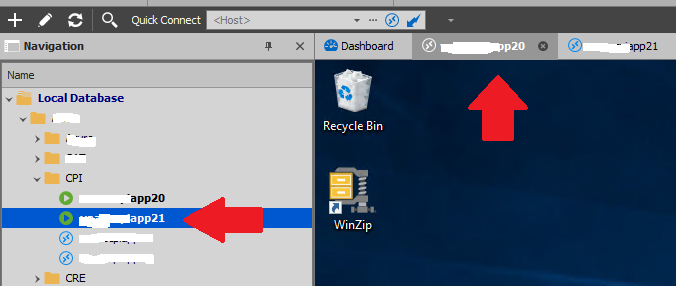
Notice in the second image that the tab is highlighted on server '20', but the Navigation pane is highlighting server '21' (these should always match).
If I select the tab for server 21, I will get server 21's desktop and the tab highlight will match. However the server highlighting in the Navigation pane never chages (as we see here).
If I select server 20 in the Navigation pane, the highlight in the Navigation pane will change, but the desktop I am presented does not change, and the tab highlight does not change.
So it appears that the presented desktop is tied to the tab but the Navigation pane is essentially now tied to nothing.
Again, for servers that I individually logged onto, this was not occurring in version 27, only with servers logged onto with a Play List. Now this is a problem with both individually logged on servers and servers logged onto with a Play List. In fact, while testing I found that whatever server I had highlighted in the Navigation pane remained highlighted when I used a Play List, even if that server had nothing to do with the servers in the Play List.
Let me know of I can assist further.
Best Regards.
Image2.png
Image1.png
Additional note,
I deleted the install of RDMfe, and rebooted my Win10 box. I then downloaded version 30 and installed it. The issue remains.
I did note that the Dashboard changes when I select different servers in the Navigator pane. The highlighted tab remains on Dashboard. 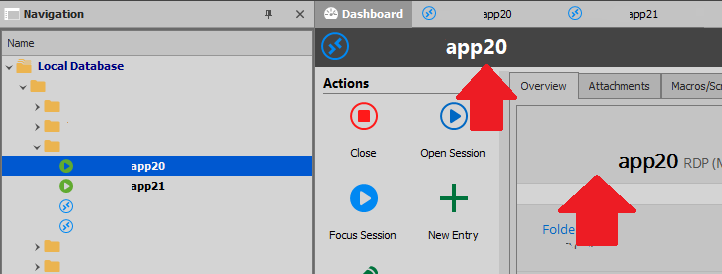
Image3.png
Disregard. This is not a bug, but apparently some level of corruption in whatever configuration file RDM uses. Which is a local file. A fresh install on another system does not present this issue with version 27. Since this issue appeared on or about the time that I updated to version 27, I made the guess that this was a bug in 27. I will move this issue to the Support forum.
Thanks.
Hello,
Thank you for your replies and for the detailed information it's very appreciated!
I'd like you to test using a portable version of RDM to see if the issue persists. To do so, you will need to do the following:
1- Download the .zip file below:
https://remotedesktopmanager.com/home/thankyou/rdmfreebin
2- Create a new folder on your Desktop
3- Extract the content of the .zip file into the folder created at #2
4- Go in this folder once the .zip file has been extracted and run remotedesktopmanager.exe
5- Enter your current serial which you can find here: https://customer-portal.devolutions.com/serials
Best regards,
Samuel Dery
Hi,
I would be happy to test further, but unfortunately, I have already resolved the issue, so further testing would be a challenge and may not provide valid data at this point.
Just for future reference, I believe that the file "RemoteDesktopManagerFree.cfg" was the likely culprit, but I was unable to test by the time all was said and done.
What I ended up doing was;
- Uninstalling RDM.
- Deleting the 'Devolutions' folder
- Installing RDM 2021.1.30.0 from EXE
- Replacing "connections.db", "RemoteDesktopManagerFree.cfg", and "RemoteDesktopManagerFreeLayout########.lyt" with those from an April backup.
Thank you for your assistance, and my apologies again for putting a non-bug issue in this section.
Hello,
Thank you for your reply,
No problem, I'm glad to hear you were able to resolve your issue.
Best regards,
Samuel Dery