
janvangurp
Chrome plugin only 'sees' credentials when corresponding vault is selected.
Hello,
Using RDM 2023.3.37, since a few weeks.
Vault A has website entry with username and pw for URL aaa.com
Vault B has website entry with username and pw for URL bbb.com
Nog RDM is running on my computer.
When visiting aaa.com, the Chrome Extension 'Devolutions Workspace' only returns username and pw when Vault A is selected, not when any other vault is currently 'open'. The same goes for website bbb.com and Vault B.
We came from an old RDM version (2022.1.23) where the extension returned the credentials independently from the then selected vault.
Is there perhaps a setting or configuration to change the behaviour to the old way?
Thank you and regards,
Jan van Gurp
Find entries which use a certain credential entry
Whohoooo, didn't know this.
And Devolutions support also doesn't know... They thought is was a good idea if I added my wish for this function to this forum.
Thanks, Alex.
Regards,
Jan
Find entries which use a certain credential entry
Hello Devolutions,
For a credential entry, I cannot see which other entries rely upon this credential entry.
Please, can you ad a "Used by..." feature for them?
Thanks, regards,
Jan van Gurp
Enforce credential copy and clipboard delay options for all users
Hi Hubert,
Thanks for responding.
We use Microsoft SQL Azure.
Regards,
Jan
Enforce credential copy and clipboard delay options for all users
Hi, hello,
As an administrator, I want to enforce the following options for all users (Application - Clipboard - Adevanced):
Credential copy options
Clipboard copy method
Clear clipboard delay
Can you please make this possible?
Thanks, regards,
Jan
Have the assigned TAGS sorted
Hello David,
When can we expect release 2022.1?
Thanks, regards,
Jan
Have the assigned TAGS sorted
What a quick solution, that is soon.
Thanks a lot, David!
Greetings,
Jan
Have the assigned TAGS sorted
Thanks David!
Please leave a comment when that version can be downloaded.
Regards,
Jan
Have the assigned TAGS sorted
Hello,
When I add multiple 'tags' to an entry, they aren't shown in sorted order. See attached image.
Some entries have as much of 20+ tags, it should be nice when these are viewed in sorted order.
How can I do that?
Thanks, regards,
Jan

RDM keeps asking, asking, ..., for Azure Sign in
Thanks, but I'm afraid I don't see the linked issue...
Regards,
Jan van Gurp
RDM keeps asking, asking, ..., for Azure Sign in
Hi Etienne,
Did you find something?
It would help me a lot if it was solved.
Best regards,
Jan van Gurp
RDM keeps asking, asking, ..., for Azure Sign in
Hello there,
Very satisfied with RDM 2021.2.16.0 (64 bit). However, if my laptop is offline for a while, and I'm not working on it, RDM keeps asking for my sign in credentials to acces the Azure SQL database.
Today, after a break, I counted more than 50 (!) sign in "Enter your password" pop up screens.
How can I prevent this to happen? If one pop-up is visible, RDM should wait and nog raising the next pop-up, and the next, end the next...
Thanks for help,
Jan van Gurp

Remote Desktop Manager 2021.2 BETA
Thanks. Could you please put a message in this Thread when the release is available?
Success with the final work!
Regards,
Jan
Remote Desktop Manager 2021.2 BETA
Thanks for the information, David.
When do you expect to release the final version 2021.2?
Regards,
Jan
Web login credentials not transferred to login fields on website
When is the official release planned?
Greetings,
Jan
Web login credentials not transferred to login fields on website
Yes, that works! Thanks! It solved the problem.
For this beta version, a database upgrade was needed. The former version of RDM (2021.1.44.0) gives a warning when using the upgraded database. I created a copy of the database, have RDM upgrade that copy, and the user which experienced the website login problems is using the given beta version.
What do you recommend: move all our users (18) to the beta version? Or wait until the final version is released?
Greetings,
Jan
Web login credentials not transferred to login fields on website
2021.1.44.0 64-bit
Web login credentials not transferred to login fields on website
Yes, on all websites entries in RDM which get their credentials by means of a 'credentials entry'.
All websites entries in RDM which have 'custom' username/password are behaving correctly.
All website entries are Chrome entries.
Web login credentials not transferred to login fields on website
We are using RDM for years. Because we started using multiple website entries with the same username/password, I recently created credential entries for these logins.
For most users, this works fine. For a few users however, in Chrome the credentials are not filled into the user and password field. Their Chrome is up to date and so is their browser extension.
The strange thing is that the browser extension does read username/password from RDM. It doesn't copy these data to the login fields on the website. You see the stars indicating a username and password has been collected from RDM.
Web login entries with custom username/password are correctly transferred to their corresponding fields.
Again, only two users are experiencing this problem. What could be wrong in their configuration?
How to log off from a data source?
Hi,
I am setting up a new data source on Azure SQL. It works fine for me. Now I want to add users to this data source. How can I log off from this data source, and login as a new user so I can test the settings which I have made for that user?
Thanks and greetings,
Jan
How to open the Data Source Configuration window?
Ben, Érica, thanks both of you.
Yes, I can use the menu and see ellipsis after adding an additional data source.
Solved!
How to open the Data Source Configuration window?
Hi there,
The manual (https://help.remotedesktopmanager.com/create-a-new-data-source.html) starts with "Open the Data Source Configuration window by clicking the ellipsis button at the top of the Navigation Pane.":
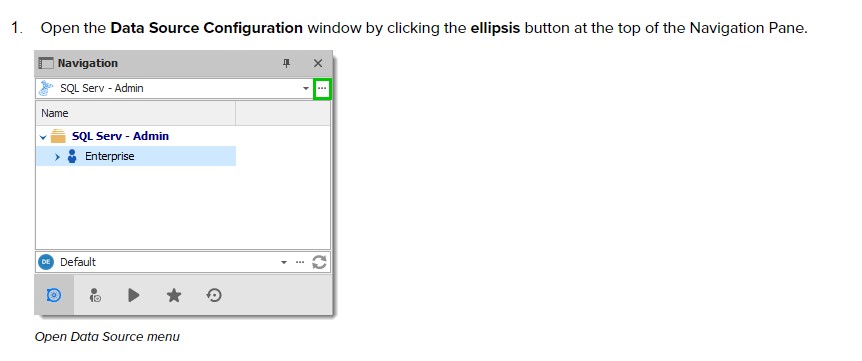
There is no ellipsis button at the top op the Navigation Pane in my RDM:
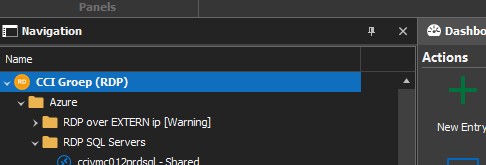
How can I open the Data Source Configuration window?
I'm an administrator.
Thanks & regards,
Jan
Username and password doesn't show up in IE
Thanks for the help!
Username and password doesn't show up in IE
Sure,
That is https://livits.abu.nl/cms/admin/login.aspx
Thanks for your help,
Jan
PS
Maybe use the chat instead?
Username and password doesn't show up in IE
Hi David,
Yes, I tried. But is doesn't work: usernames and passwords won't show up in IE.
How can we retrieve the original behavior which was that user name and password were passed to the IE browser?
Thanks and regards,
Jan