
olearif
Improve "Credentials" selection
On the latest version the issue went away. Thanks!
Improve "Credentials" selection
I have 2020.3.24.0

Improve "Credentials" selection
When configuring a session (RDP, VPN, something else) the selection of credentials is pretty weird in a vault with several branches and several credentials for each branch.
There's a dropdown menu in which you have to manually choose the value, without any filtering/search possibility.

On the contrary, if you visit the "Management Tools" there's a totally different approach. It's possible to open a windows in which you can browse the vault for the desired item.

Is it possible to adopt the second approach to "Credentials" selection also elsewhere?
VPN Session with relative path
You solution seems not to fit the needs.
In order to duplicate several entries, we have been teched by your support, to use templates. Templates allow us to duplicate tree branches also among different "roots".
What happens now is that VPN tunnesl, reference to credentials, etc. stays with the original paths leading to huge errors.
We really need to make explicit that an inner node of the tree refers to another node, by a relative path, that allow to navigate to a common anchestor (up direction) and then down again to the destination node.
Problem with multiple instances of WinSCP and key-based authentication
No, definitely not. WinSCP is far user friendly and complete with additional features that built-in SCP doesn't has.
Problem with multiple instances of WinSCP and key-based authentication
With built-in SCP it doesn't happens but with "built-in SCP" it doesn't create temp key files on user temp folder. The issue with WinSCP seems coming from this fact.
VPN Session with relative path
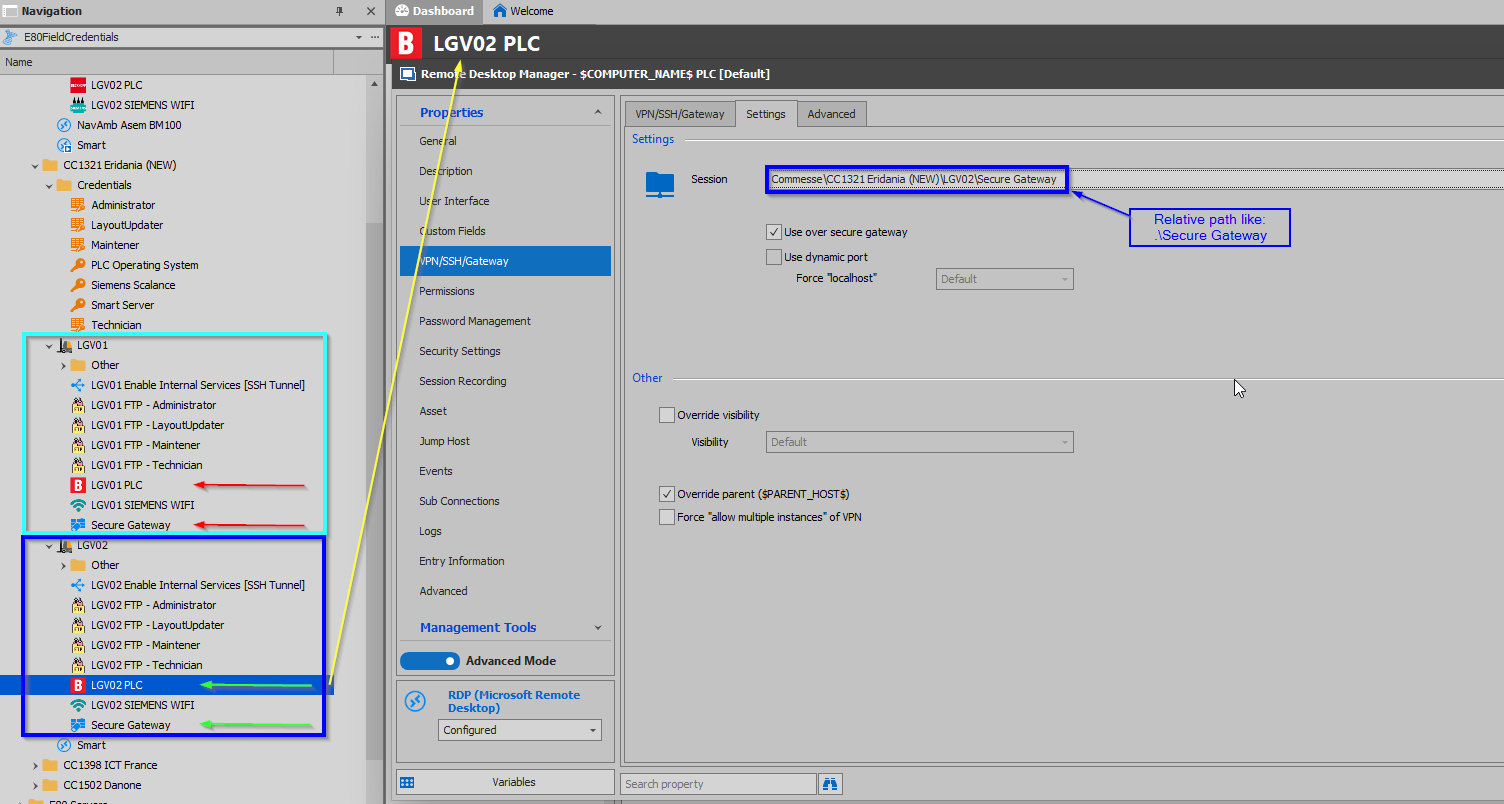
It would be very helpful to have the possibility to specify VPN Sessions with a relative path.
In my scenario I have several entries (named "LGVxx" in the attached picture) that differ only by the IP address, with some inner devices.
Each entry has a "Secure Tunnel" that exposes local services and that is automatically used by inner devices like Remote Desktop, etc.
For each inner device, I would like to specify the VPN tunnel as a relative path, in order to always refer to the Secure Tunnel inside its local folder (LGVxx).
The issue comes with Copy/Paste of "LGVxx" folders (I have to create dozens of that): the VPN Session settings still refers to the copied entry, with very high risks that when launching Remote Desktop on the "PLC" you think to be connected to LGV2 and you are connected to LGV1.
SSH Port Forward export to .csv
It would be helpful to have the "Export to .csv" feature in SSH Port Forward, exactely as we already have the "Import" feature.

Problem with multiple instances of WinSCP and key-based authentication
When using WinSCP with key-based auth it's not possible to have multiple instances open. It seems that, when you try to open the second instance, the temp file with the private key is not correctly generated. Then WinSCP gives back an auth error. See the video for further details.