VPN Session with relative path
0 vote

It would be very helpful to have the possibility to specify VPN Sessions with a relative path.
In my scenario I have several entries (named "LGVxx" in the attached picture) that differ only by the IP address, with some inner devices.
Each entry has a "Secure Tunnel" that exposes local services and that is automatically used by inner devices like Remote Desktop, etc.
For each inner device, I would like to specify the VPN tunnel as a relative path, in order to always refer to the Secure Tunnel inside its local folder (LGVxx).
The issue comes with Copy/Paste of "LGVxx" folders (I have to create dozens of that): the VPN Session settings still refers to the copied entry, with very high risks that when launching Remote Desktop on the "PLC" you think to be connected to LGV2 and you are connected to LGV1.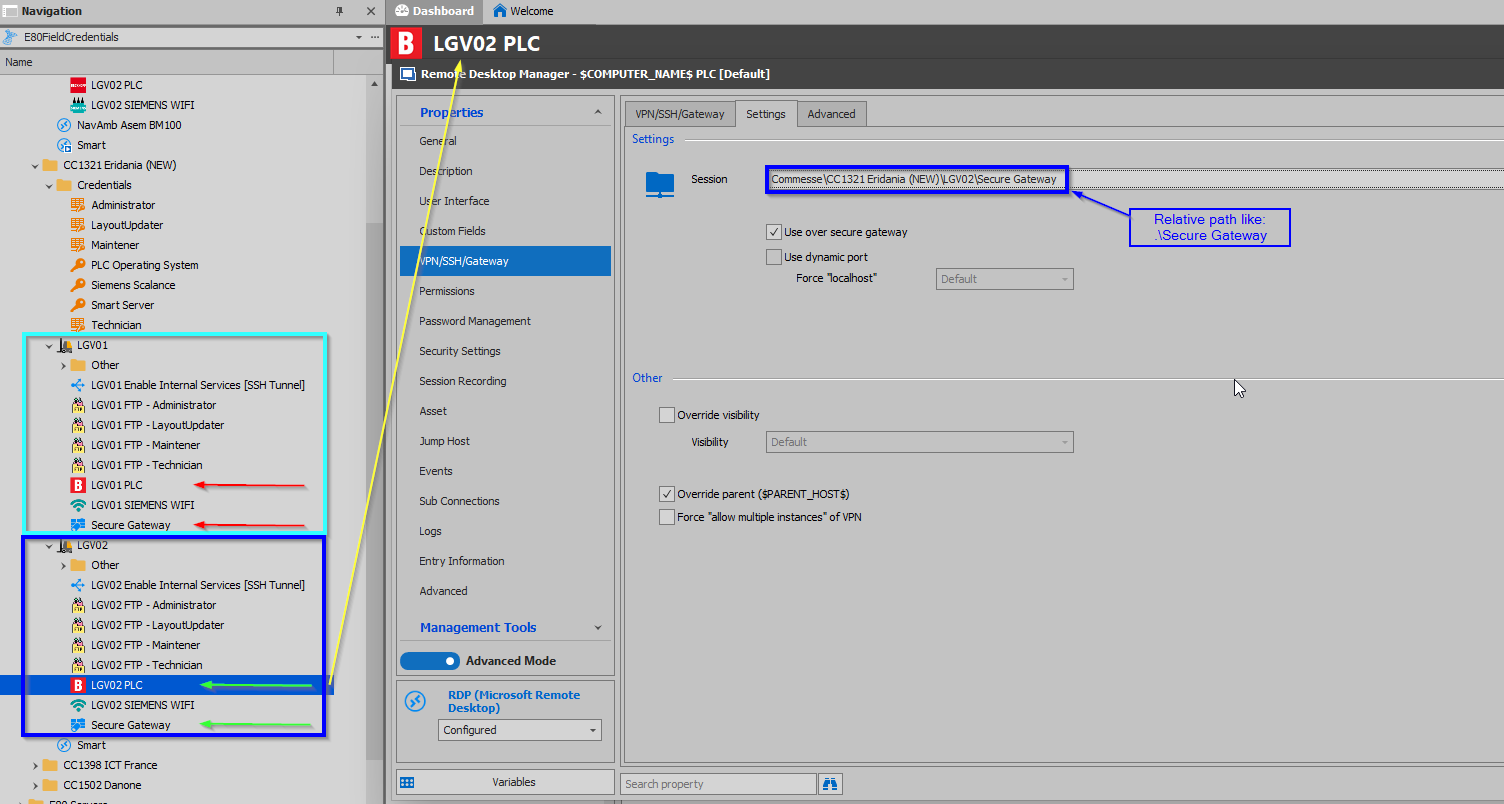
2020-10-06 11_44_49-Clipboard.png
All Comments (3)
Hello,
Thank you for contacting us on that matter!
I did some tests, and according to what I saw on my side, a variable path for the secure gateway session should not be necessary if you copy and paste your entries like I did. The path to the secure gateway session should automatically adjust to the new location.
First, create in advance your destination folder (to follow the pattern in your screenshot, let's say LGV03). Then, when you select the entries you wish to copy in the Navigation pane, make sure you don't include the top folder (LGV01) in your copy. Once you have your selection, right-click it and go to Clipboard > Copy. Make sure you enable "Change ID".
To paste, you can right-click the destination folder and use Clipboard > Paste. Normally, this should cause all of your pasted entries to be adjusted to refer to the entries within this folder. Your session should now be set to use the secure gateway located in LGV03.
Don't hesitate to let me know if that works for you!
Best regards,
Gabriel Degrandpré
You solution seems not to fit the needs.
In order to duplicate several entries, we have been teched by your support, to use templates. Templates allow us to duplicate tree branches also among different "roots".
What happens now is that VPN tunnesl, reference to credentials, etc. stays with the original paths leading to huge errors.
We really need to make explicit that an inner node of the tree refers to another node, by a relative path, that allow to navigate to a common anchestor (up direction) and then down again to the destination node.
Hello,
A ticket has been opened in our ticketing system so that we can perform a remote session with you to evaluate your scenario.
We will contact you soon to schedule the session.
Best regards,
Jeff Dagenais