
ggabinoluisa
RDP Secure Connection
Here the info.
MacBook Pro M1
MAC OS: Sonoma 14.1
RDM: Version 2023.3..8.0 (I have also tried with the two previous versions)
RDP Secure Connection
Hi
Here my comments:
On my MAC computer I have RDM and Jump Desktop applications installed.
On my iPhone and iPad I have only the RDM application installed.
On the remote Windows 2012 servers I do not have any kind of application installed (No RDM, No Jump Desktop, etc)
Using RDM app: on MAC, iPhone and iPAD I have created a new RDP session to the same Windows Server 2012 Remote server.
The RDM RDP session on MAC, iPhone and iPad was created with the default configuration (No changes on "Detect network automatically" for example)
I tried the RDP connection to the Windows Server 2012 remote server using my MAC, the connection fails, certificate warning did not arrive.
I tried the RDP connection to the Windows Server 2012 remote server using the iPhone and iPAD, the connection was established successfully, but the certificate warning did not arrive.
On my MAC, using the jump desktop app, I have created the RDP connection (default configuration) to the same Windows server 2012 remote server (The same that was created on MAC, iPhone and iPAD).
I tried the connection to the Windows 2012 remote server from Jump Desktop app, the connection fails.
I modified/edited the configuration of the RDP connection on Jump Desktop App, on advanced options, section security, I unchecked "Ignore certificate errors" and tried the connection again, the RDP connection works successfully, certificate warning did not arrive.
I closed the RDP session on Jump Desktop app (Windows session still open, I did not "log off" on windows directly).
Go back to RDM application, tried the connection to the remote windows server, the connection works, but the certificate warning did not arrive.
At this point:
I'm using the same user account on all the RDP connections, either RDM or Jump Desktop.
I'm using Jump Desktop app as a RDP client only, I mean jump desktop is not installed on the remote windows 2012 server.
My Workaround:
I have a Windows 10 computer (imagine its IP is 10.20.30.40).
I made a fresh installation of RDM on this Windows 10 Computer, created the RDP session (using default options) to the same windows server 2012 remote server (imagine its IP is 10.20.30.50). As you can notice, PC and Server are in the same subnet.
Tried the connection to the Windows Server remote server, the connection works, but the certificate warning did not arrive. I tried the same connection using the Windows 10 native RDP client, the connection works and the certificate warning arrives.
At this point I noticed no RDP errors through Windows 10 computer using RDM or Windows Native RDP Client.
Next, on my Windows 10 computer enabled the Port Forwarding as I mentioned on my previous message. As you know Windows Port Forwarding allows you use the computer as a "bridge" to redirect the input connection requests to the final destination through the port forwarding configuration.
The port forwarding configuration is awaiting for an input connection request on the 1515 TCP port (PC is waiting on 10.20.30.40:1515) to be redirected to the remote windows server 3389 TCP port (Windows10 awaiting to redirect traffic from 10.20.30.40:1515 to 10.20.30.50:3389).
Go back to RDM on MAC (Imagine my MAC IP is 10.20.30.60, I mean same subnet), created a new RDP default session, on the target IP/Host section I added the 10.20.30.40 ip address (Windows 10 Computer), on the port configuration section I changed from 3389 to 1515.
I tried the connection, the connection works successfully, but the certificate warning did not arrive.
At this point in the time I was using the Windows 10 computer (port forwarding) to connect to all the servers I cannot connect using my MAC.
A couple days later, I removed the port forwarding configuration, I'm not using this workaround on my MAC, I used it like a test just to try to get more information related to this "weird" MAC RDM RDP behavior.
At the end:
I'm using RDM on Windows 10 to connect all those servers I cannot connect using RDM for MAC.
I'm also using iPhone and iPad with RDM to connect to the servers I cannot connect using RDM for MAC.
RDP Secure Connection
Hi Richard I sent you a new DM with the logs, I'm sorry for the delay.
Some "weird" updates:
I have temporary fixed the error, my workaround was to use a Windows PC (Forwarding Windows PC) like a "Man in the middle":
On this new Windows PC I had configured windows Port Forwarding "netsh interface portproxy add v4tov4 listenaddress=localaddress listenport=localport connectaddress=destaddress connectport=destport"
On RDM I have created a new RDP session, changed the RDP port and pointed to the IP of the new Windows PC instead of the Server real IP Address to start using the forwarding configuration.
It works, RDP session stablished successfully.
I had applied this new "Alternative solution" based on that from another windows computer I have no errors connecting to the servers.
I think something is happening at the level of TCP Connection negotiation (timeout, handshake, etc), not sure if it is related to security (SSL, NLA, etc). As I mentioned at the beginning, this behavior is happening with some of the servers, majority Windows Server 2012. Please remember I also have RDM installed on my iPhone and iPad and I have not issues with the connection to the same servers (Win2012) using these devices, everything works as expected.
Thanks for your help.
RDP Secure Connection
Hi Richard, I had tried many options.
TAB Experience: Check/Uncheck "Detect network automatically" and different options with "Level" on "Enable data compression"
TAB Authentication: Check(Uncheck "NLA", "Enable Transport Layer Security", "Enable Remote Desktop Protocol Security (RDP)"
TAB Advanced: tried different values on "Codec Level" option.
Even after the modifications the connection issue still the same
Thanks a lot for your help.
RDP Secure Connection
Hi Richard, I already sent you a direct message with the logs.
Thanks in advanced.
RDP Secure Connection
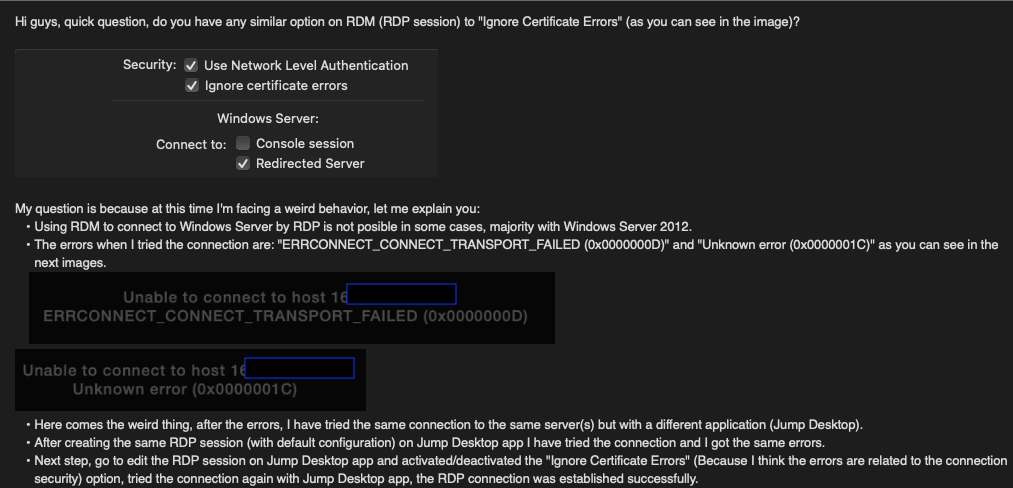
Hi guys, quick question, do you have any similar option on RDM (RDP session) to "Ignore Certificate Errors" (as you can see in the image)?
My question is because at this time I'm facing a weird behavior, let me explain you:
Using RDM to connect to Windows Server by RDP is not posible in some cases, majority with Windows Server 2012.
The errors when I tried the connection are: "ERRCONNECT_CONNECT_TRANSPORT_FAILED (0x0000000D)" and "Unknown error (0x0000001C)" as you can see in the next images.
Here comes the weird thing, after the errors, I have tried the same connection to the same server(s) but with a different application (Jump Desktop).
After creating the same RDP session (with default configuration) on Jump Desktop app I have tried the connection and I got the same errors.
Next step, go to edit the RDP session on Jump Desktop app and activated/deactivated the "Ignore Certificate Errors" (Because I think the errors are related to the connection security) option, tried the connection again with Jump Desktop app, the RDP connection was established successfully.
Next, close the Jump Desktop RDP Connection and close Jump Desktop App.
Go to RDM app, tried the RDP connection to the same remote server, now the connection was established successfully.
Why my post is weird, because I have to open the RDP connection with a third party app first to be able to open the same connection with RDM, obviously I tried the same procedure after rebooting my MAC Computer, the result is the same, I need to open the RDP connection with a third party app first to be able to open the same RDP connection with RDM.
Based on the errors, I think the error is related to the way RDM manage the security layer on the RDP connection, based on that I'm here asking you about any option similar to "Ignore certificate errors" on RDM.
Thanks in advanced.
QUICK UPDATE
I downloaded the RDM app on mi iPAD and iPhone, tried the same connection, both attempts were completed successfully, the RDP connection is working as expected, but still failing on my MAC (M1 - SONOMA)
.
.
.
.
.
.
.
.
.
.
Here an image of my post, this is because I noticed the images on the original post (body) were lost.
.
Copy through RDM RDP protocol too slow
Today earlier I installed the Update for RDM (Version 2023.2.9.1)
Downloaded the Microsoft Remote Desktop App on my Mac.
Test with Microsoft Remote Desktop app:
On the Microsoft Remote Desktop App configured the RDP session to the Windows server and, configured the "Mapping Local Folder" also.
On the RDP Windows Session I'm able to see my Mac Local Disk mapped on the windows Server.
Start copying a 300 MB files from Mac Disk to Local disk on the Windows Server, the transfer rate is working as expected (See first image), the RDP session is stable, I mean it respond to others requests such as clicking on other windows, opening other apps, etc.
Test with Remote Desktop Manager Free:
It appears the copy transfer rate is better at this time (See the second image), however the RDP session continues weird, Too Slow Behavior, for example, when I click on any window it takes around 20 seg to respond. After the copy task ends, the RDP session returns to a Stable behavior.
Image using Microsoft Remote Desktop App
Image using Remote Desktop Manager Free
Copy through RDM RDP protocol too slow
Info
Computer: MAC M1
OS: Ventura 13.5.1
App version: Remote Desktop Manager Free (RDM) 2023.2.8.1
Problem
I have several RDM RDP sessions already created to connect Windows Servers 2019&2022
MAC computer and Windows Servers are using the same network subnet.
Some of the RDM RDP sessions have configured the option to share my MAC local disk through RDP protocol, on a specific folder.
On those servers with the "share local disk" enabled I started the RDM RDP session, I'm able to see the MAC local disk mapped on the RDP Session (Windows Explorer).
My next action is to copy any file (50 MB for example) from remote MAC disk to the local disk on the Windows Server.
The copy task starts without any problem however, the RDP session starts acting weird, too slow and, the copy task starts running too slow also (Less than 600 Kbps).
The error occurs with all the RDM RDP sessions I already have configured.
Just to be sure the problem is not related to the network performance I used another computer with Windows 10, starts the Microsoft Windows Remote Desktop app, configure the Windows RDP app to share my Windows 10 local disk to the remote server (same server configured on the RDM RDP Session), start the session, opened the Windows Explorer app on the Windows Server, copy and paste a file (50 MB) from the remote disk to the local disk on the server, the copy task starts without no issues on the RDP session, RDP session performance is stable, transfer rate major than 1Mbps.
Also, on the Windows 10 computer I installed Remote Desktop Manager app, start the same steps: starts RDP session to the same windows server, RDP session performance is stable, copy task between Windows 10 remote disk to the Windows Server local disk runs without any problem.
Somebody can help with this error on MAC environment (copy tasks using RDP Protocol).
Thanks in advanced.
MAC RDM (2022.2.5.0)auto focus when working on another application
Hi Xavier,
I'm using a Local Data Source with Auto refresh option = 0 sec (Same as your image).
MAC RDM (2022.2.5.0)auto focus when working on another application
My apologies, the correct scenario is:
Using MAC M1 Computer with RDM FREE (2022.2.5.0)
I have a VNC Session created and started, this session is connected to a WINDOWS 10 computer
I moved to my email application on my MAC (VNC still connected)
5 minutes later (Approximately) the VNC Session gets the focus automatically, I have noticed it happens when:
VNC lose the connection and reconnect it automatically.
Occurs without explanation
Thanks for your support.
MAC RDM (2022.2.5.0)auto focus when working on another application
Hi guys, I'm facing another annoying behavior from RDM, specifically on RDP sessions, let me explain:
MAC Computer
I have a Windows RDP Session created and started
I moved to my email application
5 minutes later (Approximately) the RDP Session gets the focus automatically
I have been reading another very old topic ("RDM steals focus" - 7 years ago) with the same problem, and the solution was to disable the "Focus content on application activation" option, however that option is not available on the MAC RDM (2022.2.5.0)
I would like to know if this behavior can be disabled.
Thanks in advanced
RDM Free Freeze around 1 min on Copy/Paste task
Hi Richard, no I'm not using a third party software to control clipboard from my Mac.
Quick note: I have been doing the copy and paste activities inside the windows server (Most Frequently), some times from my Mac to Windows (Less Frequently), in general the behavior is the same.
Thanks in advanced.
RDM Free Freeze around 1 min on Copy/Paste task
Hi guys, I'm facing a small problem with Remote Desktop Manager Free, let me explain:
Escenario:
MacBook Pro M1 Computer
RDM Free Version 2022.1.12.0
A Remote Desktop Session created from mi MAC to a Windows Server - Same Subnet
Login to the Windows Server = OK
General activities on Windows Server = OK
Error:
Open notepad, Windows Explorer, or any other application inside Windows Server
Right Click on any folder, txt file, image, text from notepad and click copy/paste (in general any copy activity with Right Click mouse).
On clicking Copy option after Right Click the screen freeze from around 1 min, same behavior with PASTE option (Less frequently).
Based on the description, the problem is that the RDM FREE freeze with copy or paste option inside windows servers by at least 1 min.
Hope hear from you..
Devolutions products vs Apple MAC Silicon
Hi,
As you know a new version of Apple computers (ARM/Silicon) are coming soon, so I just want to know if Devolutions products (e.g. Remote Desktop Manager) are going to be compatible with it.
Thanks in advanced.