
joergziebell
Default Template Settings
Hello Etienne,
thank you for this information.
Best regards
Joerg
Default Template Settings
Hello together,
I did some resarch, but did not found a hint.
Question: I have changed some settings in the Default Templante for RDP (e.g. do not forward local Harddrives to the remote session)
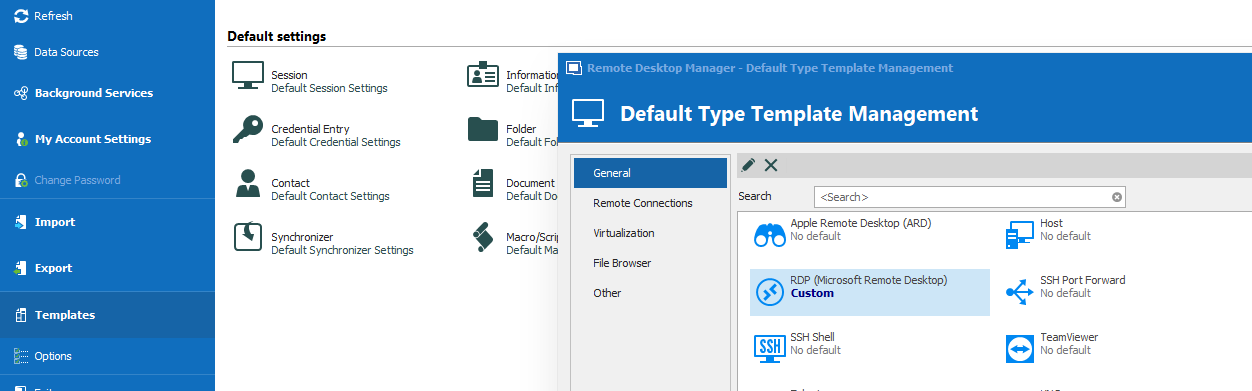
When I create a new RDP-session then these defaults are correctly in the definition.
But when another user is adding a new RDP-session, then he do not get the new defaults. (He started the RDM new after the changes to the default template were done)
Do I miss something ?
I expected, when the default template is changed, everyone who uses this template get the changed settings.
Thanks for your assistance.
Best regards
Joerg
Question regarding starting multiple RDP sessions
Hello Etienne,
sorry for my late reply.
Regarding the screensizing: Thanks for the hint. It's not working when I set the values as you suggested, but it seems to work correct, when "Screen sizing mode" is set to "Smart sizing" and leaving "Remote Desktop size" on "Automatic".
Regarding the opening sessions in background, your settings do not work. When I have time I will check different combinations to see, if the behavour can be changed to the same way as the RDCM used to work.
Thanks for your assistance.
Best regards
Joerg
Question regarding starting multiple RDP sessions
Hello,
we have in one folder several RDP-Definitions for our terminalservers.
When I use the function on folder level, to start all sessions within the folder

then the screen-size for all sessions is not correct. I will get a horizontal and vertical scrollbar

When I open a single sessions by double-click on the session-definition directly, then the screens-size is correct

Is there a trick or is it a bug ?
And another question:
When opening all sessions within a folder, I have to wait until all sessions are opened. I can't start my work on the first opened sessions, because every new opened session will come to the foreground. Is there an option to work in one RDP-session and the others are opened "in background" (The good old Remote Desktop Connection Manager worked like this. You were able to work e.g. in the first opened session, and the other sessions will open but not be forced in the foreground)
Thank you very much in advance for your assistance.
Best regards
Joerg
P.S. We use the latest verison

Option to general disable the function "Show password" ?
Hello Hubert,
thank you very much for your feedback.
Yes, this soloution also would be helpful.
Best regards
Joerg
Option to general disable the function "Show password" ?
Hello Hubert,
thank you for your feedback.
For explanation: We use the software in a team and have defined our servers including the logins. There are servers, where the login is done with a general system-user, the password of these accounts is known by all IT-employees, so thats not a problem..
But there are several servers, where each IT-employee use his own personal credentials for server-login. In the session-definition whe have defined "use my personal login information". And here is the problem: If you leave your computer unlocked, another person could easily check out your password by using the function "Show password" for a session-defintion. (Yes, we have a clean desk policy, and yes, you can lock the application itselfe, but nevertheless this is a security issue. E.g. in Windows itselfe you can't see your password anywhere in clear text.)

And yes, also in the own credentials section, it should be possible to deactivate the "eye" function

In other words: Don't show the personal login-credentials in clear-text at any place in the software
It would rise the securty, if this could be implemented.
Thank you very much in advance for checking this.
Best regards
Joerg
Option to general disable the function "Show password" ?
Hello together,
we use RDM Enterprise with MS-SQL-Database.
Is there an option to disable "show password" even for Administrators and even when it's the own password from the "personal credentials" ?
Best regards
Joerg