
medwards75
Black screen on Macbook after switching between full screen apps after last RDM update

Black screen on Macbook after switching between full screen apps after last RDM update
As soon as I submitted what I said above it all went downhill again. I was logged onto the Macbook from my PC, using VSCode on the mac, and when I change which file I'm viewing within VSCode it now triggers the black screen and 'Connection lost..' message. Switching files just a couple times caused it to happen with no recovery. I'm just staring at black screen with the 'connection lost...' message now.

to make matters worse, once this happened, I couldn't even re-connect it myself. RDM is locked up. This is unusable.
Black screen on Macbook after switching between full screen apps after last RDM update
Honestly, I got tired of the issues I've had and got a KVM switch. But sometimes I need to copy/paste from PC to macbook, so I downloaded the new version you linked above and quickly tried it. Only messed with it for a minute or so, but it appears that you guys added some recovery code for when this happens. When I navigate through the screens it will sometimes turn black, but now only for a split second and I can see a message flash on the screen (something like 'connection lost, trying to re-establish' or similar). So far the recovery has worked each time it has happened.
Black screen on Macbook after switching between full screen apps after last RDM update
The exe you linked will not let me use the program without a license. I'm using the free version of RDM.
Black screen on Macbook after switching between full screen apps after last RDM update
catalina 10.15.6
Yes, I've recreated the entry twice. All I have to do is make a few things full screen, and then Ctrl + arrow back and forth a few times and the RDM screen goes black.
Black screen on Macbook after switching between full screen apps after last RDM update
No, it says 0 logs, even right after I trigger this to happen.
Black screen on Macbook after switching between full screen apps after last RDM update
No, I just know that it prompted me to update maybe a month ago and it's been like this since.
Black screen on Macbook after switching between full screen apps after last RDM update
When checking that I saw the newest version is 2020.2.20. I upgraded and still have the same issue.
Black screen on Macbook after switching between full screen apps after last RDM update
2020.2.19.0 64-bit
Black screen on Macbook after switching between full screen apps after last RDM update
The first one - on Win machine to connect to a Mac. It worked fine until the latest update. And I can trigger this from RDM or on the Mac itself. In other words, if RDM session is open on my windows machine, I can go to my actual Macbook, switch between full screen apps, and this causes the RDM session on my Windows machine to go black. On the Macbook everything looks fine.
Black screen on Macbook after switching between full screen apps after last RDM update
This started happening immediately after the lastest update. I log onto my macbook pro via RDM on my windows machine. When I use ctrl + left/right arrow to switch between fullscreen apps, the RDM screen goes black and I have to disconnect the session. It doesn't always happen the first time I try it, but usually within the first few. Pretty frustrating.
Occasional Display Problem
The only settings I changed are to allow the windows key to be used by the mac and for the session to start undocked. I'm new to macs and not sure what the resolution is and the settings don't appear to clearly tell you for retina screens. If I go to the display settings I have it set to default. If i select Scaled and then hover over Default, it says "looks like 1440x900"
Occasional Display Problem
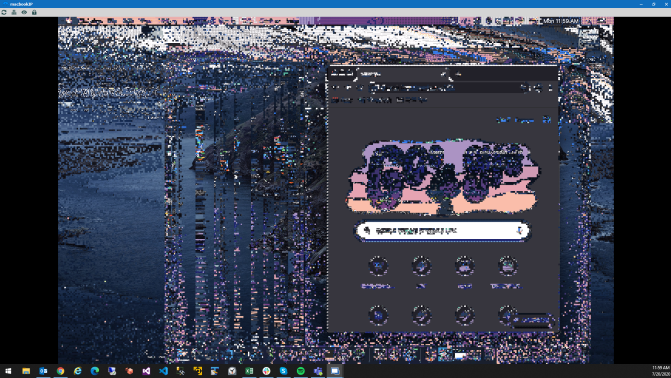
Hi - One minor issue I've had is that occasionally the display will suddenly deteriorate into a pixel mess. Is this a known issue? Any way to prevent it? The reason I say it's minor is that it usually only happens once or twice a day, and I can quickly fix it by closing and re-opening the session.
Here are my usage details:
I'm connecting to my macbook from my windows PC. Both computers are on my home network, the macbook via wifi. I set it up using ARD. RDM version is 2020.2.15.0 64-bit. macOS is Catalina 10.15.5.
I've attached an image of what it looks like when it happens. The messed up pixels move around if you drag windows around, etc. It's pretty weird.
No longer will connect to host
Due to your question I looked up the macbook's local IP address and created a new entry using that instead of the computer name. This worked. Not sure why I would have to use IP when name worked up until today, but it's now a curiosity instead of an emergency :)
No longer will connect to host
Both computers are on my home network, the macbook via wifi. I'm not sure if the IP address changed (not by my doing if so), but I'm not using the IP address. I'm just connecting using the macbook's name. I set it up using ARD. RDM version is 2020.2.15.0 64-bit. macOS is Catalina 10.15.5. Thanks.
No longer will connect to host
I've been using RDM to connect to my macbook from my windows PC. It's mostly worked without issue until this morning. When I try now to start a session it gives an error saying it can't connect to the host. This happened once before and I deleted the entry and recreated it. This time that is not working. Reboots aren't helping either. Anything to try?