Occasional Display Problem

Hi - One minor issue I've had is that occasionally the display will suddenly deteriorate into a pixel mess. Is this a known issue? Any way to prevent it? The reason I say it's minor is that it usually only happens once or twice a day, and I can quickly fix it by closing and re-opening the session.
Here are my usage details:
I'm connecting to my macbook from my windows PC. Both computers are on my home network, the macbook via wifi. I set it up using ARD. RDM version is 2020.2.15.0 64-bit. macOS is Catalina 10.15.5.
I've attached an image of what it looks like when it happens. The messed up pixels move around if you drag windows around, etc. It's pretty weird.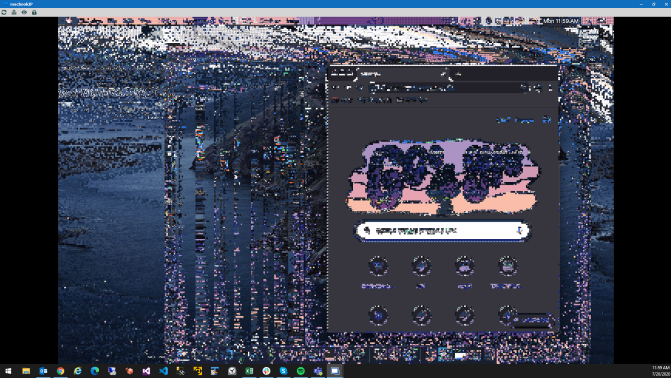
screen.png
All Comments (6)
Hi medwards76,
I'll be looking into that shortly. In the mean time, I'd like to have a little bit more details about you session.
- Are there any specific settings you might have changed in the connection settings?
- What's the resolution in the remote computer (macOS)?
Regars,
Philippe Paré
The only settings I changed are to allow the windows key to be used by the mac and for the session to start undocked. I'm new to macs and not sure what the resolution is and the settings don't appear to clearly tell you for retina screens. If I go to the display settings I have it set to default. If i select Scaled and then hover over Default, it says "looks like 1440x900"
Hi again,
thank you for the information. I've opened a ticket and will update you when I have news about the issue.
Regards,
Philippe Paré
Experiencing this as well after upgrade to Catalina. Connecting from my Windows 10 machine to an iMac that was just updated. Seems to be doing it constantly.
RDM v. 2020.2.17.0
Catalina 10.15.6
This also just happened on a Mojave based iMac as well so might be something with the latest build?
Thanks
Hi Dneville,
We are actively investigating the issue, but it looks like a protocol modification they made. We will update you once we find something. Thanks for the information!
Regards,
Philippe Paré