
CU
Cached/Offline did not work for RDM with Devolutions Cloud Datasource
What wonders me, we are using SCIM provisioned users, and all had the "no" but not the "Default: No" selected
so changing the Default didn't change their setting to yes because they had the "wrong" no selected.
Changed it now to Default yes and, luckily we didn't have that much users yet so all are changed to Default: Yes by hand
But this wrong default looks like a bug for me
I'll verify that with a new user (don't know i I'm able to check this by this week)
Cached/Offline did not work for RDM with Devolutions Cloud Datasource
Ah, found the default setting
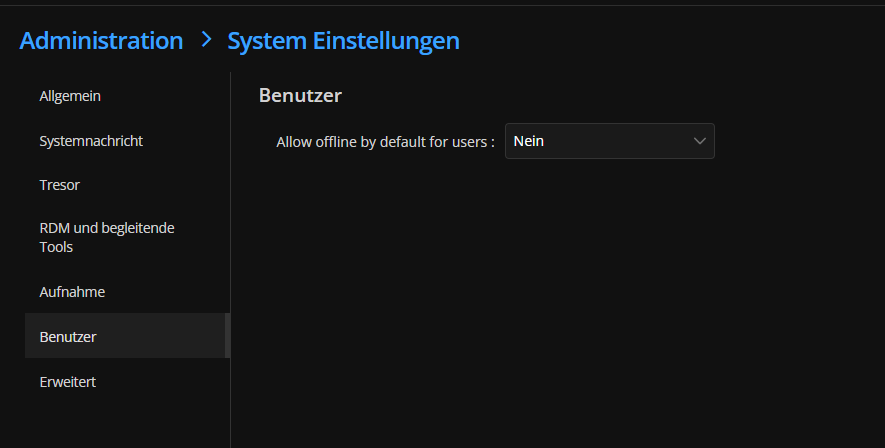
have changed it to Yes
Can we change that in batch for Existing Users?
Cached/Offline did not work for RDM with Devolutions Cloud Datasource
ok looks like the Allow Offline in the User settings is set to "no" but not to Default (which is also no...)
Do we have to enable that for every User manually?
Cached/Offline did not work for RDM with Devolutions Cloud Datasource
Since Cloudflare just had some issues we lost the Connection to our Vault.
What i would expect that when I restart RDM i can select offline and continue to work with the Cached vault.
What I got, a greyed out Offline Button and a non working Online connection.
Cache is setup to 7 days and i was connected right before... so what did I do wrong?

Problems with Import Keepass and Bitwarden Enterprise
Hi,
i just doublechecked that with the version 2025.3.21.0 and it looks like it is working now?
Maybe this was also fixed in one of the releases after the 2025.3.16.0, in that version i tested the xml import for KeePass and it wasnt working.
So that part is resolved ;) Thanks
Still looking forward for the version with bitwarden company vault import
Problems with Import Keepass and Bitwarden Enterprise
heyho,
I know that you are working on the Problem :)
But could you tell me maybe an ETA for that?
We now bought more Licenses and are in the Setup-phase of everything
But we cant start the Migration before we moved the ~5000 Entries ;)
Problems with Import Keepass and Bitwarden Enterprise
Heyho, i just tested it again with the Version 2025.3.20.0, the issue still persists.
Do you have maybe an ETA for the bugfix?
Hide Entry type in Vaults
Hi, thanks for your answer.
Could that be added to Feature Request?
Problems with Import Keepass and Bitwarden Enterprise
I could import the KeePass xml over the website, into my personal vault
but then all folders where gone, that worked over RDM, including the folders
but RDM is not available for everyone here
Also the result differs, at least the XML is valid, but the Import with folders is something i would expect from the Hub Importer ^^
Bitwarden still is not possible to import
Hide Entry type in Vaults
Is it possible to hide specific Entry Types in Hub for Business?
I know that this exists in RDM but couldn't find it in Hub Business?
We don't need that Cryptocurrency and Firearms entry and would like to hide that in all Vaults.
Or did i just didn't find that option?
Problems with Import Keepass and Bitwarden Enterprise
Hi,
we are currently implementing Devolutions Hub Business and I wanted to test the Migration of Bitwarden Enterprise and Personal KeePass files.
For Bitwarden I exported the Org Vault as JSON and after i saw that json is not supported by the Hub Importer, again as csv.
The csv showed no data in the Hub Importer? (nor an error message)
Is the Import of a Company Vault from Bitwarden supported?
(csv is filled with data)
Also same issue for KeePass 2.59
tried to export as XML, loaded in the Hub Importer, no entries shown, also no error
Tried the same as csv, it shows some entries, but stops because of the csv formatting (contains line breaks)
The Personal KeePass is not good, but mostly solvable, the broken Bitwarden Import is an huge issue.
Tested with Devolutions Hub Importer Version 2025.3.16.0
Bitwarden Synchronizer und Personal Vault
dabei handelt es sich um einen Bug. Ein Ticket wurde dafür bereits erstellt.
Danke für die Rückmeldung!
Bitwarden Synchronizer und Personal Vault
Moin,
ich teste grad mit dem Bitwarden Synchronizer rum und wollte dabei meinen Personal Vault im Bitwarden in meinen Benutzer-Tresor synchronisieren.
Bei der Zielauswahl steht oben auch "Mein Benutzer-Tresor" es werden mir allerdings die Ordner aus dem Normalem Tresor (im RDM) angezeigt?
(Meine Ordner aus dem Benutzer Tresor tauchen nicht auf)
Bug? oder mach ich was falsch?
Geht es überhaupt den Personal Vault aus Bitwarden in seinen Benutzer-Tresor zu Syncen?
Grüße