
(user deleted)
Automatic multi-step authentication
Thanks again for your guidance on this. It is very much appreciated!!! I hope this will help others as a work around that like to use embedded over external.
Have a good rest of your day, and thanks again!
-Kris
Automatic multi-step authentication
The macro worked. I put in for the enter command and played around with the delay. instead of using the username/password part.
Did not need this:

My question with this, is even though I am only using the macro for the enter command without the username password part, will it still be less secure and show password with how I set it up below?

RDM freezing every day
Erica,
I have uploaded the dump file as you had instructed for the free version. I have not had time to try and do this with the enterprise version yet.
Thanks
-Kris
Automatic multi-step authentication
Most of the sites are specity sites such as Point Click Care (our EMR/EHR), Softwriters (pharmacy software help center), Omnicell portal (Emergency drug box portal), dea lookup.
So I am not sure how helpful I can be with providing an example that you would be able to login to.
A good one would be the RDM login from the original poster. I am able to get it to enter the username, then moves to the password. It will enter the password, but cant get it to do the 2nd 'enter/submit' to finish the login process. Its better than nothing but still kinda annoying.
RDM freezing every day
Erica,
Thanks for the quick response. yes the trial licenses would be helpful. Once you are able to provide me with the trial keys, I can get everything spun up rather quickly for testing.
I will leave my RDM open overnight and then send you the dump file.
I do appreciate this, as RDM is something that I have been pushing for, for quite some time.
Thanks
-Kris
RDM freezing every day
Hello Richard,
I currently am running version 2022.2.20.0 64bit Free edition. I am also having the issue if I leave RDM open for a while it goes unresponsive or leave it open over night I have to kill it in task manager and reopen. When I had the version you spoke of and other versions I had freezing from time to time but nothing like this.
I do realize that I am close to the 5000 mark for entries, but I have had roughly the same amount for the past few years. I have tried splitting my current data source into multiple to cut down the number of entries, but that did not help at all. I checked the logs and they are clean. I have clean slated RDM off my machine and reinstalled. I am using the 64bit exe. No luck as it still is freezing.
The biggest problem is I having been working on getting the enterprise version approved since a few of us are currently using and testing. I am at the point where I need to install RDM on the rest of my teams computers to start using this. With it freezing the way it is, it would be a big turn off for alot of my team members and would undermine what I am trying to do.
Any help would be appreciated so I can get this running smoothly again. I'd really prefer to not downgrade if at all possible.
Intel core i5 6200u
16g 2400 DDR4
256 NVME WD SSD
HP Probook 650g2


Automatic multi-step authentication
Jeff,
I realize this is a bit older of a post, but is there a way to do this without having to pop up externally? I am trying to keep as much within the program as I can without having to fumble through external windows. unfortunately It seems this is becoming extremely common to have the login windows like this...
Thanks
-Kris
How to manage auto logon/fill in in RDM if website form load is in 2/3 or more phases?
Ok so I have a little bit of an update since i have been playing around with this. I am able to get it to fill in the username and then the password, but not able to get it to do a second 'enter' to finish the login process. Any idea on what I can do to get the second enter after it fills in the password?
How to manage auto logon/fill in in RDM if website form load is in 2/3 or more phases?
Hi Samuel,
Yes, they both were.
This is one I am in more than anything when I have to get client ID numbers to enter when doing integrations. It used to work until they changed over to this new annoying box...
https://www19.pointclickcare.com/home/login.jsp?ESOLGuid=40_1660852406088
Here is the one from screen cap.
Thanks
-Kris
How to manage auto logon/fill in in RDM if website form load is in 2/3 or more phases?
Also, I tried your Outlook office 365 login - export. I do not believe it is still working. I just tried it in my venture to my previous post on this topic.
How to manage auto logon/fill in in RDM if website form load is in 2/3 or more phases?
This is as close to what I am trying to do but does not have MFA. The ones i am looking at you have to actually click Login before the user/pass comes up.
For example, this is what I am trying to figure out.

Alot of the stuff I usually have to login has forms like this. I was thinking I probably going to have to script this, but I am NOT fluent with Powershell. I have tried using the custom fields, by leaving the user/pass blank, putting the ID in, then on the second I add the user/pass with the enter/submit. didnt seem to work. I have also tried putting a slight delay on it, which did not seem to help either.
The other forms with multiple steps such as "Click login to begin > enter username > enter password" then takes you to your portal or whatever. No MFA, OTP, or anything like that.
If you are able to help me it would be appreciated.
-Kris
CSV headers for asset information fields
I will try it. Thank you!
CSV headers for asset information fields
Sorry for the extremely late response.
Yes, but I am not very Powershell savvy. I was attempting to have lansweeper export information to CSV, and then have RDM import it via scheduled task since from what i can see there is no direct integration/API.
I wanted the CSV headers so i could map everything correctly.
CSV headers for asset information fields
I a working on creating our master CSV for computers to move our asset information over to RDM. I have figured out a few and used the ones i found on the "How to build a csv page", but I am struggling with ones that were not listed on the web page
Is there a list of all of the supported CSV fields within RDM? I am not looking for custom fields.
Any help would be great!!!
RDM-2021.1.38.0 x64
Template HOST-Field issue
Thanks for getting back so quickly. Just to confirm, when this is fixed a host with a name of "COMP-17" would import as "COMP-17@AD" correct?
Template HOST-Field issue
https://forum.devolutions.net/topics/34442/rdpm--template-host-field#144640
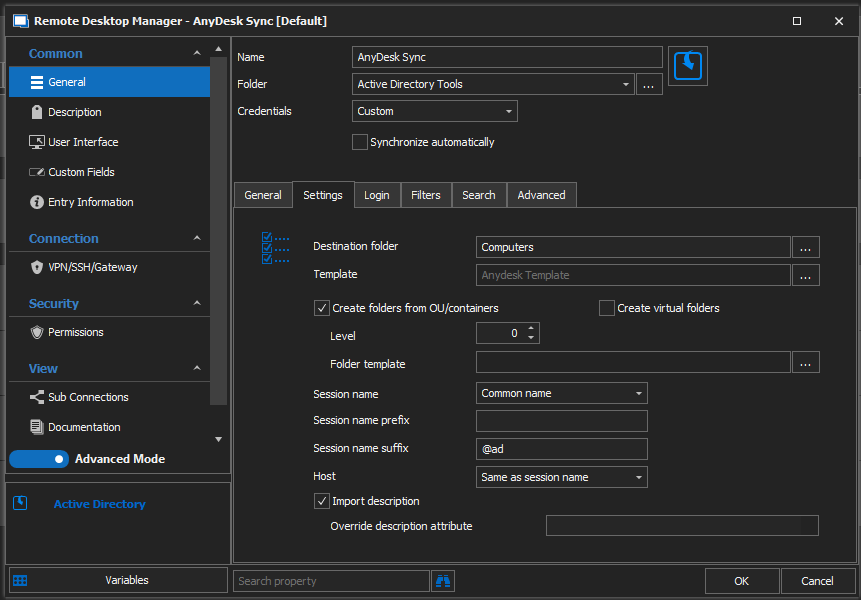
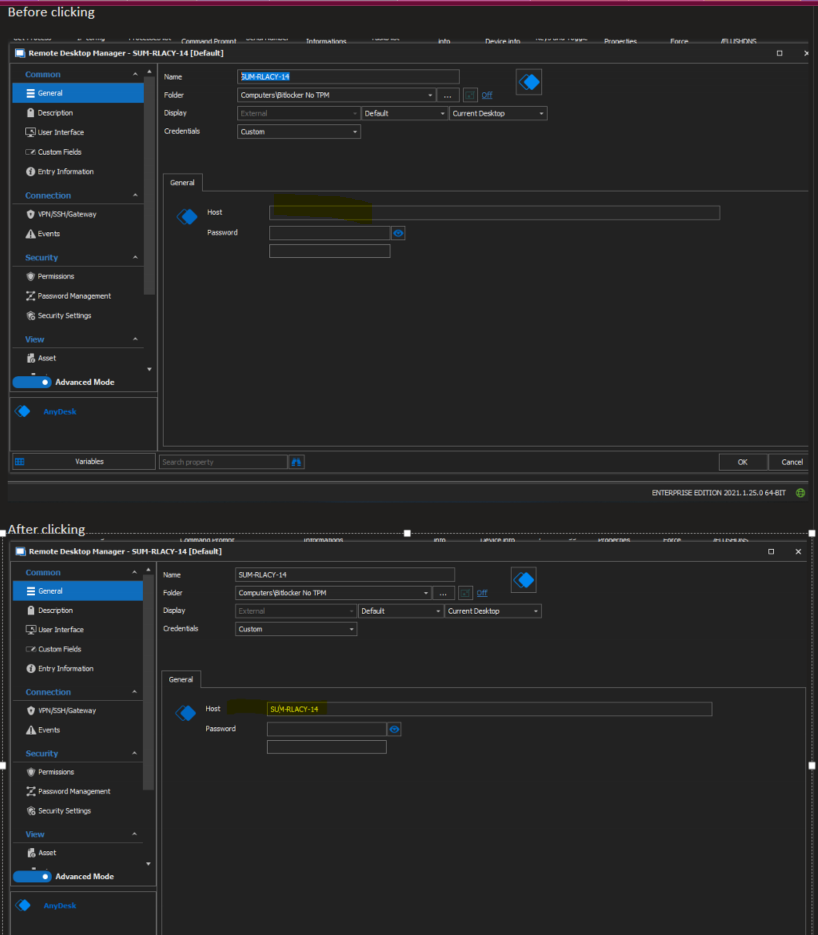
I posted an issue about a similar issue with the inventory synchronizer before which i have included. I am currently having this exact issue with my synchronizer for anydesk. It populates all the OU's, folders, and computers just fine, but all "Host fields" stay blank unless each entry is opened and then clicked. It also is not adding the suffix to the host field after clicked.
Anydesk defaults with us having to have "@ad" at the end of every host. Frustrating but not much i can do since high ups dont want to pay to get rid of it... Is there a way to get each host to add the "@ad" to add at the end?
My version of RDM
V2021.1.25.0 x64
i have been trying to get this to work since version 2020.3.29.0
I have tried this on a new vault
I have recreated and created new entry
I have installed on a different computer, created everything, and ran it. same result.
Tried having the "Session name suffix" populated, it does not do anything
Auto Sub Connections
I apologize up front if im doing this wrong. I am trying to do something similar to what i found in this post.
https://forum.devolutions.net/topics/24825/open-sub-connections-automatically
Basically what i would like to happen is when i remote into the clients host server is to get to the phone server's and voicemail server's Dashboards and have them open automatically. I have been playing around with the sub connections but cant seem to get them to open. Client is on a different domain, and i only have access to this one host on their network. The phone server and voicemail servers are Cisco Call Manager.
I am currently having to login to the host and then open both. Id prefer to have them open in the nice tabbed ribbon within RDM.
Installed RDM: 2020.2.20
I have made a diagram if it would help.
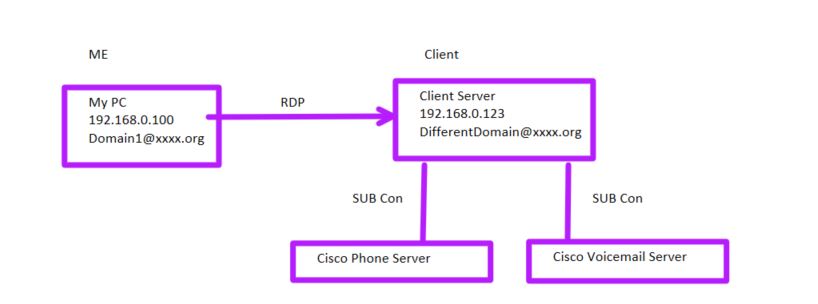
Any help would be really appreciated!! :)
RDPM - Template Host Field
James and Hubert, Thank you!
RDPM - Template Host Field
Hello,
what RDM version and datasource are you using?
Regards,
Min
Apologize for the late response. My RDM is "Enterprise 2020.2.20.0 x64" and data source is MS-SQL. Database itself is SQL2019 Enterprise.
RDPM - Template Host Field
New to the forums and templates in RDPM so apologize in advance.
Having an issue where i made an "AD Sync" using an "Inventory Template" i created. I did not use any custom fields. Works great as long as once the sync is done I go under each entry and click the "Host" field and click ok. If I do not the Host field does not populate. If i would use a normal template with the same settings it works?
-I have tried all 4 options under Host, both under "Session name"
-filled in the user/domain/passwords
Nothing is seeming to solve this issueand Not sure what i am doing wrong?