
dsi1
Unable to create a FileZilla/SFTP entry with Devolutions.PowerShell for DVLS
Hello. I can confirm that the script works. I'm not sure how I'll be able to integrate it, but I should be able to manage.
Thank you very much for your help.
Unable to create a FileZilla/SFTP entry with Devolutions.PowerShell for DVLS
Sorry, but it's not working. I'm getting almost no value from the template entry. In particular, there's no "AddOn" property. I only get :
ConnectionInfo
SecurityGroupName
TypeDescription
TypeId
Just to reiterate, I can create the entry, but it doesn't contain some of the data I need:
Host IP address
Username
Password
SFTP protocol
Home directory
Unable to create SSH entry via API
Thank you for your reply.
I'm trying to use the PowerShell module. I've managed to create SSH and Web entries, but I'm having trouble creating SFTP/FileZilla entries.
I've created a new post about this.
Unable to create a FileZilla/SFTP entry with Devolutions.PowerShell for DVLS
Hello,
I am currently migrating automation scripts from Remote Desktop Manager PowerShell to Devolutions.PowerShell for DVLS.
I managed to create SSH and Web entries using New-DSEntryBase. Now, I am trying to automatically create FileZilla SFTP entries using New-DSEntryBase.
I successfully create the entry in DVLS, but when opening it from the Web UI or from RDM app, the entry is incomplete. There is no host, no username, no password...
What I already tested:
Creating entries manually in DVLS
Exporting existing entries using Get-DSEntry
Rebuilding the JSON payload manually
Using:
connectionType = "FTP" or "9"
connectionSubType = "FileZilla"
protocol/host/port/username/password fields
Cloning existing entries
However, exported FileZilla entries seem incomplete:
host is missing
username is missing
provider-specific settings are not visible
only minimal data is returned
I also tried using New-DSEntryBase -FromRDMConnection and integrate the input configuration that is used in my functional RDM PowerShell script but it fails because the cmdlet expects:
Devolutions.RemoteDesktopManager.Business.Entities.ConnectionInfoEntity
while New-RDMSession returns:
RemoteDesktopManager.PowerShellModule.PSOutputObject.PSConnection
My goal is to fully automate the creation of FileZilla SFTP entries in DVLS from PowerShell.
Could you please provide:
The correct JSON schema for FileZilla SFTP entries
The required connectionType / connectionSubType values
The recommended way to automate FileZilla entry creation in DVLS
Whether some provider-specific data is intentionally hidden from Get-DSEntry
Thank you.
Here is my non-functional JSON configuration :
$body = @{
    name = "SFTP - Test 01"
    group = "FOLDER01"
    vaultID = "00000000-0000-0000-0000-000000000000"
    connectionType = "9"
    data = @{
        host = "10.1.1.1"
        username = "sftpuser"
        protocol = 1
        passwordItem = @{
            sensitiveData = "MyPassword123!"
        }
    }
}Unable to create SSH entry via API
Hello,
I'm currently working with the Devolutions Server API (version 2026.1.14.0) and running into an issue when trying to create entries via the /api/v1/vault endpoint.
Specifically, I am unable to create entries of type SSH or WebBrowser. Each attempt results in the following error: "The specified entry type is not supported for creation."
The main difficulty I’m facing is that the available documentation at /dvls/api-documentation is quite limited. I couldn't find:
Concrete examples of request payloads for creating entries
A list of valid values for fields like type, subType, or the structure of the data object
Clear guidance on which entry types are actually supported for creation via the API
Given this, I have a few questions:
Is there a more complete or detailed API documentation available somewhere?
Is it currently possible to create SSH or WebBrowser entries via the API?
If direct creation is not supported, is it possible to create entries using templates (e.g., via a template endpoint)?
Any clarification or guidance would be greatly appreciated.
Thank you.
Issue accessing User Vault after SQL migration and authentication migration (DVLS 2026.1.11)
It works well in version with Devolutions Server Console 2026.1.12.0.
Thank you very much !
Issue accessing User Vault after SQL migration and authentication migration (DVLS 2026.1.11)
Hello,
I’m currently working on a migration to Devolutions Server (version 2026.1.11) and I’m encountering an issue with user vaults after the process.
Context
Source: SQL data source used with Remote Desktop Manager
Target: Devolutions Server (DVLS 2026.1.11)
Migration steps:
Full SQL database backup and restore to the new server
Data source migration using the DVLS console (SQL migration tool)
User authentication migration using the Authentication Migration tool (converted a SQL user to a domain user)
Current behavior
I can successfully log in with my migrated domain account
I have access to the Default vault and can see all entries without issues
However, when I try to access my User Vault, I get the following error:
Unable to load the data. Root is empty ConnectionNavigationManager.GetConnectionsTree
TypeError: Cannot read properties of undefined (reading 'tree')
Questions
Is it expected that user vaults are not migrated when using the SQL migration + DVLS migration tool?
Should user vaults be automatically recreated after authentication migration, or is an additional step required?
Is there a supported way to recover or migrate user vault data from the original data source?
At this point, I’m trying to determine whether:
the user vault data was never stored in SQL (e.g., local storage), or
it exists but was not properly mapped/recreated in DVLS
Any guidance or recommended approach would be greatly appreciated.
Thank you.
Unable to connect to data source
Thank you Jonathan for your help,
I haven't tried what you explained to me. We finally decided to install a new up-to-date Windows and SQL server to improve overall security. We have moved the database to this new server. All has been working fine since, even with the security level = 2.
Thanks again
Unable to connect to data source
Thanks for your reply (and sorry for the delay).
Your configuration as you gave it don’t work for me. I had to put CipherString = DEFAULT@SECLEVEL= 0 instead of 1, and then, it worked fine.
However, I'm not sure about the security implications of this setting…
Unable to connect to data source
Hello,
I have 2 users who are using the Linux version of RDM, and both cannot connect to the datasource. When they click on "Test Host", they get the following message:

The datasource is a Microsoft SQL server database. The connection works fine for Windows users.
It seems the problem appeared after updating Ubuntu OS from 18.04 and 20.04 to 22.04 for both users. They also both have the latest version of RDM (2022.3.1.3).
Devolution Web Login ne fonctionne plus avec Google Chrome
Bonjour,
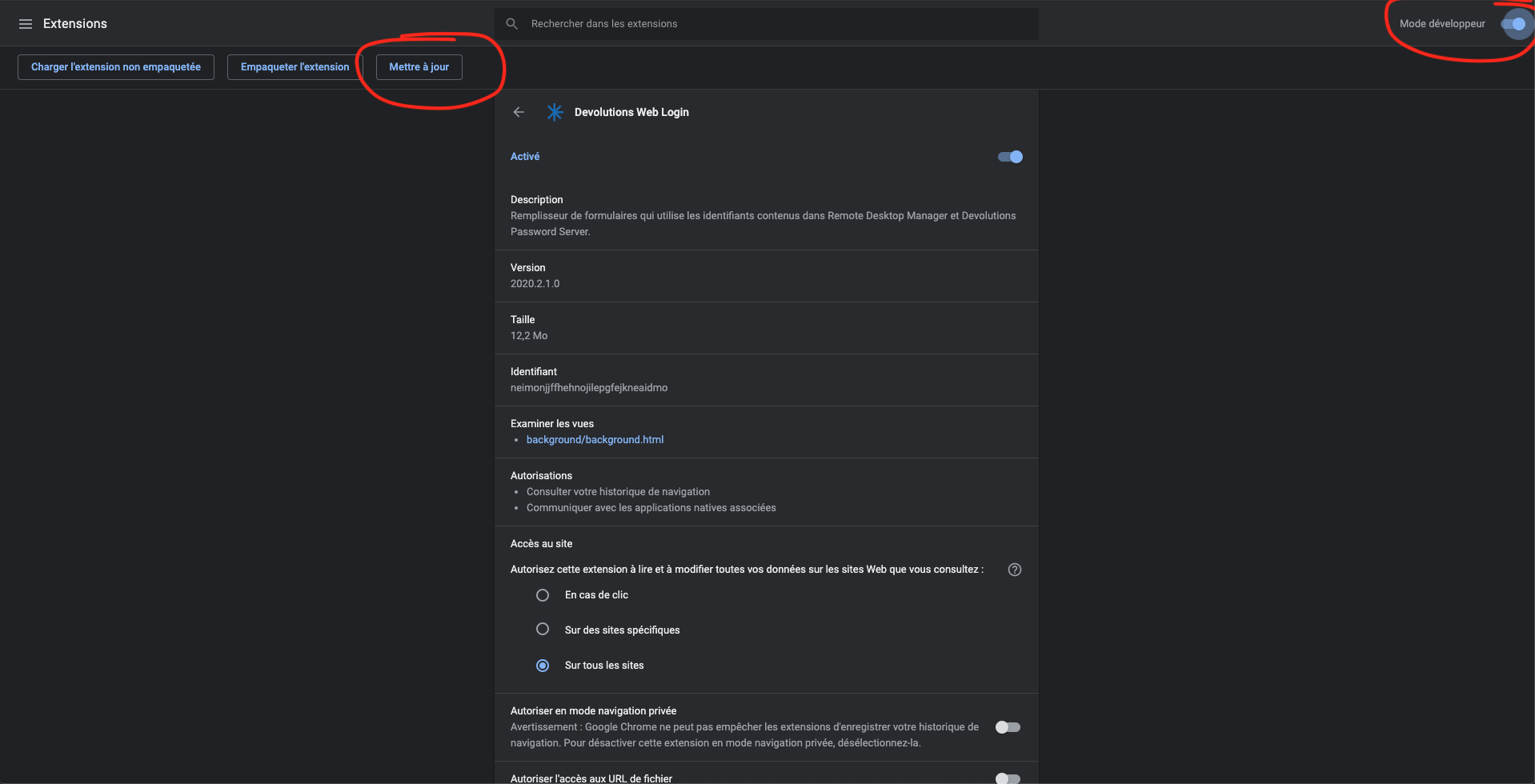
Le problème est résolu en forçant la mise à jours de l'extension sous chrome (Activation du mode debug/ mise à jour)
Devolution Web Login ne fonctionne plus avec Google Chrome
Bonjour,
Depuis ce matin l'extension chrome "Devolution Web Login" n'arrive plus à injecter les identifiants dans le formulaire de la page internet.
La connexion avec RDM fonctionne bien, Devolution Web Login nous affiche bien la liste des identifiants disponibles pour la page, mais lorsque nous cliquons dessus il ne se passe rien. A titre d'info, nous n'avons pas le problème avec mozilla Firefox par exemple.
Avez-vous connaissance de ce problème?
Cordialement,
Rodrigue