
tmashos
Configurable log cleanup lengths
We're having an issue with the amount of logs that are in the database. We have a process that logs into devolutions server quite often and that is making our DB grow quite large. I'm requesting the following 3 things
A configuration to stop logging access to database and log to file only
Configurable shorter than 1 month cleanup (maybe 1 week or less)
Ability to prevent logging for a single machine user
RDM Logging at Arch Linux with AUR package
There's a .rdm directory in your home directory (~/.rdm) that will have the log files as well as anything else needed for the application. Depending on the log level you set in the app you might need either of these files.
RemoteDesktopManager.log
RemoteDesktopManager.debug
2026.1.0.8-1 RDP issues
I just wanted to add that I had this same issue and setting it back to system resolved it for me. Running the Flatpak version of 2026.1.0.8
splash is clear
This isn't a huge deal or anything, but still a bug. The splash window on loading is clear, which is noticeable when you move it around. This is on 2023.3.1.9 on Arch Linux KDE Plasma
RDM Search hangs application in 2023.2.2.4
Yep I've updated and this has fixed the issue.
RDM Search hangs application in 2023.2.2.4
Using search in 2023.2.2.4 causes the application to hang and must be forcefully terminated. Rolling back to 2023.2.1.6 resolves the issue. This is using a Microsoft SQL data source over a VPN with 5800 entries on Arch Linux
RDM closes while starting [Manjaro]
As we are not the maintainers of the AUR repository, we cannot say when it will be updated.
You could be, when an update comes out all I do is update the version and sha256sum, recreate SRCINFO and push to the repo. Or you could email me, I'm sure Devolutions has my email address.
Extra button in version restriction prompt
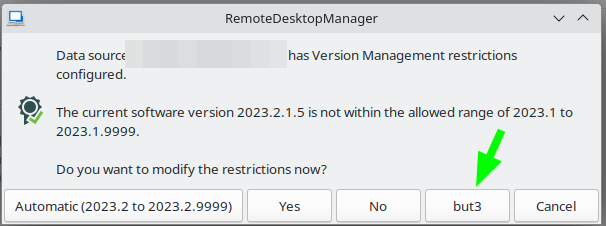
Self explanatory screenshot
Application crash on specific terminal text
Also I just noticed it only crashes after I hit a keypress (i've tried enter and space) after catting the file in step 3 of the repro steps. If I don't hit a keypress then it doesn't crash (until I hit it)
Application crash on specific terminal text
Hmm, the server I'm connecting to is nothing special. It's a CLI only Centos 7.9 server. The laptop I'm connecting from is an updated Arch Linux running KDE Plasma on X11. Shouldn't be really any differences on the Session in RDM other than we changed the font type for terminal sessions.

Cannot clear licensing messages
It seems I'm unable to clear these messages. The X on the right does nothing, neither do the "Don't show this message again" buttons. Show licences and register product both work though.

Application crash on specific terminal text
Here's the contents of that file, although I was unable to reproduce the issue by just copying and pasting this into a file

Application crash on specific terminal text
Using 2022.3.0.8 attached to an SSH session.
I'm getting the following error on KDE when I get specific output from the crowdsec command. I was able to reproduce the issue by just doing cat on the attached file (which is that crowdsec output)
NullReferenceException - Object reference not set to an instance of an object.
at Devolutions.Protocols.Xterm.DrawCombined(SKCanvas canvas, String combined, Single x, Single y)
at Devolutions.Protocols.Xterm.DrawSpan(SKCanvas canvas, Span span, Single x, Single y)
at Devolutions.Protocols.Xterm.DoPaintSurface(SKCanvas canvas)
at Devolutions.Protocols.Xterm.OnPaintSurface(SKPaintSurfaceEventArgs e)
at SkiaSharp.Views.Gtk.SKDrawingArea.OnDrawn(Context cr)
at Gtk.Widget.Drawn_cb(IntPtr inst, IntPtr cr)
---- Steps to reproduce ----
Upload the attached test.txt file to a linux server
Connect to the server in RDM Linux
run `cat test.txt` (You may need to hit enter a second time for the crash to occur.)
Application crashes
NOTE: If you use something like tmux, the application will continue to crash every time you connect to that server until you go in (without using RDM) and clear that text from the terminal.
sha256 hash on download page?
How.... did I miss that. Thanks
sha256 hash on download page?
Can we get the sha256 hash included on the download page? I include this in the AUR package and currently I need to download the deb file and hash it myself. Would be more secure if it was posted on the download page (or somewhere on the devolutions site)
Get error when disconnecting from an SSH session
Hi Nicolas,
I'm typing exit in the SSH session.
Get error when disconnecting from an SSH session
Upgraded to 2022.3.0.4 and now I'm getting the following when disconnecting from SSH sessions. This is installed on Arch running KDE Plasma

2022.3.0.4 requires a database upgrade but release notes don't list that requirement
The release notes don't mention that an upgrade is required, however when starting the app it wants to upgrade the database.
SSH Input doesn't work when too many tabs open or when clicking on it's own tab
Using 2022.2.2.5 I've found 2 more ways that SSH input stops working.
--FIRST METHOD REPO STEPS--
Open a bunch of tabs in RDM. Enough that the scrolling arrows appear in the open tabs section at the top of the session (in my case, I opened 13)
Use the scrolling arrows to scroll left and right on the tabs.
You can no longer type in the SSH session
--SECOND METHOD REPO STEPS--
Open an SSH session. (I've reproduced this with 1 open and with more open)
Click on the SSH session tab that you currently have open
You can no longer type in the SSH session
Both steps can be worked around by clicking on a server in the server list on the left.
Can we go back to the old SSH app?
We have a fix concerning focusing issues with SSH/Telnet.
Hopefully, your issue is related to those and our fix will apply.
A new version should be released soon (2022.2.1).
Is there an ETA on that release? This focus loss issue is the most infuriating thing.
Can we go back to the old SSH app?
So I haven't pinpointed the replication steps yet, but for this issue
"SSH connections seem flaky. They appear to timeout (although stay open) and require me to close and reopen before"
The SSH connections aren't terminated. I'm just unable to click into them after switching away to another tab (not every time though, that would be too convenient).
If I open another SSH session (to another server), I'm usually able to click back into the session that wasn't working. Indicating that I'm not losing connectivity to the server, but something inside RDM.
Can we go back to the old SSH app?
Sure, that works for me.
Can we go back to the old SSH app?
Correct. If I just SSH from konsole I don't have this issue.
Can we go back to the old SSH app?
I didn't see a way to export without the host so I just duplicated it and removed it.
Can we go back to the old SSH app?
Hmm, that would be so nice. I wonder why it' s completely bonkers on my end.