Can we go back to the old SSH app?

Is it possible to use the old SSH application? I've got two issues that make it difficult to do my job
1) SSH connections seem flaky. They appear to timeout (although stay open) and require me to close and reopen before
2) Tmux split screen gets obliterated and bleeds into the other pane when dealing with lines longer than the terminal window.
All Comments (19)
Hi,
Unfortunately, no, it is not possible at the moment.
- The SSH backend didn't really change. What changed is the renderer on top of the protocol. You connection would probably be as flaky even you could go back. That being said, there might be some instability the new renderer doesn't handle as well. We will look into it. This is using the sql server + vpn setup?
- I've notified the dev in charge of our SSH implementation and he's looking into it.
Jonathan Lafontaine
Hi Jonathan,
Yes, this is the SQL server over VPN datasource. The connections are over VPN as well.
We've tried to replicate your tmux issue but couldn't get it to bleed.
What server are you connecting to? What font are you using for the client, size, distro?
Anything that could help identify the cause.
Jonathan Lafontaine
Steps to reproduce
- Set terminal font to "Ubuntu Mono" (I've tried some other fonts, but they look very weird and/or like garbage. I'm willing to try a different font if necessary)
- SSH to server
- Start tmux
- Split the terminal vertically (ctrl + b, Shift+")
- Switch to the top pane (ctrl + b, up-arrow). Note the line separator between panes
- Cat a log file with long lines (tail -n 1000 /var/log/messages should work)
- Note the disappearance of the line between panes. I've seen this bleed multiple lines across that "barrier"
- (now for the more extreme example)
- Clear the top pane (run the "clear" command) ## This isn't strictly necessary but shows the issue more visably. Maybe run "ls -l /" to give it some interesting data
- Switch to the bottom pane (ctrl + b, down-arrow) Note the line separator comes back between panes
- Cat a log file with long lines (tail -n 1000 /var/log/messages should work)
- Note the complete obliteration of the top pane
Here's what it looks like on my end when following these steps.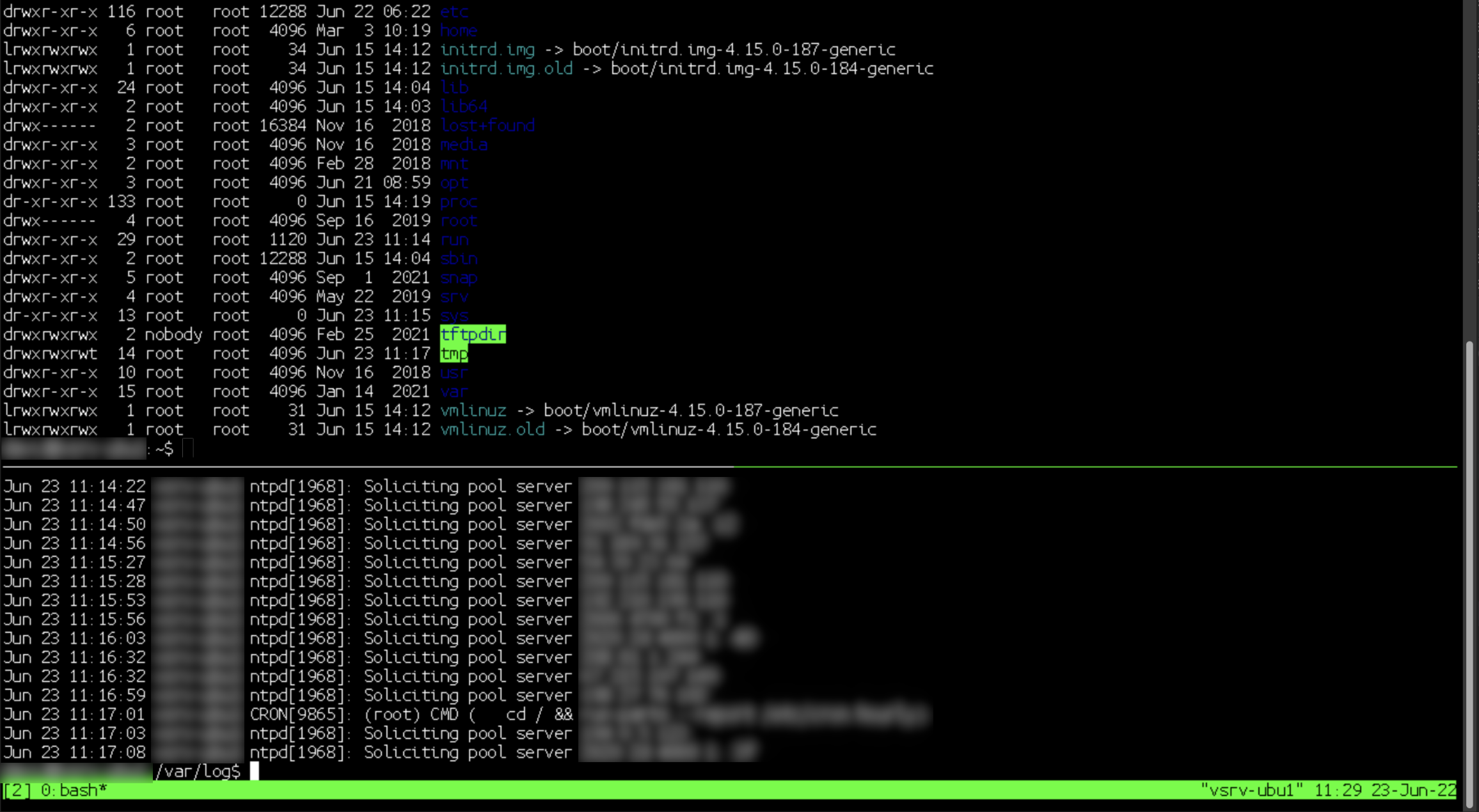
Jonathan Lafontaine
Untitled.png
Hmm, that would be so nice. I wonder why it' s completely bonkers on my end.
Could you export your session without host/username/password in case another setting is causing problem?
It might also be a setting on your server tripping our SSH client.
Jonathan Lafontaine
I didn't see a way to export without the host so I just duplicated it and removed it.
ESCLC.rdm
Same output with your session.
That would lead to the server tripping our client for some reason (as I assume other clients don't have this issue).
Jonathan Lafontaine
Correct. If I just SSH from konsole I don't have this issue.
Would it be ok if I sent you a custom build with SSH recording activated (and the output path hardcoded to Documents) so we could replay the session?
This recording doesn't store any password or keystroke. It is purely a replay of what the server sent to display.
Jonathan Lafontaine
Sure, that works for me.
So I haven't pinpointed the replication steps yet, but for this issue
"SSH connections seem flaky. They appear to timeout (although stay open) and require me to close and reopen before"
The SSH connections aren't terminated. I'm just unable to click into them after switching away to another tab (not every time though, that would be too convenient).
If I open another SSH session (to another server), I'm usually able to click back into the session that wasn't working. Indicating that I'm not losing connectivity to the server, but something inside RDM.
We have a fix concerning focusing issues with SSH/Telnet.
Hopefully, your issue is related to those and our fix will apply.
A new version should be released soon (2022.2.1).
Jonathan Lafontaine
We have a fix concerning focusing issues with SSH/Telnet.
Hopefully, your issue is related to those and our fix will apply.
A new version should be released soon (2022.2.1).
Is there an ETA on that release? This focus loss issue is the most infuriating thing.
Our release process has started. Unless we find a show stopper, it should come out this week or start of next week.
Jonathan Lafontaine
To possibly help alleviate your focusing issue.
When going back to your SSH session and the focusing seems to not have returned, press on the ALT key.
What seems to happen is Alt-Tabbing leaves the alt key pressed on the server and prevents regular key input.
Let me know if this help until we can release a version with a fix.
Jonathan Lafontaine
OS: Pop_OS 22.04
I am seeing the focusing issue as well on 2022.2.0.6
I am also seeing alot of SSH disconnects when one session has a connection issue, all other sessions get disconnected. This is especially bad when I have RDP connections open at the same time.
Hi,
Our next release (2022.2.1) should fix all focusing issues. It's currently in the testing phase and should drop soon.
Regarding your connection instability. Are you connecting through LAN, internet? Are you using a VPN or some kind of proxy?
Jonathan Lafontaine