
Casey
Remote Desktop Manager Crash Using Wayk Now Embedded
Since you seemed to have an idea the cause of the issue, I wasn't intending to post about any more crashes because we knew it'd happen eventually.
However, while it did take longer to crash, the recent crash did introduce some new errors, if that helps you at all:
Win32Exception - The current process has used all of its system allowance of handles for Window Manager objects

   at MS.Win32.SafeNativeMethods.SetTimer(HandleRef hWnd, Int32 nIDEvent, Int32 uElapse)
   at System.Windows.Threading.Dispatcher.SetWin32Timer(Int32 dueTimeInTicks)
   at System.Windows.Threading.Dispatcher.UpdateWin32TimerFromDispatcherThread(Object unused)
   at System.Windows.Threading.Dispatcher.AddTimer(DispatcherTimer timer)
   at System.Windows.Threading.DispatcherTimer.Restart()
   at System.Windows.Threading.DispatcherTimer.Start()
   at System.Windows.Threading.DispatcherTimer.set_IsEnabled(Boolean value)
   at System.Windows.Input.InputManager.InvalidateInputDevices()
   at System.Windows.Media.MediaContext.RenderMessageHandlerCore(Object resizedCompositionTarget)
   at System.Windows.Media.MediaContext.RenderMessageHandler(Object resizedCompositionTarget)
   at System.Windows.Threading.ExceptionWrapper.InternalRealCall(Delegate callback, Object args, Int32 numArgs)
   at System.Windows.Threading.ExceptionWrapper.TryCatchWhen(Object source, Delegate callback, Object args, Int32 numArgs, Delegate catchHandler)
   at System.Windows.Threading.DispatcherOperation.InvokeImpl()
   at MS.Internal.CulturePreservingExecutionContext.CallbackWrapper(Object obj)
   at System.Threading.ExecutionContext.RunInternal(ExecutionContext executionContext, ContextCallback callback, Object state, Boolean preserveSyncCtx)
   at System.Threading.ExecutionContext.Run(ExecutionContext executionContext, ContextCallback callback, Object state, Boolean preserveSyncCtx)
   at System.Threading.ExecutionContext.Run(ExecutionContext executionContext, ContextCallback callback, Object state)
   at MS.Internal.CulturePreservingExecutionContext.Run(CulturePreservingExecutionContext executionContext, ContextCallback callback, Object state)
   at System.Windows.Threading.DispatcherOperation.Invoke()
   at System.Windows.Threading.Dispatcher.ProcessQueue()
   at System.Windows.Threading.Dispatcher.WndProcHook(IntPtr hwnd, Int32 msg, IntPtr wParam, IntPtr lParam, Boolean& handled)
   at MS.Win32.HwndWrapper.WndProc(IntPtr hwnd, Int32 msg, IntPtr wParam, IntPtr lParam, Boolean& handled)
   at MS.Win32.HwndSubclass.DispatcherCallbackOperation(Object o)
   at System.Windows.Threading.ExceptionWrapper.InternalRealCall(Delegate callback, Object args, Int32 numArgs)
   at System.Windows.Threading.ExceptionWrapper.TryCatchWhen(Object source, Delegate callback, Object args, Int32 numArgs, Delegate catchHandler)
   at System.Windows.Threading.Dispatcher.LegacyInvokeImpl(DispatcherPriority priority, TimeSpan timeout, Delegate method, Object args, Int32 numArgs)
   at MS.Win32.HwndSubclass.SubclassWndProc(IntPtr hwnd, Int32 msg, IntPtr wParam, IntPtr lParam)
   at System.Windows.Forms.UnsafeNativeMethods.DispatchMessageW(MSG& msg)
   at System.Windows.Forms.Application.ComponentManager.System.Windows.Forms.UnsafeNativeMethods.IMsoComponentManager.FPushMessageLoop(IntPtr dwComponentID, Int32 reason, Int32 pvLoopData)
   at System.Windows.Forms.Application.ThreadContext.RunMessageLoopInner(Int32 reason, ApplicationContext context)
   at System.Windows.Forms.Application.ThreadContext.RunMessageLoop(Int32 reason, ApplicationContext context)
   at Devolutions.RemoteDesktopManager.Program.Main(String[] args)
This one is especially long-winded:
See the end of this message for details on invoking
just-in-time (JIT) debugging instead of this dialog box.

************** Exception Text **************
System.NullReferenceException: Object reference not set to an instance of an object.
   at Devolutions.RemoteDesktopManager.Forms.FrmMainDocumentManager.get_Documents()
   at Devolutions.RemoteDesktopManager.Business.Connectors.Results.EmbededConnectionResult.get_Container()
   at Devolutions.RemoteDesktopManager.Business.Connectors.Results.EmbededConnectionResult.get_IsClosed()
   at Devolutions.RemoteDesktopManager.Managers.OpenedConnectionManager.UpdateOpenedConnections()
   at System.Windows.Forms.Timer.OnTick(EventArgs e)
   at System.Windows.Forms.Timer.TimerNativeWindow.WndProc(Message& m)
   at System.Windows.Forms.NativeWindow.Callback(IntPtr hWnd, Int32 msg, IntPtr wparam, IntPtr lparam)


************** Loaded Assemblies **************
mscorlib
    Assembly Version: 4.0.0.0
    Win32 Version: 4.8.4180.0 built by: NET48REL1LAST_B
    CodeBase: file:///C:/Windows/Microsoft.NET/Framework64/v4.0.30319/mscorlib.dll
----------------------------------------
RemoteDesktopManager64
    Assembly Version: 2020.1.20.0
    Win32 Version: 2020.1.20.0
    CodeBase: file:///C:/Program%20Files%20(x86)/Devolutions/Remote%20Desktop%20Manager/RemoteDesktopManager64.exe
----------------------------------------
RemoteDesktopManager.Core
    Assembly Version: 2020.1.20.0
    Win32 Version: 2020.1.20.0
    CodeBase: file:///C:/Program%20Files%20(x86)/Devolutions/Remote%20Desktop%20Manager/RemoteDesktopManager.Core.DLL
----------------------------------------
RemoteDesktopManager.Business
    Assembly Version: 2020.1.20.0
    Win32 Version: 2020.1.20.0
    CodeBase: file:///C:/Program%20Files%20(x86)/Devolutions/Remote%20Desktop%20Manager/RemoteDesktopManager.Business.DLL
----------------------------------------
System.Windows.Forms
    Assembly Version: 4.0.0.0
    Win32 Version: 4.8.4150.0 built by: NET48REL1LAST_C
    CodeBase: file:///C:/WINDOWS/Microsoft.Net/assembly/GAC_MSIL/System.Windows.Forms/v4.0_4.0.0.0__b77a5c561934e089/System.Windows.Forms.dll
----------------------------------------
System
    Assembly Version: 4.0.0.0
    Win32 Version: 4.8.4001.0 built by: NET48REL1LAST_C
    CodeBase: file:///C:/WINDOWS/Microsoft.Net/assembly/GAC_MSIL/System/v4.0_4.0.0.0__b77a5c561934e089/System.dll
----------------------------------------
System.Drawing
    Assembly Version: 4.0.0.0
    Win32 Version: 4.8.3752.0 built by: NET48REL1
    CodeBase: file:///C:/WINDOWS/Microsoft.Net/assembly/GAC_MSIL/System.Drawing/v4.0_4.0.0.0__b03f5f7f11d50a3a/System.Drawing.dll
----------------------------------------
Rebex.Common
    Assembly Version: 5.0.7357.0
    Win32 Version: 5.0.7357.0
    CodeBase: file:///C:/Program%20Files%20(x86)/Devolutions/Remote%20Desktop%20Manager/Rebex.Common.DLL
----------------------------------------
RemoteDesktopManager.Core&
    Assembly Version: 1.0.0.0
    Win32 Version: 2020.1.20.0
    CodeBase: file:///C:/Program%20Files%20(x86)/Devolutions/Remote%20Desktop%20Manager/RemoteDesktopManager.Core.dll
----------------------------------------
Devolutions.Utils.Windows
    Assembly Version: 19.12.19.0
    Win32 Version: 19.12.19.0
    CodeBase: file:///C:/Program%20Files%20(x86)/Devolutions/Remote%20Desktop%20Manager/Devolutions.Utils.Windows.DLL
----------------------------------------
DevExpress.Utils.v19.2
    Assembly Version: 19.2.6.0
    Win32 Version: 19.2.6.0
    CodeBase: file:///C:/Program%20Files%20(x86)/Devolutions/Remote%20Desktop%20Manager/DevExpress.Utils.v19.2.DLL
----------------------------------------
System.Core
    Assembly Version: 4.0.0.0
    Win32 Version: 4.8.4180.0 built by: NET48REL1LAST_B
    CodeBase: file:///C:/WINDOWS/Microsoft.Net/assembly/GAC_MSIL/System.Core/v4.0_4.0.0.0__b77a5c561934e089/System.Core.dll
----------------------------------------
Devolutions.Utils
    Assembly Version: 19.12.19.0
    Win32 Version: 19.12.19.0
    CodeBase: file:///C:/Program%20Files%20(x86)/Devolutions/Remote%20Desktop%20Manager/Devolutions.Utils.DLL
----------------------------------------
netstandard
    Assembly Version: 2.0.0.0
    Win32 Version: 4.8.3752.0
    CodeBase: file:///C:/WINDOWS/Microsoft.Net/assembly/GAC_MSIL/netstandard/v4.0_2.0.0.0__cc7b13ffcd2ddd51/netstandard.dll
----------------------------------------
Devolutions.RemoteManagement
    Assembly Version: 2020.1.20.0
    Win32 Version: 2020.1.20.0
    CodeBase: file:///C:/Program%20Files%20(x86)/Devolutions/Remote%20Desktop%20Manager/Devolutions.RemoteManagement.DLL
----------------------------------------
Devolutions.Protocols
    Assembly Version: 2020.4.1.2
    Win32 Version: 2020.4.1.2
    CodeBase: file:///C:/Program%20Files%20(x86)/Devolutions/Remote%20Desktop%20Manager/Devolutions.Protocols.DLL
----------------------------------------
Devolutions.Images
    Assembly Version: 2020.1.20.0
    Win32 Version: 2020.1.20.0
    CodeBase: file:///C:/Program%20Files%20(x86)/Devolutions/Remote%20Desktop%20Manager/Devolutions.Images.DLL
----------------------------------------
System.Data
    Assembly Version: 4.0.0.0
    Win32 Version: 4.8.4121.0 built by: NET48REL1LAST_C
    CodeBase: file:///C:/WINDOWS/Microsoft.Net/assembly/GAC_64/System.Data/v4.0_4.0.0.0__b77a5c561934e089/System.Data.dll
----------------------------------------
RemoteDesktopManager.AddOn
    Assembly Version: 2020.1.20.0
    Win32 Version: 2020.1.20.0
    CodeBase: file:///C:/Program%20Files%20(x86)/Devolutions/Remote%20Desktop%20Manager/RemoteDesktopManager.AddOn.DLL
----------------------------------------
System.Configuration
    Assembly Version: 4.0.0.0
    Win32 Version: 4.8.3752.0 built by: NET48REL1
    CodeBase: file:///C:/WINDOWS/Microsoft.Net/assembly/GAC_MSIL/System.Configuration/v4.0_4.0.0.0__b03f5f7f11d50a3a/System.Configuration.dll
----------------------------------------
System.Xml
    Assembly Version: 4.0.0.0
    Win32 Version: 4.8.3752.0 built by: NET48REL1
    CodeBase: file:///C:/WINDOWS/Microsoft.Net/assembly/GAC_MSIL/System.Xml/v4.0_4.0.0.0__b77a5c561934e089/System.Xml.dll
----------------------------------------
Devolutions.SpiceworksManagement
    Assembly Version: 2020.1.20.0
    Win32 Version: 2020.1.20.0
    CodeBase: file:///C:/Program%20Files%20(x86)/Devolutions/Remote%20Desktop%20Manager/Devolutions.SpiceworksManagement.DLL
----------------------------------------
DevExpress.XtraBars.v19.2
    Assembly Version: 19.2.6.0
    Win32 Version: 19.2.6.0
    CodeBase: file:///C:/Program%20Files%20(x86)/Devolutions/Remote%20Desktop%20Manager/DevExpress.XtraBars.v19.2.DLL
----------------------------------------
DevExpress.Data.v19.2
    Assembly Version: 19.2.6.0
    Win32 Version: 19.2.6.0
    CodeBase: file:///C:/Program%20Files%20(x86)/Devolutions/Remote%20Desktop%20Manager/DevExpress.Data.v19.2.DLL
----------------------------------------
Devolutions.Crypto
    Assembly Version: 0.3.4.0
    Win32 Version: 0.3.4.0
    CodeBase: file:///C:/Program%20Files%20(x86)/Devolutions/Remote%20Desktop%20Manager/Devolutions.Crypto.DLL
----------------------------------------
Devolutions
    Assembly Version: 2020.1.20.0
    Win32 Version: 2020.1.20.0
    CodeBase: file:///C:/Program%20Files%20(x86)/Devolutions/Remote%20Desktop%20Manager/Devolutions.DLL
----------------------------------------
DevExpress.XtraTreeList.v19.2
    Assembly Version: 19.2.6.0
    Win32 Version: 19.2.6.0
    CodeBase: file:///C:/Program%20Files%20(x86)/Devolutions/Remote%20Desktop%20Manager/DevExpress.XtraTreeList.v19.2.DLL
----------------------------------------
DevExpress.XtraEditors.v19.2
    Assembly Version: 19.2.6.0
    Win32 Version: 19.2.6.0
    CodeBase: file:///C:/Program%20Files%20(x86)/Devolutions/Remote%20Desktop%20Manager/DevExpress.XtraEditors.v19.2.DLL
----------------------------------------
DevExpress.XtraGrid.v19.2
    Assembly Version: 19.2.6.0
    Win32 Version: 19.2.6.0
    CodeBase: file:///C:/Program%20Files%20(x86)/Devolutions/Remote%20Desktop%20Manager/DevExpress.XtraGrid.v19.2.DLL
----------------------------------------
DevExpress.Dialogs.v19.2.Core
    Assembly Version: 19.2.6.0
    Win32 Version: 19.2.6.0
    CodeBase: file:///C:/Program%20Files%20(x86)/Devolutions/Remote%20Desktop%20Manager/DevExpress.Dialogs.v19.2.Core.DLL
----------------------------------------
System.Xml.Linq
    Assembly Version: 4.0.0.0
    Win32 Version: 4.8.3752.0 built by: NET48REL1
    CodeBase: file:///C:/WINDOWS/Microsoft.Net/assembly/GAC_MSIL/System.Xml.Linq/v4.0_4.0.0.0__b77a5c561934e089/System.Xml.Linq.dll
----------------------------------------
Microsoft.GeneratedCode
    Assembly Version: 1.0.0.0
    Win32 Version: 4.8.3752.0 built by: NET48REL1
    CodeBase: file:///C:/WINDOWS/Microsoft.Net/assembly/GAC_MSIL/System.Xml/v4.0_4.0.0.0__b77a5c561934e089/System.Xml.dll
----------------------------------------
System.Management.Automation
    Assembly Version: 3.0.0.0
    Win32 Version: 10.0.18362.752
    CodeBase: file:///C:/WINDOWS/Microsoft.Net/assembly/GAC_MSIL/System.Management.Automation/v4.0_3.0.0.0__31bf3856ad364e35/System.Management.Automation.dll
----------------------------------------
RemoteDesktopManager.Business.XmlSerializers
    Assembly Version: 2020.1.20.0
    Win32 Version: 2020.1.20.0
    CodeBase: file:///C:/Program%20Files%20(x86)/Devolutions/Remote%20Desktop%20Manager/RemoteDesktopManager.Business.XmlSerializers.DLL
----------------------------------------
Microsoft.GeneratedCode
    Assembly Version: 1.0.0.0
    Win32 Version: 4.8.3752.0 built by: NET48REL1
    CodeBase: file:///C:/WINDOWS/Microsoft.Net/assembly/GAC_MSIL/System.Xml/v4.0_4.0.0.0__b77a5c561934e089/System.Xml.dll
----------------------------------------
RemoteDesktopManager.Core.XmlSerializers
    Assembly Version: 2020.1.20.0
    Win32 Version: 2020.1.20.0
    CodeBase: file:///C:/Program%20Files%20(x86)/Devolutions/Remote%20Desktop%20Manager/RemoteDesktopManager.Core.XmlSerializers.DLL
----------------------------------------
System.Web.Services
    Assembly Version: 4.0.0.0
    Win32 Version: 4.8.3752.0 built by: NET48REL1
    CodeBase: file:///C:/WINDOWS/Microsoft.Net/assembly/GAC_MSIL/System.Web.Services/v4.0_4.0.0.0__b03f5f7f11d50a3a/System.Web.Services.dll
----------------------------------------
Devolutions.DatabaseUpgrade.Interface
    Assembly Version: 19.2.4.0
    Win32 Version: 19.2.4.0
    CodeBase: file:///C:/Program%20Files%20(x86)/Devolutions/Remote%20Desktop%20Manager/Devolutions.DatabaseUpgrade.Interface.DLL
----------------------------------------
Devolutions.DatabaseUpgrade
    Assembly Version: 20.1.6.0
    Win32 Version: 20.1.6.0
    CodeBase: file:///C:/Program%20Files%20(x86)/Devolutions/Remote%20Desktop%20Manager/Devolutions.DatabaseUpgrade.DLL
----------------------------------------
ShellBrowser
    Assembly Version: 5.4.1.176
    Win32 Version: 5.4.1.176
    CodeBase: file:///C:/Program%20Files%20(x86)/Devolutions/Remote%20Desktop%20Manager/ShellBrowser.DLL
----------------------------------------
Devolutions.Analytics
    Assembly Version: 2020.1.20.0
    Win32 Version: 2020.1.20.0
    CodeBase: file:///C:/Program%20Files%20(x86)/Devolutions/Remote%20Desktop%20Manager/Devolutions.Analytics.DLL
----------------------------------------
System.Management
    Assembly Version: 4.0.0.0
    Win32 Version: 4.8.3752.0 built by: NET48REL1
    CodeBase: file:///C:/WINDOWS/Microsoft.Net/assembly/GAC_MSIL/System.Management/v4.0_4.0.0.0__b03f5f7f11d50a3a/System.Management.dll
----------------------------------------
Anonymously Hosted DynamicMethods Assembly
    Assembly Version: 0.0.0.0
    Win32 Version: 4.8.4180.0 built by: NET48REL1LAST_B
    CodeBase: file:///C:/WINDOWS/Microsoft.Net/assembly/GAC_64/mscorlib/v4.0_4.0.0.0__b77a5c561934e089/mscorlib.dll
----------------------------------------
Microsoft.IdentityModel.Clients.ActiveDirectory
    Assembly Version: 5.2.7.0
    Win32 Version: 5.2.7.0
    CodeBase: file:///C:/Program%20Files%20(x86)/Devolutions/Remote%20Desktop%20Manager/Microsoft.IdentityModel.Clients.ActiveDirectory.DLL
----------------------------------------
System.Runtime.Remoting
    Assembly Version: 4.0.0.0
    Win32 Version: 4.8.3752.0 built by: NET48REL1
    CodeBase: file:///C:/WINDOWS/Microsoft.Net/assembly/GAC_MSIL/System.Runtime.Remoting/v4.0_4.0.0.0__b77a5c561934e089/System.Runtime.Remoting.dll
----------------------------------------
System.ComponentModel.DataAnnotations
    Assembly Version: 4.0.0.0
    Win32 Version: 4.8.3752.0
    CodeBase: file:///C:/WINDOWS/Microsoft.Net/assembly/GAC_MSIL/System.ComponentModel.DataAnnotations/v4.0_4.0.0.0__31bf3856ad364e35/System.ComponentModel.DataAnnotations.dll
----------------------------------------
System.Data.Linq
    Assembly Version: 4.0.0.0
    Win32 Version: 4.8.3752.0
    CodeBase: file:///C:/WINDOWS/Microsoft.Net/assembly/GAC_MSIL/System.Data.Linq/v4.0_4.0.0.0__b77a5c561934e089/System.Data.Linq.dll
----------------------------------------
DevExpress.XtraNavBar.v19.2
    Assembly Version: 19.2.6.0
    Win32 Version: 19.2.6.0
    CodeBase: file:///C:/Program%20Files%20(x86)/Devolutions/Remote%20Desktop%20Manager/DevExpress.XtraNavBar.v19.2.DLL
----------------------------------------
DevExpress.XtraLayout.v19.2
    Assembly Version: 19.2.6.0
    Win32 Version: 19.2.6.0
    CodeBase: file:///C:/Program%20Files%20(x86)/Devolutions/Remote%20Desktop%20Manager/DevExpress.XtraLayout.v19.2.DLL
----------------------------------------
Accessibility
    Assembly Version: 4.0.0.0
    Win32 Version: 4.8.3752.0 built by: NET48REL1
    CodeBase: file:///C:/WINDOWS/Microsoft.Net/assembly/GAC_MSIL/Accessibility/v4.0_4.0.0.0__b03f5f7f11d50a3a/Accessibility.dll
----------------------------------------
WindowsBase
    Assembly Version: 4.0.0.0
    Win32 Version: 4.8.4180.0 built by: NET48REL1LAST_B
    CodeBase: file:///C:/WINDOWS/Microsoft.Net/assembly/GAC_MSIL/WindowsBase/v4.0_4.0.0.0__31bf3856ad364e35/WindowsBase.dll
----------------------------------------
Newtonsoft.Json
    Assembly Version: 12.0.0.0
    Win32 Version: 12.0.3.23909
    CodeBase: file:///C:/Program%20Files%20(x86)/Devolutions/Remote%20Desktop%20Manager/Newtonsoft.Json.DLL
----------------------------------------
XenServer
    Assembly Version: 7.0.0.0
    Win32 Version: 7.0.0.0
    CodeBase: file:///C:/Program%20Files%20(x86)/Devolutions/Remote%20Desktop%20Manager/XenServer.DLL
----------------------------------------
UIAutomationClient
    Assembly Version: 4.0.0.0
    Win32 Version: 4.8.4180.0 built by: NET48REL1LAST_B
    CodeBase: file:///C:/WINDOWS/Microsoft.Net/assembly/GAC_MSIL/UIAutomationClient/v4.0_4.0.0.0__31bf3856ad364e35/UIAutomationClient.dll
----------------------------------------
Interop.MSTSCLib
    Assembly Version: 1.0.0.0
    Win32 Version: 1.0.0.0
    CodeBase: file:///C:/Program%20Files%20(x86)/Devolutions/Remote%20Desktop%20Manager/Interop.MSTSCLib.DLL
----------------------------------------
System.Web
    Assembly Version: 4.0.0.0
    Win32 Version: 4.8.4075.0 built by: NET48REL1LAST
    CodeBase: file:///C:/WINDOWS/Microsoft.Net/assembly/GAC_64/System.Web/v4.0_4.0.0.0__b03f5f7f11d50a3a/System.Web.dll
----------------------------------------
Devolutions.IdentityModel
    Assembly Version: 1.6.0.0
    Win32 Version: 1.6.0.0
    CodeBase: file:///C:/Program%20Files%20(x86)/Devolutions/Remote%20Desktop%20Manager/Devolutions.IdentityModel.DLL
----------------------------------------
Devolutions.Cloud.ApiWrapper
    Assembly Version: 1.0.0.0
    Win32 Version: 1.0.0.0
    CodeBase: file:///C:/Program%20Files%20(x86)/Devolutions/Remote%20Desktop%20Manager/Devolutions.Cloud.ApiWrapper.DLL
----------------------------------------
System.Net.Http
    Assembly Version: 4.0.0.0
    Win32 Version: 4.8.3752.0 built by: NET48REL1
    CodeBase: file:///C:/WINDOWS/Microsoft.Net/assembly/GAC_MSIL/System.Net.Http/v4.0_4.0.0.0__b03f5f7f11d50a3a/System.Net.Http.dll
----------------------------------------
IdentityModel
    Assembly Version: 4.1.1.0
    Win32 Version: 4.1.1.0
    CodeBase: file:///C:/Program%20Files%20(x86)/Devolutions/Remote%20Desktop%20Manager/IdentityModel.DLL
----------------------------------------
System.Numerics
    Assembly Version: 4.0.0.0
    Win32 Version: 4.8.3752.0 built by: NET48REL1
    CodeBase: file:///C:/WINDOWS/Microsoft.Net/assembly/GAC_MSIL/System.Numerics/v4.0_4.0.0.0__b77a5c561934e089/System.Numerics.dll
----------------------------------------
System.Runtime.Serialization
    Assembly Version: 4.0.0.0
    Win32 Version: 4.8.4180.0 built by: NET48REL1LAST_B
    CodeBase: file:///C:/WINDOWS/Microsoft.Net/assembly/GAC_MSIL/System.Runtime.Serialization/v4.0_4.0.0.0__b77a5c561934e089/System.Runtime.Serialization.dll
----------------------------------------
System.ServiceModel
    Assembly Version: 4.0.0.0
    Win32 Version: 4.8.4180.0 built by: NET48REL1LAST_B
    CodeBase: file:///C:/WINDOWS/Microsoft.Net/assembly/GAC_MSIL/System.ServiceModel/v4.0_4.0.0.0__b77a5c561934e089/System.ServiceModel.dll
----------------------------------------
System.IdentityModel.Tokens.Jwt
    Assembly Version: 5.6.0.0
    Win32 Version: 5.6.0.61018
    CodeBase: file:///C:/Program%20Files%20(x86)/Devolutions/Remote%20Desktop%20Manager/System.IdentityModel.Tokens.Jwt.DLL
----------------------------------------
Microsoft.IdentityModel.Tokens
    Assembly Version: 5.6.0.0
    Win32 Version: 5.6.0.61018
    CodeBase: file:///C:/Program%20Files%20(x86)/Devolutions/Remote%20Desktop%20Manager/Microsoft.IdentityModel.Tokens.DLL
----------------------------------------
Microsoft.IdentityModel.Logging
    Assembly Version: 5.6.0.0
    Win32 Version: 5.6.0.61018
    CodeBase: file:///C:/Program%20Files%20(x86)/Devolutions/Remote%20Desktop%20Manager/Microsoft.IdentityModel.Logging.DLL
----------------------------------------
Microsoft.IdentityModel.JsonWebTokens
    Assembly Version: 5.6.0.0
    Win32 Version: 5.6.0.61018
    CodeBase: file:///C:/Program%20Files%20(x86)/Devolutions/Remote%20Desktop%20Manager/Microsoft.IdentityModel.JsonWebTokens.DLL
----------------------------------------
Keen
    Assembly Version: 0.4.0.0
    Win32 Version: 0.4.0.0
    CodeBase: file:///C:/Program%20Files%20(x86)/Devolutions/Remote%20Desktop%20Manager/Keen.DLL
----------------------------------------
Microsoft.CSharp
    Assembly Version: 4.0.0.0
    Win32 Version: 4.8.3752.0
    CodeBase: file:///C:/WINDOWS/Microsoft.Net/assembly/GAC_MSIL/Microsoft.CSharp/v4.0_4.0.0.0__b03f5f7f11d50a3a/Microsoft.CSharp.dll
----------------------------------------
System.Dynamic
    Assembly Version: 4.0.0.0
    Win32 Version: 4.8.3752.0
    CodeBase: file:///C:/WINDOWS/Microsoft.Net/assembly/GAC_MSIL/System.Dynamic/v4.0_4.0.0.0__b03f5f7f11d50a3a/System.Dynamic.dll
----------------------------------------
Microsoft.GeneratedCode
    Assembly Version: 1.0.0.0
    Win32 Version: 4.8.3752.0 built by: NET48REL1
    CodeBase: file:///C:/WINDOWS/Microsoft.Net/assembly/GAC_MSIL/System.Xml/v4.0_4.0.0.0__b77a5c561934e089/System.Xml.dll
----------------------------------------
Microsoft.GeneratedCode
    Assembly Version: 1.0.0.0
    Win32 Version: 4.8.3752.0 built by: NET48REL1
    CodeBase: file:///C:/WINDOWS/Microsoft.Net/assembly/GAC_MSIL/System.Xml/v4.0_4.0.0.0__b77a5c561934e089/System.Xml.dll
----------------------------------------
Microsoft.mshtml
    Assembly Version: 7.0.3300.0
    Win32 Version: 7.0.3300.0
    CodeBase: file:///C:/WINDOWS/assembly/GAC/Microsoft.mshtml/7.0.3300.0__b03f5f7f11d50a3a/Microsoft.mshtml.dll
----------------------------------------
ActiproSoftware.SyntaxEditor.WinForms
    Assembly Version: 18.1.340.0
    Win32 Version: 18.1.340.0
    CodeBase: file:///C:/Program%20Files%20(x86)/Devolutions/Remote%20Desktop%20Manager/ActiproSoftware.SyntaxEditor.WinForms.DLL
----------------------------------------
ActiproSoftware.Shared.WinForms
    Assembly Version: 18.1.340.0
    Win32 Version: 18.1.340.0
    CodeBase: file:///C:/Program%20Files%20(x86)/Devolutions/Remote%20Desktop%20Manager/ActiproSoftware.Shared.WinForms.DLL
----------------------------------------
Itenso
    Assembly Version: 1.3.0.0
    Win32 Version: 1.3.0.0
    CodeBase: file:///C:/Program%20Files%20(x86)/Devolutions/Remote%20Desktop%20Manager/Itenso.DLL
----------------------------------------
Devolutions.LastPassManagement
    Assembly Version: 2020.1.20.0
    Win32 Version: 2020.1.20.0
    CodeBase: file:///C:/Program%20Files%20(x86)/Devolutions/Remote%20Desktop%20Manager/Devolutions.LastPassManagement.DLL
----------------------------------------
PresentationFramework
    Assembly Version: 4.0.0.0
    Win32 Version: 4.8.4180.0
    CodeBase: file:///C:/WINDOWS/Microsoft.Net/assembly/GAC_MSIL/PresentationFramework/v4.0_4.0.0.0__31bf3856ad364e35/PresentationFramework.dll
----------------------------------------
PresentationCore
    Assembly Version: 4.0.0.0
    Win32 Version: 4.8.4180.0 built by: NET48REL1LAST_B
    CodeBase: file:///C:/WINDOWS/Microsoft.Net/assembly/GAC_64/PresentationCore/v4.0_4.0.0.0__31bf3856ad364e35/PresentationCore.dll
----------------------------------------
System.Xaml
    Assembly Version: 4.0.0.0
    Win32 Version: 4.8.4180.0 built by: NET48REL1LAST_B
    CodeBase: file:///C:/WINDOWS/Microsoft.Net/assembly/GAC_MSIL/System.Xaml/v4.0_4.0.0.0__b77a5c561934e089/System.Xaml.dll
----------------------------------------
PresentationFramework.Aero2
    Assembly Version: 4.0.0.0
    Win32 Version: 4.8.3752.0 built by: NET48REL1
    CodeBase: file:///C:/WINDOWS/Microsoft.Net/assembly/GAC_MSIL/PresentationFramework.Aero2/v4.0_4.0.0.0__31bf3856ad364e35/PresentationFramework.Aero2.dll
----------------------------------------
WindowsFormsIntegration
    Assembly Version: 4.0.0.0
    Win32 Version: 4.8.4150.0 built by: NET48REL1LAST_C
    CodeBase: file:///C:/WINDOWS/Microsoft.Net/assembly/GAC_MSIL/WindowsFormsIntegration/v4.0_4.0.0.0__31bf3856ad364e35/WindowsFormsIntegration.dll
----------------------------------------
Devolutions.Wayk.Native.Windows
    Assembly Version: 0.6.4.0
    Win32 Version: 0.6.4.0
    CodeBase: file:///C:/Program%20Files%20(x86)/Devolutions/Remote%20Desktop%20Manager/Devolutions.Wayk.Native.Windows.DLL
----------------------------------------
System.Runtime
    Assembly Version: 4.0.0.0
    Win32 Version: 4.8.3752.0
    CodeBase: file:///C:/WINDOWS/Microsoft.Net/assembly/GAC_MSIL/System.Runtime/v4.0_4.0.0.0__b03f5f7f11d50a3a/System.Runtime.dll
----------------------------------------
RestSharp
    Assembly Version: 106.0.0.0
    Win32 Version: 106.10.1.0
    CodeBase: file:///C:/Program%20Files%20(x86)/Devolutions/Remote%20Desktop%20Manager/RestSharp.DLL
----------------------------------------
UIAutomationTypes
    Assembly Version: 4.0.0.0
    Win32 Version: 4.8.4180.0 built by: NET48REL1LAST_B
    CodeBase: file:///C:/WINDOWS/Microsoft.Net/assembly/GAC_MSIL/UIAutomationTypes/v4.0_4.0.0.0__31bf3856ad364e35/UIAutomationTypes.dll
----------------------------------------
UIAutomationProvider
    Assembly Version: 4.0.0.0
    Win32 Version: 4.8.4180.0 built by: NET48REL1LAST_B
    CodeBase: file:///C:/WINDOWS/Microsoft.Net/assembly/GAC_MSIL/UIAutomationProvider/v4.0_4.0.0.0__31bf3856ad364e35/UIAutomationProvider.dll
----------------------------------------
System.Text.Encoding
    Assembly Version: 4.0.0.0
    Win32 Version: 4.8.3752.0
    CodeBase: file:///C:/WINDOWS/Microsoft.Net/assembly/GAC_MSIL/System.Text.Encoding/v4.0_4.0.0.0__b03f5f7f11d50a3a/System.Text.Encoding.dll
----------------------------------------
AxInterop.MSTSCLib
    Assembly Version: 1.0.0.0
    Win32 Version: 1.0.0.0
    CodeBase: file:///C:/Program%20Files%20(x86)/Devolutions/Remote%20Desktop%20Manager/AxInterop.MSTSCLib.DLL
----------------------------------------
Microsoft.GeneratedCode
    Assembly Version: 1.0.0.0
    Win32 Version: 4.8.3752.0 built by: NET48REL1
    CodeBase: file:///C:/WINDOWS/Microsoft.Net/assembly/GAC_MSIL/System.Xml/v4.0_4.0.0.0__b77a5c561934e089/System.Xml.dll
----------------------------------------
System.Data.SQLite
    Assembly Version: 1.0.85.0
    Win32 Version: 1.0.85.0
    CodeBase: file:///C:/Program%20Files%20(x86)/Devolutions/Remote%20Desktop%20Manager/System.Data.SQLite.DLL
----------------------------------------
System.Transactions
    Assembly Version: 4.0.0.0
    Win32 Version: 4.8.3752.0 built by: NET48REL1
    CodeBase: file:///C:/WINDOWS/Microsoft.Net/assembly/GAC_64/System.Transactions/v4.0_4.0.0.0__b77a5c561934e089/System.Transactions.dll
----------------------------------------
System.EnterpriseServices
    Assembly Version: 4.0.0.0
    Win32 Version: 4.8.3752.0 built by: NET48REL1
    CodeBase: file:///C:/WINDOWS/Microsoft.Net/assembly/GAC_64/System.EnterpriseServices/v4.0_4.0.0.0__b03f5f7f11d50a3a/System.EnterpriseServices.dll
----------------------------------------
MySqlConnector
    Assembly Version: 0.62.0.0
    Win32 Version: 0.62.0.0
    CodeBase: file:///C:/Program%20Files%20(x86)/Devolutions/Remote%20Desktop%20Manager/MySqlConnector.DLL
----------------------------------------

************** JIT Debugging **************
To enable just-in-time (JIT) debugging, the .config file for this
application or computer (machine.config) must have the
jitDebugging value set in the system.windows.forms section.
The application must also be compiled with debugging
enabled.

For example:

<configuration>
    <system.windows.forms jitDebugging="true" />
</configuration>

When JIT debugging is enabled, any unhandled exception
will be sent to the JIT debugger registered on the computer
rather than be handled by this dialog box.Remote Desktop Manager Crash Using Wayk Now Embedded
The default value is 10000 and max value is 65536 in decimal base. (you might need to reboot your pc for changes to be applied)
If memory serves, '65535' is max value for decimal, but I'll change that for now while you work on the fix.
Remote Desktop Manager Crash Using Wayk Now Embedded
It looks like the issue is caused by either the display or a general issue in Wayk Now embedded implementation.
If is an issue with the display, I'd really like to identify it so at least I can remediate it. If it's Wayk Now embedded, obviously you can just give this go to the RDM and/or WN teams to remediate as priorities allow.
Other new tidbits to help that are non-standard about the monitor is that it is 100 Hz and does have a G-Sync (variable refresh) module, although that function only turns on for fullscreen apps. Not really sure that would be a factor since the refresh rate of the monitor would have no impact on drawing applications on the computer (flow goes the other direction, yeah?).
Remote Desktop Manager Crash Using Wayk Now Embedded
Are the logs showing the same exception? If not, can you paste them here please.
This log appears to be the same, but I didn't compared line-by-line:
Source: .NET Runtime
Application: RemoteDesktopManager64.exe
Framework Version: v4.0.30319
Description: The process was terminated due to an unhandled exception.
Exception Info: System.ArgumentNullException
   at DevExpress.Utils.Drawing.XtraBufferedGraphicsContext.CreateCompatibleDIB(IntPtr, IntPtr, Int32, Int32, IntPtr ByRef)
   at DevExpress.Utils.Drawing.XtraBufferedGraphicsContext.CreateBuffer(IntPtr, Int32, Int32, Int32, Int32)
   at DevExpress.Utils.Drawing.XtraBufferedGraphicsContext.AllocBuffer(System.Drawing.Graphics, IntPtr, System.Drawing.Rectangle)
   at DevExpress.Utils.Drawing.XtraBufferedGraphicsContext.AllocBufferInTempManager(System.Drawing.Graphics, IntPtr, System.Drawing.Rectangle)
   at DevExpress.Utils.Drawing.XtraBufferedGraphicsContext.Allocate(System.Drawing.Graphics, IntPtr, System.Drawing.Rectangle)
   at DevExpress.Utils.Internal.DXLayeredWindowEx.DrawToBackBuffer(IntPtr)
   at DevExpress.Utils.Internal.DXLayeredWindowEx.UpdateLayeredWindowCore(System.Action`1<IntPtr>)
   at DevExpress.Utils.FormShadow.ShadowWindow.RenderShadowWindow(Boolean)
   at DevExpress.Utils.FormShadow.FormShadow.ActiveStateChanged(Boolean)
   at DevExpress.Utils.FormShadow.FormShadow.HwndSourceHook(IntPtr, Int32, IntPtr, IntPtr, Boolean ByRef)
   at DevExpress.Utils.FormShadow.FormShadowHookController.InternalPreFilterMessage(Int32, System.Windows.Forms.Control, IntPtr, IntPtr, IntPtr)
   at DevExpress.Utils.Win.Hook.HookManager.InternalPreFilterMessage(DevExpress.Utils.Win.Hook.HookInfo, Int32, System.Windows.Forms.Control, IntPtr, IntPtr, IntPtr)
   at DevExpress.Utils.Win.Hook.HookManager.WndHook(Int32, IntPtr, IntPtr)
Although there are two of these now, slightly different:
Source: Application Error
Faulting application name: RemoteDesktopManager64.exe, version: 2020.1.20.0, time stamp: 0x5e8dc4d9
Faulting module name: KERNELBASE.dll, version: 10.0.18362.815, time stamp: 0xb89efff3
Exception code: 0xe0434352
Fault offset: 0x000000000003a799
Faulting process id: 0x7a18
Faulting application start time: 0x01d629fc8c4c50f2
Faulting application path: C:\Program Files (x86)\Devolutions\Remote Desktop Manager\RemoteDesktopManager64.exe
Faulting module path: C:\WINDOWS\System32\KERNELBASE.dll
Report Id: c9a450bc-1587-4db8-bb4d-ad50c6650a04
Faulting package full name:
Faulting package-relative application ID:
Second one:
Source: Application Error
Faulting application name: RemoteDesktopManager64.exe, version: 2020.1.20.0, time stamp: 0x5e8dc4d9
Faulting module name: KERNELBASE.dll, version: 10.0.18362.815, time stamp: 0xb89efff3
Exception code: 0xc000041d
Fault offset: 0x000000000003a799
Faulting process id: 0x7a18
Faulting application start time: 0x01d629fc8c4c50f2
Faulting application path: C:\Program Files (x86)\Devolutions\Remote Desktop Manager\RemoteDesktopManager64.exe
Faulting module path: C:\WINDOWS\System32\KERNELBASE.dll
Report Id: 5a070701-b5eb-41c6-b425-69d218a89a9b
Faulting package full name:
Faulting package-relative application ID: Remote Desktop Manager Crash Using Wayk Now Embedded
As an addendum that really confuses things more:
This morning, I've not had that second screen connected at all and have only RDM, RingCentral Classic web app, and Spotify running yet RDM has crashed twice in the last 90 minutes. Same errors as before. No resolution changes. Primary display is UWQHD (3440x1440), if that helps.
Remote Desktop Manager Crash Using Wayk Now Embedded
Alright, it's back. I grabbed a screen shot once RDM hung but right before it actually crashed.
For additional info:
I was very careful to ensure that I had the secondary monitor I referenced previously was set to the client machine before opening up RDM entirely.
There was not a clear change when the crash occurred... I had been working in the session for about 45 minutes as you see in the image.
In the image, RDM (outlined in yellow) is running on the left side of the right-hand monitor, which is the UWQHD screen.
While I'm obscured a lot here, applications that may have some impact:
RingCentral (Zoom) Meetings app with an active meeting;
RingCentral Classic (Glip chat) web app running via Chromium Edge PWA install;
Outlook (because it destroys everything lol)
Let me know if you need help deciphering anything.

Remote Desktop Manager Crash Using Wayk Now Embedded
Thank you.
I will try to reproduce your issue and come up with a fix as soon as possible.
I will keep you posted on this thread.
So, I think I can help with that since I realised this statement...
That said, no resolution changes are occurring to the best of my knowledge.
...was not accurate.
Note: This is all client-side. The host/server sees no changes to resolution.
So, the client computer where the crash occurs has two monitors, as I said. Both are connected via DisplayPort. There is a third, otherwise completely unrelated, computer in this equation that is hooked up to the client's second monitor via HDMI. Should I switch inputs to that system, the DisplayPort topography on client computer will then "disconnect" the DisplayPort connection and trigger a desktop resize (a.k.a. resolution change).
As I've been working for hours now without a crash, I realized I've had the monitor switched to that third machine this whole time (in other words, the client computer's second monitor has been "disconnected").
To summarize, I see two potential links here:
DisplayPort topography changes (e.g. resolution change) on the client system.
Merely having two 1440p displays active on the client system.
This is entirely anecdotal and could very well be coincidence, but it's better to give you too much information than too little.
Remote Desktop Manager Crash Using Wayk Now Embedded
Hi Casey.
I would like to know how many screens are connected to your Wayk Now server and if the crash can be due to a change of screen or resolution.
Also, is there any high dpi screen connected to either the client or server?
Host/server is using a single 4K monitor manually set to 1440p; Client (where the crash occurs) is using 1440p UWQHD and 1440p WQHD screens.
The reason for the 1440p resolution on the host/server is because, frankly, Wayk Now has absolutely garbage image output scaling that turns the image quality to pixelated mud on the client if I resize a 1080p Wayk Now session window from the host/server to fit a 1440p monitor on the client. That's unrelated, obviously lol.
That said, no resolution changes are occurring to the best of my knowledge.
Remote Desktop Manager Crash Using Wayk Now Embedded
I'm experiencing an issue where, after a period of time connected to a session with Wayk Now embedded, RDM will lock up then crash. I have not observed this to happen using an RDP session or using Wayk Now by itself. Since I do not see others reporting it, I assume it's a problem with my configuration and/or hardware and would like help identifying it if possible
I set RDM and the integrated Wayk log levels to max. The Wayk Now logs return no errors.
Event viewer shows the following errors:
Event ID: 1026
Source: .NET Runtime
Application: RemoteDesktopManager64.exe
Framework Version: v4.0.30319
Description: The process was terminated due to an unhandled exception.
Exception Info: System.ArgumentNullException
   at DevExpress.Utils.Drawing.XtraBufferedGraphicsContext.CreateCompatibleDIB(IntPtr, IntPtr, Int32, Int32, IntPtr ByRef)
   at DevExpress.Utils.Drawing.XtraBufferedGraphicsContext.CreateBuffer(IntPtr, Int32, Int32, Int32, Int32)
   at DevExpress.Utils.Drawing.XtraBufferedGraphicsContext.AllocBuffer(System.Drawing.Graphics, IntPtr, System.Drawing.Rectangle)
   at DevExpress.Utils.Drawing.XtraBufferedGraphicsContext.AllocBufferInTempManager(System.Drawing.Graphics, IntPtr, System.Drawing.Rectangle)
   at DevExpress.Utils.Drawing.XtraBufferedGraphicsContext.Allocate(System.Drawing.Graphics, IntPtr, System.Drawing.Rectangle)
   at DevExpress.Utils.Internal.DXLayeredWindowEx.DrawToBackBuffer(IntPtr)
   at DevExpress.Utils.Internal.DXLayeredWindowEx.UpdateLayeredWindowCore(System.Action`1<IntPtr>)
   at DevExpress.Utils.FormShadow.ShadowWindow.RenderShadowWindow(Boolean)
   at DevExpress.Utils.FormShadow.FormShadow.ActiveStateChanged(Boolean)
   at DevExpress.Utils.FormShadow.FormShadow.HwndSourceHook(IntPtr, Int32, IntPtr, IntPtr, Boolean ByRef)
   at DevExpress.Utils.FormShadow.FormShadowHookController.InternalPreFilterMessage(Int32, System.Windows.Forms.Control, IntPtr, IntPtr, IntPtr)
   at DevExpress.Utils.Win.Hook.HookManager.InternalPreFilterMessage(DevExpress.Utils.Win.Hook.HookInfo, Int32, System.Windows.Forms.Control, IntPtr, IntPtr, IntPtr)
   at DevExpress.Utils.Win.Hook.HookManager.WndHook(Int32, IntPtr, IntPtr)

---------------------------------------------------------------------------------------------------------------------------------

Event ID: 1000
Source: Application Error
Faulting application name: RemoteDesktopManager64.exe, version: 2020.1.20.0, time stamp: 0x5e8dc4d9
Faulting module name: KERNELBASE.dll, version: 10.0.18362.778, time stamp: 0xafa78a6a
Exception code: 0xe0434352
Fault offset: 0x000000000003a799
Faulting process id: 0x8294
Faulting application start time: 0x01d6286e360eae68
Faulting application path: C:\Program Files (x86)\Devolutions\Remote Desktop Manager\RemoteDesktopManager64.exe
Faulting module path: C:\WINDOWS\System32\KERNELBASE.dll
Report Id: 0b2da10f-d070-4aca-8253-53fe3c663fcd
Faulting package full name:
Faulting package-relative application ID:
RDM's own log file nearly matches Event Viewer, but does additionally identify an 'hdc' parameter:
[12-May-20 09:09:19]ERROR SILENT System.ArgumentNullException: Value cannot be null.
Parameter name: hdc
   at DevExpress.Utils.Drawing.XtraBufferedGraphicsContext.CreateCompatibleDIB(IntPtr hdc, IntPtr hpal, Int32 ulWidth, Int32 ulHeight, IntPtr& ppvBits)
   at DevExpress.Utils.Drawing.XtraBufferedGraphicsContext.CreateBuffer(IntPtr src, Int32 offsetX, Int32 offsetY, Int32 width, Int32 height)
   at DevExpress.Utils.Drawing.XtraBufferedGraphicsContext.AllocBuffer(Graphics targetGraphics, IntPtr targetDC, Rectangle targetRectangle)
   at DevExpress.Utils.Drawing.XtraBufferedGraphicsContext.AllocBufferInTempManager(Graphics targetGraphics, IntPtr targetDC, Rectangle targetRectangle)
   at DevExpress.Utils.Drawing.XtraBufferedGraphicsContext.Allocate(Graphics targetGraphics, IntPtr targetDC, Rectangle targetRectangle)
   at DevExpress.Utils.Internal.DXLayeredWindowEx.DrawToBackBuffer(IntPtr backBufferDC)
   at DevExpress.Utils.Internal.DXLayeredWindowEx.UpdateLayeredWindowCore(Action`1 updateBackBufferCallback)
   at DevExpress.Utils.FormShadow.ShadowWindow.RenderShadowWindow(Boolean delayWhileMove)
   at DevExpress.Utils.FormShadow.FormShadow.ActiveStateChanged(Boolean active)
   at DevExpress.Utils.FormShadow.FormShadow.HwndSourceHook(IntPtr hWnd, Int32 msg, IntPtr wParam, IntPtr lParam, Boolean& handled)
   at DevExpress.Utils.FormShadow.FormShadowHookController.InternalPreFilterMessage(Int32 Msg, Control wnd, IntPtr HWnd, IntPtr WParam, IntPtr LParam)
   at DevExpress.Utils.Win.Hook.HookManager.InternalPreFilterMessage(HookInfo hInfo, Int32 Msg, Control wnd, IntPtr HWnd, IntPtr WParam, IntPtr LParam)
   at DevExpress.Utils.Win.Hook.HookManager.WndHook(Int32 ncode, IntPtr wParam, IntPtr lParam)
For context, since it may be related to the graphics API, this system is running an Intel i7-7700 and a Nvidia GTX 1080. All drivers, applications, and Windows up-to-date. I am also running Sophos Enterprise, but RDM was exempted from any actions for the sake of eliminating that as a problem with this.
Any ideas what could be wrong here?
Programmatically Setting User-Specific Settings
...as for getting the proper values dynamically from SecrertServer through a RDM call, I do not think it would be feasible in short term. There are so many integrations and they each have their own limitations (paging, limit, offset, mfa, etc). We would have to extend our powershell cmdlets significantly to support all of these options.
Completely understand. Like I said, it was a "nice to have" request. Anyway, thanks for the help, everyone!
Programmatically Setting User-Specific Settings
Hello,
Thank you. I think I'm understanding the purpose here. Translated to the snippet I posted originally (translated to Secret Server dynamic linking), it might look something like this:
$UserOverride = New-Object Devolutions.RemoteDesktopManager.Business.BaseConnectionOverride

$UserOverride.OverrideCredential = $true
$UserOverride.CredentialConnectionID = '1310CF82-6FAB-4B7A-9EEA-3E2E451CA2CF' # GUID for Inherited as an example since this isn't a PV credential
$UserOverride.CredentialDynamicName = $SecretName
$UserOverride.CredentialDynamicValue = $SecretID

Set-RDMUserSpecificSettings -Session $Server -UserSpecificSettings $UserOverride
The catch is getting the $SecretName and $SecretID values above, which (as I mentioned) I am currently doing via direct Secret Server API call but would prefer a cmdlet/function in the RDM POSH module instead as a "nice to have" but not immensely critical. These would then populate the 'CredentialDynamicName' and 'CredentialDynamicValue' attributes.
For clarity, this is what the Secret Server credential object I am referring to looks like... It has no credentials by itself. It is also not in a Private Vault. This is is the "public" vault Credential Repository where all users can see it and is inherited as the credential for all servers in this scenario. Without USS dynamic credentials, RDM will authenticate a given user against Secret Server and prompt that user to select one of the secrets to which they have permissions, then inject the API response (credentials) into the RDP session.
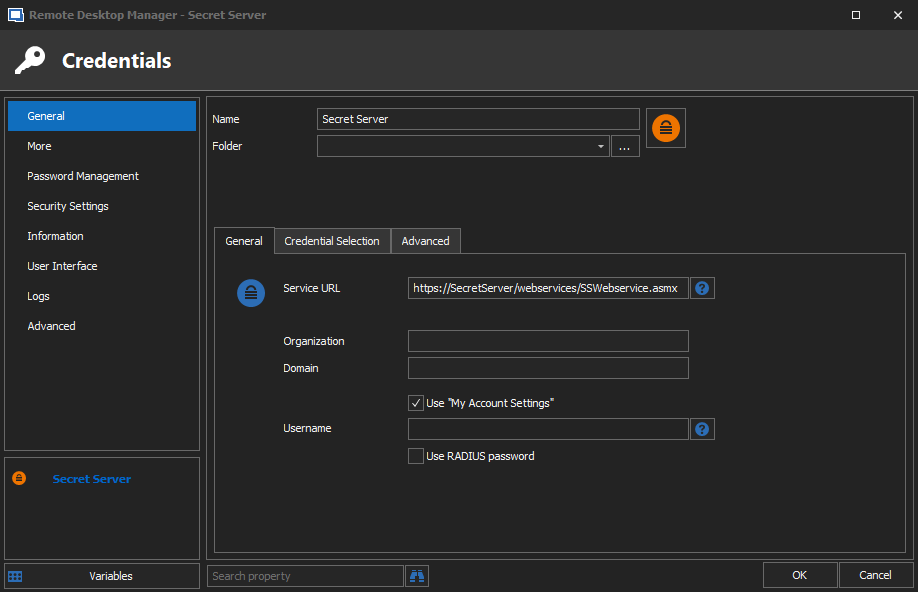
Programmatically Setting User-Specific Settings
You can link a credential entry with sessions / folder.with a static Guid Values as described here: https://help.remotedesktopmanager.com/pstipsandtricks.html?q=credential+powershell
The field to populate then is CredentialConnectionID
This means that if the entry already exists (or at least created beforehand), you can link it from there...
Hello,
Thank you for the suggestion, but this isn't really much help. I'm looked at that documentation and it appears to be more designed for the creation of a static object based on a known value. In context to the topic of my post here, that would be akin to creating the base Secret Server credential object, which is essentially just the Secret Server Web Services URL. In a SQL Server datasource, that is easily created from the admin side where all users can see it and we'd want to ensure no credentials are save at that level because it would defeat the purpose of a PAM otherwise.
I do know the attributes I want to populate with Set-UserSpecificSettings, which is the two CredentialDynamic Name and Value attributes (I assume both are needed since RDP session entries with a Dynamic link set have both configured). I can easily do this, if I have the Secret Name and Secret ID from Secret Server. My "dirty" solution is to use Secret Server API calls directly to retrieve those values. It works well enough that what follows this is a "nice to have" idea, nothing more. :-)
My suggestion was referring to adding a cmdlet or function into the RDM POSH module that mimics what RDM already does in the background in order to retrieve the Secret Name and Secret ID in order to set a Dynamic Link. The RDM POSH module also performs an almost identical function when doing the Get-RDMSessionPassword if Secret Server credential object (no Dynamic Link) is set: Authenticates to Secret Server (prompting for login if creds are in memory) then prompts user to select the Secret. The difference is that I'd want the output to be the Secret Name and Secret ID in order to populate the CredentialDynamicName & Value with Set-UserSpecificSettings.
While mechanically, it's no different than my direct API calls, the different is the RDM UI for logging in and selecting a Secret from Secret Server. I'm an automation engineer, good at scripting... I'm not good at making user-friendly UI. XD
Programmatically Setting User-Specific Settings
I'm afraid however that our powershell module wont help much in that context.
Out of curiosity, the manner in which a dynamic link is configured via the session properties in the RDM UI itself... Is it possible to translate that into a command/function in a future version of the RDM PowerShell module maybe? Like a Get/Set-RDMSessionDynamicCredential essentially? Usable with any external PM/PAM solution, such as DPS, LastPass, Secret Server, etc.
In any case, I've got ways to work around it at least. Thanks for the help!
Programmatically Setting User-Specific Settings
Not sure if this is exactly what you'Re looking for, but the SecretServerSecretID is stored in the SecretServer credential entry
$SecretServerCred.Credentials.SecretServerSecretID
Alex,
I must apologize because I did not accurately provide all the data to you for an effective answer.
The Secret Server "credential" in this scenario is only configured with the web services URL. There is no Secret ID inherently bound to that object. Setting this as a credential to an RDP entry will, upon opening the RDP session, authenticate to Secret Server (prompting for user login if none already exists), then select the desired Secret (a.k.a. credential) from a list. In the background, that performs an API call for that secret's Secret ID, pulling the username/password from there. We want it this way so the individual user is pulling credentials to which only they have permissions in Secret Server, which may be their own privileged accounts. Obviously, we don't want a single shared login for all users accessing a particular RDP session.
The only area I can find where the Secret ID is populated in RDM is if a dynamic link is set (makes perfect sense), in which case the Secret ID is bound to the 'CredentialDynamicValue' attribute of the RDP session, not the Secret Server credential session.
What I hoped your tip would do is, seeing that it had no value for the 'SecretServerSecretID' attribute, it would then trigger a Secret Server API call to retrieve one, similar to if you were to do this:
Get-RDMSessionPassword -ID $SecretServerCred.ID.GuidUnfortunately, doing this:
$SecretServerCred = Get-RDMSession -Name "Secret Server"
$SecretServerCred.Credentials.SecretServerSecretID
Simply returns a null value.
I've also tried some variations of that idea like this:
$CaptureCred = Get-RDMSessionPassword -ID $SecretServerCred.ID.Guid
$CaptureCred.Credentials.SecretServerSecretID

$Server = Get-RDMSession -Name "Server" -IncludeUserSpecificSettings
$Server.Credentials.SecretServerSecretID
The only time I can get the Secret ID is actually
"Server" already have dynamic link configured from RDM UI.

$Server = Get-RDMSession -Name "Server" -IncludeUserSpecificSettings
$Server.CredentialDynamicValue
I guess what I'm ultimately looking to achieve is behavior similar to 'Get-RDMSessionUserName', where it will initiate a Secret Server API call and prompt the user to select a Secret. However, instead of retrieving the 'username' from the selected Secret, it retrieves the Secret ID.
If it's not possible, as a dirty workaround, I can always use SecretSever API calls directly, it's just a less elegant method that lacks RDM's pretty UI for selecting the Secret.
You can access the field definition of any entry by right clicking on an entry -> Clipboard -> Copy -> Preview tab.
This is a very useful trick, for many and any situation...
Thank you for the additional method of finding that info. I've just been browsing through value attributes via PowerShell.
Programmatically Setting User-Specific Settings
I'm been searching around for this, but I can't find any solid documentation on this.
I'm designing a SQL datasource of RDM. Currently, our PAM solution is Thycotic Secret Server. I've built out a few test sessions and the Secret Server credential. All of that has worked in some basic testing.
The issue was with Dynamic Linking. Obviously, thanks to User Specific Settings, it's possible for each user to be able to dynamically link Secret Server credentials, but since RDM is new to our environment, I'm trying to increase adoption by making it as streamlined as possible for those completely unfamiliar with RDM's interface.
In previous tests (before going with the SQL option), I've been able to deploy a PowerShell script via SCCM that ran as the initiating user in order to install a session into their local datasource. I believe I could achieve a similar method to alter User Specific Settings, but the RDM PS cmdlet Set-UserSpecificSettings is... well... lacking really any notation/documentation on how to use it.
What I'd like the script to do (most of it I can handle) is something along these lines:
# Variable for testing. Script uses an interactive menu. By default, credential is set to Secret Server (no dynamic link)
$Server = Get-RDMSession -Name "Server" -IncludeUserSpecificSettings

# Finds the existing credential entry for Secret Server.
$SecretServerCred = Get-RDMSession -Name "Secret Server"

# This prompts user to log into Secret Server and select the credential they wish to link.
# There is a problem here in that this is the literal password not the secret ID. How do I retrieve the secret ID?
$CaptureCred = Get-RDMSessionPassword -ID $SecretServerCred.ID.Guid

# So now I have everything I need: The folder/server to change and the SS cred I want to link.
# This is where things get a bit hazy on my end. Does the process look something like this?
$UserSettings = Get-RDMUserSpecificSettings -Session $Server
$UserOverride = $UserSetting.CredentialDynamicValue = $CapturedCred
Set-RDMUserSpecificSettings -Session $Server -UserSpecificSettings $UserOverride