Programmatically Setting User-Specific Settings

I'm been searching around for this, but I can't find any solid documentation on this.
I'm designing a SQL datasource of RDM. Currently, our PAM solution is Thycotic Secret Server. I've built out a few test sessions and the Secret Server credential. All of that has worked in some basic testing.
The issue was with Dynamic Linking. Obviously, thanks to User Specific Settings, it's possible for each user to be able to dynamically link Secret Server credentials, but since RDM is new to our environment, I'm trying to increase adoption by making it as streamlined as possible for those completely unfamiliar with RDM's interface.
In previous tests (before going with the SQL option), I've been able to deploy a PowerShell script via SCCM that ran as the initiating user in order to install a session into their local datasource. I believe I could achieve a similar method to alter User Specific Settings, but the RDM PS cmdlet Set-UserSpecificSettings is... well... lacking really any notation/documentation on how to use it.
What I'd like the script to do (most of it I can handle) is something along these lines:
# Variable for testing. Script uses an interactive menu. By default, credential is set to Secret Server (no dynamic link)
$Server = Get-RDMSession -Name "Server" -IncludeUserSpecificSettings

# Finds the existing credential entry for Secret Server.
$SecretServerCred = Get-RDMSession -Name "Secret Server"

# This prompts user to log into Secret Server and select the credential they wish to link.
# There is a problem here in that this is the literal password not the secret ID. How do I retrieve the secret ID?
$CaptureCred = Get-RDMSessionPassword -ID $SecretServerCred.ID.Guid

# So now I have everything I need: The folder/server to change and the SS cred I want to link.
# This is where things get a bit hazy on my end. Does the process look something like this?
$UserSettings = Get-RDMUserSpecificSettings -Session $Server
$UserOverride = $UserSetting.CredentialDynamicValue = $CapturedCred
Set-RDMUserSpecificSettings -Session $Server -UserSpecificSettings $UserOverride
All Comments (11)
Hello,
Not sure if this is exactly what you'Re looking for, but the SecretServerSecretID is stored in the SecretServer credential entry
$SecretServerCred.Credentials.SecretServerSecretID
You can access the field definition of any entry by right clicking on an entry -> Clipboard -> Copy -> Preview tab.
This is a very useful trick, for many and any situation...
Give this a try, keep me in touch :)
Best regards,
Alex Belisle
Not sure if this is exactly what you'Re looking for, but the SecretServerSecretID is stored in the SecretServer credential entry
$SecretServerCred.Credentials.SecretServerSecretID
Alex,
I must apologize because I did not accurately provide all the data to you for an effective answer.
The Secret Server "credential" in this scenario is only configured with the web services URL. There is no Secret ID inherently bound to that object. Setting this as a credential to an RDP entry will, upon opening the RDP session, authenticate to Secret Server (prompting for user login if none already exists), then select the desired Secret (a.k.a. credential) from a list. In the background, that performs an API call for that secret's Secret ID, pulling the username/password from there. We want it this way so the individual user is pulling credentials to which only they have permissions in Secret Server, which may be their own privileged accounts. Obviously, we don't want a single shared login for all users accessing a particular RDP session.
The only area I can find where the Secret ID is populated in RDM is if a dynamic link is set (makes perfect sense), in which case the Secret ID is bound to the 'CredentialDynamicValue' attribute of the RDP session, not the Secret Server credential session.
What I hoped your tip would do is, seeing that it had no value for the 'SecretServerSecretID' attribute, it would then trigger a Secret Server API call to retrieve one, similar to if you were to do this:
Get-RDMSessionPassword -ID $SecretServerCred.ID.Guid
Unfortunately, doing this:
$SecretServerCred = Get-RDMSession -Name "Secret Server"
$SecretServerCred.Credentials.SecretServerSecretID
Simply returns a null value.
I've also tried some variations of that idea like this:
$CaptureCred = Get-RDMSessionPassword -ID $SecretServerCred.ID.Guid
$CaptureCred.Credentials.SecretServerSecretID

$Server = Get-RDMSession -Name "Server" -IncludeUserSpecificSettings
$Server.Credentials.SecretServerSecretID
The only time I can get the Secret ID is actually
"Server" already have dynamic link configured from RDM UI.

$Server = Get-RDMSession -Name "Server" -IncludeUserSpecificSettings
$Server.CredentialDynamicValue
I guess what I'm ultimately looking to achieve is behavior similar to 'Get-RDMSessionUserName', where it will initiate a Secret Server API call and prompt the user to select a Secret. However, instead of retrieving the 'username' from the selected Secret, it retrieves the Secret ID.
If it's not possible, as a dirty workaround, I can always use SecretSever API calls directly, it's just a less elegant method that lacks RDM's pretty UI for selecting the Secret.
You can access the field definition of any entry by right clicking on an entry -> Clipboard -> Copy -> Preview tab.
This is a very useful trick, for many and any situation...
Thank you for the additional method of finding that info. I've just been browsing through value attributes via PowerShell.
Hello,
I understand better, thanks for the detail.
I'm afraid however that our powershell module wont help much in that context.
The module is not designed to perform calls directly to the other integrated systems unfortunately.
That said, you can try to call Open-RDMSession, after assigning the values and called Set-RDMSession, to prompt for the list (and benefit from the pretty UI), but this will require user's interaction.
I think that the "dirty workaround" is possibly your best solution...
I'm sorry I cannot be of more help.
Best regards,
Alex Belisle
I'm afraid however that our powershell module wont help much in that context.
Out of curiosity, the manner in which a dynamic link is configured via the session properties in the RDM UI itself... Is it possible to translate that into a command/function in a future version of the RDM PowerShell module maybe? Like a Get/Set-RDMSessionDynamicCredential essentially? Usable with any external PM/PAM solution, such as DPS, LastPass, Secret Server, etc.
In any case, I've got ways to work around it at least. Thanks for the help!
Hello,
Sorry for the delay...
You can link a credential entry with sessions / folder.with a static Guid Values as described here: https://help.remotedesktopmanager.com/pstipsandtricks.html?q=credential+powershell
The field to populate then is CredentialConnectionID
This means that if the entry already exists (or at least created beforehand), you can link it from there...
Would this help?
Best regards,
Alex Belisle
You can link a credential entry with sessions / folder.with a static Guid Values as described here: https://help.remotedesktopmanager.com/pstipsandtricks.html?q=credential+powershell
The field to populate then is CredentialConnectionID
This means that if the entry already exists (or at least created beforehand), you can link it from there...
Hello,
Thank you for the suggestion, but this isn't really much help. I'm looked at that documentation and it appears to be more designed for the creation of a static object based on a known value. In context to the topic of my post here, that would be akin to creating the base Secret Server credential object, which is essentially just the Secret Server Web Services URL. In a SQL Server datasource, that is easily created from the admin side where all users can see it and we'd want to ensure no credentials are save at that level because it would defeat the purpose of a PAM otherwise.
I do know the attributes I want to populate with Set-UserSpecificSettings, which is the two CredentialDynamic Name and Value attributes (I assume both are needed since RDP session entries with a Dynamic link set have both configured). I can easily do this, if I have the Secret Name and Secret ID from Secret Server. My "dirty" solution is to use Secret Server API calls directly to retrieve those values. It works well enough that what follows this is a "nice to have" idea, nothing more. :-)
My suggestion was referring to adding a cmdlet or function into the RDM POSH module that mimics what RDM already does in the background in order to retrieve the Secret Name and Secret ID in order to set a Dynamic Link. The RDM POSH module also performs an almost identical function when doing the Get-RDMSessionPassword if Secret Server credential object (no Dynamic Link) is set: Authenticates to Secret Server (prompting for login if creds are in memory) then prompts user to select the Secret. The difference is that I'd want the output to be the Secret Name and Secret ID in order to populate the CredentialDynamicName & Value with Set-UserSpecificSettings.
While mechanically, it's no different than my direct API calls, the different is the RDM UI for logging in and selecting a Secret from Secret Server. I'm an automation engineer, good at scripting... I'm not good at making user-friendly UI. XD
Hello,
Erica will provide a working example of setting the USS in a "non-secret server" fashion in the first phase, we will then work with you on identifying the proper fields to set.
Sorry about the delay, we should have a sample shortly
Best regards,
Maurice
Hello,
Here is a sample you can use to set a USS on a specific entry. Just adapt the session's name and the PV entry name. For your information, the CredentialConnectionID GUID is the value for the USS to get the credential from the Private Vault.
$pv = Get-RDMPrivateSession -Name MyCreds
$sess = Get-RDMSession -Name MyRDPSession
$newuss = New-Object Devolutions.RemoteDesktopManager.Business.BaseConnectionOverride
$newuss.OverrideCredential = $true
$newuss.CredentialConnectionID = '245A4245-48E7-4DF5-9C4C-11861D8E1F81'
$newuss.PersonalCredentialConnectionID = $pv.ID
Set-RDMUserSpecificSettings -Session $sess -UserSpecificSettings $newuss
Update-RDMUI
Best regards,
Érica Poirier
Hello,
Thank you. I think I'm understanding the purpose here. Translated to the snippet I posted originally (translated to Secret Server dynamic linking), it might look something like this:
$UserOverride = New-Object Devolutions.RemoteDesktopManager.Business.BaseConnectionOverride

$UserOverride.OverrideCredential = $true
$UserOverride.CredentialConnectionID = '1310CF82-6FAB-4B7A-9EEA-3E2E451CA2CF' # GUID for Inherited as an example since this isn't a PV credential
$UserOverride.CredentialDynamicName = $SecretName
$UserOverride.CredentialDynamicValue = $SecretID

Set-RDMUserSpecificSettings -Session $Server -UserSpecificSettings $UserOverride
The catch is getting the $SecretName and $SecretID values above, which (as I mentioned) I am currently doing via direct Secret Server API call but would prefer a cmdlet/function in the RDM POSH module instead as a "nice to have" but not immensely critical. These would then populate the 'CredentialDynamicName' and 'CredentialDynamicValue' attributes.
For clarity, this is what the Secret Server credential object I am referring to looks like... It has no credentials by itself. It is also not in a Private Vault. This is is the "public" vault Credential Repository where all users can see it and is inherited as the credential for all servers in this scenario. Without USS dynamic credentials, RDM will authenticate a given user against Secret Server and prompt that user to select one of the secrets to which they have permissions, then inject the API response (credentials) into the RDP session.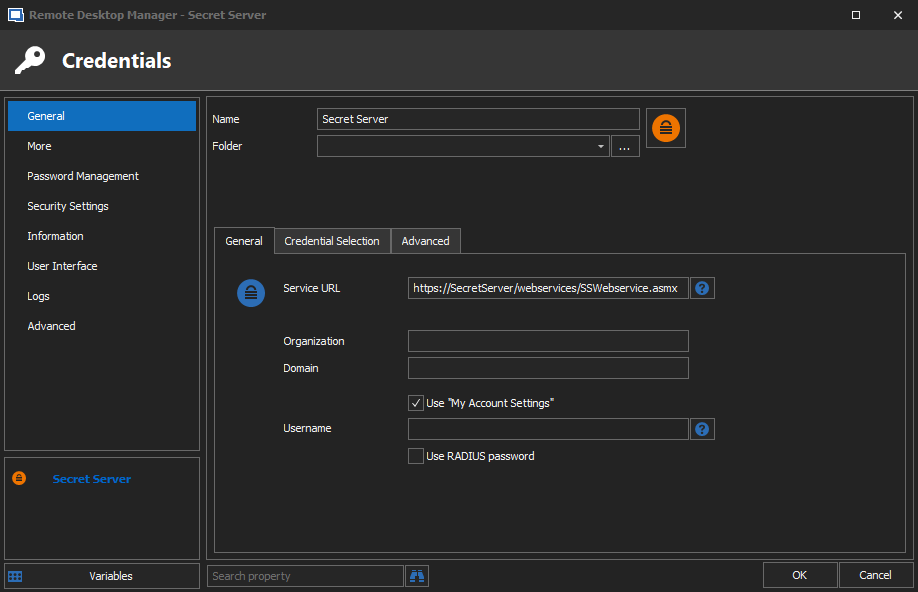
SecretServerRDM-CredObject.png
Hello,
You have the right code, as for getting the proper values dynamically from SecrertServer through a RDM call, I do not think it would be feasible in short term. There are so many integrations and they each have their own limitations (paging, limit, offset, mfa, etc). We would have to extend our powershell cmdlets significantly to support all of these options.
In my own foray into this area, I do use the CyberArk rest api to list accounts prior to creating entries in RDM, its the best pattern to use IMHO.
Maurice
...as for getting the proper values dynamically from SecrertServer through a RDM call, I do not think it would be feasible in short term. There are so many integrations and they each have their own limitations (paging, limit, offset, mfa, etc). We would have to extend our powershell cmdlets significantly to support all of these options.
Completely understand. Like I said, it was a "nice to have" request. Anyway, thanks for the help, everyone!