
patscrap
Dynamic Inventory from script or api
Do you have an example PowerShell script on how you would synchronize entries? Where would this script run, in rdm or in a terminal? Our royal script is already powershell, so updating to work with rdm shouldn't be that difficult.
Dynamic Inventory from script or api
This isn't exactly what I'm looking for. Our workflow is we provision a vm with terraform. During provisioning terraform also adds the vm details to netbox. Once provisioning completes we then manually add the session details to the datasource in RDM. I would like to be able to eliminate this last manual step. With royalTS dynamic folders, we created a script that queries netbox and generates all the connection profiles automatically. This way anything we provision is automatically available in royal right away.
Dynamic Inventory from script or api
We use netbox as our source of truth for our network. We would like to be able to use this as a data source or inventory source. RoyalTS has a feature called dynamic folder which allows you to run a script to generate your inventory. I was wondering if there was similar functionality in RDM or a way to achieve the same outcome.
Tunnel local Webcam trough RDP Session
Bumping this thread to see if any progress has been made.
ssh to alternative port fails over existing ssh session.
I'm on the latest version. Work around had the same error but logging seemed more verbose. Setting the port in the host field caused it to fail immediately.
With port set in host field
[4/24/2020 9:39:30 AM] Starting SSH, verbose level: 2
[4/24/2020 9:39:30 AM] Setting up connection
[4/24/2020 9:39:30 AM] Connecting as redacted
[4/24/2020 9:39:30 AM] Disconnecting
legacy terminal, port set in port field
[4/24/2020 9:41:14 AM] Looking up host "10.94.37.136"
[4/24/2020 9:41:14 AM] Connecting to 10.94.37.136 port 6222
[4/24/2020 9:41:14 AM] We claim version: SSH-2.0-PuTTY_Release_0.67
[4/24/2020 9:41:35 AM] Failed to connect to 10.94.37.136: Network error: Connection timed out
[4/24/2020 9:41:35 AM] Network error: Connection timed out
[4/24/2020 9:41:44 AM] Looking up host "10.94.37.136"
[4/24/2020 9:41:44 AM] Connecting to 10.94.37.136 port 6222
[4/24/2020 9:41:44 AM] We claim version: SSH-2.0-PuTTY_Release_0.67
[4/24/2020 9:42:05 AM] Failed to connect to 10.94.37.136: Network error: Connection timed out
ssh to alternative port fails over existing ssh session.
[4/24/2020 9:05:25 AM] Starting SSH, verbose level: 2
[4/24/2020 9:05:25 AM] Setting up connection
[4/24/2020 9:05:25 AM] Connecting as redacted
[4/24/2020 9:05:46 AM] SSH Error sending raw output: -23
[4/24/2020 9:05:46 AM] Disconnection in progress
[4/24/2020 9:05:46 AM] Disconnecting
ssh to alternative port fails over existing ssh session.
In RDM this works fine over port 22 through this bastion host to other servers in the same environment. I haven't tried with putty, but it works fine with the open-ssh client installed in WSL.
ssh to alternative port fails over existing ssh session.
I'm on the latest version of the free edition of RDM. I'm using the google drive data source but it is not shared with anyone else. I've attached screenshots, let me know what else you need.
.PNG)
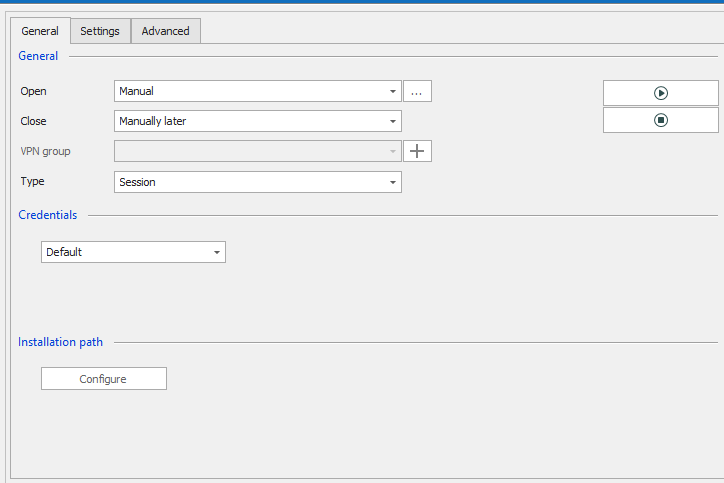
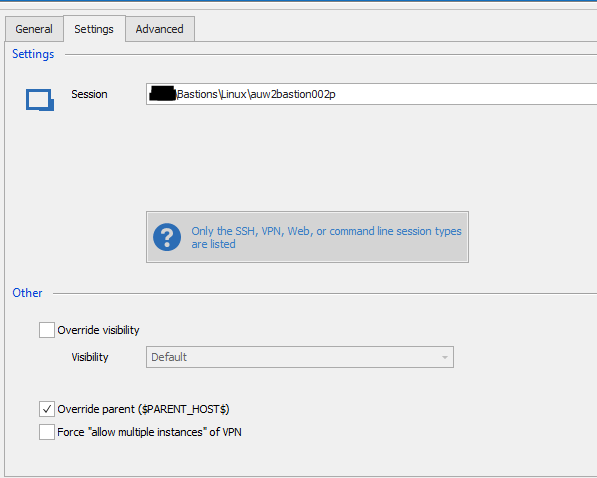
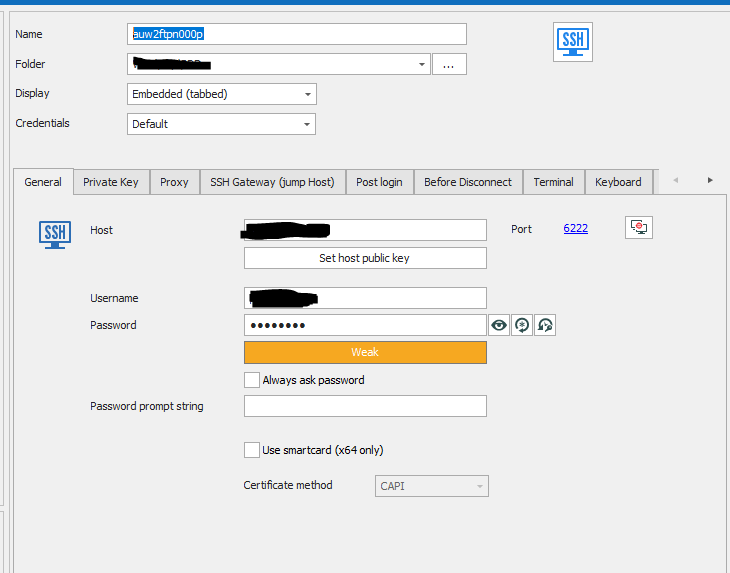
ssh to alternative port fails over existing ssh session.
I have an ssh session open to my bastion server. I am able to connect to other servers through the existing session on the bastion. One particular server has ssh listening on an alternative port (6222) because another service is listening on 22. I can hit the service on 22 over the bastion, but connections to 6222 fail.