ssh to alternative port fails over existing ssh session.

I have an ssh session open to my bastion server. I am able to connect to other servers through the existing session on the bastion. One particular server has ssh listening on an alternative port (6222) because another service is listening on 22. I can hit the service on 22 over the bastion, but connections to 6222 fail.
All Comments (9)
Hello,
Thank you for contacting us on that matter!
That being said, which version of RDM and what type of Data Source are you currently using? Is it the Free or the Enterprise Edition?
Also, would it be possible for you to provide us screenshots of the configuration of your SSH entry?
Furthermore, could you please provide me a screenshot of the full error message you are receiving in RDM?
Best regards,
James Lafleur
I'm on the latest version of the free edition of RDM. I'm using the google drive data source but it is not shared with anyone else. I've attached screenshots, let me know what else you need..PNG)
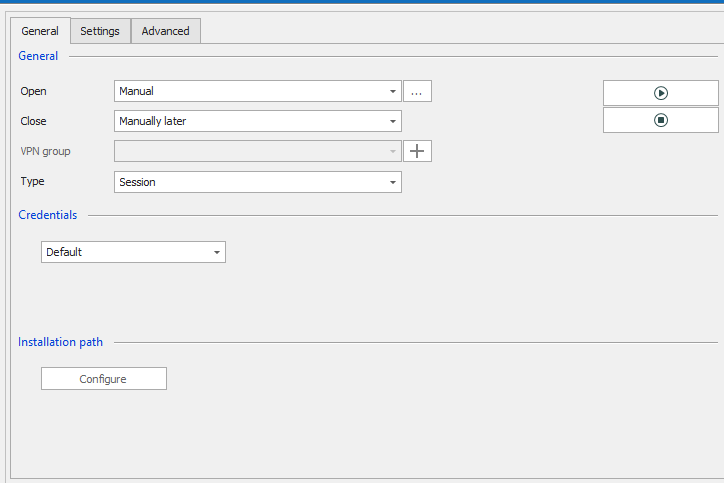
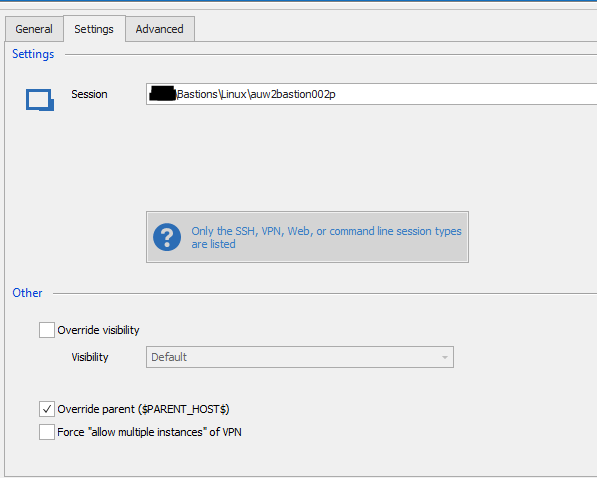
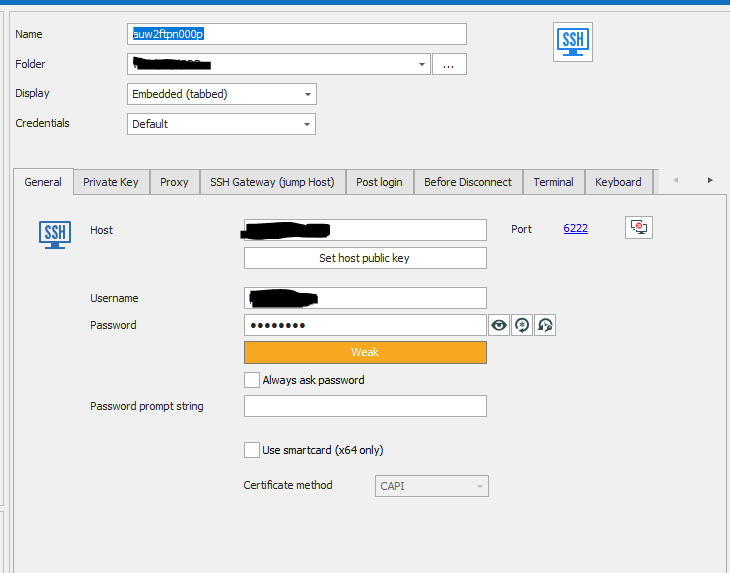
RDM_vpnConfig.PNG
RDM_vpnConfigSettings.PNG
RDM_Error.PNG
RDM_ServerConfig.PNG
Hello,
Thank you for your quick reply!
That being said, is this something that you have been able to achieve outside of RDM using putty?
In the meantime, I will need to verify if that is something that can be done in the application.
Best regards,
James Lafleur
In RDM this works fine over port 22 through this bastion host to other servers in the same environment. I haven't tried with putty, but it works fine with the open-ssh client installed in WSL.
Could you enable the Verbose and logs and send us a copy of them? For further help you could see this help topic (https://devolutions.atlassian.net/servicedesk/customer/portal/1/article/608731251?src=-361456831)
Regards,
David Grandolfo
[4/24/2020 9:05:25 AM] Starting SSH, verbose level: 2
[4/24/2020 9:05:25 AM] Setting up connection
[4/24/2020 9:05:25 AM] Connecting as redacted
[4/24/2020 9:05:46 AM] SSH Error sending raw output: -23
[4/24/2020 9:05:46 AM] Disconnection in progress
[4/24/2020 9:05:46 AM] Disconnecting
The log is sadly not useful with this generic error.
Could you:
- Set the port in the host instead of using the port section. As IP:Port (ex. 192.168.123.123:6222)
- Which version of RDM are you running? If it's not the latest one 2020.1.20, could you test it?
- Could you test a workaround which is the Legacy terminal
- Go under file -> Options -> Terminal -> Under the Advanced section, check Use Legacy Terminal.
- Try to connect again, what is the logs and verbose?
Regards,
David Grandolfo
I'm on the latest version. Work around had the same error but logging seemed more verbose. Setting the port in the host field caused it to fail immediately.
With port set in host field
[4/24/2020 9:39:30 AM] Starting SSH, verbose level: 2
[4/24/2020 9:39:30 AM] Setting up connection
[4/24/2020 9:39:30 AM] Connecting as redacted
[4/24/2020 9:39:30 AM] Disconnecting
legacy terminal, port set in port field
[4/24/2020 9:41:14 AM] Looking up host "10.94.37.136"
[4/24/2020 9:41:14 AM] Connecting to 10.94.37.136 port 6222
[4/24/2020 9:41:14 AM] We claim version: SSH-2.0-PuTTY_Release_0.67
[4/24/2020 9:41:35 AM] Failed to connect to 10.94.37.136: Network error: Connection timed out
[4/24/2020 9:41:35 AM] Network error: Connection timed out
[4/24/2020 9:41:44 AM] Looking up host "10.94.37.136"
[4/24/2020 9:41:44 AM] Connecting to 10.94.37.136 port 6222
[4/24/2020 9:41:44 AM] We claim version: SSH-2.0-PuTTY_Release_0.67
[4/24/2020 9:42:05 AM] Failed to connect to 10.94.37.136: Network error: Connection timed out
Hi Patrick,
A remote session might be, at this point, easier to look at the issue. I opened a ticket and I sent you an email through it to book a remote session.
Regards,
David Grandolfo