
ThRe_PGN
RDM - Chrome "EOWebBrowser" session no longer downloads files
Ok, will upgrade to the latest version and report back if the issue occurs again.
RDM - Chrome "EOWebBrowser" session no longer downloads files
I've tried to reproduce it again but cannot. I didn't alter any session settings and did not upgrade RDM. I think the bug will hit again in a few days as I've already done the cache wiping manually 4 times. But I have no clue how the bug is triggered. When it happens, the download dialog of RDM just does not appear with no indication of any error. When I go to Chrome Browser outside of RDM then to verify if the firewall is sending the backup download correctly to the browser, I can download the file. It must be some bug introduced into RDM since the upgrade I last did (see first post).
RDM Enterprise 2020.2.16.0: Does not have the bug, always downloaded correctly over months.
RDM Enterprise 2020.3.23.0: Has this download bug with the windows not appearing until I clear the cache manually from Windows Explorer
RDM - Chrome "EOWebBrowser" session no longer downloads files
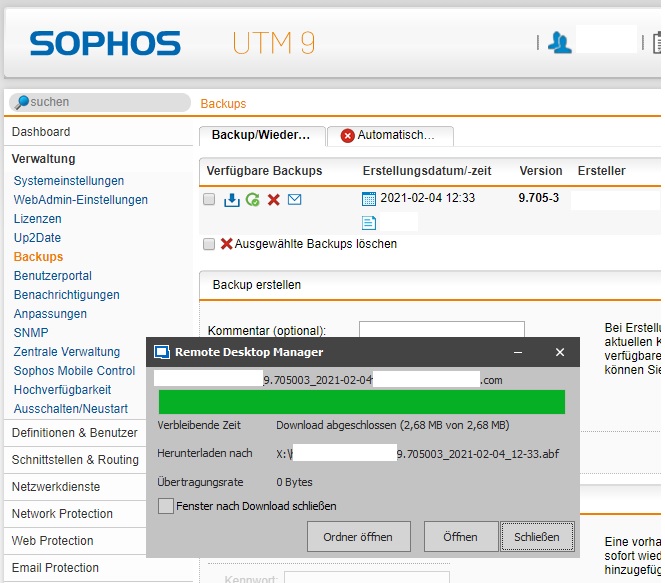
After deleting the EO.Webbrowser cache folder. the expected correct behaviour takes place when I hit the download button.
RDM - Chrome "EOWebBrowser" session no longer downloads files
My E-mail from Sent: Mon 1. Feb 2021 09:41 did not arrive here ...
Hi,
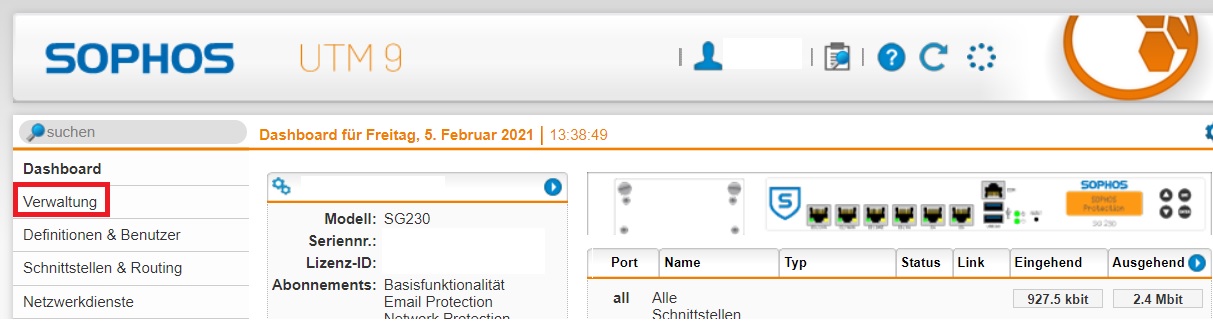
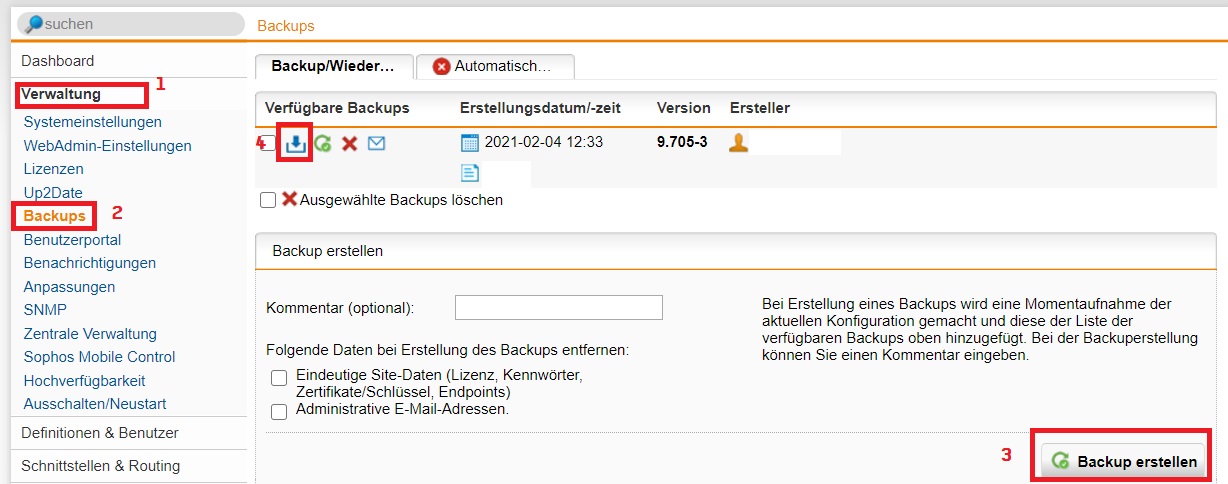
it's, for example, on the web admin interface of our Sophos UTM firewall. Unfortunately, I cannot grant you a login there. But you can download Sophos UTM Home Free at sophos' site, they'll email you a free license or you'll have 30 day trial and then just go to "Administration" / "Backups", click "perform backup" and then download the backup that was created and shown above that button. First time, it works, second time, too. About five more attempts -> permamently failing.
Link: https://www.sophos.com/de-de/products/free-tools/sophos-utm-home-edition.aspx
Thank you.
RDM - Chrome "EOWebBrowser" session no longer downloads files
Hi,
I'm on RDM Enterprise 2020.3.23.0 x64 on Win10-1903. Since this "latest" update I've installed a new bug occurs. The feature where RDM displays the "download options assistant dialog" when a chrome web session has something to download triggered by the website appears properly and then - from all of a sudden - it does no longer appear. I could not find a fix for that, tried reboot of the computer, RDM restarts, creating a new chrome session entry --> no luck, problem persists.
I've found a workaround finally and that's why I guess RDM has a bug here that was not present in earlier releases. When I delete "%LocalAppData%\Devolutions\RemoteDesktopManager\EO.WebBrowser.Cache" completely while RDM is closed, the problem is fixed for an "undefined" amount of time until the issue comes up again. I opened RDM after purging the cache folder, clicked my chrome session, let it start a download and the dialog appeared just as expected.
Thanks for your help on fixing this.
Kind regards
RDM 2020.2.15.0 - Application RunAs entries don't respect user credentials
Thank you very much :).
At a first glance: I've deleted the custom credentials from the session affected by the bug, saved, edited again, and switch the logon type to "current session" credentials. This didn't work with 2020.2.15.0 and now DOES work again with 2020.2.16..0.
Good work!
RDM 2020.2.15.0 - Application RunAs entries don't respect user credentials
Will it be available at https://cdn.devolutions.net/download/Setup.RemoteDesktopManager.2020.2.16.0.msi ?
RDM 2020.2.15.0 - Application RunAs entries don't respect user credentials
Thanks for taking care of this *thumbsup* :+1
I'll try the update.
App crash after updating 2019.2.24.0 > 2020.2.15.0
Hi,
maybe someone of the dev team finds the solution so future updates run smoothly. I wonder why it happened on two different machines with different Windows versions, .NET and VCredist constellations. But I've found my workaround by uninstall and reinstall.
Thank you.
Kind regards
RDM 2020.2.15.0 - Application RunAs entries don't respect user credentials
Hi,
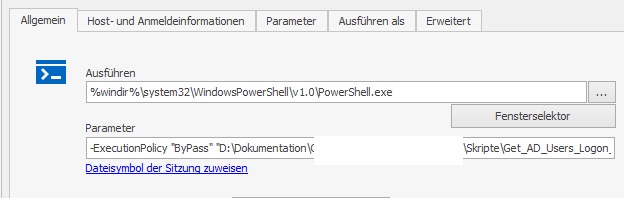
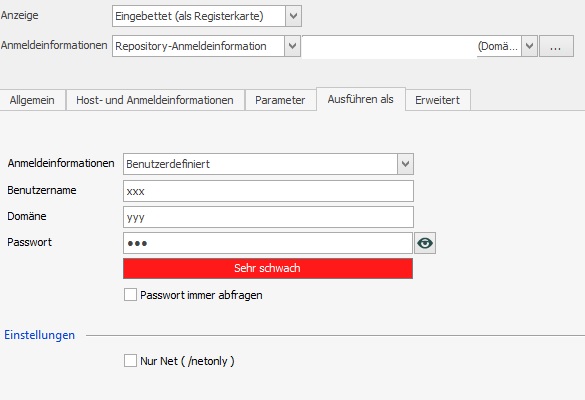
I've got the problem after updating 2019.x to 2020.2.15.0 that the session's user credentials are ignored. I've configured a command shell (cmd.exe) to run with user B while myself am logged as user A. taskmgr shows cmd.exe coming up as user A (expected: user B). I've switched through the runas-user options of the entry and only setting the drop-down to "custom credentials" helps.
There are two bugs:
When I successfully started the cmd.exe as user B using the "custom credentials" option and switch back to "session credentials", RDM still launches with the custom credentials.
I can reproduce this bug by entering invalid "custom credentials" and switchting back - session cannot be launched (error launching app). If I enter valid "custom credentials", the app (cmd.exe) can be launched.
If I enter invalid credentials and switch to the (valid) session credential option, the app launches, but not as user B - still the wrong user A I'm logged on with.
Please fix it. It worked in the old version.
Thanks.
App crash after updating 2019.2.24.0 > 2020.2.15.0
Very strange, if I take this upgrade path, the upgrade to 2020.2.15.0 succeeds.
RDM 2019.2.24.0 > 2020.1.20.0 > 2020.2.15.0
App crash after updating 2019.2.24.0 > 2020.2.15.0
Downgrading on Win-1903 to V. 2020.1.20.0 does work. Application starts.

Can you confirm, the 2020.2.15.0 is a faulty release?
App crash after updating 2019.2.24.0 > 2020.2.15.0
It also crashes after update on Windows Server 2012R2 x64, recent MS updates applied (already before the update of RDM).
Problemsignatur:
Problemereignisname: CLR20r3
Problemsignatur 01: RemoteDesktopManager64.exe
Problemsignatur 02: 2020.2.15.0
Problemsignatur 03: 5ef1f79d
Problemsignatur 04: RemoteDesktopManager.Core
Problemsignatur 05: 2020.2.15.0
Problemsignatur 06: 5ef1f7de
Problemsignatur 07: 8584
Problemsignatur 08: 1c
Problemsignatur 09: System.IO.FileNotFoundException
Betriebsystemversion: 6.3.9600.2.0.0.400.8
Gebietsschema-ID: 1031
Zusatzinformation 1: 9a90
Zusatzinformation 2: 9a90d1db1b211376df5b6776a9814e30
Zusatzinformation 3: 87e4
Zusatzinformation 4: 87e40a506aa848558ea0f9ba078ff44f
App crash after updating 2019.2.24.0 > 2020.2.15.0
Windows 10 Pro 1903 x64
Using MSI installer
I'm getting this eventvwr log:
.NET Runtime ERROR
Anwendung: RemoteDesktopManager.exe
Frameworkversion: v4.0.30319
Beschreibung: Der Prozess wurde aufgrund einer unbehandelten Ausnahme beendet.
Ausnahmeinformationen: System.IO.FileNotFoundException
bei Devolutions.RemoteDesktopManager.Managers.ErrorManager.IsException[[System.__Canon, mscorlib, Version=4.0.0.0, Culture=neutral, PublicKeyToken=b77a5c561934e089]](System.Exception, System.String[])
bei Devolutions.RemoteDesktopManager.Managers.ErrorManager.HandleError(System.Exception)
bei Devolutions.RemoteDesktopManager.Managers.LogManager.LogError(System.Exception)
bei Devolutions.RemoteDesktopManager.Program.Main(System.String[])
and then: Application Error
Name der fehlerhaften Anwendung: RemoteDesktopManager.exe, Version: 2020.2.15.0, Zeitstempel: 0x5ef1f79a
Name des fehlerhaften Moduls: KERNELBASE.dll, Version: 10.0.18362.267, Zeitstempel: 0x91664cab
Ausnahmecode: 0xe0434352
Fehleroffset: 0x00113442
ID des fehlerhaften Prozesses: 0x3484
Startzeit der fehlerhaften Anwendung: 0x01d64eb7c9cae2ea
Pfad der fehlerhaften Anwendung: C:\Program Files (x86)\Devolutions\Remote Desktop Manager\RemoteDesktopManager.exe
Pfad des fehlerhaften Moduls: C:\Windows\System32\KERNELBASE.dll
Berichtskennung: 5b04df2c-e728-4d18-922c-00700057bd05
Vollständiger Name des fehlerhaften Pakets:
Anwendungs-ID, die relativ zum fehlerhaften Paket ist:

Make silent background internet connection to third-party Devolutions' services Opt-In
Hi Jean-Francois,
thanks - I didn't know this option existed since RDM 2019.x. It's very helpful and feels convenient to be able turning it off.
Best regards
Make silent background internet connection to third-party Devolutions' services Opt-In
Hi,
since my Update to RDM 2019.02.24, RDM "phones home" which feels very unconvenient for a password manager tool because I was not noticed nor asked to Opt-In. Please make this feature Opt-Out by default. Just caught this multiple times on RDM startup with the behaviour analyzer of my firewall:
I don't want to be "forced" to trust your third party service providers you would probably not be able to hold "under privacy control" yourself signing contract with them for RDM 2019.
Servers in question were:
- api.keen.io
- stream.tellimer.com
2020:01:26-02:03:16 firewall httpproxy[11142]: id="0001" severity="info" sys="SecureWeb" sub="http" name="http access" action="pass" method="GET" srcip="192.168.177.2" dstip="54.68.247.118" user="" group="" ad_domain="" statuscode="401" cached="0" profile="REF_HttProContaIntraNetwo (Profil_Host_Net01)" filteraction="REF_DefaultHTTPCFFAction (Default content filter action)" size="97" request="0xd4085100" url="http://stream.tellimer.com/" referer="" error="" authtime="0" dnstime="46442" aptptime="208" cattime="31344" avscantime="2053" fullreqtime="417244" device="0" auth="0" ua="Mozilla/5.0 (Windows NT 10.0; Win64; x64) AppleWebKit/537.36 (KHTML, like Gecko) Chrome/73.0.3683.103 Safari/537.36" exceptions="" category="105" reputation="neutral" categoryname="Business" country="United States" content-type="application/json" sandbox="-"2020:01:26-13:38:21 firewall httpproxy[11142]: id="0001" severity="info" sys="SecureWeb" sub="http" name="http access" action="pass" method="POST" srcip="192.168.177.2" dstip="54.213.2.131" user="" group="" ad_domain="" statuscode="201" cached="0" profile="REF_HttProContaIntraNetwo (Profil_Host_Net01)" filteraction="REF_DefaultHTTPCFFAction (Default content filter action)" size="17" request="0xdaedbc00" url="https://api.keen.io/3.0/projects/5c48d4c8c9e77c0001cf1e40/events/datasource_events" referer="" error="" authtime="0" dnstime="0" aptptime="258" cattime="195" avscantime="2728" fullreqtime="556192" device="0" auth="0" ua="" exceptions="" country="United States" category="175" reputation="trusted" categoryname="Software/Hardware" content-type="application/json" sandbox="-"
It is okay for me to contact:
- crm.devolutions.com
- cloud.devolutions.com
I don't want to offend you or sound rude, but privacy is a strong thing for a tool like RDM, so please at least read my feedback.
Thank you.
Bug found, affects all RDM 2019.x versions and up
Btw I've discovered the "close" button on an active tab is invisible now, but I can still click it to close the tab.
Bug found, affects all RDM 2019.x versions and up
I used the one given in my forum profile. (Don't want to post publicly) The report was sent in the morning between 09.00 and 10.00 o'clock.
You can easily reproduce it by ticking "Automatic Column Widths in navigation pane", I guess.
Bug found, affects all RDM 2019.x versions and up
Thanks for your reply.
That being said, after your initial update from 14.1.3.0 to RDM 2019.2.24.0, did you see a "Red X" in your Navigation Pane or it was simply empty?
It was simply empty. To submit the bug report, I've used the "send report" button within RDM.
Bug found, affects all RDM 2019.x versions and up
Hi,
I've updated from 14.1.3.0 enterprise to 2019.x 1st release approx. 1 year ago with the result of getting a NPE error after login to my MySQL datasource and the navigation tree no longer loading. This rendered my RDM almost unusable so I sent a bug report and reverted to 14.1.3.0.
Today, I've attempted to upgrade from 14.1.3.0 to 2019.2.24.0 - unfortunately, the bug is still there.
I've figured out the root cause and please, devs, fix this.
After the NPE crash occured, I reverted back to 14.1.3.0 again and went to "Settings > UI > Custom Settings" to turn off the "Automatic Column Width in Navigation View" setting. After that, my update to 2019.2.24.0 was successful and the navigation tree was shown as usual. I don't have any DSN errors, schema check passed OK.
Let me know if you need more info. I've also filed a bug report under my mail address @polygon-design.com
Thanks and keep up the good work.
ThRe.