Scott Carter
2026.3.8.0 - Bugs report
I'm on 2026.3.9.0 and am still experiencing the same issue.
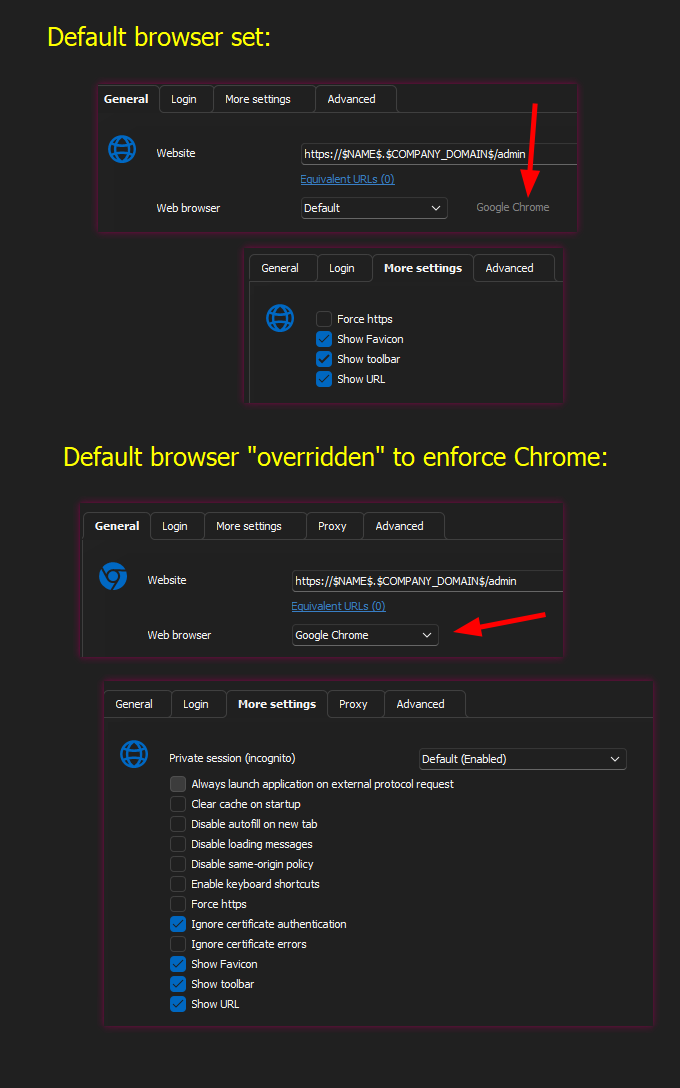
Embedded Chrome - Can't ignore cert auth if it's set as default browser
I think the more settings tab should show the same set of options when Chrome is set as the default as it does when Chrome is set for an individual website entry. If other browsers also have a different set of options now or in the future, they should also be shown when that browser is configured as the default.
Also, if the decision is made to allow certificate authentication to be ignored globally, there should be an option available to disable that setting on individual entries.
Embedded Chrome - Can't ignore cert auth if it's set as default browser
I came here looking for the solution to the constant cert requests I receive when attempting to connect to our VMware Horizon connection servers. I found that there was an option added to RDM to do this when you have Chrome set as the browser. It looks like that only works if a specific website entry is configured to use Chrome. I have Chrome set as the default browser in RDM, but that option is not available in the "More Settings" tab unless I manually set that site to use Chrome.
I know I can set the default browser to Edge to avoid this entirely, which I'm doing. This feels like a bug to me, and thought I'd bring it to your attention. Is there a way to globally ignore certificate authentication requests if Chrome is set as the default browser? I have attached some screenshots to better explain what I'm seeing.