
jesper.a
Support customfields on more entry types
Hello,
Thank you for being so patient!
I'm pleased to inform you that a new version of Hub Business has been released, featuring the fix for the issue with the custom field on the Document entry type.
Please let us know if this works or if you encounter any issues.
The other request regarding "Connection-String" entry is still being prioritized.
Best regards,
@Maxim Robert
Yes I can confirm that the document type works now
Export to encrypted json
Hello @jesper.a,
We are sorry for the confusion, but this feature is not yet implemented. We will let you know when it is done. Thank you for your understanding.
Best regards,
@Yevgeniy Shmygun
Okej thanks for letting me know!
Export to encrypted json
Those, like the web client, does not support the master key option yet. It has been added to the backlog like the web client item.
@Maxime Morin
Just noticed this has been marked as resolved and implemented
Is there any documentation I can read on this?
Looks like I have latest powershell modul installed but cant sort out a way to encrypt it
Support customfields on more entry types
@Dominic Dansereau
Yeah we found the raw date lastnight and was able to workaround alot that way.
But not everyone have the permissions to view the raw data we found out.
So trying to experiment with least-privilage to be able to see it.
We also found on for example documents, this was flagged if it makes any difference?

Support customfields on more entry types
After exporting our vaults from the server version and import into Hub, we have noticed many entries have lost their customfields where we have stored data which can no longer be accessed via the Hub.
So we have kept our old devolution password server online.
The bare minimum for me would be to be able to migrate 1 to 1 between your own services which we cant 100% do, when theres a few entries that dont even exist in Hub but do in password server, and fields are not shows.
An example of this is old certificate entry, in hub the entries are just called document after import.
Custom fields are shown when viewing the entries in RDM and connected to the Hub, so the data have been imported they just need to be shown.
Connection-String as an entry cannot be added in Hub as a new entry, but old ones have been imported so the entry type exist since it recognize it as "Connection-String"-type.
Export to encrypted json
Those, like the web client, does not support the master key option yet. It has been added to the backlog like the web client item.
@Maxime Morin
Thank you
Export to encrypted json
Which cmdlet do you use to export? Export-RDMSession supports it with the "Password" parameter.
@Maxime Morin
Module:
Devolutions.PowerShell
cmdlets used:
Get-HubVaultsForExport
Get-HubEntriesForExport
As per documented in Hub Export.
Export to encrypted json
Hello,
From the web, it's not currently possible, but from RDM you can add a master key to your export.
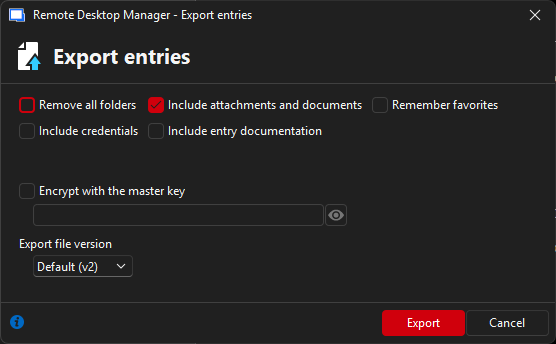
It's something that we could look into to add in the web client.
Have a good day!
@Maxime Morin
What about powershell?
Its actually the biggest thing we want encryption for, for our automated exports
Export to encrypted json
Is there anyway we can export our vaults encrypted and not just obscured?
I dont want it to be possible to later import the same files into someone personal hub for example which is possible atm.
I havent tried any other passwordmanagers if they are able to import these files, which I hope they cannot.
Devolutions Cloud Importer cannot use other authentication methods
Hello,
Thank you for your reply,
Would you be interested in having a remote session to give us an overview of the issue?
To do so, I will need to open a case for you, would the email used for your account be the correct one to use?
Let me know,
Best regards,
@Samuel Dery
Yes sure we can do that
Devolutions Cloud Importer cannot use other authentication methods
Hello,
Do you have any errors in the Hub Importer? From my side, I can successfully login with my SSO account in Hub Importer. On a side note, if your users are in your Hub Business, they do have a Devolutions Account, it's mandatory for Hub Business. Do you happen to use the encryption service to provide a seamless authentication experience? (Making Devolutions Account pretty much transparent.)
Have a good day!
@Maxime Morin
no errors, just ask users to login with a password they don’t know.
yes we are using encryption service to make it seamless
Import entries from .RDM file exported via DVLS
Hello,
Have you tried our Hub Importer tool? It's available freely and supports importing .rdm files into the user vault.
Devolutions Hub Importer - Companion tool - Devolutions
Have a good day!
@Maxime Morin
Thanks for the reply
Yes some have used it but it poses other problems for us at least.
Not all of our users are admins on their PCs and can’t run pre-approved applications on their own.
And the importer tool does not work for users that do not have a devolution account as well, so for users that only use the selected SSO method that we have, cannot use it.
Devolutions Cloud Importer cannot use other authentication methods
Would be good if the Importer would be able to use the Hubs selected authentication.
We have setup Azure SSO and force it, no other user can export because they need to login with devolution accounts, which non of them have at the moment.
Import entries from .RDM file exported via DVLS
We are currently moving from DVLS to Hub and have noticed there is no way to easy import user vaults.
We have many users that do not use RDM or have access to other tools and have tried to export from DVLS, which exports as .RDM-file. Which cannot be imported to the Hub.
Issues downloading uploaded files
Tried to download the files both from web interface and RDM, non work, RDM gives the error written above, web gives nothing.
The PDFs are documentation related to the entries yes.
Have checked Data source logs, nothing related to the downloaded file in question.
But now my collegue have deleted the entries with the PDF's so I cant reproduce the issue.. So I think we can ignore it for now.
Issues downloading uploaded files
We have uploaded some PDF-files which is stated to be 177.4kB, which is correct.
But when trying to download it just downloads 0bytes and errors when opening, nothing in logs or anything.
What steps should be taken to troubleshoot this?
Also, when trying to download from RDM we get:
"An unknown error occurred. Please check the application logs for more information."
But application logs is emtpy.
Server version: 2025.1.9.0
RDM version: 2025.1.38.0
Issue creating new user from Office365
When trying to import users manually.
I search for the user, mark the person, click import.
Get promted with "You will import 0 users"
When adding a user, I enter all the details and click "Add" and nothing happens, no error logs or error messages appears.
Nothing regarding these users have any entries in Login Attempts log
We have 58users created.
Issue creating new user from Office365
Hello Erica,
This is the full error message:
SqlException - The INSERT statement conflicted with the FOREIGN KEY constraint "FK_UserRoamingSettings_UserID". The conflict occurred in database "Devolutions", table "dbo.UserAccount", column 'ID'.
The statement has been terminated.

   at System.Data.SqlClient.SqlConnection.OnError(SqlException exception, Boolean breakConnection, Action`1 wrapCloseInAction)
   at System.Data.SqlClient.TdsParser.ThrowExceptionAndWarning(TdsParserStateObject stateObj, Boolean callerHasConnectionLock, Boolean asyncClose)
   at System.Data.SqlClient.TdsParser.TryRun(RunBehavior runBehavior, SqlCommand cmdHandler, SqlDataReader dataStream, BulkCopySimpleResultSet bulkCopyHandler, TdsParserStateObject stateObj, Boolean& dataReady)
   at System.Data.SqlClient.SqlCommand.FinishExecuteReader(SqlDataReader ds, RunBehavior runBehavior, String resetOptionsString, Boolean isInternal, Boolean forDescribeParameterEncryption, Boolean shouldCacheForAlwaysEncrypted)
   at System.Data.SqlClient.SqlCommand.RunExecuteReaderTds(CommandBehavior cmdBehavior, RunBehavior runBehavior, Boolean returnStream, Boolean async, Int32 timeout, Task& task, Boolean asyncWrite, Boolean inRetry, SqlDataReader ds, Boolean describeParameterEncryptionRequest)
   at System.Data.SqlClient.SqlCommand.RunExecuteReader(CommandBehavior cmdBehavior, RunBehavior runBehavior, Boolean returnStream, String method, TaskCompletionSource`1 completion, Int32 timeout, Task& task, Boolean& usedCache, Boolean asyncWrite, Boolean inRetry)
   at System.Data.SqlClient.SqlCommand.InternalExecuteNonQuery(TaskCompletionSource`1 completion, String methodName, Boolean sendToPipe, Int32 timeout, Boolean& usedCache, Boolean asyncWrite, Boolean inRetry)
   at System.Data.SqlClient.SqlCommand.ExecuteNonQuery()
   at Devolutions.Server.DatabaseManager.c843895dfc7829d351f9eb41abc3610db.cc902ee7f757050da3322ae94b0862221(DbCommand c469787a81372d641f189d46c8cbb1738)
   at Devolutions.Server.DatabaseManager.c0cced03e774635c6035f19bccecbcaf0(DbConnection cc8ffdaea2e23db4129bef3df37e0e2f5, DbTransaction c5a0ca8eaa594113c2f0b3cfe13dedff9, String c18a861f9b67a3be20238a264f7a3df12, IEnumerable`1 cd859b08da59abe612143bd1559182965, CommandType c24bc7a37e7769fa709bb027e16b894dd, Action`1 c6cc9ab02b2ea9ccd42c7c0497677bcc2)
   at Devolutions.Server.DatabaseManager.cbcc45115c47c83b663184443aeecaccc(DbConnection cc8ffdaea2e23db4129bef3df37e0e2f5, DbTransaction c5a0ca8eaa594113c2f0b3cfe13dedff9, String c18a861f9b67a3be20238a264f7a3df12, IEnumerable`1 cd859b08da59abe612143bd1559182965, CommandType c24bc7a37e7769fa709bb027e16b894dd)
   at Devolutions.Server.DatabaseManager.ExecuteNonQuery(String sql, IEnumerable`1 parameters, CommandType commandType)
   at Devolutions.Server.UserManager.c3634fbdf95e6dcc446c96cd01a2adcab(ISessionContext c7f73d40d473700e7f67b5ed4acf6d298, UserRoamingSettingEntity c05982ef72f43a9d309dd3c22a6e5c06e)
We have not set to Only from this AD group
Issue creating new user from Office365
After updating to 2022.1.12 no new users have been able to be created.
We keep getting this in the logs:
SqlException - The INSERT statement conflicted with the FOREIGN KEY constraint "FK_UserRoamingSettings_UserID". The conflict occurred in database "Devolutions", table "dbo.UserAccount", column 'ID'.
The statement has been terminated.
This is causing quite bit annoyance for us, since we have people not being able to access any required passwords to do their jobs at the moment.
Bug: Invalid Credentials Exception since DVLS Update 2022.1.10.0
And yes, I confirmed it works like this in previous version.
Bug: Invalid Credentials Exception since DVLS Update 2022.1.10.0
Hello Richard,
I have found the issue.
Versions before 2022.1.9 does not require custom user to be activated as authentication method for application user to work, now it does.
I would like to report this as an issue.
Bug: Invalid Credentials Exception since DVLS Update 2022.1.10.0
Yep, using the same version as you
Just updated powershell to latest, but no difference.

Bug: Invalid Credentials Exception since DVLS Update 2022.1.10.0
Hello,
Just to be certain, are you using a custom (local) user? That error is usually when using a domain or O365 account.
I just tried it and it worked as expected with a custom user, but it was on Devolutions Server 2022.1.12 and PowerShell 7.2.3:
VERBOSE: [Login] Beginning...
VERBOSE: GET with 0-byte payload
VERBOSE: received 1095-byte response of content type application/json
VERBOSE: [New-CryptographicKey] Beginning...
VERBOSE: [New-CryptographicKey] Completed Successfully.
VERBOSE: [Encrypt-RSA] Beginning...
VERBOSE: [Convert-HexToBytes] Beginning...
VERBOSE: [Convert-HexToBytes] Completed Successfully.
VERBOSE: [Convert-HexToBytes] Beginning...
VERBOSE: [Convert-HexToBytes] Completed Successfully.
VERBOSE: [Encrypt-RSA] Completed Successfully.
VERBOSE: [New-AESService] Beginning...
VERBOSE: [Convert-HexToBytes] Beginning...
VERBOSE: [Convert-HexToBytes] Completed Successfully.
VERBOSE: [New-AESService] Completed Successfully.
VERBOSE: POST with 557-byte payload
VERBOSE: received 2954-byte response of content type application/json
VERBOSE: [New-DSSession] Successfully logged in to Devolutions Server
Best regards,
We are using application user, which I guess counts as a local user?
We have updated to 2022.1.12 but no difference.
This is the code I test with:
$DS_URL= 'https://{dvls-url}'
$appSecret = '{app-secret}'
$appKey = '{app-id}'


[securestring]$Password = ConvertTo-SecureString $appSecret -AsPlainText -Force
[pscredential]$Credential = New-Object System.Management.Automation.PSCredential ($appKey, $Password)
New-DSSession $Credential $DS_URL -AsApplication -VerboseBug: Invalid Credentials Exception since DVLS Update 2022.1.10.0
Im also having this issue.
Running DVLS version 2022.1.10.0
Powershell Module version 2022.1.10.0
VERBOSE: [Login] Beginning...
VERBOSE: GET https://{dvls-url}/api/server-information with 0-byte payload
VERBOSE: received 12863-byte response of content type application/json
VERBOSE: [New-CryptographicKey] Beginning...
VERBOSE: [New-CryptographicKey] Completed Successfully.
VERBOSE: [Encrypt-RSA] Beginning...
VERBOSE: [Convert-HexToBytes] Beginning...
VERBOSE: [Convert-HexToBytes] Completed Successfully.
VERBOSE: [Convert-HexToBytes] Beginning...
VERBOSE: [Convert-HexToBytes] Completed Successfully.
VERBOSE: [Encrypt-RSA] Completed Successfully.
VERBOSE: [New-AESService] Beginning...
VERBOSE: [Convert-HexToBytes] Beginning...
VERBOSE: [Convert-HexToBytes] Completed Successfully.
VERBOSE: [New-AESService] Completed Successfully.
VERBOSE: POST https://{dvls-url}/api/login/partial with 712-byte payload
VERBOSE: received 152-byte response of content type application/json
Exception: .\Devolutions.Server\2022.1.10.0\Public\Authentication\New-DSSession.ps1:116:17
Line |
 116 |                  throw $_.Exception.Message
     |                  ~~~~~~~~~~~~~~~~~~~~~~~~~~
| InvalidUserNameOrPasswordPleaseVerifyYourCredentialsChange the UPN on Users
Hello,
Yes, it is possible using a SQL statement, I will send it to you via PM.
Best regards,
Im also in need of this.
We are currently in the works of changing all our users UPN