
sebastijan
SSH to Azure VM with short lived key
To help us better understand and resolve the issue, could you please check whether the authorized_keys file on your Azure VM includes a line similar to the following:
cert-authority ssh-rsa AAAAB3...rest_of_ca_public_key... comment
This line is crucial because it allows the server to recognize and accept SSH certificates signed by a specific Certificate Authority (CA). If this entry is missing or not properly configured, the server may reject the SSH certificate provided by RDM.
There is actually no ~/.ssh/authorized_keys file at all... I know that servers are added to Active Directory, so I am wondering if this might be stored somewhere else...
On the other hand, would it be easier if I would have ppk file instead? For example I have already successfully set up WinSCP, where in addition to 'az ssh config ...' I also run this to convert certificate to PPK:
$winscpargs = '/keygen "<userprofiledir>\az_ssh_config\$HOST$\id_rsa" /certificate="<userprofiledir>\az_ssh_config\<host IP>\id_rsa.pub-aadcert.pub" /output="<userprofiledir>\az_ssh_config\<host IP>\id_rsa.ppk"'
Start-Process -Wait -FilePath "<userprofiledir>\Documents\Tools\WinSCP-Portable\WinSCP.com" -ArgumentList $winscpargs
Then I just point ssh key setting of winscp entry to this ppk file and scp works (protocol in entry is set to SCP):
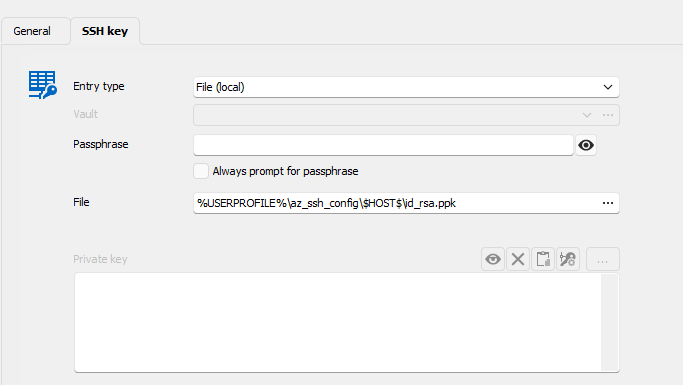
But if I try to do same in SSH (set PPK as in "SSH key"->General and no certificate in "SSK key"->Certificate, I again get error.
SSH to Azure VM with short lived key
In the meantime, as a workaround, could you try creating a Windows Terminal entry and use the following command:
`ssh -F <userprofiledir>\config -l user@domain.com <host IP>`
Please let me know if the issue still occurs using this method instead of an SSH session.
That works, but unfortunately with Windows Terminal I cannot use stuff like "Post login" commands.
SSH to Azure VM with short lived key
Hello!
>No problem, I will transfer this to the RDM support forum.
Thanks for fixing my mess 😅
>Would it be possible to try recreating the certificate and see if the issue persists?
Certificate is created each time by running this:
az ssh config --ip <host IP> --file <userprofiledir>\config --overwrite
This creates <userprofiledir>\config file with following content:
Host <host IP>
	User user@domain.com
	CertificateFile "<userprofiledir>\az_ssh_config\<host IP>\id_rsa.pub-aadcert.pub"
	IdentityFile "<userprofiledir>\az_ssh_config\<host IP>\id_rsa"
Following two files are also created:
<userprofiledir>\az_ssh_config\<host IP>\id_rsa.pub-aadcert.pub
<userprofiledir>\az_ssh_config\<host IP>\id_rsa
I can use config file directly, which works, so certificate must be OK:
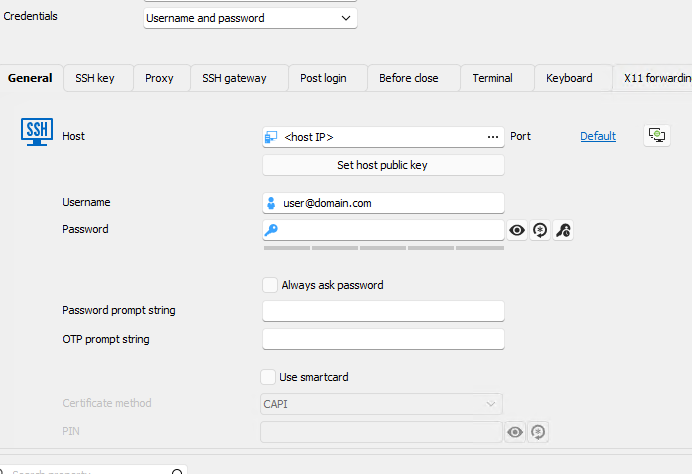
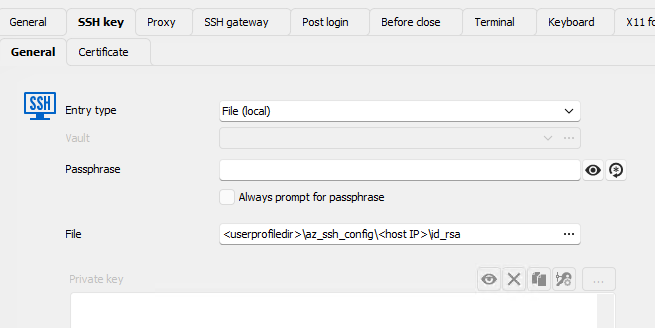
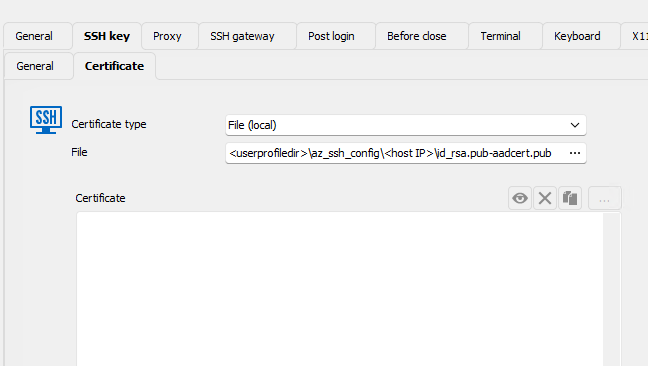
ssh -F <userprofiledir>\config -l user@domain.com <host IP>But if I user RDM and put "<userprofiledir>\az_ssh_config\<host IP>\id_rsa" as SSH key and <userprofiledir>\az_ssh_config\<host IP>\id_rsa.pub-aadcert.pub as certificate I get error above.
Obviously I am putting wrong things to wrong places, so this is my configuration (sensitive data redacted, but I used absolute paths to files):
Kind regards,
Sebastijan
SSH to Azure VM with short lived key
Hi!
I am trying to ssh to VM running on Azure, similar to this post:
I have pointed ssh private key configuration to id_rsa and certificate to id_rsa.pub-aadcert.pub
But remote server does not support ssh-rsa-cert-v01@openssh.com.
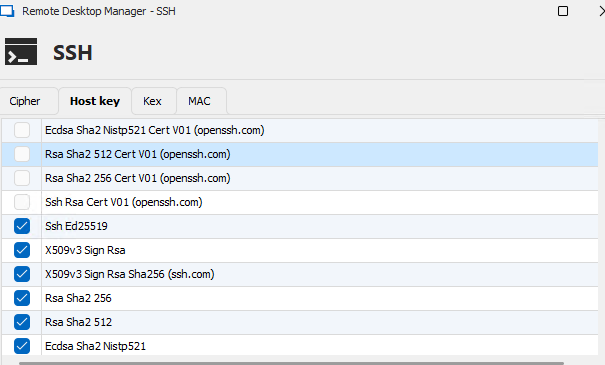
I tried to disable this in host key configuration like that, but still no success:
ssh log:
[18.11.2024 12:06:52] Devolutions Protocols version: 2024.9.27.1 Windows
[18.11.2024 12:06:52] Terminal font: Lucida Console [Lucida Console, fixed=True]
[18.11.2024 12:06:52] Starting SSH, verbose level: 4
[18.11.2024 12:06:52] Setting up connection
[18.11.2024 12:06:52] Connecting to port: 22 (IP any)
[18.11.2024 12:06:52] SSH banner: SSH-2.0-OpenSSH_8.7

[18.11.2024 12:06:52] Sending kex init
[18.11.2024 12:06:52] Received kex init
[18.11.2024 12:06:52] Selected algorithms: curve25519-sha256(strict), ssh-ed25519, chacha20-poly1305@openssh.com, chacha20-poly1305@openssh.com, implicit by cipher, implicit by cipher, none, none
[18.11.2024 12:06:52] Sending Ed25519 kex init
[18.11.2024 12:06:52] Received Ed25519 kex reply
[18.11.2024 12:06:52] Successfully authentified server
[18.11.2024 12:06:52] Sending new keys message
[18.11.2024 12:06:52] Received new keys message
[18.11.2024 12:06:52] Sending userauth service request
[18.11.2024 12:06:52] Received extension info message
[18.11.2024 12:06:52] Server accepts public key types: ssh-ed25519,sk-ssh-ed25519@openssh.com,ssh-rsa,rsa-sha2-256,rsa-sha2-512,ssh-dss,ecdsa-sha2-nistp256,ecdsa-sha2-nistp384,ecdsa-sha2-nistp521,sk-ecdsa-sha2-nistp256@openssh.com,webauthn-sk-ecdsa-sha2-nistp256@openssh.com
[18.11.2024 12:06:52] Received service accepted message
[18.11.2024 12:06:52] Using provided key data
[18.11.2024 12:06:52] Using provided SSH certificate
[18.11.2024 12:06:52] Sending userauth init request
[18.11.2024 12:06:52] Received userauth failure: publickey
[18.11.2024 12:06:52] Starting authentication by key
[18.11.2024 12:06:52] Validating public key: ssh-rsa-cert-v01@openssh.com
[18.11.2024 12:06:52] Received userauth failure: publickey
[18.11.2024 12:06:52] Key not accepted accepted by server
[18.11.2024 12:06:52] No authentication method available
[18.11.2024 12:06:52] The server does not accept interactive authentication
[18.11.2024 12:06:52] The server does not accept password authentication
[18.11.2024 12:06:52] Disconnection in progress
[18.11.2024 12:06:52] Bytes sent: 2732, Bytes received: 1605
[18.11.2024 12:06:52] Packets sent: 6, Packets received: 7
[18.11.2024 12:06:52] Kex completed: 1
[18.11.2024 12:06:52] Disconnecting
Any idea what to change?
Kind regards,
Sebastijan
SSH to Azure VM with short lived key
My mistake, I should not post that in feature requests. Can somebody delete this post and I will properly post this in Support
Thanks and kind regards,
Sebastijan
SSH to Azure VM with short lived key
Hi!
I am trying to ssh to VM running on Azure, similar to this post:
I have pointed ssh private key configuration to id_rsa and certificate to id_rsa.pub-aadcert.pub
But remote server does not support ssh-rsa-cert-v01@openssh.com.
I tried to disable this in host key configuration like that, but still no success:
ssh log:
[18.11.2024 12:06:52] Devolutions Protocols version: 2024.9.27.1 Windows
[18.11.2024 12:06:52] Terminal font: Lucida Console [Lucida Console, fixed=True]
[18.11.2024 12:06:52] Starting SSH, verbose level: 4
[18.11.2024 12:06:52] Setting up connection
[18.11.2024 12:06:52] Connecting to port: 22 (IP any)
[18.11.2024 12:06:52] SSH banner: SSH-2.0-OpenSSH_8.7

[18.11.2024 12:06:52] Sending kex init
[18.11.2024 12:06:52] Received kex init
[18.11.2024 12:06:52] Selected algorithms: curve25519-sha256(strict), ssh-ed25519, chacha20-poly1305@openssh.com, chacha20-poly1305@openssh.com, implicit by cipher, implicit by cipher, none, none
[18.11.2024 12:06:52] Sending Ed25519 kex init
[18.11.2024 12:06:52] Received Ed25519 kex reply
[18.11.2024 12:06:52] Successfully authentified server
[18.11.2024 12:06:52] Sending new keys message
[18.11.2024 12:06:52] Received new keys message
[18.11.2024 12:06:52] Sending userauth service request
[18.11.2024 12:06:52] Received extension info message
[18.11.2024 12:06:52] Server accepts public key types: ssh-ed25519,sk-ssh-ed25519@openssh.com,ssh-rsa,rsa-sha2-256,rsa-sha2-512,ssh-dss,ecdsa-sha2-nistp256,ecdsa-sha2-nistp384,ecdsa-sha2-nistp521,sk-ecdsa-sha2-nistp256@openssh.com,webauthn-sk-ecdsa-sha2-nistp256@openssh.com
[18.11.2024 12:06:52] Received service accepted message
[18.11.2024 12:06:52] Using provided key data
[18.11.2024 12:06:52] Using provided SSH certificate
[18.11.2024 12:06:52] Sending userauth init request
[18.11.2024 12:06:52] Received userauth failure: publickey
[18.11.2024 12:06:52] Starting authentication by key
[18.11.2024 12:06:52] Validating public key: ssh-rsa-cert-v01@openssh.com
[18.11.2024 12:06:52] Received userauth failure: publickey
[18.11.2024 12:06:52] Key not accepted accepted by server
[18.11.2024 12:06:52] No authentication method available
[18.11.2024 12:06:52] The server does not accept interactive authentication
[18.11.2024 12:06:52] The server does not accept password authentication
[18.11.2024 12:06:52] Disconnection in progress
[18.11.2024 12:06:52] Bytes sent: 2732, Bytes received: 1605
[18.11.2024 12:06:52] Packets sent: 6, Packets received: 7
[18.11.2024 12:06:52] Kex completed: 1
[18.11.2024 12:06:52] Disconnecting
Any idea what to change?
Kind regards,
Sebastijan