SSH to Azure VM with short lived key

Hi!
I am trying to ssh to VM running on Azure, similar to this post:
https://forum.devolutions.net/topics/39258/can-rdm-use-my-local-ssh-configuration-to-connect-to-a-remote-host
I have pointed ssh private key configuration to id_rsa and certificate to id_rsa.pub-aadcert.pub
But remote server does not support ssh-rsa-cert-v01@openssh.com.
I tried to disable this in host key configuration like that, but still no success: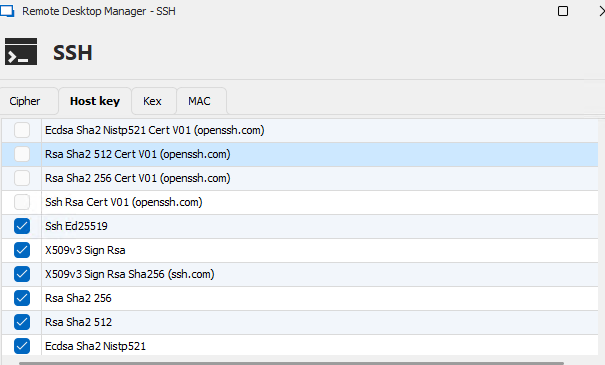
ssh log:
[18.11.2024 12:06:52] Devolutions Protocols version: 2024.9.27.1 Windows
[18.11.2024 12:06:52] Terminal font: Lucida Console [Lucida Console, fixed=True]
[18.11.2024 12:06:52] Starting SSH, verbose level: 4
[18.11.2024 12:06:52] Setting up connection
[18.11.2024 12:06:52] Connecting to port: 22 (IP any)
[18.11.2024 12:06:52] SSH banner: SSH-2.0-OpenSSH_8.7

[18.11.2024 12:06:52] Sending kex init
[18.11.2024 12:06:52] Received kex init
[18.11.2024 12:06:52] Selected algorithms: curve25519-sha256(strict), ssh-ed25519, chacha20-poly1305@openssh.com, chacha20-poly1305@openssh.com, implicit by cipher, implicit by cipher, none, none
[18.11.2024 12:06:52] Sending Ed25519 kex init
[18.11.2024 12:06:52] Received Ed25519 kex reply
[18.11.2024 12:06:52] Successfully authentified server
[18.11.2024 12:06:52] Sending new keys message
[18.11.2024 12:06:52] Received new keys message
[18.11.2024 12:06:52] Sending userauth service request
[18.11.2024 12:06:52] Received extension info message
[18.11.2024 12:06:52] Server accepts public key types: ssh-ed25519,sk-ssh-ed25519@openssh.com,ssh-rsa,rsa-sha2-256,rsa-sha2-512,ssh-dss,ecdsa-sha2-nistp256,ecdsa-sha2-nistp384,ecdsa-sha2-nistp521,sk-ecdsa-sha2-nistp256@openssh.com,webauthn-sk-ecdsa-sha2-nistp256@openssh.com
[18.11.2024 12:06:52] Received service accepted message
[18.11.2024 12:06:52] Using provided key data
[18.11.2024 12:06:52] Using provided SSH certificate
[18.11.2024 12:06:52] Sending userauth init request
[18.11.2024 12:06:52] Received userauth failure: publickey
[18.11.2024 12:06:52] Starting authentication by key
[18.11.2024 12:06:52] Validating public key: ssh-rsa-cert-v01@openssh.com
[18.11.2024 12:06:52] Received userauth failure: publickey
[18.11.2024 12:06:52] Key not accepted accepted by server
[18.11.2024 12:06:52] No authentication method available
[18.11.2024 12:06:52] The server does not accept interactive authentication
[18.11.2024 12:06:52] The server does not accept password authentication
[18.11.2024 12:06:52] Disconnection in progress
[18.11.2024 12:06:52] Bytes sent: 2732, Bytes received: 1605
[18.11.2024 12:06:52] Packets sent: 6, Packets received: 7
[18.11.2024 12:06:52] Kex completed: 1
[18.11.2024 12:06:52] Disconnecting
Any idea what to change?
Kind regards,
Sebastijan
16229b52-3887-40c5-8ce5-2c0a82c4c824.png
All Comments (8)
My mistake, I should not post that in feature requests. Can somebody delete this post and I will properly post this in Support
Thanks and kind regards,
Sebastijan
Hello,
No problem, I will transfer this to the RDM support forum.
Based on the logs you've provided, the SSH authentication is failing because the server does not accept the SSH certificate you're using for authentication.
Would it be possible to try recreating the certificate and see if the issue persists?
Best regards,
Carl Marien
Hello!
>No problem, I will transfer this to the RDM support forum.
Thanks for fixing my mess 😅
>Would it be possible to try recreating the certificate and see if the issue persists?
Certificate is created each time by running this:
az ssh config --ip <host IP> --file <userprofiledir>\config --overwrite
This creates <userprofiledir>\config file with following content:
Host <host IP>
	User user@domain.com
	CertificateFile "<userprofiledir>\az_ssh_config\<host IP>\id_rsa.pub-aadcert.pub"
	IdentityFile "<userprofiledir>\az_ssh_config\<host IP>\id_rsa"
Following two files are also created:
- <userprofiledir>\az_ssh_config\<host IP>\id_rsa.pub-aadcert.pub
- <userprofiledir>\az_ssh_config\<host IP>\id_rsa
I can use config file directly, which works, so certificate must be OK:
ssh -F <userprofiledir>\config -l user@domain.com <host IP>
But if I user RDM and put "<userprofiledir>\az_ssh_config\<host IP>\id_rsa" as SSH key and <userprofiledir>\az_ssh_config\<host IP>\id_rsa.pub-aadcert.pub as certificate I get error above.
Obviously I am putting wrong things to wrong places, so this is my configuration (sensitive data redacted, but I used absolute paths to files):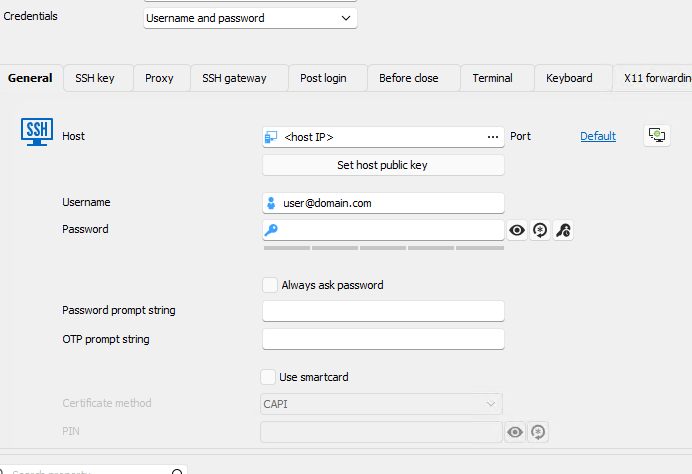
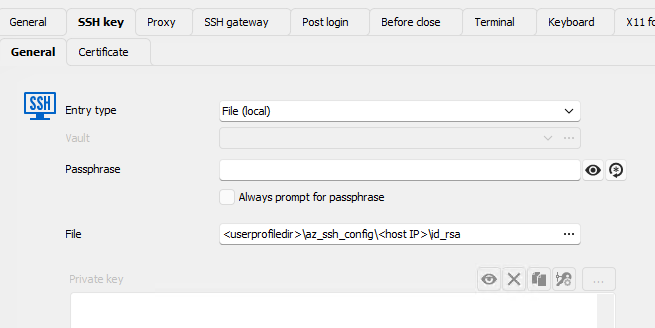
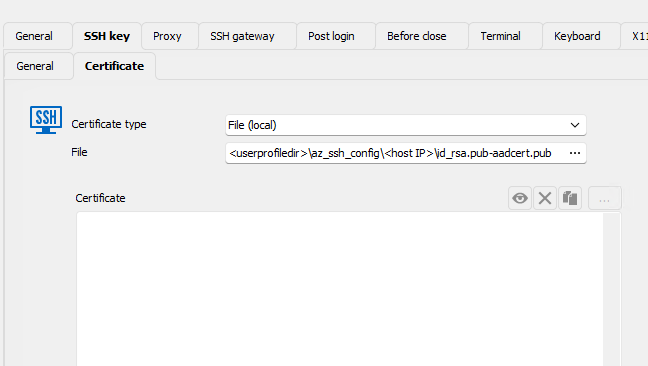
Kind regards,
Sebastijan
4a8df186-2b6a-4799-b0ea-384b0ddeaaf9.png
17d6ef3c-7785-48fe-b236-339e7ff27790.png
e01ee6b0-db1c-434c-a7bf-7643dd9aa6b5.png
Hello,
Thank you for your patience.
While RDM does support RSA keys, the issue likely stems from how RDM handles OpenSSH certificates associated with those keys. OpenSSH certificates are different from standard public keys and seems to require specific handling.
I will contact the development team to see if there is anything we can do to address your issue.
In the meantime, as a workaround, could you try creating a Windows Terminal entry and use the following command:
`ssh -F <userprofiledir>\config -l user@domain.com <host IP>`
Please let me know if the issue still occurs using this method instead of an SSH session.
Best regards,
Carl Marien
Hello
To help us better understand and resolve the issue, could you please check whether the authorized_keys file on your Azure VM includes a line similar to the following:
cert-authority ssh-rsa AAAAB3...rest_of_ca_public_key... comment
This line is crucial because it allows the server to recognize and accept SSH certificates signed by a specific Certificate Authority (CA). If this entry is missing or not properly configured, the server may reject the SSH certificate provided by RDM.
Best regard
Carl Marien
In the meantime, as a workaround, could you try creating a Windows Terminal entry and use the following command:
`ssh -F <userprofiledir>\config -l user@domain.com <host IP>`
Please let me know if the issue still occurs using this method instead of an SSH session.
That works, but unfortunately with Windows Terminal I cannot use stuff like "Post login" commands.
To help us better understand and resolve the issue, could you please check whether the authorized_keys file on your Azure VM includes a line similar to the following:
cert-authority ssh-rsa AAAAB3...rest_of_ca_public_key... comment
This line is crucial because it allows the server to recognize and accept SSH certificates signed by a specific Certificate Authority (CA). If this entry is missing or not properly configured, the server may reject the SSH certificate provided by RDM.
There is actually no ~/.ssh/authorized_keys file at all... I know that servers are added to Active Directory, so I am wondering if this might be stored somewhere else...
On the other hand, would it be easier if I would have ppk file instead? For example I have already successfully set up WinSCP, where in addition to 'az ssh config ...' I also run this to convert certificate to PPK:
$winscpargs = '/keygen "<userprofiledir>\az_ssh_config\$HOST$\id_rsa" /certificate="<userprofiledir>\az_ssh_config\<host IP>\id_rsa.pub-aadcert.pub" /output="<userprofiledir>\az_ssh_config\<host IP>\id_rsa.ppk"'
Start-Process -Wait -FilePath "<userprofiledir>\Documents\Tools\WinSCP-Portable\WinSCP.com" -ArgumentList $winscpargs
Then I just point ssh key setting of winscp entry to this ppk file and scp works (protocol in entry is set to SCP):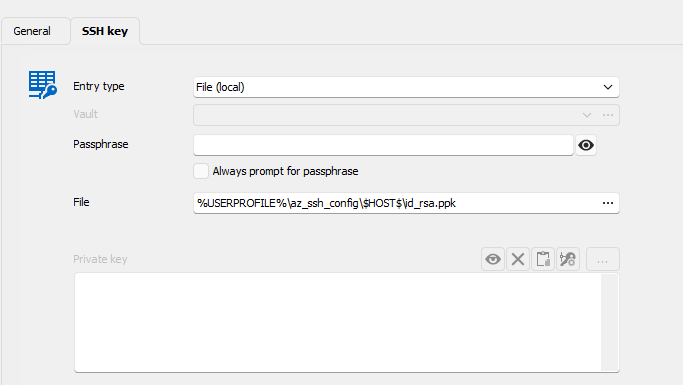
But if I try to do same in SSH (set PPK as in "SSH key"->General and no certificate in "SSK key"->Certificate, I again get error.
7b600454-0a25-4ac7-80c0-537166153db7.png
Hello,
Thank you for your patience.
Unfortunately, we currently do not have the setup required to reproduce the issue. However, we will work on recreating it and keep you updated on any progress.
Best regards,
Carl Marien