
Sabater
Android RDM - RDP session crashes when switching to fullscreen
it looks like it's not crashing anymore. I have a probably unrelated bug where i have to enable/disable the trackpad multple times on android but i didn't get the cause of this yet, can't reproduce this constantly
Android RDM - RDP session crashes when switching to fullscreen
Hi, I have the same issue from at least June. I thought "surely someone else is going to report this" and just waited 😅
Phone: pixel 7 on Android 15 or 16 (crashed on both)
Locale: Italian, English as secondary
Keyboard: Gboard with English+italian
Tried to uninstall and use with a new clean DB , no difference
Logcat:
FATAL EXCEPTION: mainProcess: com.devolutions.remotedesktopmanager, PID: 21862android.runtime.JavaProxyThrowable: [System.NullReferenceException]: Object reference not set to an instance of an object at Devolutions.RemoteDesktopManager.Activities.Sessions.RDP.RDPSessionActivity.<OnCreate>b__65_0 + 0x0(Unknown Source) at Devolutions.RemoteDesktopManager.SessionOpenGLRenderer.OnCreateInputConnection + 0x1e(Unknown Source) at Android.Views.View.n_OnCreateInputConnection_Landroid_view_inputmethod_EditorInfo_ + 0xf(Unknown Source) at Android.Runtime.JNINativeWrapper.Wrap_JniMarshal_PPL_L + 0x5(Unknown Source) at crc6458513862cd674d01.SessionOpenGLRenderer.n_onCreateInputConnection(Native Method) at crc6458513862cd674d01.SessionOpenGLRenderer.onCreateInputConnection(SessionOpenGLRenderer.java:82) at android.view.inputmethod.InputMethodManager.createInputConnection(InputMethodManager.java:5155) at android.view.inputmethod.InputMethodManager.startInputInner(InputMethodManager.java:3389) at android.view.inputmethod.InputMethodManager.startInputOnWindowFocusGainInternal(InputMethodManager.java:1117) at android.view.inputmethod.InputMethodManager.-$$Nest$mstartInputOnWindowFocusGainInternal(Unknown Source:0) at android.view.inputmethod.InputMethodManager$DelegateImpl.onPostWindowGainedFocus(InputMethodManager.java:943) at android.view.ImeFocusController.onPostWindowFocus(ImeFocusController.java:110) at android.view.ViewRootImpl.handleWindowFocusChanged(ViewRootImpl.java:4781) at android.view.ViewRootImpl.-$$Nest$mhandleWindowFocusChanged(Unknown Source:0) at android.view.ViewRootImpl$ViewRootHandler.handleMessageImpl(ViewRootImpl.java:7029) at android.view.ViewRootImpl$ViewRootHandler.handleMessage(ViewRootImpl.java:6937) at android.os.Handler.dispatchMessage(Handler.java:110) at android.os.Looper.dispatchMessage(Looper.java:315) at android.os.Looper.loopOnce(Looper.java:251) at android.os.Looper.loop(Looper.java:349) at android.app.ActivityThread.main(ActivityThread.java:9041) at java.lang.reflect.Method.invoke(Native Method) at com.android.internal.os.RuntimeInit$MethodAndArgsCaller.run(RuntimeInit.java:593) at com.android.internal.os.ZygoteInit.main(ZygoteInit.java:929)
Ps: I used the help>logs option and I find logs from crashes from more than a year ago. How is that possible, I uninstalled the app and reinstalled and tried to use a new DB.
Now I reloaded the DB that is hosted on nextcloud, the logs are saved there?
Or reinstalling restores some faulty setting from Google backup or something like that? I'm no longer using a devolution account to login so I don't understand how the logs are still there
SQlite support for Android
ah, i was unaware about cross platform problems :(
i tried both the devolution password hub personal and the xml and i have the impression that the sqlite data source it's much snappier on startup (i'm talking about a second, not huge difference)
it's ok, i can export on google drive every once in a while, and setup that as a source on android, i have just a few entries :)
SQlite support for Android
My connection database is sqlite, but looks like on android i can only load xml files
it would be great if it could support sqlite databases one day
SSH terminal crashes when a specific script runs on the server
Well... I couldn't stand the weird apple keyboard shortcuts and I just wiped, migrating to ubuntu... I have no way to test this on osx anymore :)
RDM doesn't run with mono installed
Hi, i had this problem too but WITHOUT mono installed.
system: Ubuntu 20.04 (without snapd)
~$ remotedesktopmanager.free

Unhandled Exception:
System.TypeInitializationException: The type initializer for 'GLib.Marshaller' threw an exception. ---> System.TypeInitializationException: The type initializer for 'Sys' threw an exception. ---> System.DllNotFoundException: /usr/lib/../lib/libmono-native.so assembly:<unknown assembly> type:<unknown type> member:(null)
  at (wrapper managed-to-native) Interop+Sys.LChflagsCanSetHiddenFlag()
  at Interop+Sys..cctor () [0x00000] in <c453bf849bb84e719dbec0475e99db95>:0
   --- End of inner exception stack trace ---
  at System.IO.FileSystem.FileExists (System.ReadOnlySpan`1[T] fullPath, System.Int32 fileType, Interop+ErrorInfo& errorInfo) [0x00007] in <c453bf849bb84e719dbec0475e99db95>:0
  at System.IO.FileSystem.FileExists (System.ReadOnlySpan`1[T] fullPath) [0x00006] in <c453bf849bb84e719dbec0475e99db95>:0
  at System.IO.File.Exists (System.String path) [0x00043] in <c453bf849bb84e719dbec0475e99db95>:0
  at System.TimeZoneInfo.TryLoadTzFile (System.String tzFilePath, System.Byte[]& rawData, System.String& id) [0x00000] in <c453bf849bb84e719dbec0475e99db95>:0
  at System.TimeZoneInfo.TryGetLocalTzFile (System.Byte[]& rawData, System.String& id) [0x0000f] in <c453bf849bb84e719dbec0475e99db95>:0
  at System.TimeZoneInfo.GetLocalTimeZoneFromTzFile () [0x00000] in <c453bf849bb84e719dbec0475e99db95>:0
  at System.TimeZoneInfo.GetLocalTimeZone (System.TimeZoneInfo+CachedData cachedData) [0x00000] in <c453bf849bb84e719dbec0475e99db95>:0
  at System.TimeZoneInfo+CachedData.CreateLocal () [0x00018] in <c453bf849bb84e719dbec0475e99db95>:0
  at System.TimeZoneInfo+CachedData.get_Local () [0x0000c] in <c453bf849bb84e719dbec0475e99db95>:0
  at System.TimeZoneInfo.get_Local () [0x00000] in <c453bf849bb84e719dbec0475e99db95>:0
  at System.CurrentSystemTimeZone..ctor () [0x00011] in <c453bf849bb84e719dbec0475e99db95>:0
  at System.TimeZone.get_CurrentTimeZone () [0x00024] in <c453bf849bb84e719dbec0475e99db95>:0
  at GLib.Marshaller..cctor () [0x00096] in <5b0dd59206734c9f99b9f9b329cdd118>:0
   --- End of inner exception stack trace ---
  at GLib.Global.set_ProgramName (System.String value) [0x00000] in <5b0dd59206734c9f99b9f9b329cdd118>:0
  at Gtk.Application.SetPrgname () [0x00015] in <1bdf72322a644cc3917a854c8dfd1be8>:0
  at Gtk.Application.Init () [0x00000] in <1bdf72322a644cc3917a854c8dfd1be8>:0
  at Devolutions.RemoteDesktopManager.Program.Main (System.String[] args) [0x00000] in <03bd1ac7bedf44a4bef05e3c51491e10>:0
[ERROR] FATAL UNHANDLED EXCEPTION: System.TypeInitializationException: The type initializer for 'GLib.Marshaller' threw an exception. ---> System.TypeInitializationException: The type initializer for 'Sys' threw an exception. ---> System.DllNotFoundException: /usr/lib/../lib/libmono-native.so assembly:<unknown assembly> type:<unknown type> member:(null)
  at (wrapper managed-to-native) Interop+Sys.LChflagsCanSetHiddenFlag()
  at Interop+Sys..cctor () [0x00000] in <c453bf849bb84e719dbec0475e99db95>:0
   --- End of inner exception stack trace ---
  at System.IO.FileSystem.FileExists (System.ReadOnlySpan`1[T] fullPath, System.Int32 fileType, Interop+ErrorInfo& errorInfo) [0x00007] in <c453bf849bb84e719dbec0475e99db95>:0
  at System.IO.FileSystem.FileExists (System.ReadOnlySpan`1[T] fullPath) [0x00006] in <c453bf849bb84e719dbec0475e99db95>:0
  at System.IO.File.Exists (System.String path) [0x00043] in <c453bf849bb84e719dbec0475e99db95>:0
  at System.TimeZoneInfo.TryLoadTzFile (System.String tzFilePath, System.Byte[]& rawData, System.String& id) [0x00000] in <c453bf849bb84e719dbec0475e99db95>:0
  at System.TimeZoneInfo.TryGetLocalTzFile (System.Byte[]& rawData, System.String& id) [0x0000f] in <c453bf849bb84e719dbec0475e99db95>:0
  at System.TimeZoneInfo.GetLocalTimeZoneFromTzFile () [0x00000] in <c453bf849bb84e719dbec0475e99db95>:0
  at System.TimeZoneInfo.GetLocalTimeZone (System.TimeZoneInfo+CachedData cachedData) [0x00000] in <c453bf849bb84e719dbec0475e99db95>:0
  at System.TimeZoneInfo+CachedData.CreateLocal () [0x00018] in <c453bf849bb84e719dbec0475e99db95>:0
  at System.TimeZoneInfo+CachedData.get_Local () [0x0000c] in <c453bf849bb84e719dbec0475e99db95>:0
  at System.TimeZoneInfo.get_Local () [0x00000] in <c453bf849bb84e719dbec0475e99db95>:0
  at System.CurrentSystemTimeZone..ctor () [0x00011] in <c453bf849bb84e719dbec0475e99db95>:0
  at System.TimeZone.get_CurrentTimeZone () [0x00024] in <c453bf849bb84e719dbec0475e99db95>:0
  at GLib.Marshaller..cctor () [0x00096] in <5b0dd59206734c9f99b9f9b329cdd118>:0
   --- End of inner exception stack trace ---
  at GLib.Global.set_ProgramName (System.String value) [0x00000] in <5b0dd59206734c9f99b9f9b329cdd118>:0
  at Gtk.Application.SetPrgname () [0x00015] in <1bdf72322a644cc3917a854c8dfd1be8>:0
  at Gtk.Application.Init () [0x00000] in <1bdf72322a644cc3917a854c8dfd1be8>:0
  at Devolutions.RemoteDesktopManager.Program.Main (System.String[] args) [0x00000] in <03bd1ac7bedf44a4bef05e3c51491e10>:0
the problem was that mono WAS NOT installed
~$ mono --version

Command «mono» not found, can be installed with:

sudo apt install mono-runtime
now, a while ago, I installed Pinta from gnome-software, then when I noticed that it installed mono system-wide, I immediately uninstalled it and use the flatpak version. For some reason this left me with a broken install where the binary was removed but some mono directories weren't, and this prevented me to install it again: apt would fail saying that /usr/lib/mono/ and /etc/mono/ weren't empty. So i deleted those two directories and now RDM works fine!
SSH: use standard (PC, not Apple) keyboard shortcuts on mac?
Yes, but the problem is that apple switched the positions of ctrl alt and meta on the keyboard with their own weird positions, so when I press ctrl on my PC keyboard, macos thinks "in that position there's command" (or option? I never understood the difference the two different weird symbols)
For example by trial and error in iterm i did this:

and now it works correctly with a PC keyboard.
If i whitelist rdm in karabiner, then it will mess all the rdp and vnc connections
SSH: use standard (PC, not Apple) keyboard shortcuts on mac?
In RDP there's a way to switch the keys, but not in SSH
SSH: use standard (PC, not Apple) keyboard shortcuts on mac?
Hi, at work the management decided that imacs are nicer on the desk and when the customers visit the offices it's more pleasant to watch, even though 100% of my work is remoting in linux and windows servers.
Ok, let's use a $2000 thin client just because it's more pretty on the desk...
I hate the apple keyboard so I am using a regular USB PC keyboard, with ctrl, win, alt keys.
I also hate the apple shortcuts, so i am using karabiner to remap everything to PC standard.
ctrl is ctrl, alt is alt, win is win. I copy with ctrl+c and paste with ctrl+v.
I setup iterm2 to send ctrl to the machine, so I stop scripts with ctrl+c, copy with win+c
Now, when i use RDM, I always confuse which key is command and which key is option. I have to stop scripts with win+c. There's a way to use standard PC keys?
My workaround is "open external" and i setup to use iterm2, but I'd like to use the integrated one because otherwise if it gets detached and I open 10 windows, I lose track of where is where with the poor window management that macos has
FDM not starting, only splash screen
Now that I think about it, this time I directly installed kubuntu instead of changing it later
FDM not starting, only splash screen
I am running Ubuntu 20.04 but I use KDE instead of GNOME
FDM not starting, only splash screen
also on my latest ubuntu it doesn't start, it's greyed out and locked
the terminal doesn't have any message
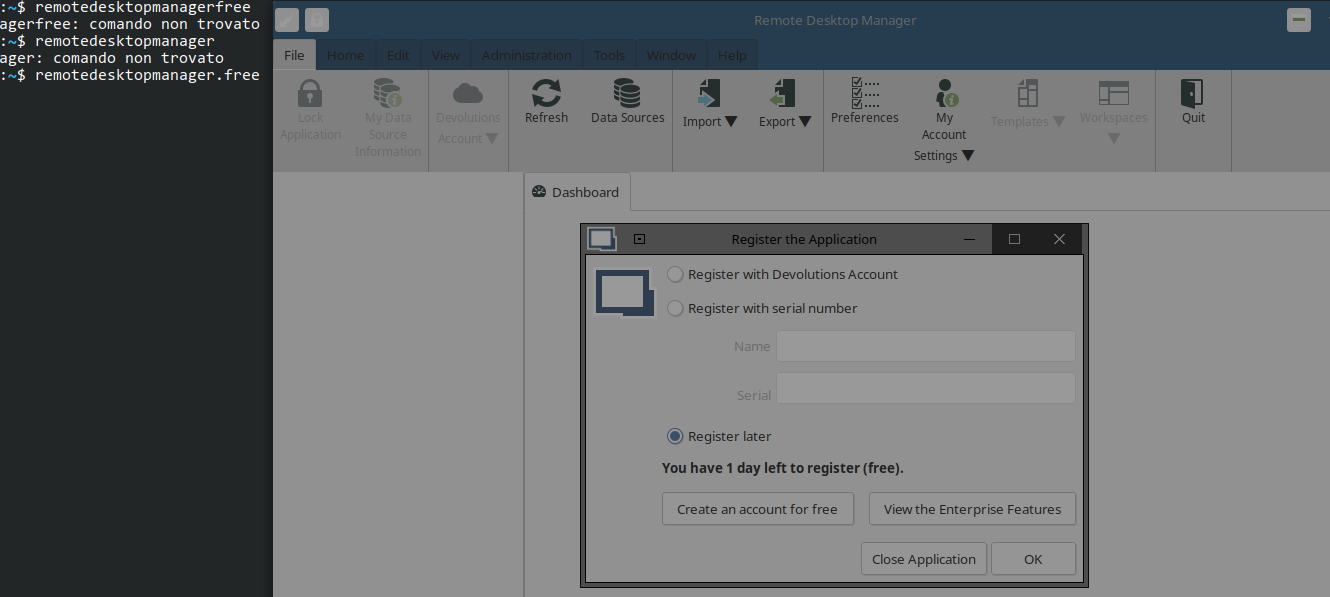
libwebkit2gtk-4.0-37 is already installed (2.30.5-0ubuntu0.20.04.1)
edit: I pressed esc several times and the splash screen went away. probably is due because i replaced gnome with another de
SSH terminal crashes when a specific script runs on the server
I found out that RDM for mac crashes when I run armbian-config on my server.
It's this script: config/debian-config at master · armbian/config · GitHub
It crashes and the window disappears, I don't have the typical crash report dialog. The script wants to have a dialog full screen, like this:

So weird...
Option to have the rdp screen in landscape only
Cool! Thanks!
Option to have the rdp screen in landscape only
yes exactly. If i force 1920x1080, then it connects portrait with black bars on top / bottom
Option to have the rdp screen in landscape only
Hi, because my phone takes a full second to perform the screen rotation animations, it's extremely sensitive (rotates the screen when it's lightly tilted) and for some reason they enabled it also for upside-down, i am forced to keep auto rotation disabled.
Now, Microsoft remote desktop client has an option to always show the remote desktop in landscape, even if the phone is set to portrait only.
With rdm i can force a landscape resolution, but then i have the big black bars on top and bottom
After all, most people will use a pc with a landscape screen, not with a portrait resolution
So, i suggest an option to force landscape orientation when showing the desktop in full screen