
Benoit Cortier
Devolutions Gateway support for "Proxmox (Beta)"-session
Hi @markusburkhardt,
Thanks for the request, it makes sense, and Proxmox should be a good fit for the Gateway.
Almost everything the Proxmox session uses runs over HTTPS on port 8006 of the Proxmox host. That includes the API behind the dashboard, the web interface, and the noVNC and xterm.js consoles. The Gateway already tunnels this kind of traffic for website entries, so it should be doable. The main exception is SPICE, which goes through a separate proxy on port 3128 and needs some extra handling, this is something we would need to investigate first.
In the meantime, there's a possible workaround. I haven't tested it myself, but it should work: create a Website entry pointing to https://<your-proxmox-host>:8006 and set it to connect through your Devolutions Gateway. In theory, this gives you the full Proxmox web interface through the Gateway, including the VM and container consoles. If you try it, please let us know whether it works.
A few details would help us cover your setup:
- Which console type do you use: noVNC, SPICE, or both?
- Is this a single Proxmox node or a cluster? For a cluster, do you connect to one node or to several?
Best regards,
Daisy Chaining Gateways for access into different network segments
Hi @Yoffstr
Thank you for following up.
The Agent Tunnel will be stabilized and documented as part of the v2026.3 release.
The complete architecture we discussed here is separate, however. Policy-based Gateway selection remains the main gap, and our intention is to work on that next.
We’ll keep this thread updated as the work progresses.
Best regards,
[Devolutions Gateway] Validate the TLS certificate at service startup, not at first handshake
Thank you for the report.
We agree that the current behavior can be improved.
Devolutions Gateway currently resolves certificates from the Windows certificate store when a TLS connection is received. This allows certificates to be installed, renewed, or replaced without restarting the service, but it also means that some certificate-store problems are only reported when the first client connects.
We are considering adding a startup validation that attempts to locate the configured certificate, verify that it is usable by the Gateway service account, and confirm that its private key and certificate chain can be loaded.
We have recorded this improvement for investigation.
In the meantime, the Gateway logs should report the certificate-selection error when a TLS connection is attempted.
Best regards,
Daisy Chaining Gateways for access into different network segments
sorry one thing i forgot to mention in the scope, is the traversal needs to be both ways.
For example: clients in internal network, connect to internal gateway, that connects to agent in DMZ, to connect to servers in DMZ. While also external clients, connect to the gateway in the dmz, gateway connects to agents in internal network, to connect to servers in internal network.
kind regards
Oops, I missed this message when I sent the previous one.
So I assumed that the Gateway in DMZ was accessible to clients in the internal network, but if that’s not the case, we could imagine exactly what you just said!
The caveat here compared to federations is that you, as an network administrator, will need to configure more components: "two Gateway farms in a single federation" vs "two Gateway farms and two Agent farms" + configure the selection policy (e.g.: can I reach DMZ Farm? Can I reach internal Farm?) for each relevant entries.
EDIT: Noting that you don’t need more machines since you can still have both a Gateway and an Agent per node. (Agent that you may already have installed for the updater module anyway.)
We’ll have to think about how to make this easy to configure.
Best regards,
Daisy Chaining Gateways for access into different network segments
Hi again,
Thank you for confirming!
Following up on my own post. The diagrams you shared made your setup much easier to understand, so it seemed worth doing the same, and here it is:
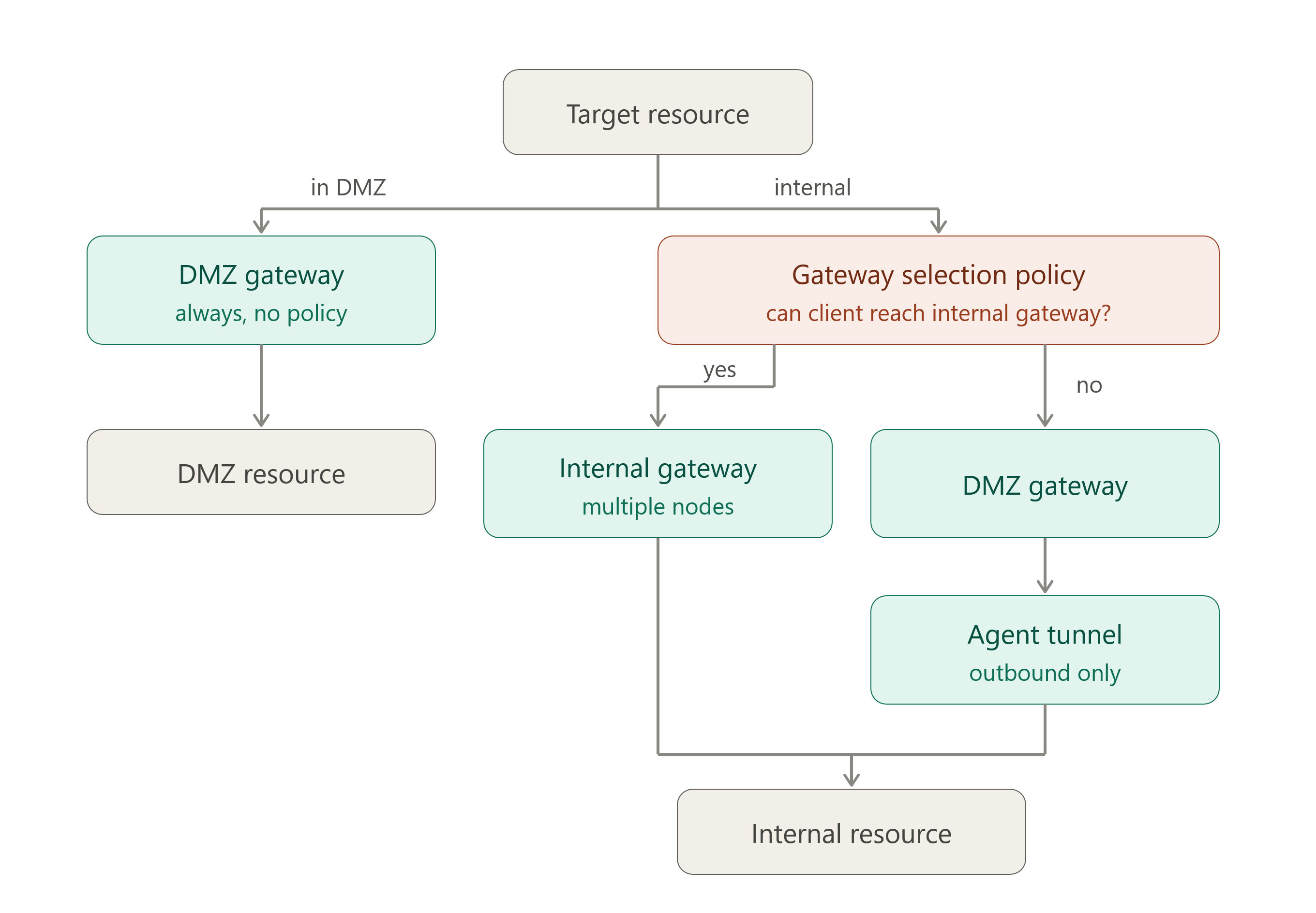
One refinement on the probe. It can be as narrow as "can I reach the internal Gateway" rather than an internal-only FQDN, because a split-horizon record can resolve over a VPN that still cannot route to the farm. Testing the Gateway itself is both simpler and more accurate.
The only thing I am not sure is, for utilising the agent tunnels, could they be utilised in a active passive setup for high availiabilty?
Honestly, high availability is a gap: on the "no" branch the internal next hop is a single Agent rather than a farm, so it has no redundancy today.
That is the main thing I would want to address before calling this a complete answer to your diagrams.
Fortunately, agent redundancy is a very reasonable feature we could add to Agent tunneling, and we are actually already thinking about it.
Best regards,
Daisy Chaining Gateways for access into different network segments
Hi @Yoffstr
I want to validate the actual requirements once more, because the proposed “super farm” is a specific implementation rather than necessarily the underlying need.
As I understand it, users should connect through the appropriate entry Gateway and then reach any authorized resource across the internal and DMZ networks, with automatic routing, minimal firewall exposure, high availability, auditing, and recording.
The architecture I proposed provides essentially the same outcome using existing building blocks: an internal Gateway for internal users, and a public Gateway using Agent Tunnel for internal destinations. Routing can still be based on subnet or hostname. The main difference is that the internal next hop is an Agent rather than another Gateway Farm, and the Agent connects outward to the already reachable public Gateway instead of requiring inter-farm network exposure.
Gateway federation is an interesting concept: effectively, a peer network of farms where selecting the federation provides access to anything it can route to. However, implementing it would require substantial work around trust, route exchange, loop prevention, authorization, auditing, recording, failover, and compatibility. It would solve valid scenarios, but many of them can already be addressed using simpler mechanisms. Unless we identify requirements that specifically require both Gateway Farms to participate in the session, it is unlikely to be implemented in the foreseeable future. Keeping the request open still makes sense, particularly if broader demand or additional use cases emerge.
The key question is: what capability would be lost if the internal next hop were an Agent instead of the internal Gateway Farm? Is Gateway federation itself a hard requirement, or would another architecture be acceptable if it satisfies the requirements?
If the simplified architecture works, a more realistic product improvement would be policy-based selection of the entry Gateway. Combined with Agent Tunnel destination routing, this could make the deployment transparent, avoid duplicated entries, and is something we could reasonably consider implementing sooner.
Thank you also for the internal-vs-external detection approach. LAN range plus a probe against an internal-only-resolvable FQDN. That's a sound way to disambiguate. A policy engine would need the client to evaluate network context and select the entry Gateway accordingly. That's a useful constraint to know early, and I think it fits well with policy-based selection too!
Looking forward to your reply.
Best regards,
Change the session recording path - through Gateway installer
Hi @Yoffstr
Glad to hear that! I’ll let you know as we make progress.
Best regards,
Change the session recording path - through Devolutions Cloud
Hi @Yoffstr
Thank you for confirming, I updated our internal ticket accordingly.
Best regards,
Daisy Chaining Gateways for access into different network segments
Hi @Yoffstr
Thank you for the feedback. Graphs made this easy to understand.
I agree that the Agent Tunnel solution does not really match the original symmetric gateway-chaining design.
I’m thinking that a more practical compromise could be:
An internal Devolutions Gateway for corporate access.
A DMZ Gateway with an Agent Tunnel for external access to internal resources.
Recordings stored on the Gateway handling the session, using the existing “same as session” or custom recording Gateway settings where appropriate.
True daisy-chaining would be considerably more complex because each Gateway would need to securely forward session traffic, authorization context, auditing, recording, failure handling, and potentially farm load balancing across another independently managed Gateway. That would introduce significant architectural and operational complexity, so honestly it is unlikely to be implemented in the near term.
This alternative is still asymmetric and relatively advanced, but it avoids trying to chain two Gateway Farms together. The main remaining challenge would be selecting the appropriate Gateway based on whether the user is internal or external, which may require separate entries or configuration scopes… Maybe we could facilitate this by introducing policy-based Gateway selection. For example: choosing the Gateway based on user group, access method, source context, or target zone. That would reduce duplicated entries and make this deployment pattern feel much more intentional.
How does that sound?
Best regards,
Reverse Proxy for Gateway Agents
Hi @Yoffstr
The polishing is progressing, and feature will be stabilized for the v2026.3 release.
Best regards,
Change the session recording path - through Devolutions Cloud
Hi @Yoffstr
The two solutions proposed (cloud-side and gateway side) work for different scenarios. which I will list my reasons for the gateway side here in my other thread: Change the session recording path - through Gateway installer - so to keep the to conversation seperate as asked by the Devolutions team.
Thank you for the detailed explanation, and my apologies again for initially posting in the wrong thread. I’ll quote the Cloud-related portion of your response here so that this part of the discussion remains in the appropriate thread. I also see a third, distinct workstream that may be worth tracking separately, which I’ll address below.
The two solutions proposed (cloud-side and gateway side) work for different scenarios. which I will list my reasons for the cloud side here in my other thread: Change the session recording path - through Devolutions Cloud - so to keep the to conversation seperate as asked by the Devolutions team.
With regards to the gateway installer, please see my answer to your questions below:
> If the concern is the recordings filling the drive and bringing the server down, retention policy in Cloud/PAM
> service is I think the direct fix, and you already found the request for it. Once retention is in place, plus the
> ability to choose the path at install time, is there anything left that this request would solve for you?
Answer: yes, i am sure this will address majority of the userbases requirements. Hwever, if someone misconfigures the recording location at install (by accident or lack of knowledge of what they are doing). Are they then going to be required to uninstall the gateway, in order to reconfig the recording location? my thought is if they can run a interactive program to reconfigure the gateway/recording path, that would be much easier.
> If there is a remaining scenario, I would like to understand it precisely. For example: an already-deployed
> Gateway where you've since added a disk or a network share and want to relocate. In that case, would a
> proper configuration tool running on the Gateway machine (interactive, no JSON editing, works on
> Windows and Linux) cover it, or do you specifically need to do this remotely without touching the server?
Answer: In this case, I believe a interactive tool would be most benifitical.
Agreed. We’ve been considering an interactive solution for editing the configuration after installation. Specifically: something graphical, rather than requiring users to edit the .json file manually or run a PowerShell cmdlet.
> Note that changing the path doesn't move the existing recordings, so on a Gateway whose drive is already
> filling up, changing the path alone won't reclaim any space. You would still have to deal with what's already
> there.
Answer: ok, so this raises a good point. If changing the path, wont bring the existing recordings over to the new location. will this cause integrity issues if someone was to bring them over to the new location (if they are wanting to keep consistancy - having all recordings in one location)? A suggestion, would be to prompt the user to see if they want the recording migrated to the new location or just left in the current location.
Hub maintains Gateway session metadata associating each recording with the Gateway on which it was created. The data source will continue routing playback requests to the associated Gateway, but the Gateway will no longer find recordings that remain under the old path. Offering to migrate the existing recordings as part of the interactive configuration workflow would make sense, and it is something we should consider.
I won’t expand further on the local configuration workflow here, because your latest example clarifies that the primary need behind this Cloud-side request is centralized configuration management for organizations operating multiple Gateways or Gateway farms.
If you would like to follow the separate graphical configuration tool workstream specifically, we could open a third feature request dedicated to it.
If i am a MSP or a larger organisation that has multiple gateways and farm deployed. Majority of the time, my gateways are going to be standardised for ease of deployment and constancy. Now if i am wanting to be make the same adjustment to multple gateways, rather than logging into each one (RDP), using the (proposed) interactive tool, restarting the service and logging out.
Instead, you could make the config change in Devolutions cloud under the gateway module. Push the config change to the gateway/s, or gateway farm (which the cloud service could drain the updated gateway and then restart. once its back up then drain the next gateway in the farm and so on). Then the cloud could progressively update all the gateways without having to do it manually.
Thank you for the input. For an MSP or a larger organization, updating each Gateway individually would require connecting to every server, changing the configuration, restarting the service, and verifying the result. Instead, you would like to make the configuration change from Devolutions Hub (EDIT: Cloud) and apply it to:
multiple selected Gateways;
all members of a Gateway farm; or
potentially a broader group of standardized Gateways.
For a farm, you are also suggesting that the update be coordinated as a rolling operation: drain one member, apply the configuration, restart and validate it, and then proceed to the next member. This would avoid interrupting the entire farm at once.
This distinction is important. A basic remote configuration option would not fully address your scenario without bulk targeting and coordinated rollout.
I therefore see three progressively broader levels of scope:
Selecting the recording path during installation.
Providing a local, graphical and interactive post-install configuration tool.
Providing centralized, bulk configuration and rolling orchestration through Devolutions Hub (EDIT: Cloud).
The third level is significantly broader and more complex, but your last example clearly explains its value for MSPs and larger deployments.
Is that an accurate summary of the requirement?
Best regards,
Change the session recording path - through Gateway installer
Hi @Yoffstr
As you noticed, I mistakenly posted this message in the wrong thread. I moved it to the appropriate thread as soon as I realized the mistake, but apparently not quickly enough. My apologies for the confusion.
Since this feature request is specifically focused on the Windows installer, there is not much more to discuss here. We intend to address it within a reasonable timeframe as an initial stopgap.
I’ll quote your response and reply to it in the other thread.
Again, I’m sorry for the confusing interaction.
Best regards,
Change the session recording path - through Devolutions Cloud
Hi @Yoffstr
Thanks for splitting this out, and for explaining the underlying concern, that's the part that is most useful to us.
On the installer side: we agree it's reasonable, it's tracked internally, and it should land in a reasonable timeframe.
For this one, I would like to step back before we commit to a design, because I'm not convinced changing the path from the Cloud interface is the best answer to the problem you described:
If the concern is the recordings filling the drive and bringing the server down, retention policy in Cloud/PAM service is I think the direct fix, and you already found the request for it. Once retention is in place, plus the ability to choose the path at install time, is there anything left that this request would solve for you?
Note that changing the path doesn't move the existing recordings, so on a Gateway whose drive is already filling up, changing the path alone won't reclaim any space. You would still have to deal with what's already there.
If there is a remaining scenario, I would like to understand it precisely. For example: an already-deployed Gateway where you've since added a disk or a network share and want to relocate. In that case, would a proper configuration tool running on the Gateway machine (interactive, no JSON editing, works on Windows and Linux) cover it, or do you specifically need to do this remotely without touching the server?
I ask because a Cloud-side solution and a Gateway-side solution are very different features on our end, and the second one would apply to every workspace type rather than only Cloud.
Kind regards
Custom File Naming for Session Recordings via Devolutions Gateway
Hello,
Thank you for the additional details, and sorry for the delayed follow-up.
Gateway recordings are primarily intended to be accessed through Devolutions Server rather than directly from the recording storage folder. This is important because the recording storage layout is also used by Gateway and DVLS to keep recordings associated with the correct session, retrieve them, delete them, and preserve traceability.
There is also a playback aspect to consider. A single recorded session may be represented by multiple recording files, depending on the session type and how the recording was produced. Accessing the files directly with a local video player may work in some cases, but the DVLS/Gateway recording player provides a more reliable and user-friendly way to view the complete recording.
That said, I understand the need for better file names for external archiving, indexing, or custom workflows. I will bring this use case to our product managers.
From a technical point of view, changing the recording folder name is more difficult because the folder structure is tied to the recording/session identifier used by Gateway and DVLS. However, we could evaluate other approaches, such as adding more metadata to the recording manifest, or improving the generated recording file names while keeping the folder structure stable. For example, the recording files could use more descriptive names, and the manifest could include additional metadata that would make custom indexing easier on your side.
So the most realistic direction would probably be:
keep the recording folder structure based on the internal recording/session identifier;
improve the recording file names where possible;
add useful metadata to the recording manifest for external indexing or automation scenarios.
I cannot confirm yet whether or when this could be implemented, but your feedback is clear and I will make sure the requirement is shared with the product team.
Regards,
Daisy Chaining Gateways for access into different network segments
Hello @Yoffstr
There is no plan for Gateway Daisy Chaining as-is, but I think we’ll have a solution for the problem you are describing: the Agent Tunnel feature.
I’m talking about it in this thread: https://forum.devolutions.net/topics/52725/reverse-proxy-for-gateway-agents?message=226688#226688
With this feature, you:
Place a Devolutions Gateway, exposed to the internet in the DMZ
Place a Devolutions Agent on the DMZ/internal edge
DVLS will route through the Devolutions Gateway (DMZ), and the Devolutions Gateway will route through the Devolutions Agent (DMZ/internal edge), but with a call home model such that you just need to allow outbound connections from the Devolutions Agent to the Devolutions Gateway. You don’t need to allow inbound connections.
I believe that would be the most hardened network setup you could imagine as of today.
Is it addressing your concern?
Best regards,
Reverse Proxy for Gateway Agents
Hi @gertvanniekerk
Sorry for the confusion here. You’re right: the current documentation does not explain where to get the Enrollment string yet.
This feature is still marked experimental for a few reasons:
The documentation is not ready yet.
The feature has not gone through the same QA coverage as a production-ready feature.
The Devolutions Server integration is not available yet.
The planned experience is to add a menu in Devolutions Server where an admin can generate Agent Tunnel enrollment tokens, similar to how KDC long-lived tokens are generated today.
For now, the process is more manual, the enrollment string must be generated manually using an internal/developer tool called "tokengen". This is temporary and not the final user experience we want.
DISCLAIMER for people skimming through the message: The feature in its polished version will not require you to download the private key. This message is probably already outdated for anyone reading this in the future.
What needs to happen:
First, make sure this is being tested in a lab or non-production setup.
Go to the Administration -> Devolutions Gateway menu in Devolutions Server, logged with an administrator account, and download the Gateway provisioner private key.
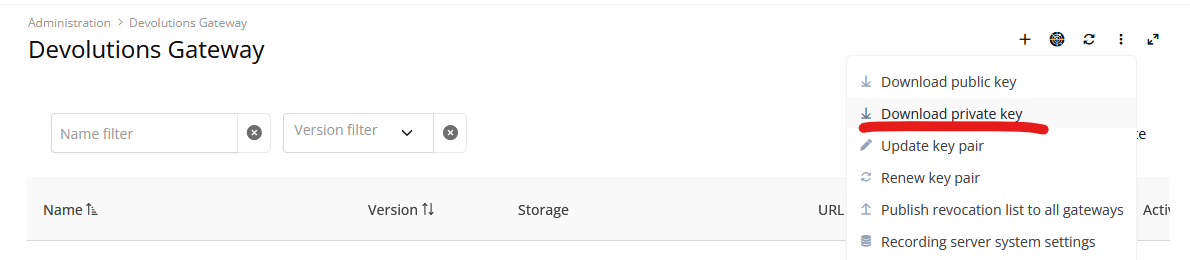
Be very careful with this file: the private key is a sensitive secret.
Then, you need the Rust toolchain installed and then download the source code of the Devolutions Gateway (GitHub repository).
Build the tokengen tool:
cd tools/tokengen
cargo build --release
After the build completes, the binary should be available here:
target/release/tokengenOn Windows:
target\release\tokengen.exeHere is an example of token generation command:
tokengen sign --provisioner-key "C:\Path\To\provisioner-private-key.pem" --validity-duration 15m enrollment --jet-gw-url "https://gateway.example.com:7171" --jet-agent-name "site-a-agent-01"The output of that command is the Enrollment string to paste into the Agent installer.
A few notes:
The enrollment string is a signed token.
It tells the Agent which Gateway to contact and which friendly name to use during enrollment.
Because this is still experimental, we recommend testing it only in a controlled environment for now.
Again, sorry for the lack of clarity. The release note exposed the feature before the documentation and the Devolutions Server management UI were ready.
Reverse Proxy for Gateway Agents
Hi @webadmin!
This kind of deployment with a reverse proxy-like system in front of the Devolutions Gateway is supported, and yes, you can configure the Devolutions Gateway to listen on port 80 if you prefer. I don’t see any problem as long as you don’t try to do something like DNS load balancing with 1 load balancer -> 2+ Gateways (load balancing is only supported via Gateway Farms).
Best regards,
Custom File Naming for Session Recordings via Devolutions Gateway
Hello,
Thank you for the feedback.
Before we evaluate this, we would like to better understand what level of customization you need. Today, Gateway recordings rely on a structured layout using internal identifiers, such as the session ID, recording manifest, and generated recording file names. This structure is important because Gateway uses it to know where recordings are stored, how to list them, retrieve them, delete them, and associate them with the correct session. Because of that, naming customization may need to be limited to avoid breaking recording traceability and retrieval.
We should also mention that Gateway currently has access to a limited amount of metadata when saving recording files. Depending on what you need in the filename, we may need to evaluate whether additional metadata should be passed to Gateway or stored with the recording.
Could you clarify the following?
What filename is currently generated in your environment, and what filename would you like to see instead?
Do you need to customize the actual file name stored on the Gateway, or would it be enough to customize the name when the recording is downloaded, exported, or archived?
Which values would you need in the filename? For example: session ID, username, target host, start date/time, protocol, entry name, ticket number, or custom fields.
If some of those values are not currently available to Gateway, would it still be useful if we supported a smaller set first, such as session ID, timestamp, protocol, and recording type?
Are you reading the recordings directly from the Gateway storage folder, or retrieving them through an API or another integration?
This will help us determine whether the best approach is to support a display/export filename, a limited configurable naming template, or a broader metadata enhancement for Gateway recordings.
Questions regarding Devolutions Server and Gateway communication
Hello Lennart,
Question 1: The graph above that line shows that the Devolutions Server only communicates on port 7171 outgoing to the gateway. So I would assume that my firewall rule for Devolutions Server and Gateway communication doesn't need port 8181 outgoing allowed right?
That is correct. This port is used by native clients (in RDM) that only understand how to communicate using TCP, and you don’t have to allow Devolutions Server to use it.
Side note: we also plan to add a feature where the TCP listener is completely optional even for RDM at the cost of a small performance penalty.
Question 2: I know that when using the Remote Desktop Manager and connecting to, for example an RDP session via a gateway its the client running RDM that opens the connection.
However when I use the WebUI of the Devolutions Server to connect to a RDP Session via a gateway does my client running the Browser/WebUI initiate the connection or is it the Devolutions Server that connects to the remote gateway?
It is the client running the browser; everything is happening locally and Devolutions Server is only serving the web page.
Best regards,
Reverse Proxy for Gateway Agents
Hello @gertvanniekerk
I’m glad you’re evaluating our products again.
As for the diagram, it’s slightly different in the details: you would install a Devolutions Gateway in your infrastructure or in the cloud (it could be anywhere as long as you’re able to reach it from your infrastructure and from the customer infrastructures), and you would install a Devolutions Agent in each customer’s infrastructure. The Devolutions Agent will perform the "call home" against the Devolutions Gateway, and a VPN-like tunnel will be open between the Devolutions Gateway and each Devolutions Agent instance. In this configuration, the Devolutions Gateway will be used as a rendezvous server: the Devolutions Agent connects to it, RDM connects to it, and the session is relayed without ports being opened in the target infrastructure, which is what you are after as I understand it.
Will you support that we can place an reverse proxy (NGINX) in front of the Devolution server?
I think it’s already possible for you to have a reverse proxy in front of both Devolutions Server and Devolutions Gateway. You just need to forward HTTP traffic for Devolutions Server, and both HTTP and TCP traffic for Devolutions Gateway (there is a HTTP listener and TCP listener).
Can the port be changed to simply be 443, this makes outbound port requirement on the customers network much easier since almost everybody has 443 open
For Devolutions Server, the port can be changed to 443. In fact I think it’s already the default, as per this documentation page: https://docs.devolutions.net/server/kb/knowledge-base/ports-firewalls/
For Devolutions Gateway, I think the default ports are 7171 and 8181, but that’s also something that can be changed either during the installation or by modifying the configuration file.
Will this work for all types of your Gateway servers? (Windows, Linux and Docker)
Yes, it’s planned for all platforms, for both Devolutions Gateway and Devolutions Agent. (Although I don’t think we provide docker images for the agent yet, that’s something we’ll provide too in the future.)
We are running af trial on the software now. I've configured some gateway servers, it seems they needs to be signed with trusted certs as far as I understand?
Yes, we highly recommend using TLS for encrypting the HTTP payload, and this needs to be trusted certificates. However, you can have your own certificate authority as long as each client machine is configured to trust this authority.
Also the CRL also needs to work or can we simply just use the "Publish revocation list" once and everything will just work? (I'm thinking of the challenge of deploying + maintaining around 50 gateway servers)
The "Publish revocation list" button you see for the Devolutions Gateway is different from the CRL of the (HTTP) server certificates. It’s a revocation list for long-lived tokens that you may or may not need for using the KDC proxy feature of the Devolutions Gateway. It’s okay to not publish it if you don’t use that feature.
Please let me know if you have further questions.
Best regards,
Option to change Windows Service-Account of Gateway Service
Hi!
We recognize the need for a better supported workflow here. As per internal discussions, we are looking into:
Updating the installer to ensure it does not overwrite a custom service account on updates.
Providing documentation about the required permissions for a custom Windows service account running the gateway.
We’ll keep you posted on any progress for official support and documentation.
Best regards,
Reverse Proxy for Gateway Agents
Perfect.
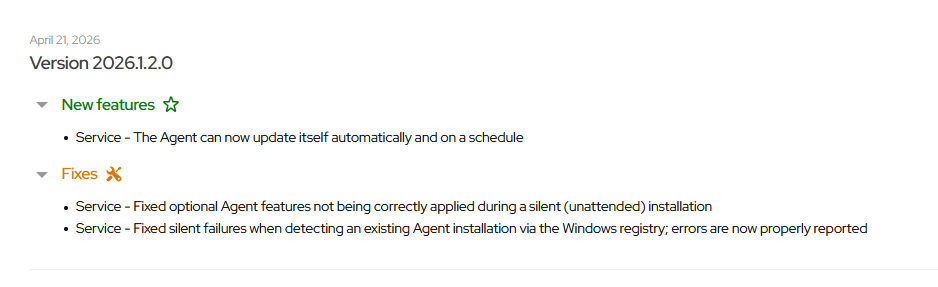
The 2026.2 iteration will also ship self updates and scheduled updates for Devolutions Agents.
The feature is already part of Devolutions Agent and Gateway v2026.1.2 released yesterday:
However, we still need to make this easy to manage centrally via Devolutions Server.
As for the timeframe, YYYY.2.0 versions are typically released in June, so I would say in 1 or 2 months from now.
Best regards,
Reverse Proxy for Gateway Agents
Thanks, that helps.
I want to make sure I’m really understanding your request correctly.
You are asking for a native site connector / outbound tunnel capability in Devolutions Gateway, where a component deployed inside the customer network would:
establish an outbound connection to Gateway, simplifying network configuration at the customer site,
allow Gateway to securely relay RDP / SSH / HTTPS connections to internal systems behind it,
and do this without requiring a separate third-party reverse proxy or VPN solution such as Cloudflare tunnel or Ngrok.
If that is what you mean, then I believe I understand the use case correctly.
I’m also glad to let you know that we are currently experimenting with such a feature and have already made good progress. It is currently planned for v2026.2 on our roadmap.
I’ll attach the ticket to this thread.
Best regards,
Reverse Proxy for Gateway Agents
Hello @Lars
Just to clarify the use case: is the goal to install an Agent at a customer or remote site, have it establish an outbound connection to Gateway, and then let Gateway route sessions through that Agent to private resources behind it?
In other words, are you referring to something like a remote-site outbound connector or tunnel? Something that would allow you to use a central Devolutions Gateway to manage access to many internal networks behind Devolutions Agents?
Best regards,
2026.1 Proxy based credential injection
Hello @freddy1
The option is available when using a Gateway Ruleset.
First, create a Gateway Ruleset:

Go under the Security section:

As written in the announcement, it’s enabled by default for new rulesets, so most likely you would just save, and select the Gateway Ruleset for the connections you wish to apply proxy-based credentials injection. Gateway Rulesets are assigned the same way as normal Devolutions Gateways.
Best regards,