Reverse Proxy for Gateway Agents
5 votes

Is there any plans to include a native Reverse Proxy functionallity into the Gateway agent installations?
The inclution of Reverse Proxy functionallity would make the Gateway product a very viable option to handle customers/remote sites access at scale.
All Comments (14)
Hello @Lars
Just to clarify the use case: is the goal to install an Agent at a customer or remote site, have it establish an outbound connection to Gateway, and then let Gateway route sessions through that Agent to private resources behind it?
In other words, are you referring to something like a remote-site outbound connector or tunnel? Something that would allow you to use a central Devolutions Gateway to manage access to many internal networks behind Devolutions Agents?
Best regards,
Benoit Cortier
Hello @Benoit Cortier
As we understood the Gateway is a way to connect to servers and services on edge networks without VPN.
But we do requiere those connections to be on-demand and the protection a reverse proxy offers.
I see you support 3- party Reverse Proxy Solutions, but this another layer of complexity to the solution.
the addition of a native Reverse Proxy in the Gateway solution would make it a viable option for us to make use of.
A typical example of a use case for us would be to connect to a server (RDP) or a service (SSH/HTTPS) at a customer location. Today we use VPN for this.
But we're looking into a way to do this simpler and more secure.
What we want would be the option to deploying one Reverse Proxy Agent that would handle incoming network connections to the different servers in that given network. (RDP, SSH, HTTPS etc).
Allowing only connections coming from our Public IP.
Thanks, that helps.
I want to make sure I’m really understanding your request correctly.
You are asking for a native site connector / outbound tunnel capability in Devolutions Gateway, where a component deployed inside the customer network would:
- establish an outbound connection to Gateway, simplifying network configuration at the customer site,
- allow Gateway to securely relay RDP / SSH / HTTPS connections to internal systems behind it,
- and do this without requiring a separate third-party reverse proxy or VPN solution such as Cloudflare tunnel or Ngrok.
If that is what you mean, then I believe I understand the use case correctly.
I’m also glad to let you know that we are currently experimenting with such a feature and have already made good progress. It is currently planned for v2026.2 on our roadmap.
I’ll attach the ticket to this thread.
Best regards,
Benoit Cortier
Correct, that is what we are looking for in functionallity.
Of course with central mangement of these Gateway agents, so we can bulk update them from the Gateway server.
Glad to hear that, do you have a timeframe for when v2026.2 will be available?
Perfect.
The 2026.2 iteration will also ship self updates and scheduled updates for Devolutions Agents.
The feature is already part of Devolutions Agent and Gateway v2026.1.2 released yesterday: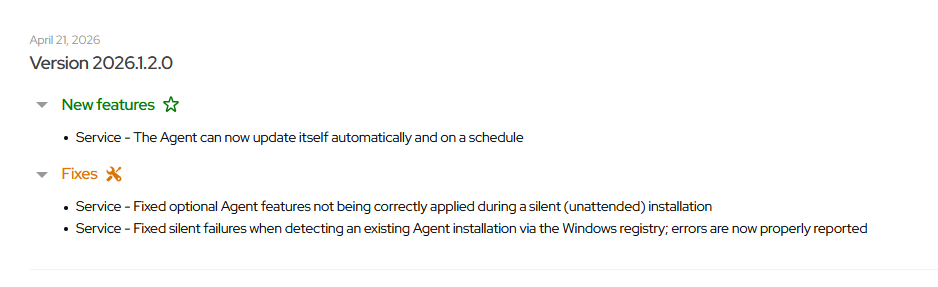
However, we still need to make this easy to manage centrally via Devolutions Server.
As for the timeframe, YYYY.2.0 versions are typically released in June, so I would say in 1 or 2 months from now.
Best regards,
Benoit Cortier
537fa744-59b3-459e-aba5-bb4c836e0269.png
Thanks, we'll keep our eyes peeled!
This sounds really interesting if this is truly an "call home" network design Devolutions is working on.
We're an MSP company which POC'ed your software around 2-3 years ago, and the main reason we did not choose you was because as an MSP with many customers where we manage our servers in their site/network, we always have a hard requirement for the software we use needs to be able to call home in order for us to be able to use it.
Back then you also license per gateway which would have costed way to much for us, I can see the licensing has changed and this is no longer the case.
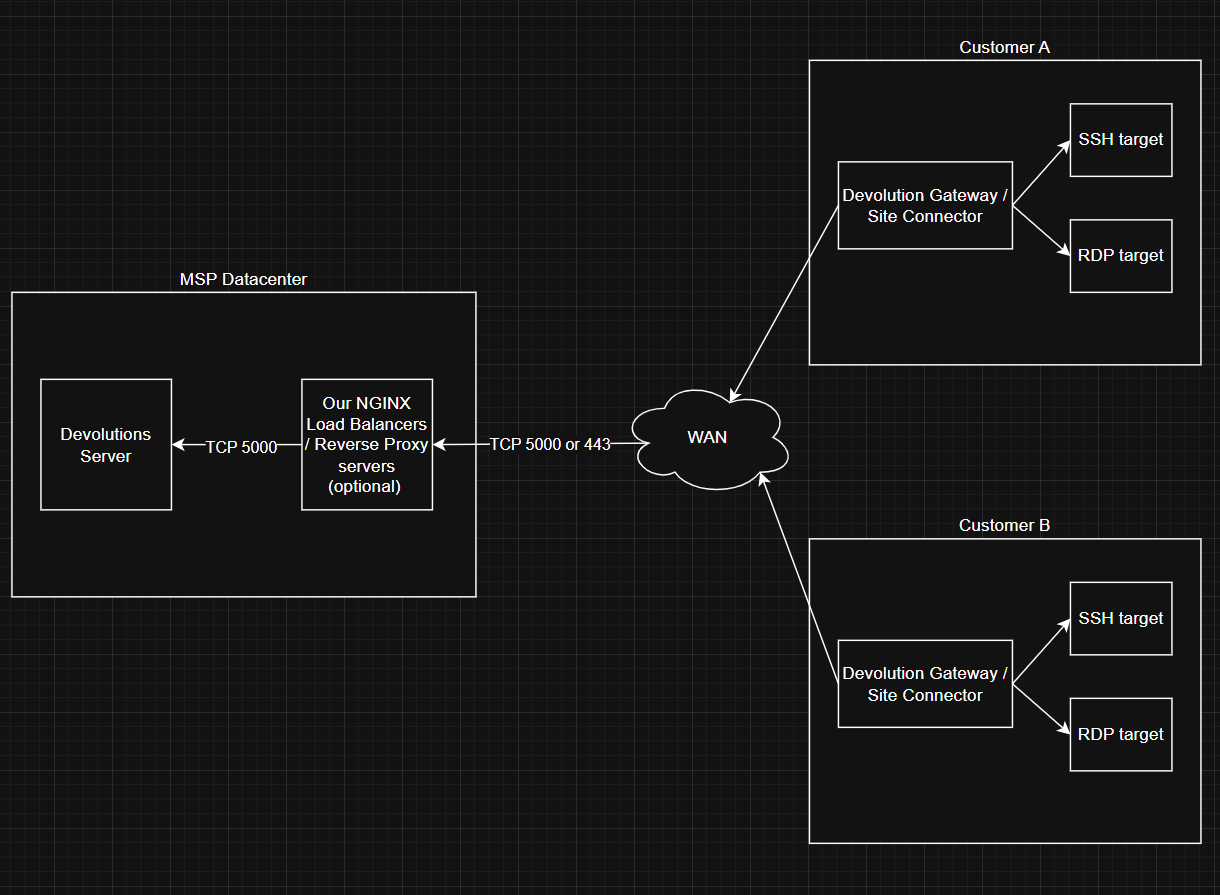
@Benoit Cortier I've quickly sketched this on draw.io, is it correct that this is the flow of traffic that will hope to support is the upcoming release?
Other questions
- Will you support that we can place an reverse proxy (NGINX) in front of the Devolution server?
- Can the port be changed to simply be 443, this makes outbound port requirement on the customers network much easier since almost everybody has 443 open
- Will this work for all types of your Gateway servers? (Windows, Linux and Docker)
- We are running af trial on the software now. I've configured some gateway servers, it seems they needs to be signed with trusted certs as far as I understand? Also the CRL also needs to work or can we simply just use the "Publish revocation list" once and everything will just work? (I'm thinking of the challenge of deploying + maintaining around 50 gateway servers)
Regards.
Gert
461cf8e0-08bd-4a10-8e1a-70ff642f4e55.png
Hello @gertvanniekerk
I’m glad you’re evaluating our products again.
As for the diagram, it’s slightly different in the details: you would install a Devolutions Gateway in your infrastructure or in the cloud (it could be anywhere as long as you’re able to reach it from your infrastructure and from the customer infrastructures), and you would install a Devolutions Agent in each customer’s infrastructure. The Devolutions Agent will perform the "call home" against the Devolutions Gateway, and a VPN-like tunnel will be open between the Devolutions Gateway and each Devolutions Agent instance. In this configuration, the Devolutions Gateway will be used as a rendezvous server: the Devolutions Agent connects to it, RDM connects to it, and the session is relayed without ports being opened in the target infrastructure, which is what you are after as I understand it.
Will you support that we can place an reverse proxy (NGINX) in front of the Devolution server?
I think it’s already possible for you to have a reverse proxy in front of both Devolutions Server and Devolutions Gateway. You just need to forward HTTP traffic for Devolutions Server, and both HTTP and TCP traffic for Devolutions Gateway (there is a HTTP listener and TCP listener).
Can the port be changed to simply be 443, this makes outbound port requirement on the customers network much easier since almost everybody has 443 open
For Devolutions Server, the port can be changed to 443. In fact I think it’s already the default, as per this documentation page: https://docs.devolutions.net/server/kb/knowledge-base/ports-firewalls/
For Devolutions Gateway, I think the default ports are 7171 and 8181, but that’s also something that can be changed either during the installation or by modifying the configuration file.
Will this work for all types of your Gateway servers? (Windows, Linux and Docker)
Yes, it’s planned for all platforms, for both Devolutions Gateway and Devolutions Agent. (Although I don’t think we provide docker images for the agent yet, that’s something we’ll provide too in the future.)
We are running af trial on the software now. I've configured some gateway servers, it seems they needs to be signed with trusted certs as far as I understand?
Yes, we highly recommend using TLS for encrypting the HTTP payload, and this needs to be trusted certificates. However, you can have your own certificate authority as long as each client machine is configured to trust this authority.
Also the CRL also needs to work or can we simply just use the "Publish revocation list" once and everything will just work? (I'm thinking of the challenge of deploying + maintaining around 50 gateway servers)
The "Publish revocation list" button you see for the Devolutions Gateway is different from the CRL of the (HTTP) server certificates. It’s a revocation list for long-lived tokens that you may or may not need for using the KDC proxy feature of the Devolutions Gateway. It’s okay to not publish it if you don’t use that feature.
Please let me know if you have further questions.
Best regards,
Benoit Cortier
Hi @Benoit Cortier
I have a similar question to this topic.
We are using AWS services and I want to use AWS Application Load Balancer in front of the HTTP endpoint of the DVLS Gateway because that way, I can benefit from autorenewal of the certificate (and also it is free) and I can plug some security features like a WAF.
Here is a view of what I want : 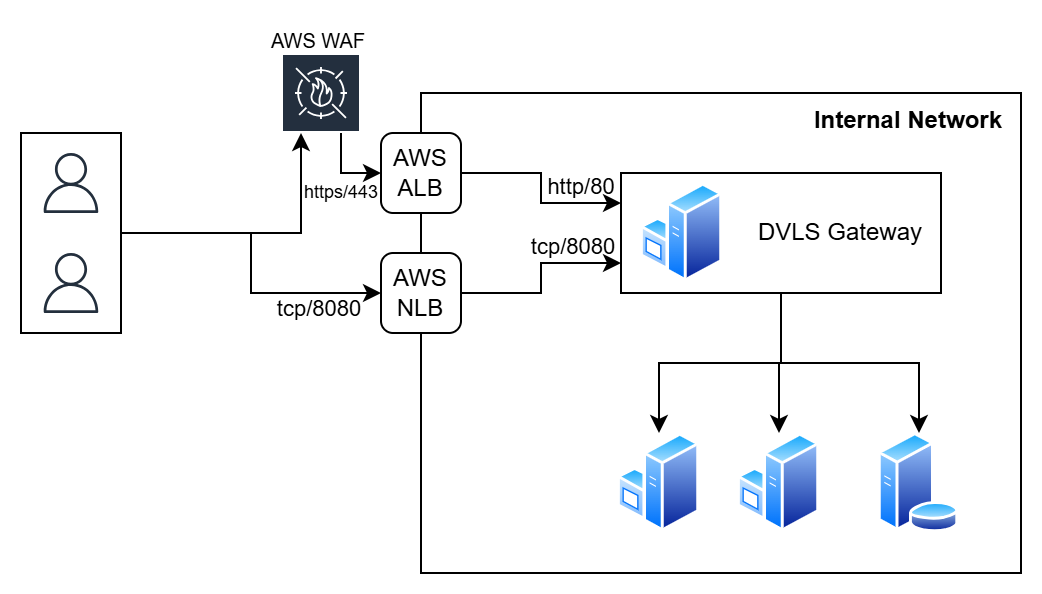
I suppose that if I configure the DVLS Gateway listening port to http://*:80 and let the load balancer handle the secure connection it will work.
But, my concern is on the TCP listener.
How the TLS is handled by the TCP listener ?
Because using AWS ALB, the gateway server will not have access to the certificate, so is it a problem for the TLS endpoint or is it handled by another way ?
Thank you for your help.
Stephane
dvls (1).png
@Benoit Cortier
In the latest Devolutions Agent, the release notes says: "Service - Add experimental transparent routing through the Agent Tunnel"
When installing the Devolutions Agents and selecting the "Agent Tunnel", it asks me for an "Enrollment string" which it says I can get from my Gateway Operator.
Do you have some sort of guide, I've tried my way around but I'm unable to find this "Enrollment string", and your current documentation does not show anything regarding this?
Regards,
Gert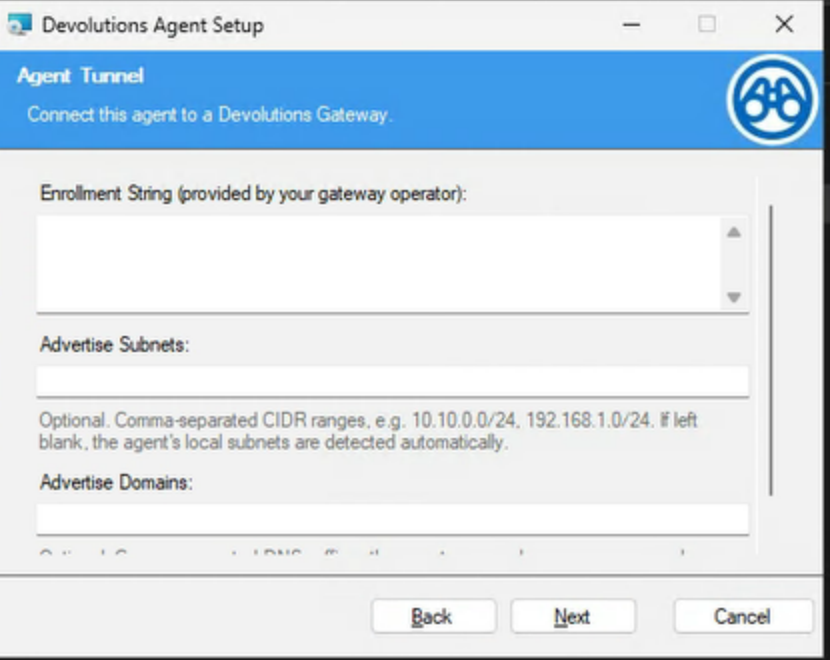
f1286ebd-9112-48fb-88e5-b489b30d5e10.png
Hi @webadmin!
This kind of deployment with a reverse proxy-like system in front of the Devolutions Gateway is supported, and yes, you can configure the Devolutions Gateway to listen on port 80 if you prefer. I don’t see any problem as long as you don’t try to do something like DNS load balancing with 1 load balancer -> 2+ Gateways (load balancing is only supported via Gateway Farms).
Best regards,
Benoit Cortier
Hi @gertvanniekerk
Sorry for the confusion here. You’re right: the current documentation does not explain where to get the Enrollment string yet.
This feature is still marked experimental for a few reasons:
- The documentation is not ready yet.
- The feature has not gone through the same QA coverage as a production-ready feature.
- The Devolutions Server integration is not available yet.
The planned experience is to add a menu in Devolutions Server where an admin can generate Agent Tunnel enrollment tokens, similar to how KDC long-lived tokens are generated today.
For now, the process is more manual, the enrollment string must be generated manually using an internal/developer tool called "tokengen". This is temporary and not the final user experience we want.
DISCLAIMER for people skimming through the message: The feature in its polished version will not require you to download the private key. This message is probably already outdated for anyone reading this in the future.
What needs to happen:
First, make sure this is being tested in a lab or non-production setup.
Go to the Administration -> Devolutions Gateway menu in Devolutions Server, logged with an administrator account, and download the Gateway provisioner private key.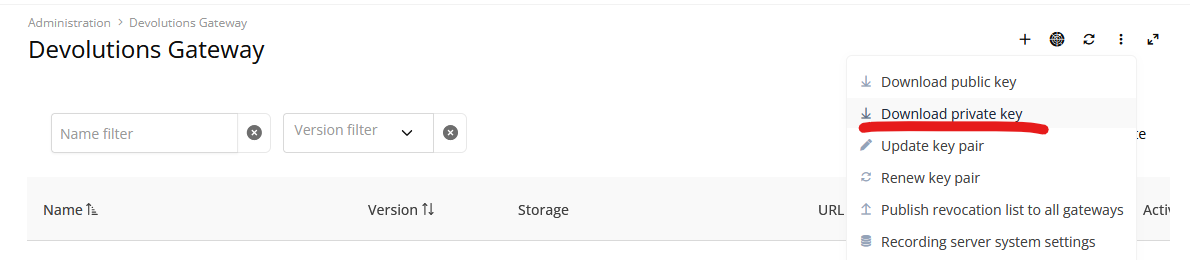
Be very careful with this file: the private key is a sensitive secret.
Then, you need the Rust toolchain installed and then download the source code of the Devolutions Gateway (GitHub repository).
Build the tokengen tool:
cd tools/tokengen
cargo build --release
After the build completes, the binary should be available here:
target/release/tokengen
On Windows:
target\release\tokengen.exe
Here is an example of token generation command:
tokengen sign --provisioner-key "C:\Path\To\provisioner-private-key.pem" --validity-duration 15m enrollment --jet-gw-url "https://gateway.example.com:7171" --jet-agent-name "site-a-agent-01"
The output of that command is the Enrollment string to paste into the Agent installer.
A few notes:
- The enrollment string is a signed token.
- It tells the Agent which Gateway to contact and which friendly name to use during enrollment.
- Because this is still experimental, we recommend testing it only in a controlled environment for now.
Again, sorry for the lack of clarity. The release note exposed the feature before the documentation and the Devolutions Server management UI were ready.
Benoit Cortier
e6619e7f-acc1-4013-8ba6-6bfb194943fc.png
hi,
any further update on this feature or when it will be out of the experiemental phase?
Hi @Yoffstr
The polishing is progressing, and feature will be stabilized for the v2026.3 release.
Best regards,
Benoit Cortier