
Niksa
How to get Linked (Vault) connection appear in the RDM?
Hi, the issue was seems like some GUI glitch, after a restart of the VM on which RDM is running, all seems ok.
Thanks again
How to get Linked (Vault) connection appear in the RDM?
Hi,
we are preparing a new RDM environment based on our old one for different set of users.
What we want is to have a "folder" which has different sub folder available with credential entries inside them.
After that, we want to link those credential entries with the associated VPN or RDP or other sessions through GUI and the Linked(Vault) option, but we only have Promt on connection, we don't have a drop down menu with all the credentials like in our old environment.
What can we do about it?
Or ould RDM environment has this:

Our new doesn't have it:

I tired to create a folder with the credentials in it, but nothing.
Thanks
Nikša
Support for Barracuda NAC VPN Client 5.X.X
Hi - any update on this? we also need rvpn.exe to be usable?
Thanks,
Nikša
RDM database - connecting existing users and permissions to a new domain AD
Thanks James for your proposition and time!
Will do ...
Have a great weekend!
Nikša
RDM database - connecting existing users and permissions to a new domain AD
Hi,
thanks for the reply, I’ve seen this and got more things clarified with our SQL guys but is there a possibility that we make a call with some of your support specialists for 30minutes some day over Teams or other platform so that we can be more precise with our tasks and not to wonder around too much? We would like to show someone from your side what exactly do we need. We do have a 3 year site license and we would really appreciate if you can provide us someone who can help us just demistify things?
We would adopt to your timezone and schedule.
Thanks
Nikša
RDM database - connecting existing users and permissions to a new domain AD
Hi everyone,
I talked to James Lafleur and he advised me to write here about this issue we are trying to solve.
So – we are using RDM as an remote app. Basically we have couple of
hosts which have ~50 VM's running Windows 10 and on them there is RDM installed.
We have Remote desktop services configured and RDM is published as an
remote app. When people run that RDM as an remote app, they first login to the
VM with their old domain AD account, also permissions inside RDM are tied to
that old AD account.
The RDM version is 2020.3.18.0
We are using SQL server for the database.
We have additional new host servers, new Remote desktop Services up and running and new VM's runnning
the same RDM version with that old database.
What we want now, is to make user mapping for new domain users which we
now use so that we swap all old AD users in RDM database with the new AD users
from the new domain so that we don't have to do everything from the ground up.
For instance – my UPN on the old domain is niksap@olddomain.com or olddomain\niksap,
for that user I have all things configured for the RDM, now I want to swap all
permissions on the RDM for the user niksap@olddomain.com
or hr\niksap with niksa.pirovic@newdomain.com or newdomain\niksa.pirovic
We have ~100 users on our old domain, we have ~200 clients, so we are trying to figure out the
proper way how to do that so that we don't have to do everything from scratch?
James wrote that there is no easy way of doing this and maybe there are PS experts here which
can help us with that?
My question - is it possible just to, for instance, copy a RDM database, tie it to the new RDS/VM's which are running on newdomain.com, edit logins and swap them like I mentioned, will that be enough for RDM to swap permissions also or is it more complex if anybody knows?
Thanks in advance,
Best regards,
Nikša
oVPN issue - imported working oVPN config file doesn't work on RDM
Hi
the version we are using is 2020.1.19.0
We have lot's of different OVPN connections and we all of them needed some manual modification but this one is not working.
This is how this one which is not working is looking inside RDM.
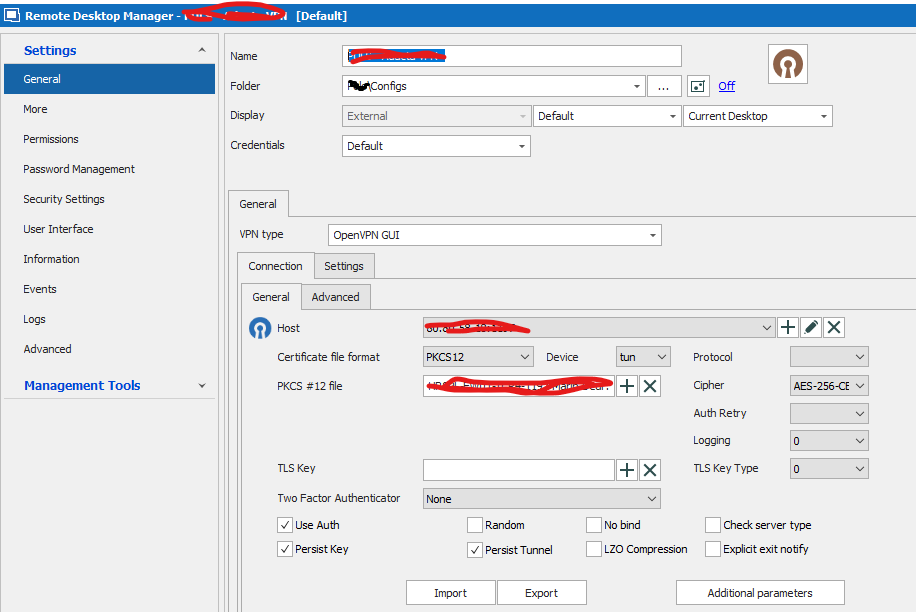
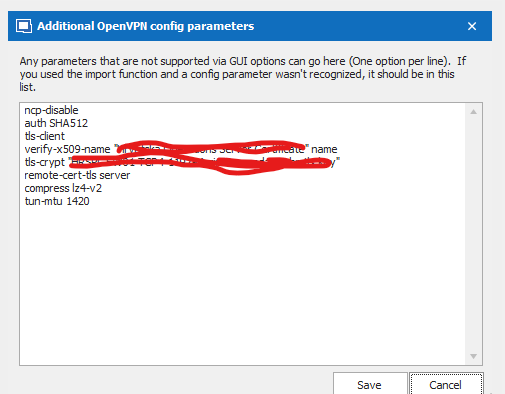
and this is the error
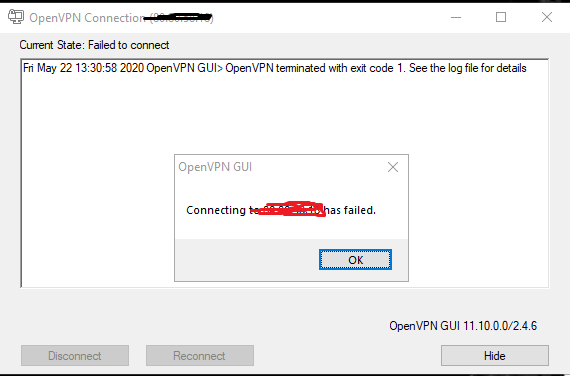
So, on a normal import to oVPN on my PC it's working - what else can we check?
I've tried to add TLS key manually through the GUI of RDM, no result, can i change it somehow to point a path
through adiitional openvpn config?
Regards,
Niksa
oVPN issue - imported working oVPN config file doesn't work on RDM
Hi,
I have a strange issue - when I import a working oVPN file with PKCS file and TLS key to my local oVPN installation, connection works
fine.
When I import the same connection to RDM - I get an error in log like this:
Thu May 21 14:52:40 2020 WARNING: cannot stat file 'HRSPL-FW01-TCP4-1197-xxxxxxxxxx.hr-tls.key': No such file or directory (errno=2)
Options error: --tls-crypt fails with 'HRSPL-FW01-TCP4-1197-xxxxxxxxxx.hr-tls.key': No such file or directory (errno=2)
Options error: Please correct these errors.
Use --help for more information.
All the files are in the same directory as oVPN config file
Do I need to add something specific for the TLS file, path or something?
We have dozens of oVPN connections and all of them work fine except for this one.
Regards,
Niksa
Open VPN can't import config file - error
??
Open VPN can't import config file - error
So we should wait for the RDM update ? When will it be released ?
Open VPN can't import config file - error
It's 2.4.6 and the GUI is 11.10.0.0
Open VPN can't import config file - error
Hi,
everything worked normally and we didn't upgrade nor OpenVPN(v 11.10) for couple of months or RDM(1.41.0) in the last month or so.
I only get this in log
Options error: --auth-retry method must be 'interact', 'nointeract', or 'none'
Use --help for more information.
But that setting is set like it says here
When I try to import another config , then I get the error message which says to contact you guys.
oVPN not working anymore on new RDM 1.36
Hi,
no - still the same, we don't even get the popping oVPN screen like we used to...
Dis is what was going on when we ran connections with oVPN as a VPN solution.

Now, we only get the message .. "Remote Desktop Manager is now waiting for the VPN to be available...."
oVPN not working anymore on new RDM 1.36
Hi,
we are using RDM for couple of hundred of different connections, and some of them have oVPN, after the recent update to 1.36, oVPN
is not opening at all - the oVPN window won't pop out anymore. Do you have some advice what to check?
oVPN version is fine since it's been working flawlessly for all of our connections until this recent update.
Regards,
Thx,
Niksa