
Andreas07
DUO 2FA not working since update to version 2020.3.4.0
Hi Xavier,
you are absolutely right. Increasing the connection timeout to 30s did the trick :-). I confirm, DUO Push 2FA is now working again with version 2020.3.4.0.
Thank you for investigating.
Regards
DUO 2FA not working since update to version 2020.3.4.0
Did some testing, installed all versions from 2020.2.0.0 to 2020.3.3.0 one by one - DUO 2FA is working well. Only version 2020.3.4.0 is faulty.
Solution: Do not update to version 2020.3.4.0 unless you are not using DUO 2FA.
Regards
DUO 2FA not working since update to version 2020.3.4.0
Hi Xavier,
sure, it was version 2020.2.0.0.
Regards,
DUO 2FA not working since update to version 2020.3.4.0
The 2FA windows appears clicking on "Push" let me receive my Duo message on the iphone, after accepting nothing happens. The 2FA windows stays open and seems waiting for confirmation. I waited up to 5 mins after confirming the login, nothing happend. If I choose SMS I instantly get my Code and authentication works like a charm.
On another mac running version 2020.2.0.0 the 2FA push with DUO works flawlessly.
Any advice what I´m doing wrong here?
Regards,
Andrew
Scheduler Service not starting
Hi Érica,
thanks so far, this worked for me, but have to keep in mind that the service user needs appropriate rights on the database server.
Regards,
Scheduler Service not starting
Hi Érica,
the new link only provides information about account types but does not explain how to setup the scheduler service using a special account. I remember a faq page where these steps were exactly described, also more details on the account being used. (Member of.. etc)
Scheduler Service not starting
David,
the link provided to Jira does not function properly. I get a entry page without any content related to scheduler services. Could you please check the link?
Scheduler Service not starting
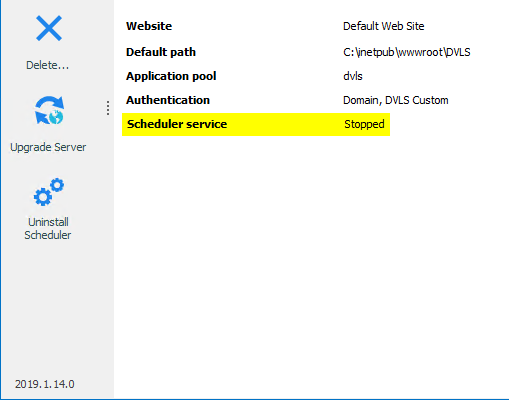
While evaluation we try to start the scheduler Service without any success. We also tried to uninstall and install again - same issue. The service was installed using the LOCAL SYSTEM Account.
Any help regarding getting the service to start I would be very appreciate.
BR
Andreas
Windows Authentication feature not working with DPS 6.0/RDM 14
Hi Erica!
In our case no explicit Administrator Credentials were set, we used "Current Windows Session".
I´ve changed it to use the AD Admin Credentials for testing and now the error is gone by active Windows Authentication. :-)
Can I consider this as an Workaround and do I have to change the altered Domain Name and Credentials back to it´s Defaults when the Updates comes out?
What Domain Privileges the Admin Account at least must have for proper Authentication used in this case? I will not use the Domain Admin itself in production environment?
For now, it seems to work.
:)
Windows Authentication feature not working with DPS 6.0/RDM 14
Hi Erica,
I changed the Domain to our Netbios Name "MY-NETBIOS" (has hyphen in it) but it does not solve the Problem. Error is the same.
:-(
Windows Authentication feature not working with DPS 6.0/RDM 14
We use Windows Authentication with NETBIOS. User log in using MY-DOMAIN\Username.
User can log in to RDM BUT if he wants to change the repository every time the following error occurs:
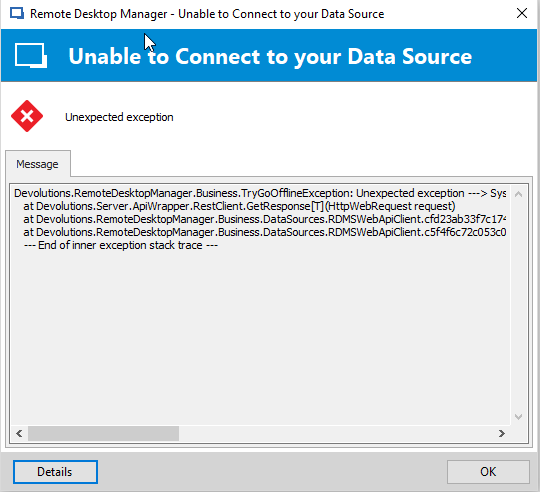
Afterwards the user gets disconnected but can click refresh and the selected repository loads. The Error occurs every Time a User wants to Change the Repository. On our Macs we do not have any issues while switching through Repositories because no Windows Authentication is used. When we turn off using Windows Authentication on the affected Windows Client RDM is running smooth and well.
Console and Clients are updated to the latest available Builds.
Error-Message:
The following error was received by MY-DOMAIN\username at 12/13/2018 6:30:50 PM
Error:
DirectoryServicesCOMException - Der Benutzername oder das Kennwort ist falsch. at System.DirectoryServices.DirectoryEntry.Bind(Boolean throwIfFail) at System.DirectoryServices.DirectoryEntry.Bind() at System.DirectoryServices.DirectoryEntry.get_AdsObject() at System.DirectoryServices.DirectorySearcher.FindAll(Boolean findMoreThanOne) at System.DirectoryServices.DirectorySearcher.FindOne() at Devolutions.RemoteDesktopManager.Managers.DirectoryServicesManager.GetGroups(UserPrincipal userPrincipal, PrincipalContext context, DirectoryServicesQueryParameter parameter) at Devolutions.RemoteDesktopManager.Managers.DirectoryServicesManager.GetUserDetails(String fullName, DirectoryServicesQueryParameter directoryServicesQueryParameter, Boolean isMultiDomain, RoleEntity[] roleNames) at Devolutions.Server.Controllers.APIControllers.V2.BackendApiController.GetCurrentUser(GetCurrentUserData data) at lambda_method(Closure , Object , Object[] ) at System.Web.Http.Controllers.ReflectedHttpActionDescriptor.ActionExecutor.<>c__DisplayClass10.b__9(Object instance, Object[] methodParameters) at System.Web.Http.Controllers.ReflectedHttpActionDescriptor.ActionExecutor.Execute(Object instance, Object[] arguments) at System.Web.Http.Controllers.ReflectedHttpActionDescriptor.ExecuteAsync(HttpControllerContext controllerContext, IDictionary`2 arguments, CancellationToken cancellationToken) --- End of stack trace from previous location where exception was thrown --- at System.Runtime.ExceptionServices.ExceptionDispatchInfo.Throw() at System.Runtime.CompilerServices.TaskAwaiter.HandleNonSuccessAndDebuggerNotification(Task task) at System.Web.Http.Controllers.ApiControllerActionInvoker.d__0.MoveNext() --- End of stack trace from previous location where exception was thrown --- at System.Runtime.ExceptionServices.ExceptionDispatchInfo.Throw() at System.Runtime.CompilerServices.TaskAwaiter.HandleNonSuccessAndDebuggerNotification(Task task) at System.Web.Http.Filters.ActionFilterAttribute.d__5.MoveNext() --- End of stack trace from previous location where exception was thrown --- at System.Runtime.ExceptionServices.ExceptionDispatchInfo.Throw() at System.Web.Http.Filters.ActionFilterAttribute.d__5.MoveNext() --- End of stack trace from previous location where exception was thrown --- at System.Runtime.ExceptionServices.ExceptionDispatchInfo.Throw() at System.Runtime.CompilerServices.TaskAwaiter.HandleNonSuccessAndDebuggerNotification(Task task) at System.Web.Http.Filters.ActionFilterAttribute.d__0.MoveNext() --- End of stack trace from previous location where exception was thrown --- at System.Runtime.ExceptionServices.ExceptionDispatchInfo.Throw() at System.Runtime.CompilerServices.TaskAwaiter.HandleNonSuccessAndDebuggerNotification(Task task) at System.Web.Http.Filters.ActionFilterAttribute.d__5.MoveNext() --- End of stack trace from previous location where exception was thrown --- at System.Runtime.ExceptionServices.ExceptionDispatchInfo.Throw() at System.Web.Http.Filters.ActionFilterAttribute.d__5.MoveNext() --- End of stack trace from previous location where exception was thrown --- at System.Runtime.ExceptionServices.ExceptionDispatchInfo.Throw() at System.Runtime.CompilerServices.TaskAwaiter.HandleNonSuccessAndDebuggerNotification(Task task) at System.Web.Http.Filters.ActionFilterAttribute.d__0.MoveNext() --- End of stack trace from previous location where exception was thrown --- at System.Runtime.ExceptionServices.ExceptionDispatchInfo.Throw() at System.Runtime.CompilerServices.TaskAwaiter.HandleNonSuccessAndDebuggerNotification(Task task) at System.Web.Http.Controllers.ActionFilterResult.d__2.MoveNext() --- End of stack trace from previous location where exception was thrown --- at System.Runtime.ExceptionServices.ExceptionDispatchInfo.Throw() at System.Runtime.CompilerServices.TaskAwaiter.HandleNonSuccessAndDebuggerNotification(Task task) at System.Web.Http.Filters.AuthorizationFilterAttribute.d__2.MoveNext() --- End of stack trace from previous location where exception was thrown --- at System.Runtime.ExceptionServices.ExceptionDispatchInfo.Throw() at System.Runtime.CompilerServices.TaskAwaiter.HandleNonSuccessAndDebuggerNotification(Task task) at System.Web.Http.Controllers.ExceptionFilterResult.d__0.MoveNext() --- DefaultSource:
System.DirectoryServices
Windows Authentication feature not working with DPS 6.0/RDM 14
Hi @all!
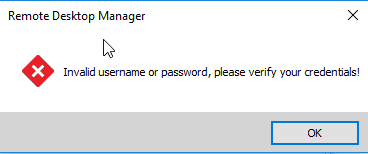
I can confirm Ulrichs´s experience using windows authentication still not working properly. Our domain user authentication is set to sam Account and before upgrading to DPS 6 and client to 14.x we had no issues. Now RDM shows error Message "Invalid username or password, please verify your credentials".
A warning can be found in Server-Log with timestamp of logon, title = GetLoginAccess and in the lower window "SessionRequired"
Switching Windows Authentication off all issues are gone.
After downgrading to DPS 5 and Client 13 Windows Authentication is working well again.
We tried to setup a new repository, created a new AD User and granted him to the repo, still the same error.
Our AD credentials are DOMAIN\username and we use complex Passwords.
Regards,
Andreas
Hi Erica,
I just tested the new release and the integrated Windows authentication is still not working 100%. If the username is set to be the UPN (user@domain) I'm not able to login with the integrated authentication, only if the username is set to be on the NetBios format (DOMAIN\user) it is working - but still gives a lot of event logs like "bad domain".
So, in the end, I restored my working 5.x release again. Is there anything I'm doing wrong?
Thanks!
Ulrich