Scheduler Service not starting

While evaluation we try to start the scheduler Service without any success. We also tried to uninstall and install again - same issue. The service was installed using the LOCAL SYSTEM Account.
Any help regarding getting the service to start I would be very appreciate.
BR
Andreas
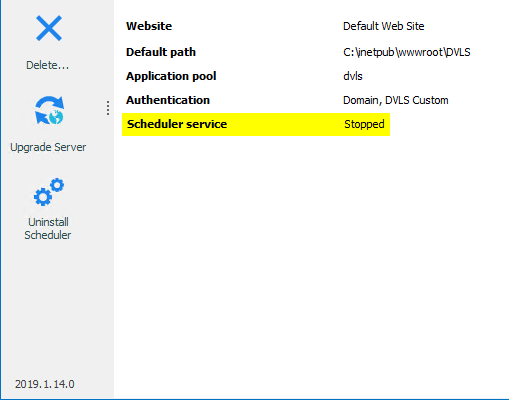
2019-06-18 07_16_39-Window.png
All Comments (9)
Hello,
We recommend using a specific account for the scheduler service. In this help topic (https://kb.devolutions.net/dps_pre_deployment_account_survey.html) you can find further information regarding the VaultSchedulerService account that we suggest.
We detail the description and information for AD infrastructure or non-domain infrastructure.
Best regards,
David Grandolfo
David,
the link provided to Jira does not function properly. I get a entry page without any content related to scheduler services. Could you please check the link?
Hello,
Could you please try this link instead?
https://kb.devolutions.net/dps_pre_deployment_account_survey.html
If you cannot reach that page, you may have to create an account on our support web portal here.
https://devolutions.atlassian.net/servicedesk/customer/portal
Best regards,
Érica Poirier
Hi Érica,
the new link only provides information about account types but does not explain how to setup the scheduler service using a special account. I remember a faq page where these steps were exactly described, also more details on the account being used. (Member of.. etc)
Hello Andreas,
The page you mention was the old method to configure the Scheduler. Now you just have to set the domain account in the Log On tab of the DevolutionsSchedulerService in the computer's Services.
Best regards,
Érica Poirier
Hi Érica,
thanks so far, this worked for me, but have to keep in mind that the service user needs appropriate rights on the database server.
Regards,
Hello,
Thank you for your feedback and glad that it's working. And you are right that the account configured in the DevolutionsSchedulerService needs specific permissions on the database.
@everyone, if you want to get the required permissions for the service account, please send an email to ticket@devolutions.net.
Best regards,
Érica Poirier
Hello,
Thank you for your feedback and glad that it's working. And you are right that the account configured in the DevolutionsSchedulerService needs specific permissions on the database.
@everyone, if you want to get the required permissions for the service account, please send an email to ticket@devolutions.net.
Best regards,
Hi, is it why the Devolutions Scheduler wont start automaticaly when the machine goes up ? On my side i have to start it manually everytime event in automatic startup type.
Hello Maxime,
If you can start it manually, it's probably not related to the permissions on the SQL database.
Do you have relevant error messages in the DVLS logs on restarting the server?
https://docs.devolutions.net/server/kb/how-to-articles/view-server-datasource-logs/
Is the SQL database located on the same server as the DVLS instance? If so, this method may help you.
https://docs.devolutions.net/server/kb/troubleshooting-articles/devolutions-server-unavailable-after-reboot/#solution
Let us know if that helps.
Best regards,
Érica Poirier