Windows Authentication feature not working with DPS 6.0/RDM 14
Hello,
When trying to log on a Devolutions Password Server instance version 6.0 from Remote Desktop Manager version 14 using the Windows authentication option enabled, you will get the following error message in RDM : Unable to Connect to your Data Source.
We are able to reproduce the issue and a ticket has been sent to our engineering department. The ticket number is DPS-2241. As soon as the support team will get any information about this issue, we will post it here.
The workaround is to go in File - Data Sources, edit the data source and disable the Windows Authentication option. Then populate the username and password fields and save your modifications.
Best regards,
Érica Poirier
All Comments (67)
Hello,
For all of you that this may concern, if you don't want to ask all your users to update their data source configuration, the most secure workaround is to revert back your DPS installation until this will be fix.
If you need help to restore your current DPS installation, please see the Restore steps section of the following online help page https://helpserver.devolutions.net/kb_backup.htm
Best regards,
Érica Poirier
Hi,
still not fixed in 6.0.1.0. Andy News on this?
Thanks!
Hi,
still there with DPS 6.0.1.0 and RDM V.14.0.2.0
Hello,
The issue still exist and we will keep you informed as soon as a fix will be available.
Best regards,
Érica Poirier
Hello Erica,
thanks.
Is the bug in DVLS or is it in RDM?
Hello,
@everyone, the issue is in Devolutions Password Server.
Again, as soon as a fix will be available, I will post it here.
Best regards,
Érica Poirier
Hello,
@everyone, Devolutions Password Server version 6.0.2 is now available online. This version includes the fix for the Windows Authentication issue.
We highly recommend to follow the procedure for Upgrading Devolutions Passwword Server.
We also offer a free remote session to assist customers during the upgrade process. If you would like to book a session, please contact us at ticket@devolutions.net.
Best regards,
Érica Poirier
Hi Erica,
I just tested the new release and the integrated Windows authentication is still not working 100%. If the username is set to be the UPN (user@domain) I'm not able to login with the integrated authentication, only if the username is set to be on the NetBios format (DOMAIN\user) it is working - but still gives a lot of event logs like "bad domain".
So, in the end, I restored my working 5.x release again. Is there anything I'm doing wrong?
Thanks!
Ulrich
Hello Ulrich,
I will this behavior tomorrow at work. I have tested some of these scenarios but will have to check this out more deeply.
Could you please go in the DPS Console and send us the Diagnostic report using Send Diagnostic to support? Please add a reference to this topic.
I would also need the username format that are used in Users Management dialog. Is it UPN, NetBios or only the username. No need to have a screen shot of that dialog, just want to know the username format save in the database.
Best regards,
Érica Poirier
Hi,
Upgraded to the latest server and client today, but sadly no change here.
No matter which "Username Format" I choose in DPS, I get the "Connection failed!" in RDM.
@Erica I have sent a diagnostic report to you.
Hi,
I can't send a diagnostic report, because I'm already switched back to the old version. The users are all registered with their UPN (user@domain). As Ii just wrote above, when I add a new user with the NetBiosformattingg (DOMAIN\user) it works but gives a lot of warnings/errors in the DVLS logs about the login.
Regards
Ulrich
Hello Peter,
Thank you for your DPS Diagnostic report.
What exact error message do you get in RDM? Is it the 500 error message?
From your report, I can see that there is no domain account set in the Administration credentials field of the Domain tab in your DPS settings? Could you please try to set this account? You will find more information about this field on the foloowing online help page.
https://helpserver.devolutions.net/settings_domain.htm
Best regards,
Érica Poirier
Hi Erica,
I'm not getting the 500 error message anymore.
I'm getting the "Invalid username or password, please verify your credentials" when using Remote Desktop Manager and a prompt for login if I visit the Password Server via Chrome browser (site is added to trusted sites with automatic logon with current user name and password enabled).
I've tried adding a domain admin account to the Authentication > Domain > Domain Authentication page, with the same result. Dont know if i'm missing something in my setup.
- Peter
Hello,
the new DPS V 6.0.2.0 is available.
This Version fix the issue with windows Authenticatio.
I update and works.
Hello,
Do you have something relevant in the DPS Logs?
https://helpserver.devolutions.net/configure_dvlslogs.htm
Best regards,
Érica Poirier
Hello,
@Ulrich, could you please send us an email at ticket@devolutions.net? We want to schedule an appointment for a remote session to upgrade your DPS instance or create a new instance in a staging/test environment and troubleshoot the Windows Authentication issue in your environment.
Best regards,
Érica Poirier
Hi @all!
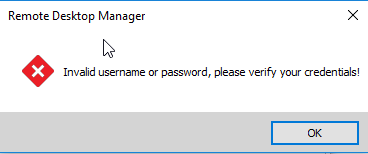
I can confirm Ulrichs´s experience using windows authentication still not working properly. Our domain user authentication is set to sam Account and before upgrading to DPS 6 and client to 14.x we had no issues. Now RDM shows error Message "Invalid username or password, please verify your credentials".
A warning can be found in Server-Log with timestamp of logon, title = GetLoginAccess and in the lower window "SessionRequired"
Switching Windows Authentication off all issues are gone.
After downgrading to DPS 5 and Client 13 Windows Authentication is working well again.
We tried to setup a new repository, created a new AD User and granted him to the repo, still the same error.
Our AD credentials are DOMAIN\username and we use complex Passwords.
Regards,
Andreas
2018-11-05 20_42_26-Window.png
Hello,
@Andreas, could you please send us the DPS Diagnostic report using Send Diagnostic to Support in the DPS Console?
https://helpserver.devolutions.net/kb_senddiagnostic.htm
Even if you run DPS version 5.x, I will check if I can find something in your DPS configuration that could cause this issue.
Best regards,
Érica Poirier
I'm also receiving "Invalid username or password, please verify your credentials" when re-enabling windows authentication after upgrading to 6.0.2
I'll send through dianostics reports.
I've sent my diagnostic report too.
We are seeing the same "errors". No 500 error anymore, but the Windows authentication mechanisme does not work. As others has mentioned it states invalid username or password.
- Peter
I get the same error, i have been happy too early
Hello,
I have seen different issues about the Windows Authentication feature and there are some configuration that you must check to be sure that you are using the right version Devolutions Password Server.
@everyone, First of all, be sure that the DPS Console has been updated to version 6.0.2.0. The console is an application to allow you to manage the DPS web application. It is also needed to apply the right updates on the DPS web application. Next, the DPS web application needs to be updated to version 6.0.2. We highly recommend to follow all steps on the following online help page. One of the highly recommended step is to test the new version in a staging/test environment before updating your production DPS instance.
https://helpserver.devolutions.net/upgrade_rdms.htm
@Peter, your DPS web application is on version 6.0.2 but your DPS Console is still on version 6.0.1. Could you please upgrade your DPS Console to latest version? Then, you will have to apply again the 6.0.2 update on your DPS web application with the Upgrade Server button.
@Marc, could you please send me your DPS Diagnostic report using Send Diagnostic to Support from the DPS Console?
@Stuart, I will contact you from the email you sent us.
Finally, we offer a free remote session to assist you during the upgrade process of your DPS instance. If you would like to book a session, please send an email to ticket@devolutions.net.
Best regards,
Érica Poirier
DPS Report is delivered
Hello Marc,
I have received your DPS Diagnostic report. I see that there is no domain account configured in the Administration credentials filed in the Domain tab of your DPS settings. Could you please populate this field with a domain account that has enough privileges on your AD structure to gather user account information? It doesn't need to be an AD administrator account, a service account should be enough. You will find more information on the following online help page about the requirements of the Administration credentials field.
https://helpserver.devolutions.net/settings_domain.htm
Best regards,
Érica Poirier
Hello,
i configured a user account which have enough privilege
I change the settings from"current windows session" to "use custom credentials".
This change had a success.
I will send you a DPS report as well.
Hi Erica,
My fault, just expected the DPS Console to upgrade along with server.
Anyway, I've upgraded the DPS Console to the latest, and re-run the Upgrade Server procedure by clicking the Upgrade Server button.
Results: The same, still gives me a login error, when trying to use Windows Authentication from my workstation.
I'll send a DPS Diagostic report again.
Hello,
@Marc, as I understand, you are now able to log using the Windows Authentication issue, right? If so, great! If not, could you please check in the DPS Logs if there is any relevant error messages and send it to ticket@devolutions.net?
@Peter, thank you for the DPS Diagnostic report. Everything seems correctly configured. Could you please check in the DPS Logs if there is any relevant error messages and send it to ticket@devolutions.net?
Here is how you can View Logs using the DPS Console.
Best regards,
Érica Poirier
Hello,
yes i'm able to log with windows authentication.
Hello Marc,
Thank you for your feedback and glad that it's now working.
Best regards,
Érica Poirier
@erica
Hi again,
I've checked the log in DPS, nothing special here. I have a couple of ArgumentException from the Scheduler, but they are a 10-15 minutes old. Nothing when I push the "Test Autentication" button from RDM.
Kind regards
Peter
Hello,
@Peter, could you please try to connect using the Windows Authentication in RDM and not using the Test Connection button? I want to be sure that an error will be triggered in the DPS Logs.
Best regards,
Érica Poirier
Hi
@erica sure thing, sadly no change in behaviour:
https://imgur.com/a/NQBWbxC
I click "ok", the same dialog pops up again
I click "ok" again, the same dialog pops up/stays on (cant determine),
I click "ok" 2-3 times more, before the dialog disappears, and turns back to a disconnected RDM.

Hi,
this is my output.
DPS V 6.0.2.0
RDM 14.0.4.0
fill in Credentials manually.
Windows Authentication - successful
Properties:
Domain: FQDN without .local , @
This setting working good, for us.
Hello,
Thank you @Marc for your configuration. It could be very helpful for other customers.
@Peter, do you have something relevant in the DPS logs now?
Best regards,
Érica Poirier
@erica
No nothing new.
https://imgur.com/rPebomX

Just to clarify:
Connecting using:
- Prompt for credentials - works
- Username and password, with or without "Always ask password" option on/off - works
Successfull authentication using "Test connection" button or starting RDM with the above options.
Unsuccessfull authentication using "Test connection" button or starting RDM, as soon as i check the "Use Windows authentication"
Hello Peter,
Thank you very much for the information and the screen shots.
Could you please send an email to ticket@devolutions.net? I will send you our online calendar to book an appointment for a remote session.
Best regards,
Érica Poirier
Is there anything inside IIS that we should cross check?
My setup is:
Running in the Default Web Site, in the dvls subfolder as an enabled application.
Application is running with a SSL certificate and authentication enabled for Anoymous Authentcation enabled and Windows Authentication enabled (HTTP 401 Challenge).
Read/Write feature delegation on the server for Authentication - Anoymous and Autentication Windows features, as described in your KB.
Apart from that a pretty basic Windows Server 2016 1607 14393.2248 virtual machine built only for the purpurse of hosting DPS, so no fancy configs besides the stuff in your KB regarding DPS and Windows Authentication.
Local SQL express with a local db-account for DPS. Both Test Server and Test Database turns up Successfull.
yeah sure thing I'll do that right away
This is identical to our testing as well
Hello,
@Stuart and @Peter,
Could you please check in the IIS Logs?
If there is anything relevant there, could you please check if you have the exact same settings for the Authentication in IIS?
Only the Anonymous Authentication must be enabled here.
Best regards,
Érica Poirier
For your information,
any tries to sign in failed, with any authentication.
Workaroud:
I edit the DPS settings, go on Domain and save the settings again.
After that, the authentication was successfully.
I had the same mistake yesterday morning.
Hi all
I've changed the Default Web Site, and the Application Authentication Settings to the pictures above.
Also tried MarcST1984 workaround, all with the same outcome "Invalid username or password, please verify your credentials!"
No errors in DPS log and all 200-ok http status in the W3SVC log to urls like loginWindows/partial, security/forcepublicipvalidation and the IIS is seeing my credential but as DOMAIN\initials. We logon on using initials@domain.tld
Hello,
@Peter, have you received my email from ticket@devolutions.net for the remote session?
Best regards,
Érica Poirier
Hi Erica,
I confirmed that our IIS authentication settings are correct.
I also tried Marc's suggestion of editing domain details in DPS and saving again but no luck.
We have a remote session for another issue later today - perhaps we can look at this then too.
Stuart
Hi Everyone
We managed to fix this with a remote session.
In DPS / Auth / Domain - the domain must be set to the NETBIOS name of the domain rather than the FQDN (ie. MICROSOFT instead of MICROSOFT.LOCAL)
Hope his helps
Hi
@erica no i did not, but the NETBIOS name did the trick here too! We can now logon using Windows Authentication. Yay!
The domain config with NETBIOS works, the FQDN don't work fo us.
Hello,
@everyone, a ticket has been sent to our engineering department for the issue when the Windows Authentication feature fails with the domain name set with the FQDN in the Domain tab of the DPS settings. The ticket number is DPS-2365.
As soon as a fix will be available, I will post an update here.
Best regards,
Érica Poirier
Hello,
Our engineering department has made a fix when the Windows Authentication using the FQDN in the Domain tab of the DPS Settings. In our internal tests, it's working flawlessly. To be sure that we are on the right track, I want to know if someone can test that beta internal DPS version in their environment. It will be important to test this is a staging/test environment. Please let me know and I will send a download link in a private message.
Best regards,
Érica Poirier
Hello, we use UPN for the authentication and the SSO not works but manual yes
Hello,
@Malot Tyba, which domain name format is set in the Domain tab of the Devolutions Password Server settings? If the domain name set is the FQDN (YourDomain.local), please try to set the NetBios domain name (YourDomain). This should help to resolve the issue.
Best regards,
Érica Poirier
works fine thanks

@Erica, Did the fix get for the FQDN get through testing yet? We have been waiting to upgrade until the fix for FQDN is available.
Thanks,
Richard
Hello,
@Richard, yes we have tested it and it's working on our environment. We have also tested it with a customer in its own environment successfully.
Best regards,
Érica Poirier
Hello,
@Erica, that is great news. Which version of the server includes the FQDN fix?
Thanks,
Richard
Hello,
@Richard, the version that will include the fix should be 6.0.7 or higher. We are currently testing that version internally and should release it soon.
Best regards,
Érica Poirier
Can we get an ETA on when the next release will be available?
Hello,
@Grant, I am afraid to say that it's hard to know exactly when the new DPS version will be released. We hope to release it soon.
About the Windows Authentication, a workaround exist that the domain name needs to be set as the NetBios name. Have you tried it?
We can offer you a remote session to investigate all your issues and see what we can do to troubleshoot them. Please send an email to ticket@devolutions.net and we will send you our online calendar to book an appointment.
Best regards,
Érica Poirier
We use Windows Authentication with NETBIOS. User log in using MY-DOMAIN\Username.
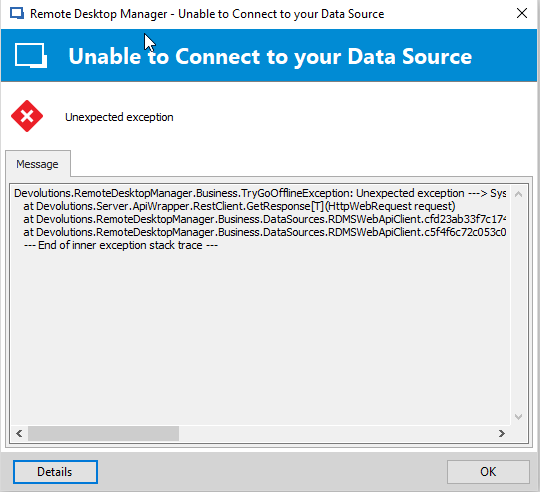
User can log in to RDM BUT if he wants to change the repository every time the following error occurs:
Afterwards the user gets disconnected but can click refresh and the selected repository loads. The Error occurs every Time a User wants to Change the Repository. On our Macs we do not have any issues while switching through Repositories because no Windows Authentication is used. When we turn off using Windows Authentication on the affected Windows Client RDM is running smooth and well.
Console and Clients are updated to the latest available Builds.
Error-Message:
The following error was received by MY-DOMAIN\username at 12/13/2018 6:30:50 PM
Error:
DirectoryServicesCOMException - Der Benutzername oder das Kennwort ist falsch. at System.DirectoryServices.DirectoryEntry.Bind(Boolean throwIfFail) at System.DirectoryServices.DirectoryEntry.Bind() at System.DirectoryServices.DirectoryEntry.get_AdsObject() at System.DirectoryServices.DirectorySearcher.FindAll(Boolean findMoreThanOne) at System.DirectoryServices.DirectorySearcher.FindOne() at Devolutions.RemoteDesktopManager.Managers.DirectoryServicesManager.GetGroups(UserPrincipal userPrincipal, PrincipalContext context, DirectoryServicesQueryParameter parameter) at Devolutions.RemoteDesktopManager.Managers.DirectoryServicesManager.GetUserDetails(String fullName, DirectoryServicesQueryParameter directoryServicesQueryParameter, Boolean isMultiDomain, RoleEntity[] roleNames) at Devolutions.Server.Controllers.APIControllers.V2.BackendApiController.GetCurrentUser(GetCurrentUserData data) at lambda_method(Closure , Object , Object[] ) at System.Web.Http.Controllers.ReflectedHttpActionDescriptor.ActionExecutor.<>c__DisplayClass10.b__9(Object instance, Object[] methodParameters) at System.Web.Http.Controllers.ReflectedHttpActionDescriptor.ActionExecutor.Execute(Object instance, Object[] arguments) at System.Web.Http.Controllers.ReflectedHttpActionDescriptor.ExecuteAsync(HttpControllerContext controllerContext, IDictionary`2 arguments, CancellationToken cancellationToken) --- End of stack trace from previous location where exception was thrown --- at System.Runtime.ExceptionServices.ExceptionDispatchInfo.Throw() at System.Runtime.CompilerServices.TaskAwaiter.HandleNonSuccessAndDebuggerNotification(Task task) at System.Web.Http.Controllers.ApiControllerActionInvoker.d__0.MoveNext() --- End of stack trace from previous location where exception was thrown --- at System.Runtime.ExceptionServices.ExceptionDispatchInfo.Throw() at System.Runtime.CompilerServices.TaskAwaiter.HandleNonSuccessAndDebuggerNotification(Task task) at System.Web.Http.Filters.ActionFilterAttribute.d__5.MoveNext() --- End of stack trace from previous location where exception was thrown --- at System.Runtime.ExceptionServices.ExceptionDispatchInfo.Throw() at System.Web.Http.Filters.ActionFilterAttribute.d__5.MoveNext() --- End of stack trace from previous location where exception was thrown --- at System.Runtime.ExceptionServices.ExceptionDispatchInfo.Throw() at System.Runtime.CompilerServices.TaskAwaiter.HandleNonSuccessAndDebuggerNotification(Task task) at System.Web.Http.Filters.ActionFilterAttribute.d__0.MoveNext() --- End of stack trace from previous location where exception was thrown --- at System.Runtime.ExceptionServices.ExceptionDispatchInfo.Throw() at System.Runtime.CompilerServices.TaskAwaiter.HandleNonSuccessAndDebuggerNotification(Task task) at System.Web.Http.Filters.ActionFilterAttribute.d__5.MoveNext() --- End of stack trace from previous location where exception was thrown --- at System.Runtime.ExceptionServices.ExceptionDispatchInfo.Throw() at System.Web.Http.Filters.ActionFilterAttribute.d__5.MoveNext() --- End of stack trace from previous location where exception was thrown --- at System.Runtime.ExceptionServices.ExceptionDispatchInfo.Throw() at System.Runtime.CompilerServices.TaskAwaiter.HandleNonSuccessAndDebuggerNotification(Task task) at System.Web.Http.Filters.ActionFilterAttribute.d__0.MoveNext() --- End of stack trace from previous location where exception was thrown --- at System.Runtime.ExceptionServices.ExceptionDispatchInfo.Throw() at System.Runtime.CompilerServices.TaskAwaiter.HandleNonSuccessAndDebuggerNotification(Task task) at System.Web.Http.Controllers.ActionFilterResult.d__2.MoveNext() --- End of stack trace from previous location where exception was thrown --- at System.Runtime.ExceptionServices.ExceptionDispatchInfo.Throw() at System.Runtime.CompilerServices.TaskAwaiter.HandleNonSuccessAndDebuggerNotification(Task task) at System.Web.Http.Filters.AuthorizationFilterAttribute.d__2.MoveNext() --- End of stack trace from previous location where exception was thrown --- at System.Runtime.ExceptionServices.ExceptionDispatchInfo.Throw() at System.Runtime.CompilerServices.TaskAwaiter.HandleNonSuccessAndDebuggerNotification(Task task) at System.Web.Http.Controllers.ExceptionFilterResult.d__0.MoveNext() --- DefaultSource:
System.DirectoryServices
2018-12-13 19_04_34-Window.png
Hello,
@Andreas, could you please check if the domain name set in the Domain tab of the Devolutions Password Server setting is the NetBios domain name format? The workaround is you have to change the domain name to its NetBios name format. 
Best regards,
Érica Poirier
Hi Erica,
I changed the Domain to our Netbios Name "MY-NETBIOS" (has hyphen in it) but it does not solve the Problem. Error is the same.
:-(
Hello Andreas,
Does the Administration fields in the Domain tab of the DPS settings is populated with a domain account that has enough privileges to gather AD user account information?
If so, using the NetBios domain name doesn't help. Then, you will have to wait for the next DPS version that includes a fix for the Windows Authentication issue. We should release it soon but cannot say when exactly.
So, I would recommend you to set back the FQDN in the Domain tab and then either put the user credentials in File - Data Sources or set the Always prompt for credentials option box until the next version will be available.
I am very sorry about that.
Best regards,
Érica Poirier
Hi Erica!
In our case no explicit Administrator Credentials were set, we used "Current Windows Session".
I´ve changed it to use the AD Admin Credentials for testing and now the error is gone by active Windows Authentication. :-)
Can I consider this as an Workaround and do I have to change the altered Domain Name and Credentials back to it´s Defaults when the Updates comes out?
What Domain Privileges the Admin Account at least must have for proper Authentication used in this case? I will not use the Domain Admin itself in production environment?
For now, it seems to work.
:)
Hello,
You will find the information about the Administration credentials field on the following online help page.
https://helpserver.devolutions.net/settings_domain.htm#settings
Then, I would recommend you to set back the domain name when you will install the new DPS version.
Best regards,
Érica Poirier
Hello,
Devolutions Password Server version 6.1 is now available and the fix for the Windows Authentication issue is included. Please note that RDM version 14.1 is required to connect on this DPS version.
We strongly recommend following the instructions on this online help page: Upgrading Devolutions Password Server
We also offer free remote session to assist you during the upgrade process of your DPS instance. If you would like to book a session, please send an email to ticket@devolutions.net and we will send you our online calendar.
Best regards,
Érica Poirier